Skip to content
  • Categories
  • Recent
  • Tags
  • Popular
  • Users
  • Groups
  • Search
  • Get Qt
  • Unsolved
Collapse
Brand Logo
  1. Home
  2. Qt Development
  3. General and Desktop
  4. QT equivalent of CGradient and CGradientCtrl
Qt 6.11 is out! See what's new in the release blog

QT equivalent of CGradient and CGradientCtrl

Scheduled Pinned Locked Moved Unsolved General and Desktop
12 Posts 3 Posters 2.0k Views 3 Watching
  • Oldest to Newest
  • Newest to Oldest
  • Most Votes
Reply
  • Reply as topic
Log in to reply
This topic has been deleted. Only users with topic management privileges can see it.
  • PerdrixP Offline
    PerdrixP Offline
    Perdrix
    wrote on last edited by
    #3

    So sorry I forgot to post the URL, so of course you won't know what it does:

    https://www.codeproject.com/articles/2196/cgradient-and-cgradientctrl

    D.

    mrjjM 1 Reply Last reply
    1
    • PerdrixP Perdrix

      So sorry I forgot to post the URL, so of course you won't know what it does:

      https://www.codeproject.com/articles/2196/cgradient-and-cgradientctrl

      D.

      mrjjM Offline
      mrjjM Offline
      mrjj
      Lifetime Qt Champion
      wrote on last edited by mrjj
      #4

      @Perdrix
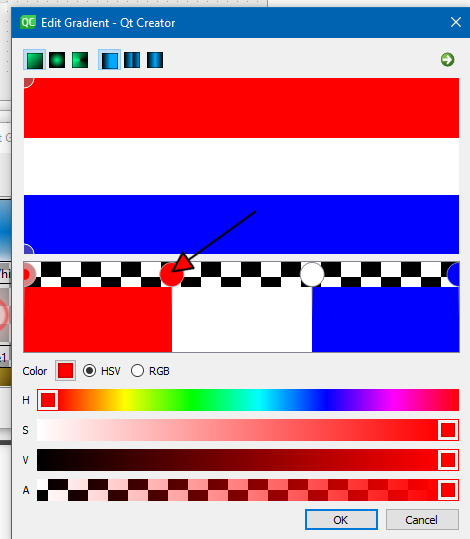
      So its a control that allows the user to kinda edit the gradient, moving the PEGS around ?
      Like the build-in editor ?

      alt text

      It seems to use palettes, is that important to you ?

      1 Reply Last reply
      0
      • PerdrixP Offline
        PerdrixP Offline
        Perdrix
        wrote on last edited by Perdrix
        #5

        Well not much like that editor, but sort of in concept at least. But it does more than that - when the use moves the pegs the application can be told that changes have been made. So if I wish to move the "grey" point in a gamma slider for the default position of sqrt(0.5) , I can do so and the application get to know the new position etc.. Or I can change the "black point" and be told that has changed as well.

        Palettes, yes but that's a Windows CPalette which isn't very much like a QPalette ...

        mrjjM 1 Reply Last reply
        0
        • PerdrixP Perdrix

          Well not much like that editor, but sort of in concept at least. But it does more than that - when the use moves the pegs the application can be told that changes have been made. So if I wish to move the "grey" point in a gamma slider for the default position of sqrt(0.5) , I can do so and the application get to know the new position etc.. Or I can change the "black point" and be told that has changed as well.

          Palettes, yes but that's a Windows CPalette which isn't very much like a QPalette ...

          mrjjM Offline
          mrjjM Offline
          mrjj
          Lifetime Qt Champion
          wrote on last edited by
          #6

          @Perdrix
          Hi
          Hmm I have not seen such Widget im afraid. ( also did a google search but its all types of other sliders)

          So it must allow color change and have movable PEGS that send a signal when moved.
          Can user also add/remove pegs ?

          You could reuse the editor for the PEGS part

          https://code.woboq.org/qt5/qttools/src/shared/qtgradienteditor/

          or try to port that class CGradientCtrl to Qt. I could not watch the code so not sure how much
          it would take. You can reuse its structures but anything mouse related and colors would have to be changed.

          1 Reply Last reply
          0
          • PerdrixP Offline
            PerdrixP Offline
            Perdrix
            wrote on last edited by
            #7

            Yes, User can add pegs as needed by double click - it's a pretty clever control. I looked at the Gradient control editor and it's not IMHO in the same league. You might be able to convert the MFC code to Qt, not sure I could!

            1 Reply Last reply
            0
            • mrjjM Offline
              mrjjM Offline
              mrjj
              Lifetime Qt Champion
              wrote on last edited by mrjj
              #8

              Hi
              Update.
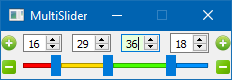
              I found this
              alt text

              https://github.com/ctin/MultiSlider

              That can have multiple handles. (as many as you like) Maybe this can be tweaked to do what you want ?

              1 Reply Last reply
              0
              • SGaistS Offline
                SGaistS Offline
                SGaist
                Lifetime Qt Champion
                wrote on last edited by
                #9

                Hi,

                Do you mean something like shown in this cgradient demo project ?

                Interested in AI ? www.idiap.ch
                Please read the Qt Code of Conduct - https://forum.qt.io/topic/113070/qt-code-of-conduct

                mrjjM 1 Reply Last reply
                0
                • SGaistS SGaist

                  Hi,

                  Do you mean something like shown in this cgradient demo project ?

                  mrjjM Offline
                  mrjjM Offline
                  mrjj
                  Lifetime Qt Champion
                  wrote on last edited by
                  #10

                  @SGaist
                  Yep, exactly that one. He links to it higher up.

                  SGaistS 1 Reply Last reply
                  0
                  • mrjjM mrjj

                    @SGaist
                    Yep, exactly that one. He links to it higher up.

                    SGaistS Offline
                    SGaistS Offline
                    SGaist
                    Lifetime Qt Champion
                    wrote on last edited by
                    #11

                    @mrjj said in QT equivalent of CGradient and CGradientCtrl:

                    @SGaist
                    Yep, exactly that one. He links to it higher up.

                    Sorry, I missed the link.

                    The multi slider you found looks like a good start.

                    Interested in AI ? www.idiap.ch
                    Please read the Qt Code of Conduct - https://forum.qt.io/topic/113070/qt-code-of-conduct

                    mrjjM 1 Reply Last reply
                    0
                    • SGaistS SGaist

                      @mrjj said in QT equivalent of CGradient and CGradientCtrl:

                      @SGaist
                      Yep, exactly that one. He links to it higher up.

                      Sorry, I missed the link.

                      The multi slider you found looks like a good start.

                      mrjjM Offline
                      mrjjM Offline
                      mrjj
                      Lifetime Qt Champion
                      wrote on last edited by
                      #12

                      @SGaist
                      At least he would get the "PEGS" adding and movement for free.
                      So yeah, it could be, i hope.

                      1 Reply Last reply
                      0

                      • Login

                      • Login or register to search.
                      • First post
                        Last post
                      0
                      • Categories
                      • Recent
                      • Tags
                      • Popular
                      • Users
                      • Groups
                      • Search
                      • Get Qt
                      • Unsolved