
Skip to content
  • Categories
  • Recent
  • Tags
  • Popular
  • Users
  • Groups
  • Search
  • Get Qt Extensions
  • Unsolved
Collapse
Brand Logo
  1. Home
  2. Qt Development
  3. General and Desktop
  4. Drag and Drop different item text in two QListWidgets

Drag and Drop different item text in two QListWidgets

Scheduled Pinned Locked Moved Unsolved General and Desktop
14 Posts 4 Posters 1.5k Views 1 Watching
  • Oldest to Newest
  • Newest to Oldest
  • Most Votes
Reply
  • Reply as topic
Log in to reply
This topic has been deleted. Only users with topic management privileges can see it.
  • M Offline
    M Offline
    Mr-Workalot
    wrote on last edited by
    #1

    I have two QListWidgets , one named “Commands” on the left side and other named “XML Script” on the right side , I am able to drag and drop items from one List to another, How ever, when I drag one item, I don’t want drop that same item text, I want some changed text to be dropped.

    Example: In this example when I dragged “SetScroll Command” from “commands” QListWidget and I am trying to drop this in “XML Script” QListWidget , I need some different text to be dropped like If I drag ‘Pause Command’ from “Commands”, the dropped item in “XML Script ”should have item with text like “This is a Pause Command”

    ?? How can I achieve this, I am intending to keep a Map data structure which will have key as “Pause Command” and Value as “This is a Pause Command”. Whenever key text is dragged , value text shall be dropped,

    Any help appreciated.
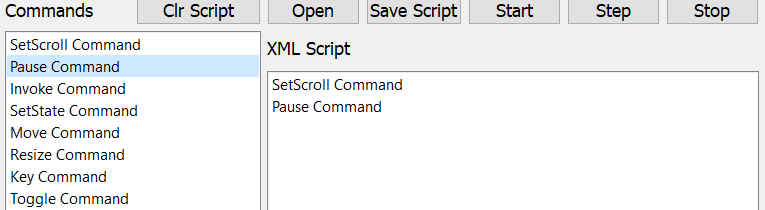
    6f71daaf-0908-436a-9a91-1d0adef05f43-image.png

    1 Reply Last reply
    0
    • B Offline
      B Offline
      Bonnie
      wrote on last edited by Bonnie
      #2

      You can add user data to QListWidgetItem

      QListWidgetItem *item = new QListWidgetItem("Pause Command");
      item->setData(Qt::UserRole, QString("This is a Pause Command"));
      

      And in the mimeData function which you has reimplemented, use

      item->data(Qt::UserRole).toString()
      

      instead of item->text()
      *Note: If you want to drop different text to different text editers, then this won't work.

      You can even define more user roles to store different datas

      #define MIME_TEXT_ROLE Qt::UserRole + 1
      #define MIME_HTML_ROLE Qt::UserRole + 2
      
      1 Reply Last reply
      1
      • M Offline
        M Offline
        Mr-Workalot
        wrote on last edited by
        #3

        Can you please code the mimeData Function ??

        B 1 Reply Last reply
        0
        • M Mr-Workalot

          Can you please code the mimeData Function ??

          B Offline
          B Offline
          Bonnie
          wrote on last edited by
          #4

          @Mr-Workalot
          It's just the reimplemented QListWidget::mimeData function, I think you already implemented it in your previous post.

          protected:
              QMimeData* mimeData(const QList<QListWidgetItem*> items) const
              {
                  QMimeData* mime= QListWidget::mimeData(items);
                  QString text;
                  for (QListWidgetItem* item : items)
                      text.append(item->data(Qt::UserRole).toString()).append('\n');
                  mime->setText(text);
                  return mime;
              }
          
          M 1 Reply Last reply
          1
          • B Bonnie

            @Mr-Workalot
            It's just the reimplemented QListWidget::mimeData function, I think you already implemented it in your previous post.

            protected:
                QMimeData* mimeData(const QList<QListWidgetItem*> items) const
                {
                    QMimeData* mime= QListWidget::mimeData(items);
                    QString text;
                    for (QListWidgetItem* item : items)
                        text.append(item->data(Qt::UserRole).toString()).append('\n');
                    mime->setText(text);
                    return mime;
                }
            
            M Offline
            M Offline
            Mr-Workalot
            wrote on last edited by
            #5

            @Bonnie i tried the above mimeData function , when i drag from one QListWIdget to another QListWidget, it only transfers "Pause Command" and not its data i.e"This is a Pause Command",

            However, when i drag from QListWidget to QTextEdit , after dragging it shows "This is a Pause Command".

            B 1 Reply Last reply
            0
            • VRoninV Offline
              VRoninV Offline
              VRonin
              wrote on last edited by VRonin
              #6

              No need to reimplement QListWidget::mimeData. See https://forum.qt.io/post/444126

              "La mort n'est rien, mais vivre vaincu et sans gloire, c'est mourir tous les jours"
              ~Napoleon Bonaparte

              On a crusade to banish setIndexWidget() from the holy land of Qt

              M 1 Reply Last reply
              2
              • VRoninV VRonin

                No need to reimplement QListWidget::mimeData. See https://forum.qt.io/post/444126

                M Offline
                M Offline
                Mr-Workalot
                wrote on last edited by
                #7

                @VRonin Thanks for this, i got slight hope that my problem is solvable , but still kind of helpless here, in my case i want to drag item from one QListWidget-1 to QListWidget-2 but after dragging the text of that item in List widget -2 should change.

                How can i acheive this ? , can you please provide code for Drop EVent ?

                1 Reply Last reply
                0
                • SGaistS Offline
                  SGaistS Offline
                  SGaist
                  Lifetime Qt Champion
                  wrote on last edited by
                  #8

                  Hi,

                  You have the code in the link @VRonin provided.

                  Interested in AI ? www.idiap.ch
                  Please read the Qt Code of Conduct - https://forum.qt.io/topic/113070/qt-code-of-conduct

                  M 1 Reply Last reply
                  0
                  • SGaistS SGaist

                    Hi,

                    You have the code in the link @VRonin provided.

                    M Offline
                    M Offline
                    Mr-Workalot
                    wrote on last edited by
                    #9

                    @SGaist Okay, But in my case this function does not gets executed, so, before

                    void MainWindow::dropEvent(QDropEvent* event) 
                    

                    gets invoked , do i need to enter any other function ??

                    1 Reply Last reply
                    0
                    • SGaistS Offline
                      SGaistS Offline
                      SGaist
                      Lifetime Qt Champion
                      wrote on last edited by
                      #10

                      Why are you implementing that method for your MainWindow ?

                      Interested in AI ? www.idiap.ch
                      Please read the Qt Code of Conduct - https://forum.qt.io/topic/113070/qt-code-of-conduct

                      M 1 Reply Last reply
                      0
                      • M Mr-Workalot

                        @Bonnie i tried the above mimeData function , when i drag from one QListWIdget to another QListWidget, it only transfers "Pause Command" and not its data i.e"This is a Pause Command",

                        However, when i drag from QListWidget to QTextEdit , after dragging it shows "This is a Pause Command".

                        B Offline
                        B Offline
                        Bonnie
                        wrote on last edited by
                        #11

                        @Mr-Workalot
                        Oh, sorry, I was misunderstanding your need, thinking you need to drop the text to a text edit.
                        If you reimplement dropEvent, I think you should create a new class for listwidget-2 and reimplement there.

                        M 1 Reply Last reply
                        1
                        • SGaistS SGaist

                          Why are you implementing that method for your MainWindow ?

                          M Offline
                          M Offline
                          Mr-Workalot
                          wrote on last edited by Mr-Workalot
                          #12

                          @SGaist Yeah, that's what, it kind of felt wrong to me, the place from where i am dragging is a modified QListWIdget,

                          std::map<QString, QString> commands;
                          bool first_time = true;
                          
                          class ListWidget : public QListWidget {
                          private:
                          
                             //  map<QString, QString>::iterator it;
                          public:
                             using QListWidget::QListWidget; 
                          protected: 
                             QMimeData* mimeData(const QList<QListWidgetItem*> items) const
                             {
                                 
                                 QMimeData* md = QListWidget::mimeData(items);
                                 QStringList texts;
                                 for (QListWidgetItem* item : selectedItems())
                                 {
                                   auto it = commands.find(item->text());
                                    texts << it->second;
                                 }
                                 if (first_time == true)
                                 {
                                     QString end = "</Script>";
                                     md->setText("<?xml version=\"1.0\" encoding=\"utf - 8\"?> \n <Script> \n"  + texts.join(QStringLiteral("\n")));
                                     first_time = false;
                                     return md;
                                 }
                                 else
                                 {
                                     md->setText(texts.join(QStringLiteral("\n")));
                                     return md;
                                 }
                             }
                          };
                          

                          and where i am dropping is a normal QListWidget,

                          should , i create a DropEvent for where i am dropping, right ??

                          and how do i create that , im very new to QT ?

                          1 Reply Last reply
                          0
                          • B Bonnie

                            @Mr-Workalot
                            Oh, sorry, I was misunderstanding your need, thinking you need to drop the text to a text edit.
                            If you reimplement dropEvent, I think you should create a new class for listwidget-2 and reimplement there.

                            M Offline
                            M Offline
                            Mr-Workalot
                            wrote on last edited by
                            #13

                            @Bonnie said in Drag and Drop different item text in two QListWidgets:

                            If you reimplement dropEvent, I think you should create a new class for listwidget-2 and reimplement there.

                            oh okay, thanks for clarifying. and how can i reimpliment drop event for listwidget-2 ??
                            what are the steps ??
                            , i know im asking too much but if you help me once, im gonna learn this for life.

                            B 1 Reply Last reply
                            0
                            • M Mr-Workalot

                              @Bonnie said in Drag and Drop different item text in two QListWidgets:

                              If you reimplement dropEvent, I think you should create a new class for listwidget-2 and reimplement there.

                              oh okay, thanks for clarifying. and how can i reimpliment drop event for listwidget-2 ??
                              what are the steps ??
                              , i know im asking too much but if you help me once, im gonna learn this for life.

                              B Offline
                              B Offline
                              Bonnie
                              wrote on last edited by Bonnie
                              #14

                              @Mr-Workalot
                              Hmm..I tried to find an easiest way to handle this...
                              The QDataStream decode/encode thing may need to subclass the model, too.
                              So I think you just let it drop in the normal way, and then change it.

                              protected:
                                  bool dropMimeData(int index, const QMimeData *data, Qt::DropAction action)
                                  {
                                      if(QListWidget::dropMimeData(index, data, action)) {
                                          if(QListWidgetItem *dropped = item(index)) {
                                              dropped->setData(Qt::DisplayRole, dropped->data(Qt::UserRole));
                                          }
                                          return true;
                                      }
                                      return false;
                                  }
                              

                              This is only working when you'll only accept drops from a item which you need to change its text to its Qt::UserRole.
                              If you want to accept drops from other items, you may need to add some conditional statements.

                              1 Reply Last reply
                              0

                              • Login

                              • Login or register to search.
                              • First post
                                Last post
                              0
                              • Categories
                              • Recent
                              • Tags
                              • Popular
                              • Users
                              • Groups
                              • Search
                              • Get Qt Extensions
                              • Unsolved