
Skip to content
  • Categories
  • Recent
  • Tags
  • Popular
  • Users
  • Groups
  • Search
  • Get Qt Extensions
  • Unsolved
Collapse
Brand Logo
  1. Home
  2. Qt Development
  3. General and Desktop
  4. Arc (Curved) Button
Forum Updated to NodeBB v4.3 + New Features

Arc (Curved) Button

Scheduled Pinned Locked Moved Solved General and Desktop
5 Posts 2 Posters 585 Views 1 Watching
  • Oldest to Newest
  • Newest to Oldest
  • Most Votes
Reply
  • Reply as topic
Log in to reply
This topic has been deleted. Only users with topic management privileges can see it.
  • E Offline
    E Offline
    Eli_a_n
    wrote on last edited by Eli_a_n
    #1

    Hi All,

    i was wondering if you could help me build a curved button, something like in qml :

    f6a58e87-8ede-4b49-8cbf-0181e2e8ccac-image.png

    i tried using ArcPath but i don't know how to merge it with the button

    thank you,
    best regards

    1 Reply Last reply
    0
    • E Offline
      E Offline
      Eli_a_n
      wrote on last edited by
      #2

      So nobody knows how to merge 2 items to create that effect ?

      1 Reply Last reply
      0
      • mrjjM Offline
        mrjjM Offline
        mrjj
        Lifetime Qt Champion
        wrote on last edited by
        #3

        Hi
        To make it a button that only reacts to click with that arc, you have to use a mask as else
        its still retangular and also reacts when you click outside.

        You can see here how its done.
        https://doc.qt.io/qt-5/qtwidgets-widgets-shapedclock-example.html

        Basically its a QRegion + setMask
        QRegion maskedRegion(width() / 2 - side / 2, height() / 2 - side / 2, side,
        side, QRegion::Ellipse);
        setMask(maskedRegion);

        aæso this
        https://stackoverflow.com/questions/12734319/change-rectangular-qt-button-to-round

        1 Reply Last reply
        2
        • E Offline
          E Offline
          Eli_a_n
          wrote on last edited by
          #4

          Hi mrjj,

          thanks you so much for your help.

          regards

          mrjjM 1 Reply Last reply
          0
          • E Eli_a_n

            Hi mrjj,

            thanks you so much for your help.

            regards

            mrjjM Offline
            mrjjM Offline
            mrjj
            Lifetime Qt Champion
            wrote on last edited by
            #5

            @Eli_a_n

            Hi
            np. I think you can make a Qregion from a path.
            (i assume it goes for arc path too)

            For fun i tried using the image (here on forum) as mask.
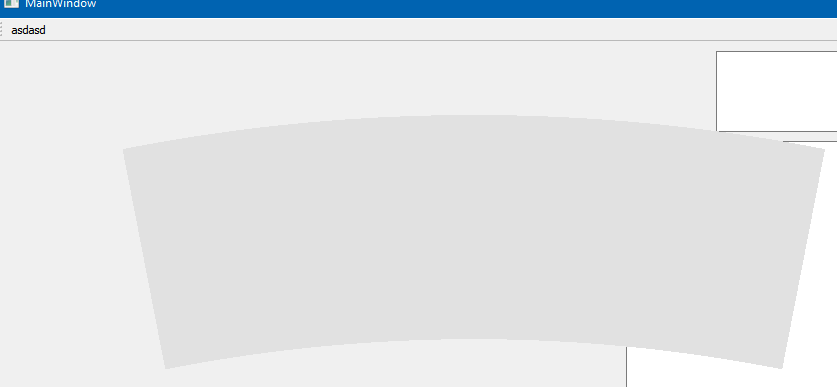
            alt text

                    QPixmap pixmapLogin(":/arc.png");
                    QSize imagesize = pixmapLogin.size();
                    ui->arcbutton->setFixedSize(imagesize);
                    ui->arcbutton->setMask(pixmapLogin.mask());


            and it does correctly only click inside the arc.

            Note this show only the shape and not the actual image as i just use the image for the button shape. not its icon.

            1 Reply Last reply
            1

            • Login

            • Login or register to search.
            • First post
              Last post
            0
            • Categories
            • Recent
            • Tags
            • Popular
            • Users
            • Groups
            • Search
            • Get Qt Extensions
            • Unsolved