
Skip to content
  • Categories
  • Recent
  • Tags
  • Popular
  • Users
  • Groups
  • Search
  • Get Qt Extensions
  • Unsolved
Collapse
Brand Logo
  1. Home
  2. Qt Development
  3. General and Desktop
  4. Need help: Using QVideoWidget as a Background
Qt 6.11 is out! See what's new in the release blog

Need help: Using QVideoWidget as a Background

Scheduled Pinned Locked Moved Solved General and Desktop
17 Posts 2 Posters 3.3k Views
  • Oldest to Newest
  • Newest to Oldest
  • Most Votes
Reply
  • Reply as topic
Log in to reply
This topic has been deleted. Only users with topic management privileges can see it.
  • V Offline
    V Offline
    veixeros
    wrote on last edited by
    #1

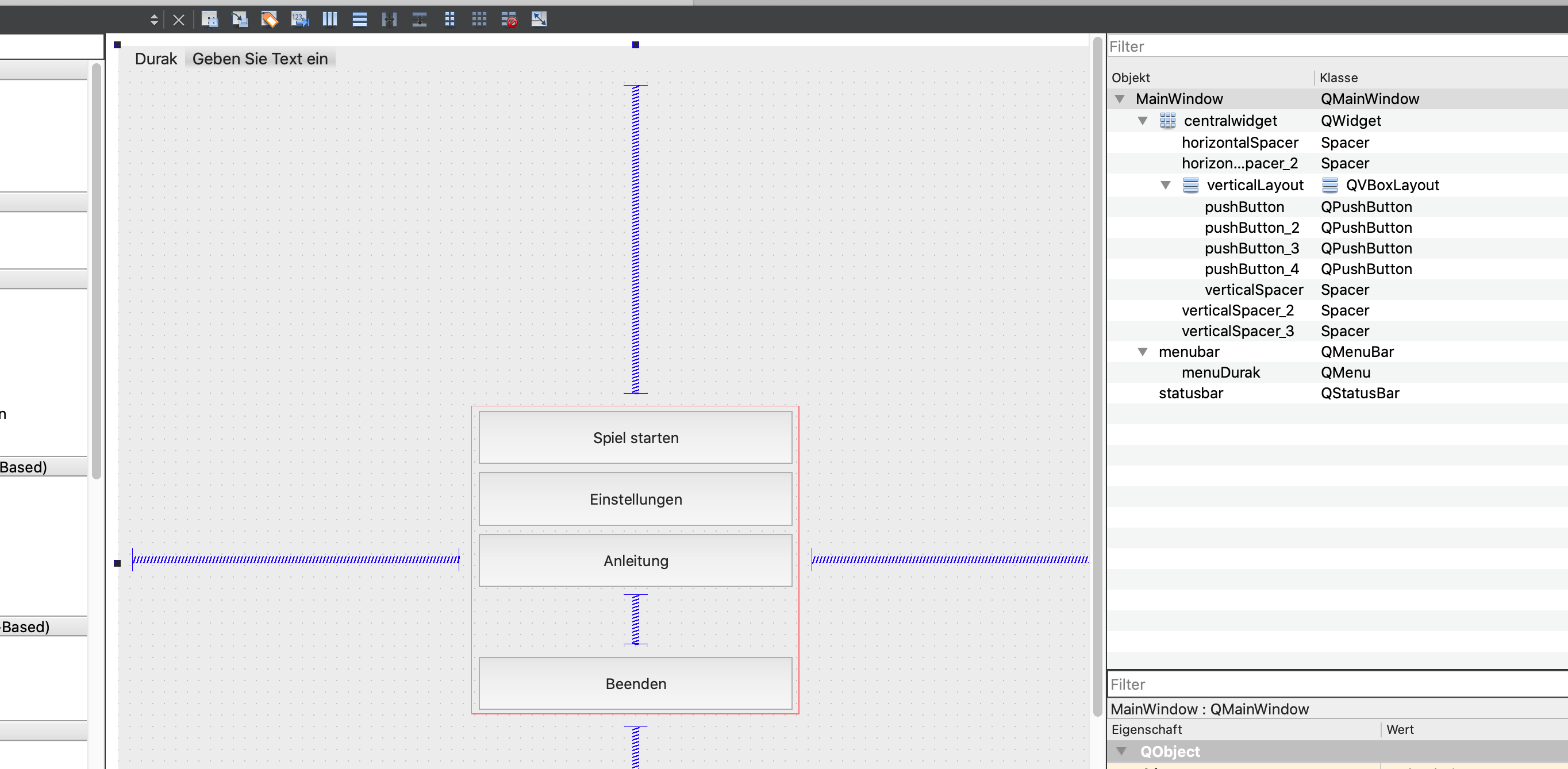
    Hello, I am super new to QT. I want to design a menu for a game. In the foreground should be some buttons (like I designed in the UI designer, see picture) and in the background I want a video to be played. If I set the video player as the central widget, my buttons are gone and also I cannot raise them. If I don't set it as central widget, my buttons are there but the video player is in the upper left corner.

    This is how I created the video player:

    MainWindow::MainWindow(QWidget *parent)
        : QMainWindow(parent)
        , ui(new Ui::MainWindow)
    {
        ui->setupUi(this);
    
        player = new QMediaPlayer(this);
        vw = new QVideoWidget(this);
        player->setVideoOutput(vw);
        this->setCentralWidget(vw);
    

    Is there any way I can put the buttons on top of the video player ? Thanks in advance !!

    Bildschirmfoto 2020-05-18 um 16.03.17.png

    1 Reply Last reply
    0
    • B Offline
      B Offline
      Bonnie
      wrote on last edited by Bonnie
      #4

      Ok, I've finished testing. I think the best way is using:

      ui->gridLayout->addWidget(vw, 0, 0, -1, -1);
      vw->lower(); //just in case
      

      where gridLayout should be the layoutName of centralWidget.

      V 1 Reply Last reply
      0
      • B Offline
        B Offline
        Bonnie
        wrote on last edited by Bonnie
        #2

        I think you can promote the centralWidget in ui to a QVideoWidget.
        This is the simplest solution I can think of, not tested.
        Tested, not a good idea.
        But there're also others. Let me test another...
        [UPDATED]
        It is very simple to arrange that layout for a normal widget.
        But with a QVideoWidget, seems there's some render issue if I put some widgets on it.

        V 1 Reply Last reply
        0
        • B Bonnie

          I think you can promote the centralWidget in ui to a QVideoWidget.
          This is the simplest solution I can think of, not tested.
          Tested, not a good idea.
          But there're also others. Let me test another...
          [UPDATED]
          It is very simple to arrange that layout for a normal widget.
          But with a QVideoWidget, seems there's some render issue if I put some widgets on it.

          V Offline
          V Offline
          veixeros
          wrote on last edited by
          #3

          @Bonnie Thanks for your reply. Can you give me short instructions on how I promote it ? Because in the UI designer the video widget does not appear.

          1 Reply Last reply
          0
          • B Offline
            B Offline
            Bonnie
            wrote on last edited by Bonnie
            #4

            Ok, I've finished testing. I think the best way is using:

            ui->gridLayout->addWidget(vw, 0, 0, -1, -1);
            vw->lower(); //just in case
            

            where gridLayout should be the layoutName of centralWidget.

            V 1 Reply Last reply
            0
            • B Bonnie

              Ok, I've finished testing. I think the best way is using:

              ui->gridLayout->addWidget(vw, 0, 0, -1, -1);
              vw->lower(); //just in case
              

              where gridLayout should be the layoutName of centralWidget.

              V Offline
              V Offline
              veixeros
              wrote on last edited by veixeros
              #5

              @Bonnie Alright I tested your suggestion and it works, the video is now displayed on the whole window but the buttons are still behind it (can see parts of them behind the video). When I raise one single button it's still behind the video. Maybe I am still messing things up with the layout ?
              Bildschirmfoto 2020-05-18 um 18.53.35.png
              the central widget is set to grid layout from the upper menubar. Has it something to do with this maybe ? Can't figure it out.. Thanks for helping !!

              Also when I remove vw->raise(); the buttons are not behind the video anymore.

              B 1 Reply Last reply
              0
              • V veixeros

                @Bonnie Alright I tested your suggestion and it works, the video is now displayed on the whole window but the buttons are still behind it (can see parts of them behind the video). When I raise one single button it's still behind the video. Maybe I am still messing things up with the layout ?
                Bildschirmfoto 2020-05-18 um 18.53.35.png
                the central widget is set to grid layout from the upper menubar. Has it something to do with this maybe ? Can't figure it out.. Thanks for helping !!

                Also when I remove vw->raise(); the buttons are not behind the video anymore.

                B Offline
                B Offline
                Bonnie
                wrote on last edited by
                #6

                @veixeros what I wrote is not raise(), but lower() :)

                V 1 Reply Last reply
                0
                • B Bonnie

                  @veixeros what I wrote is not raise(), but lower() :)

                  V Offline
                  V Offline
                  veixeros
                  wrote on last edited by
                  #7

                  @Bonnie sorry I meant lower()

                  B 1 Reply Last reply
                  0
                  • V veixeros

                    @Bonnie sorry I meant lower()

                    B Offline
                    B Offline
                    Bonnie
                    wrote on last edited by Bonnie
                    #8

                    @veixeros If your code works, you can go without lower().
                    Though it does not make any different on my machine.
                    I added that because it should ensure the video widget to behind the buttons.
                    Not sure why not work on your's.

                    V 1 Reply Last reply
                    0
                    • B Bonnie

                      @veixeros If your code works, you can go without lower().
                      Though it does not make any different on my machine.
                      I added that because it should ensure the video widget to behind the buttons.
                      Not sure why not work on your's.

                      V Offline
                      V Offline
                      veixeros
                      wrote on last edited by
                      #9

                      @Bonnie Sorry I may have explained it wrong, when I leave out the lower() then the buttons are not there at all. Only the video. When I insert it, the buttons are there but behind the video

                      B 1 Reply Last reply
                      0
                      • V veixeros

                        @Bonnie Sorry I may have explained it wrong, when I leave out the lower() then the buttons are not there at all. Only the video. When I insert it, the buttons are there but behind the video

                        B Offline
                        B Offline
                        Bonnie
                        wrote on last edited by
                        #10

                        @veixeros Hmm...In my test I make a simple layout with some buttons and I can see them all.
                        Would you mind posting the full code of MainWindow (including ui) so I can test with yours?
                        I just need the layout and player part.
                        When will the player start playing?

                        V 1 Reply Last reply
                        0
                        • B Bonnie

                          @veixeros Hmm...In my test I make a simple layout with some buttons and I can see them all.
                          Would you mind posting the full code of MainWindow (including ui) so I can test with yours?
                          I just need the layout and player part.
                          When will the player start playing?

                          V Offline
                          V Offline
                          veixeros
                          wrote on last edited by veixeros
                          #11

                          @Bonnie The player should start immediately when the program is opened

                          Here is the main window.cpp:

                          #include "mainwindow.h"
                          #include "ui_mainwindow.h"
                          
                          MainWindow::MainWindow(QWidget *parent)
                              : QMainWindow(parent)
                              , ui(new Ui::MainWindow)
                          {
                              ui->setupUi(this);


                              player = new QMediaPlayer(this);
                              vw = new QVideoWidget(this);
                              player->setVideoOutput(vw);
                          
                              ui->gridLayout->addWidget(vw, 0, 0, -1, -1);
                              vw->lower();
                              vw->update();
                              player->setMedia(QUrl::fromLocalFile("/Users/simon/Desktop/Intro.mp4"));
                          
                              player->play();
                          }
                          
                          MainWindow::~MainWindow()
                          {
                              delete ui;
                          }
                          
                          void MainWindow::on_pushButton_2_clicked()
                          {
                          
                          }
                          
                          void MainWindow::on_pushButton_4_clicked()
                          {
                          
                          }
                          

                          This is the UI:

                          <?xml version="1.0" encoding="UTF-8"?>
                          <ui version="4.0">
                           <class>MainWindow</class>
                           <widget class="QMainWindow" name="MainWindow">
                            <property name="geometry">
                             <rect>
                              <x>0</x>
                              <y>0</y>
                              <width>900</width>
                              <height>900</height>
                             </rect>
                            </property>
                            <property name="sizePolicy">
                             <sizepolicy hsizetype="Expanding" vsizetype="Expanding">
                              <horstretch>0</horstretch>
                              <verstretch>0</verstretch>
                             </sizepolicy>
                            </property>
                            <property name="windowTitle">
                             <string>Durak</string>
                            </property>
                            <widget class="QWidget" name="centralwidget">
                             <property name="sizePolicy">
                              <sizepolicy hsizetype="Expanding" vsizetype="Preferred">
                               <horstretch>0</horstretch>
                               <verstretch>0</verstretch>
                              </sizepolicy>
                             </property>
                             <property name="styleSheet">
                              <string notr="true"/>
                             </property>
                             <layout class="QGridLayout" name="gridLayout">
                              <item row="1" column="1">
                               <layout class="QVBoxLayout" name="verticalLayout">
                                <item>
                                 <widget class="QPushButton" name="pushButton_2">
                                  <property name="sizePolicy">
                                   <sizepolicy hsizetype="Expanding" vsizetype="Expanding">
                                    <horstretch>0</horstretch>
                                    <verstretch>0</verstretch>
                                   </sizepolicy>
                                  </property>
                                  <property name="text">
                                   <string>Spiel starten</string>
                                  </property>
                                 </widget>
                                </item>
                                <item>
                                 <widget class="QPushButton" name="pushButton_3">
                                  <property name="sizePolicy">
                                   <sizepolicy hsizetype="Expanding" vsizetype="Expanding">
                                    <horstretch>0</horstretch>
                                    <verstretch>0</verstretch>
                                   </sizepolicy>
                                  </property>
                                  <property name="text">
                                   <string>Einstellungen</string>
                                  </property>
                                 </widget>
                                </item>
                                <item>
                                 <widget class="QPushButton" name="pushButton">
                                  <property name="sizePolicy">
                                   <sizepolicy hsizetype="Expanding" vsizetype="Expanding">
                                    <horstretch>0</horstretch>
                                    <verstretch>0</verstretch>
                                   </sizepolicy>
                                  </property>
                                  <property name="text">
                                   <string>Anleitung</string>
                                  </property>
                                 </widget>
                                </item>
                                <item>
                                 <spacer name="verticalSpacer">
                                  <property name="orientation">
                                   <enum>Qt::Vertical</enum>
                                  </property>
                                  <property name="sizeHint" stdset="0">
                                   <size>
                                    <width>20</width>
                                    <height>40</height>
                                   </size>
                                  </property>
                                 </spacer>
                                </item>
                                <item>
                                 <widget class="QPushButton" name="pushButton_4">
                                  <property name="sizePolicy">
                                   <sizepolicy hsizetype="Expanding" vsizetype="Expanding">
                                    <horstretch>0</horstretch>
                                    <verstretch>0</verstretch>
                                   </sizepolicy>
                                  </property>
                                  <property name="text">
                                   <string>Beenden</string>
                                  </property>
                                 </widget>
                                </item>
                               </layout>
                              </item>
                              <item row="1" column="0">
                               <spacer name="horizontalSpacer">
                                <property name="orientation">
                                 <enum>Qt::Horizontal</enum>
                                </property>
                                <property name="sizeHint" stdset="0">
                                 <size>
                                  <width>40</width>
                                  <height>20</height>
                                 </size>
                                </property>
                               </spacer>
                              </item>
                              <item row="2" column="1">
                               <spacer name="verticalSpacer_3">
                                <property name="orientation">
                                 <enum>Qt::Vertical</enum>
                                </property>
                                <property name="sizeHint" stdset="0">
                                 <size>
                                  <width>20</width>
                                  <height>40</height>
                                 </size>
                                </property>
                               </spacer>
                              </item>
                              <item row="0" column="1">
                               <spacer name="verticalSpacer_2">
                                <property name="orientation">
                                 <enum>Qt::Vertical</enum>
                                </property>
                                <property name="sizeHint" stdset="0">
                                 <size>
                                  <width>20</width>
                                  <height>40</height>
                                 </size>
                                </property>
                               </spacer>
                              </item>
                              <item row="1" column="2">
                               <spacer name="horizontalSpacer_2">
                                <property name="orientation">
                                 <enum>Qt::Horizontal</enum>
                                </property>
                                <property name="sizeHint" stdset="0">
                                 <size>
                                  <width>40</width>
                                  <height>20</height>
                                 </size>
                                </property>
                               </spacer>
                              </item>
                             </layout>
                            </widget>
                            <widget class="QMenuBar" name="menubar">
                             <property name="geometry">
                              <rect>
                               <x>0</x>
                               <y>0</y>
                               <width>900</width>
                               <height>22</height>
                              </rect>
                             </property>
                             <widget class="QMenu" name="menuDurak">
                              <property name="title">
                               <string>Durak</string>
                              </property>
                             </widget>
                             <addaction name="menuDurak"/>
                            </widget>
                            <widget class="QStatusBar" name="statusbar"/>
                           </widget>
                           <resources/>
                           <connections/>
                          </ui>


                          And the main window.h

                          #ifndef MAINWINDOW_H
                          #define MAINWINDOW_H
                          
                          #include <QMainWindow>
                          #include <QMediaPlayer>
                          #include <QVideoWidget>
                          
                          QT_BEGIN_NAMESPACE
                          namespace Ui { class MainWindow; }
                          QT_END_NAMESPACE
                          
                          class MainWindow : public QMainWindow
                          {
                              Q_OBJECT
                          
                          public:
                              MainWindow(QWidget *parent = nullptr);
                              ~MainWindow();
                          
                          private slots:
                          
                          
                              void on_pushButton_2_clicked();
                          
                              void on_pushButton_4_clicked();
                          
                          private:
                              Ui::MainWindow *ui;
                              QMediaPlayer* player;
                              QVideoWidget* vw;
                          };
                          #endif // MAINWINDOW_H
                          
                          B 1 Reply Last reply
                          0
                          • V veixeros

                            @Bonnie The player should start immediately when the program is opened

                            Here is the main window.cpp:

                            #include "mainwindow.h"
                            #include "ui_mainwindow.h"
                            
                            MainWindow::MainWindow(QWidget *parent)
                                : QMainWindow(parent)
                                , ui(new Ui::MainWindow)
                            {
                                ui->setupUi(this);


                                player = new QMediaPlayer(this);
                                vw = new QVideoWidget(this);
                                player->setVideoOutput(vw);
                            
                                ui->gridLayout->addWidget(vw, 0, 0, -1, -1);
                                vw->lower();
                                vw->update();
                                player->setMedia(QUrl::fromLocalFile("/Users/simon/Desktop/Intro.mp4"));
                            
                                player->play();
                            }
                            
                            MainWindow::~MainWindow()
                            {
                                delete ui;
                            }
                            
                            void MainWindow::on_pushButton_2_clicked()
                            {
                            
                            }
                            
                            void MainWindow::on_pushButton_4_clicked()
                            {
                            
                            }
                            

                            This is the UI:

                            <?xml version="1.0" encoding="UTF-8"?>
                            <ui version="4.0">
                             <class>MainWindow</class>
                             <widget class="QMainWindow" name="MainWindow">
                              <property name="geometry">
                               <rect>
                                <x>0</x>
                                <y>0</y>
                                <width>900</width>
                                <height>900</height>
                               </rect>
                              </property>
                              <property name="sizePolicy">
                               <sizepolicy hsizetype="Expanding" vsizetype="Expanding">
                                <horstretch>0</horstretch>
                                <verstretch>0</verstretch>
                               </sizepolicy>
                              </property>
                              <property name="windowTitle">
                               <string>Durak</string>
                              </property>
                              <widget class="QWidget" name="centralwidget">
                               <property name="sizePolicy">
                                <sizepolicy hsizetype="Expanding" vsizetype="Preferred">
                                 <horstretch>0</horstretch>
                                 <verstretch>0</verstretch>
                                </sizepolicy>
                               </property>
                               <property name="styleSheet">
                                <string notr="true"/>
                               </property>
                               <layout class="QGridLayout" name="gridLayout">
                                <item row="1" column="1">
                                 <layout class="QVBoxLayout" name="verticalLayout">
                                  <item>
                                   <widget class="QPushButton" name="pushButton_2">
                                    <property name="sizePolicy">
                                     <sizepolicy hsizetype="Expanding" vsizetype="Expanding">
                                      <horstretch>0</horstretch>
                                      <verstretch>0</verstretch>
                                     </sizepolicy>
                                    </property>
                                    <property name="text">
                                     <string>Spiel starten</string>
                                    </property>
                                   </widget>
                                  </item>
                                  <item>
                                   <widget class="QPushButton" name="pushButton_3">
                                    <property name="sizePolicy">
                                     <sizepolicy hsizetype="Expanding" vsizetype="Expanding">
                                      <horstretch>0</horstretch>
                                      <verstretch>0</verstretch>
                                     </sizepolicy>
                                    </property>
                                    <property name="text">
                                     <string>Einstellungen</string>
                                    </property>
                                   </widget>
                                  </item>
                                  <item>
                                   <widget class="QPushButton" name="pushButton">
                                    <property name="sizePolicy">
                                     <sizepolicy hsizetype="Expanding" vsizetype="Expanding">
                                      <horstretch>0</horstretch>
                                      <verstretch>0</verstretch>
                                     </sizepolicy>
                                    </property>
                                    <property name="text">
                                     <string>Anleitung</string>
                                    </property>
                                   </widget>
                                  </item>
                                  <item>
                                   <spacer name="verticalSpacer">
                                    <property name="orientation">
                                     <enum>Qt::Vertical</enum>
                                    </property>
                                    <property name="sizeHint" stdset="0">
                                     <size>
                                      <width>20</width>
                                      <height>40</height>
                                     </size>
                                    </property>
                                   </spacer>
                                  </item>
                                  <item>
                                   <widget class="QPushButton" name="pushButton_4">
                                    <property name="sizePolicy">
                                     <sizepolicy hsizetype="Expanding" vsizetype="Expanding">
                                      <horstretch>0</horstretch>
                                      <verstretch>0</verstretch>
                                     </sizepolicy>
                                    </property>
                                    <property name="text">
                                     <string>Beenden</string>
                                    </property>
                                   </widget>
                                  </item>
                                 </layout>
                                </item>
                                <item row="1" column="0">
                                 <spacer name="horizontalSpacer">
                                  <property name="orientation">
                                   <enum>Qt::Horizontal</enum>
                                  </property>
                                  <property name="sizeHint" stdset="0">
                                   <size>
                                    <width>40</width>
                                    <height>20</height>
                                   </size>
                                  </property>
                                 </spacer>
                                </item>
                                <item row="2" column="1">
                                 <spacer name="verticalSpacer_3">
                                  <property name="orientation">
                                   <enum>Qt::Vertical</enum>
                                  </property>
                                  <property name="sizeHint" stdset="0">
                                   <size>
                                    <width>20</width>
                                    <height>40</height>
                                   </size>
                                  </property>
                                 </spacer>
                                </item>
                                <item row="0" column="1">
                                 <spacer name="verticalSpacer_2">
                                  <property name="orientation">
                                   <enum>Qt::Vertical</enum>
                                  </property>
                                  <property name="sizeHint" stdset="0">
                                   <size>
                                    <width>20</width>
                                    <height>40</height>
                                   </size>
                                  </property>
                                 </spacer>
                                </item>
                                <item row="1" column="2">
                                 <spacer name="horizontalSpacer_2">
                                  <property name="orientation">
                                   <enum>Qt::Horizontal</enum>
                                  </property>
                                  <property name="sizeHint" stdset="0">
                                   <size>
                                    <width>40</width>
                                    <height>20</height>
                                   </size>
                                  </property>
                                 </spacer>
                                </item>
                               </layout>
                              </widget>
                              <widget class="QMenuBar" name="menubar">
                               <property name="geometry">
                                <rect>
                                 <x>0</x>
                                 <y>0</y>
                                 <width>900</width>
                                 <height>22</height>
                                </rect>
                               </property>
                               <widget class="QMenu" name="menuDurak">
                                <property name="title">
                                 <string>Durak</string>
                                </property>
                               </widget>
                               <addaction name="menuDurak"/>
                              </widget>
                              <widget class="QStatusBar" name="statusbar"/>
                             </widget>
                             <resources/>
                             <connections/>
                            </ui>


                            And the main window.h

                            #ifndef MAINWINDOW_H
                            #define MAINWINDOW_H
                            
                            #include <QMainWindow>
                            #include <QMediaPlayer>
                            #include <QVideoWidget>
                            
                            QT_BEGIN_NAMESPACE
                            namespace Ui { class MainWindow; }
                            QT_END_NAMESPACE
                            
                            class MainWindow : public QMainWindow
                            {
                                Q_OBJECT
                            
                            public:
                                MainWindow(QWidget *parent = nullptr);
                                ~MainWindow();
                            
                            private slots:
                            
                            
                                void on_pushButton_2_clicked();
                            
                                void on_pushButton_4_clicked();
                            
                            private:
                                Ui::MainWindow *ui;
                                QMediaPlayer* player;
                                QVideoWidget* vw;
                            };
                            #endif // MAINWINDOW_H
                            
                            B Offline
                            B Offline
                            Bonnie
                            wrote on last edited by
                            #12

                            @veixeros Still good in Windows. Maybe something platform related.
                            What platform are you using?
                            BTW, it's quite late here. I might look at this next day.

                            V 1 Reply Last reply
                            0
                            • B Bonnie

                              @veixeros Still good in Windows. Maybe something platform related.
                              What platform are you using?
                              BTW, it's quite late here. I might look at this next day.

                              V Offline
                              V Offline
                              veixeros
                              wrote on last edited by
                              #13

                              @Bonnie I'm working on Mac.. Yes of course, I'll let you rest :) Thanks for your effort so far ! Hope to hear from you tomorrow.

                              1 Reply Last reply
                              0
                              • B Offline
                                B Offline
                                Bonnie
                                wrote on last edited by
                                #14

                                I've tested with my Mac, and also no behind issue, though there's other issue...
                                The buttons are totally above the video.
                                Well, then I have no idea why it acts differently on your machine... :(

                                What's your Qt version?
                                Can you make a screen capture of what that looks like when "parts of them behind the video"?

                                V 1 Reply Last reply
                                0
                                • B Bonnie

                                  I've tested with my Mac, and also no behind issue, though there's other issue...
                                  The buttons are totally above the video.
                                  Well, then I have no idea why it acts differently on your machine... :(

                                  What's your Qt version?
                                  Can you make a screen capture of what that looks like when "parts of them behind the video"?

                                  V Offline
                                  V Offline
                                  veixeros
                                  wrote on last edited by
                                  #15

                                  @Bonnie Could you maybe give me your test Projekt so I can run it on my machine ? This would be the easiest way. I am using QT Creator 5.14.2 on newest MacOS

                                  B 1 Reply Last reply
                                  0
                                  • V veixeros

                                    @Bonnie Could you maybe give me your test Projekt so I can run it on my machine ? This would be the easiest way. I am using QT Creator 5.14.2 on newest MacOS

                                    B Offline
                                    B Offline
                                    Bonnie
                                    wrote on last edited by Bonnie
                                    #16

                                    @veixeros I've tested with 5.14.2, it does have render issue that cause the buttons invisible (so they are not actually behind the video, they can be clicked while being invisible).
                                    Earlier I tested with 5.12.7 in MacOS, it doesn't have this render issue, the buttons are all visible, but the QVideoWidget has some video size issue when the player is stopped and then start again.

                                    V 1 Reply Last reply
                                    0
                                    • B Bonnie

                                      @veixeros I've tested with 5.14.2, it does have render issue that cause the buttons invisible (so they are not actually behind the video, they can be clicked while being invisible).
                                      Earlier I tested with 5.12.7 in MacOS, it doesn't have this render issue, the buttons are all visible, but the QVideoWidget has some video size issue when the player is stopped and then start again.

                                      V Offline
                                      V Offline
                                      veixeros
                                      wrote on last edited by
                                      #17

                                      @Bonnie Oh wow.. didn't expect that :) I'll downgrade then and I'll see.. Thanks a lot for helping !

                                      1 Reply Last reply
                                      0

                                      • Login

                                      • Login or register to search.
                                      • First post
                                        Last post
                                      0
                                      • Categories
                                      • Recent
                                      • Tags
                                      • Popular
                                      • Users
                                      • Groups
                                      • Search
                                      • Get Qt Extensions
                                      • Unsolved