
Skip to content
  • Categories
  • Recent
  • Tags
  • Popular
  • Users
  • Groups
  • Search
  • Get Qt Extensions
  • Unsolved
Collapse
Brand Logo
  1. Home
  2. Qt Development
  3. Installation and Deployment
  4. Qt Creator 4.12.0 (Community) not working
Qt 6.11 is out! See what's new in the release blog

Qt Creator 4.12.0 (Community) not working

Scheduled Pinned Locked Moved Unsolved Installation and Deployment
12 Posts 3 Posters 1.9k Views 1 Watching
  • Oldest to Newest
  • Newest to Oldest
  • Most Votes
Reply
  • Reply as topic
Log in to reply
This topic has been deleted. Only users with topic management privileges can see it.
  • A atharva.karnik

    I have installed Qt Open Source from online installer with version 5.14.2, however the Qt Creator application is not working. Whenever I launch the application, a prompt comes, stating 'It looks like Qt Creator closed because of a problem with the "Python" plugin. Temporarily disable the plugin?'. There 3 options to this prompt, 'Disable Plugin', 'Show Details', 'Continue' from which, no option leads to the Qt Creator working. After clicking Show Details, there is following message: Disable plugins permanently in Help > About Plugins..
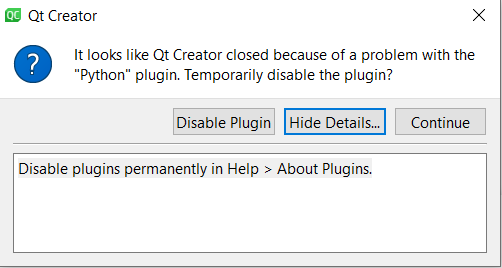
    ce3a2674-8bb4-4acc-86f4-4faad1b7764d-image.png
    What should I do?

    A little information about the Python on my laptop, I have Python 3.7*(stable)* and 3.8 (latest till date) installed on my laptop.

    aha_1980A Offline
    aha_1980A Offline
    aha_1980
    Lifetime Qt Champion
    wrote on last edited by
    #2

    Hi @atharva-karnik,

    what happens if you start QtCreator from the command line, giving the -noload Python option?

    C:\Qt\Tools\QtCreator\bin\qtcreator -noload Python (you may need to adjust the path, though).

    If that works, you can disable the plugin in the mentioned dialog.

    Regards

    Qt has to stay free or it will die.

    A 1 Reply Last reply
    1
    • aha_1980A aha_1980

      Hi @atharva-karnik,

      what happens if you start QtCreator from the command line, giving the -noload Python option?

      C:\Qt\Tools\QtCreator\bin\qtcreator -noload Python (you may need to adjust the path, though).

      If that works, you can disable the plugin in the mentioned dialog.

      Regards

      A Offline
      A Offline
      atharva.karnik
      wrote on last edited by
      #3

      Hi @aha_1980, I tried as you said after setting the directory. It still prompts the same message and no matter what I choose, Qt Creator doesn't launch...

      jsulmJ 1 Reply Last reply
      1
      • A atharva.karnik

        Hi @aha_1980, I tried as you said after setting the directory. It still prompts the same message and no matter what I choose, Qt Creator doesn't launch...

        jsulmJ Offline
        jsulmJ Offline
        jsulm
        Lifetime Qt Champion
        wrote on last edited by
        #4

        @atharva-karnik Try with

        C:\Qt\Tools\QtCreator\bin\qtcreator -noload all
        

        If QtCreator starts you can enable one plug-in at a time and check whether is still starts.

        https://forum.qt.io/topic/113070/qt-code-of-conduct

        A 1 Reply Last reply
        1
        • jsulmJ jsulm

          @atharva-karnik Try with

          C:\Qt\Tools\QtCreator\bin\qtcreator -noload all
          

          If QtCreator starts you can enable one plug-in at a time and check whether is still starts.

          A Offline
          A Offline
          atharva.karnik
          wrote on last edited by
          #5

          @jsulm It showed the following prompt:
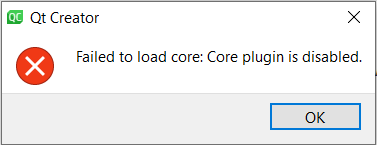
          6b66b50c-6da0-49b6-8650-14a0f43b75a6-image.png

          jsulmJ 1 Reply Last reply
          1
          • A atharva.karnik

            @jsulm It showed the following prompt:

            6b66b50c-6da0-49b6-8650-14a0f43b75a6-image.png

            jsulmJ Offline
            jsulmJ Offline
            jsulm
            Lifetime Qt Champion
            wrote on last edited by
            #6

            @atharva-karnik Then

            C:\Qt\Tools\QtCreator\bin\qtcreator -noload all -load Core
            

            https://forum.qt.io/topic/113070/qt-code-of-conduct

            A 1 Reply Last reply
            0
            • jsulmJ jsulm

              @atharva-karnik Then

              C:\Qt\Tools\QtCreator\bin\qtcreator -noload all -load Core
              
              A Offline
              A Offline
              atharva.karnik
              wrote on last edited by
              #7

              @jsulm It prompted to disable the Qml Plugin. It launched after disabling that plugin. However, it is showing much lesser options. Even the Menu bar is reduced!

              c8ed550d-f032-47f3-ba12-22d5ecd05e8f-image.png

              jsulmJ 1 Reply Last reply
              1
              • A atharva.karnik

                @jsulm It prompted to disable the Qml Plugin. It launched after disabling that plugin. However, it is showing much lesser options. Even the Menu bar is reduced!

                c8ed550d-f032-47f3-ba12-22d5ecd05e8f-image.png

                jsulmJ Offline
                jsulmJ Offline
                jsulm
                Lifetime Qt Champion
                wrote on last edited by
                #8

                @atharva-karnik That's because almost all plug-ins were disabled. Try now with:

                C:\Qt\Tools\QtCreator\bin\qtcreator -noload Python -noload Qml
                

                https://forum.qt.io/topic/113070/qt-code-of-conduct

                A 1 Reply Last reply
                0
                • jsulmJ jsulm

                  @atharva-karnik That's because almost all plug-ins were disabled. Try now with:

                  C:\Qt\Tools\QtCreator\bin\qtcreator -noload Python -noload Qml
                  
                  A Offline
                  A Offline
                  atharva.karnik
                  wrote on last edited by
                  #9

                  @jsulm It says that: There is no Qml plugin...

                  jsulmJ 1 Reply Last reply
                  0
                  • A atharva.karnik

                    @jsulm It says that: There is no Qml plugin...

                    jsulmJ Offline
                    jsulmJ Offline
                    jsulm
                    Lifetime Qt Champion
                    wrote on last edited by
                    #10

                    @atharva-karnik Then try

                    C:\Qt\Tools\QtCreator\bin\qtcreator -noload Python -noload qml
                    

                    Or check how it is named in "Help/About Plugins..."

                    https://forum.qt.io/topic/113070/qt-code-of-conduct

                    A 1 Reply Last reply
                    0
                    • jsulmJ jsulm

                      @atharva-karnik Then try

                      C:\Qt\Tools\QtCreator\bin\qtcreator -noload Python -noload qml
                      

                      Or check how it is named in "Help/About Plugins..."

                      A Offline
                      A Offline
                      atharva.karnik
                      wrote on last edited by
                      #11

                      @jsulm I tried reinstalling the whole software. The QtCreator was able to launch just after the installation. However, it has descended to the same problem again after rebooting my laptop. I say that a couple of times, the Qt5.dll was quarantined by my Anti-virus before I reported that as a false positive alert. Yet, I am unable to launch it now.
                      After I typed C:\Qt\Tools\QtCreator\bin\qtcreator -noload Python -noload qml , following dialogue box appears:
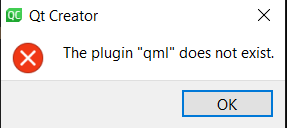
                      d03cf7d2-b54e-4782-9c68-86bed82ddbde-image.png

                      If I run it without -noload qml , the system simply does nothing. The process qtcreator.exe gets created (saw in task manager) and then disappears after few seconds.

                      jsulmJ 1 Reply Last reply
                      0
                      • A atharva.karnik

                        @jsulm I tried reinstalling the whole software. The QtCreator was able to launch just after the installation. However, it has descended to the same problem again after rebooting my laptop. I say that a couple of times, the Qt5.dll was quarantined by my Anti-virus before I reported that as a false positive alert. Yet, I am unable to launch it now.
                        After I typed C:\Qt\Tools\QtCreator\bin\qtcreator -noload Python -noload qml , following dialogue box appears:
                        d03cf7d2-b54e-4782-9c68-86bed82ddbde-image.png

                        If I run it without -noload qml , the system simply does nothing. The process qtcreator.exe gets created (saw in task manager) and then disappears after few seconds.

                        jsulmJ Offline
                        jsulmJ Offline
                        jsulm
                        Lifetime Qt Champion
                        wrote on last edited by
                        #12

                        @atharva-karnik Please check what the correct QML plug-in name is in "Help/About Plugins..."

                        https://forum.qt.io/topic/113070/qt-code-of-conduct

                        1 Reply Last reply
                        0

                        • Login

                        • Login or register to search.
                        • First post
                          Last post
                        0
                        • Categories
                        • Recent
                        • Tags
                        • Popular
                        • Users
                        • Groups
                        • Search
                        • Get Qt Extensions
                        • Unsolved