
Skip to content
  • Categories
  • Recent
  • Tags
  • Popular
  • Users
  • Groups
  • Search
  • Get Qt Extensions
  • Unsolved
Collapse
Brand Logo
  1. Home
  2. Qt Development
  3. General and Desktop
  4. Widgets are shrinked when added to scroll area
Qt 6.11 is out! See what's new in the release blog

Widgets are shrinked when added to scroll area

Scheduled Pinned Locked Moved Unsolved General and Desktop
16 Posts 3 Posters 3.4k Views 2 Watching
  • Oldest to Newest
  • Newest to Oldest
  • Most Votes
Reply
  • Reply as topic
Log in to reply
This topic has been deleted. Only users with topic management privileges can see it.
  • mrjjM Offline
    mrjjM Offline
    mrjj
    Lifetime Qt Champion
    wrote on last edited by
    #2

    Hi
    Since you scale the pixmap to 200x200 then the easy fix is simply to set minimum size on the labels to that.
    label = QLabel()
    label.setMinimumSize(QSize(200,200));

    1 Reply Last reply
    1
    • K Offline
      K Offline
      kraken1564
      wrote on last edited by
      #3

      It doesn't work. I tried it already. The labels shrink anyway.

      mrjjM 1 Reply Last reply
      0
      • K kraken1564

        It doesn't work. I tried it already. The labels shrink anyway.

        mrjjM Offline
        mrjjM Offline
        mrjj
        Lifetime Qt Champion
        wrote on last edited by
        #4

        @kraken1564

        Hi
        thats odd. works fine here in c++
        It wont make them less than min size.
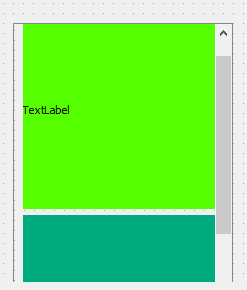
        alt text

        can you show your exact code ? Maybe we can spot something.

        1 Reply Last reply
        0
        • K Offline
          K Offline
          kraken1564
          wrote on last edited by
          #5

          The code above is basically my code. One thing I forgot to say that I do some "computations" in a working thread and then use signals/slots to emit intermediate results. So the code where I create labels with images is my slot updating the GUI.

          I recorded the screen one more time. This what I see with the code above: https://gfycat.com/lighthearteddentalcrustacean . If I add

          widget.updateGeometry()
          

          after adding a new label, these jumps/flickers almost disappear but sometimes happen (way less frequently).

          If I add

          time.sleep(1)
          

          after emitting a new signal (so slot creating my labels is called less often), these jumps/flickers don't happen at all: https://gfycat.com/calculatinggenuinekoodoo .

          Can it be some problem with processing too many signals in a short period of time so the widgets cannot be repainted/updated fast enough to avoid these jumps/flickers?

          1 Reply Last reply
          0
          • SGaistS Offline
            SGaistS Offline
            SGaist
            Lifetime Qt Champion
            wrote on last edited by
            #6

            Hi,

            How many signals are you sending per seconds for your image updates ?

            Interested in AI ? www.idiap.ch
            Please read the Qt Code of Conduct - https://forum.qt.io/topic/113070/qt-code-of-conduct

            1 Reply Last reply
            0
            • K Offline
              K Offline
              kraken1564
              wrote on last edited by
              #7

              About 5-10. It's not too many I think. But I have quite old CPU - Athlon 64 x2 3800+. I do not have any fancy hardware with me right now to test it.

              But, indeed, the rarer the GUI needs to be updated, the less frequent these glitch are.

              1 Reply Last reply
              0
              • SGaistS Offline
                SGaistS Offline
                SGaist
                Lifetime Qt Champion
                wrote on last edited by
                #8

                The number seems fine but is it per image ?
                It could also come from your graphics stack.

                Interested in AI ? www.idiap.ch
                Please read the Qt Code of Conduct - https://forum.qt.io/topic/113070/qt-code-of-conduct

                1 Reply Last reply
                0
                • K Offline
                  K Offline
                  kraken1564
                  wrote on last edited by
                  #9

                  No, It's one signal per image.

                  1 Reply Last reply
                  0
                  • SGaistS Offline
                    SGaistS Offline
                    SGaist
                    Lifetime Qt Champion
                    wrote on last edited by
                    #10

                    Can you provide a minimal buildable example that shows that behaviour ?

                    Interested in AI ? www.idiap.ch
                    Please read the Qt Code of Conduct - https://forum.qt.io/topic/113070/qt-code-of-conduct

                    1 Reply Last reply
                    0
                    • K Offline
                      K Offline
                      kraken1564
                      wrote on last edited by
                      #11

                      I think the "too many signals" hypothesis is right. I added a label and update it hundreds times per second. The glitches gets way worse. If I do not do it, they almost disappear. Also I tested it on another hardware and got the same behaviour ( less signals - no glitches, more signals - glitches).

                      Here is the code (but it is use PyQt, is it ok?):

                      import sys
                      from multiprocessing import Pool
                      from pathlib import Path
                      
                      from PyQt5 import QtCore, QtGui, QtWidgets
                      
                      # !!! Change to your folder with images
                      FOLDER = '/home/user/images'
                      
                      def find_images(folder):
                          '''Return paths of the images in the folder'''
                      
                          images = []
                          for filename in Path(folder).rglob('*.jpg'):
                              if filename.is_file():
                                  images.append(str(filename))
                          return images
                      
                      def scale_image_BA(image_path):
                          '''To generate more signals, concurrent processing is
                          used (via lib "multiprocessing"). QPixmap or QImage cannot
                          be serialized so converting to QByteArray is used'''
                      
                          reader = QtGui.QImageReader(image_path)
                          reader.setScaledSize(QtCore.QSize(200, 200))
                          image = reader.read()
                      
                          ba = QtCore.QByteArray()
                          buf = QtCore.QBuffer(ba)
                          buf.open(QtCore.QIODevice.WriteOnly)
                          image.save(buf, 'JPG', 100)
                          buf.close()
                          return ba
                      
                      def QByteArray_to_QPixmap(ba_image):
                          '''Convert from QByteArray back to QPixmap'''
                      
                          pixmap = QtGui.QPixmap()
                          pixmap.loadFromData(ba_image)
                          return pixmap
                      
                      
                      class Signals(QtCore.QObject):
                          image = QtCore.pyqtSignal(QtCore.QByteArray)
                          label = QtCore.pyqtSignal(str)
                      
                      
                      class Worker(QtCore.QRunnable):
                          def __init__(self, image_paths):
                              super().__init__()
                              self.image_paths = image_paths
                              self.signals = Signals()
                      
                          @QtCore.pyqtSlot()
                          def run(self):
                              '''Run image scaling on all available cores to emit more signals'''
                      
                              with Pool() as p:
                                  for baimg in p.imap_unordered(scale_image_BA, self.image_paths):
                                      # Glitches happen if emit many signals per second???
                                      # Without updating 'label' many times, everything's fine
                                      for i in range(1000):
                                          self.signals.label.emit(str(i))
                                      self.signals.image.emit(baimg)
                      
                      
                      class MyMainWindow(QtWidgets.QMainWindow):
                      
                          def __init__(self):
                              super().__init__()
                      
                              self.setMinimumSize(QtCore.QSize(800, 600))
                      
                              centralWidget = QtWidgets.QWidget()
                              self.setCentralWidget(centralWidget)
                      
                              scrollArea = QtWidgets.QScrollArea()
                              scrollArea.setWidgetResizable(True)
                      
                              imagesWidget = QtWidgets.QWidget()
                              scrollArea.setWidget(imagesWidget)
                      
                              self.label = QtWidgets.QLabel('Counter')
                      
                              startButton = QtWidgets.QPushButton('Start')
                              startButton.clicked.connect(self.run_worker)
                      
                              verticalLayout = QtWidgets.QVBoxLayout()
                              verticalLayout.addWidget(scrollArea)
                              verticalLayout.addWidget(self.label)
                              verticalLayout.addWidget(startButton)
                              centralWidget.setLayout(verticalLayout)
                      
                              self.imagesLayout = QtWidgets.QVBoxLayout()
                              imagesWidget.setLayout(self.imagesLayout)
                      
                          def run_worker(self):
                              images = find_images(FOLDER)
                              threadpool = QtCore.QThreadPool.globalInstance()
                              w = Worker(images)
                              w.signals.image.connect(self.update_gui)
                              w.signals.label.connect(self.label.setText)
                              threadpool.start(w)
                      
                          def update_gui(self, image):
                              label = QtWidgets.QLabel()
                              pixmap = QByteArray_to_QPixmap(image)
                              label.setPixmap(pixmap)
                              self.imagesLayout.addWidget(label)
                      
                      
                      if __name__ == '__main__':
                      
                          app = QtWidgets.QApplication(sys.argv)
                          mw = MyMainWindow()
                          mw.show()
                          app.exec()
                      
                      1 Reply Last reply
                      0
                      • SGaistS Offline
                        SGaistS Offline
                        SGaist
                        Lifetime Qt Champion
                        wrote on last edited by
                        #12

                        What version of PyQt5 are you using ?

                        Interested in AI ? www.idiap.ch
                        Please read the Qt Code of Conduct - https://forum.qt.io/topic/113070/qt-code-of-conduct

                        1 Reply Last reply
                        0
                        • K Offline
                          K Offline
                          kraken1564
                          wrote on last edited by
                          #13

                          5.12.2, but tested also on 5.14.2 and 5.9 - got the same behaviour.

                          1 Reply Last reply
                          0
                          • SGaistS Offline
                            SGaistS Offline
                            SGaist
                            Lifetime Qt Champion
                            wrote on last edited by
                            #14

                            What graphics stack do you have on your machine ?

                            Interested in AI ? www.idiap.ch
                            Please read the Qt Code of Conduct - https://forum.qt.io/topic/113070/qt-code-of-conduct

                            1 Reply Last reply
                            0
                            • K Offline
                              K Offline
                              kraken1564
                              wrote on last edited by kraken1564
                              #15

                              One PC has Geforce GT 730, driver v. 435.21, Linux Mint with Cinnamon DE (last one);
                              the other one has Intel UHD 630, Manjaro with KDE (use Qt, right?) - again get the same thing,

                              1 Reply Last reply
                              0
                              • K Offline
                                K Offline
                                kraken1564
                                wrote on last edited by kraken1564
                                #16

                                I've made the peace of code showing this behaviour a little simpler:

                                import sys
                                from PyQt5 import QtCore, QtGui, QtWidgets
                                
                                # Maybe you need to play with these constants
                                PIXMAP_NUM = 1000
                                EVENTLOOP_RUN_NUM = 100
                                
                                
                                class Signals(QtCore.QObject):
                                    pixmaps = QtCore.pyqtSignal(list)
                                
                                
                                class Worker(QtCore.QRunnable):
                                    def __init__(self):
                                        super().__init__()
                                        self.signals = Signals()
                                
                                    @QtCore.pyqtSlot()
                                    def run(self):
                                        '''Make QPixmap object with different colours, add them to a list
                                        and emit the list'''
                                
                                        c = QtGui.QColor
                                        colors = [c('red'), c('green'), c('blue'), c('cyan'),
                                                  c('magenta'), c('yellow')]
                                        i = 0
                                
                                        pms = []
                                        for _ in range(PIXMAP_NUM):
                                            pixmap = QtGui.QPixmap(200, 200)
                                            pixmap.fill(colors[i])
                                            i += 1
                                            if i == len(colors):
                                                i = 0
                                            pms.append(pixmap)
                                
                                        self.signals.pixmaps.emit(pms)
                                
                                
                                class MyMainWindow(QtWidgets.QMainWindow):
                                
                                    def __init__(self):
                                        super().__init__()
                                
                                        self.setMinimumSize(QtCore.QSize(800, 600))
                                
                                        centralWidget = QtWidgets.QWidget()
                                        self.setCentralWidget(centralWidget)
                                
                                        scrollArea = QtWidgets.QScrollArea()
                                        scrollArea.setWidgetResizable(True)
                                
                                        imagesWidget = QtWidgets.QWidget()
                                        scrollArea.setWidget(imagesWidget)
                                
                                        startButton = QtWidgets.QPushButton('Start')
                                        startButton.clicked.connect(self.run_worker)
                                
                                        verticalLayout = QtWidgets.QVBoxLayout()
                                        verticalLayout.addWidget(scrollArea)
                                        verticalLayout.addWidget(startButton)
                                        centralWidget.setLayout(verticalLayout)
                                
                                        self.imagesLayout = QtWidgets.QVBoxLayout()
                                        imagesWidget.setLayout(self.imagesLayout)
                                
                                    def run_worker(self):
                                        threadpool = QtCore.QThreadPool.globalInstance()
                                        w = Worker()
                                        w.signals.pixmaps.connect(self.update_gui)
                                        threadpool.start(w)
                                
                                    def update_gui(self, pixmaps):
                                        for i, img in enumerate(pixmaps):
                                            label = QtWidgets.QLabel()
                                            # The next line doesn't change the behaviour
                                            label.setMinimumSize(QtCore.QSize(200, 200))
                                            label.setPixmap(img)
                                            self.imagesLayout.addWidget(label)
                                            # The next line doesn't change the behaviour
                                            self.updateGeometry()
                                
                                            if i % EVENTLOOP_RUN_NUM == 0:
                                                QtCore.QCoreApplication.processEvents()
                                
                                
                                if __name__ == '__main__':
                                
                                    app = QtWidgets.QApplication(sys.argv)
                                    mw = MyMainWindow()
                                    mw.show()
                                    app.exec()
                                

                                This code reproduce the glitches on both the machines.

                                I've noticed one thing. If we do not set the minimum size,

                                label.setMinimumSize(QtCore.QSize(200, 200))
                                

                                labels shrink. But if we do, they overlap (so, indeed, the minimum size is respected but imagesWidget is not big enough - cannot change its own size fast enough??? - to set the labels without overlapping???)

                                1 Reply Last reply
                                0

                                • Login

                                • Login or register to search.
                                • First post
                                  Last post
                                0
                                • Categories
                                • Recent
                                • Tags
                                • Popular
                                • Users
                                • Groups
                                • Search
                                • Get Qt Extensions
                                • Unsolved