
Skip to content
  • Categories
  • Recent
  • Tags
  • Popular
  • Users
  • Groups
  • Search
  • Get Qt Extensions
  • Unsolved
Collapse
Brand Logo
  1. Home
  2. Qt Development
  3. Qt for Python
  4. How to set margin of content of QScrollArea

How to set margin of content of QScrollArea

Scheduled Pinned Locked Moved Solved Qt for Python
8 Posts 3 Posters 3.9k Views 1 Watching
  • Oldest to Newest
  • Newest to Oldest
  • Most Votes
Reply
  • Reply as topic
Log in to reply
This topic has been deleted. Only users with topic management privileges can see it.
  • NiagarerN Offline
    NiagarerN Offline
    Niagarer
    wrote on last edited by
    #1

    Hi,
    I am struggling to set the margin of the widgets inside a QScrollArea.
    This is what I tried:

    class NodeWidget(QWidget):
        def __init__(self):
            super(NodeWidget, self).__init__()
    
            # UI
            main_layout = QGridLayout()
    
            name_label = QLabel('label 1')
            name_label.setFont(QFont('Poppins', 12))
            package_name_label = QLabel('label 1')
            package_name_label.setFont(QFont('Poppins', 12))
    
            main_layout.addWidget(name_label, 0, 0)
            main_layout.addWidget(package_name_label, 1, 0)
    
            self.setLayout(main_layout)
    
    
            main_layout.setVerticalSpacing(0)
            main_layout.setSpacing(0)
            self.setContentsMargins(-6, -6, -6, -6)
            main_layout.setContentsMargins(-6, -6, -6, -6)
    
            self.setStyleSheet('margin: 0px;')  # doen't work
    
    
    class MyWidget(QScrollArea):
        def __init__(self):
            super(MyWidget, self).__init__()
            self.setWidgetResizable(True)
            self.list_scroll_area_widget = QWidget()
            self.setWidget(self.list_scroll_area_widget)
    
            self.list_layout = QVBoxLayout()
            self.list_layout.setAlignment(Qt.AlignTop)
            self.list_scroll_area_widget.setLayout(self.list_layout)
    
    
            nw1 = NodeWidget()
            self.list_layout.addWidget(nw1)
            nw2 = NodeWidget()
            self.list_layout.addWidget(nw2)
    
            self.setStyleSheet('background-color: #5555aa; border: 1px solid grey;')
    
            self.setContentsMargins(0, 0, 0, 0)  # doesn't work either


    Result:
    Qt 58.png
    I actually want the space between the label boxes and the border of the scroll area to be smaller.
    How can i do this?
    Thanks for answers!

    1 Reply Last reply
    0
    • mrjjM Offline
      mrjjM Offline
      mrjj
      Lifetime Qt Champion
      wrote on last edited by
      #2

      @Niagarer said in How to set margin of content of QScrollArea:

      self.setContentsMargins(0, 0, 0, 0) # doesn't work either

      Hi
      It has to be on the inner most layout that holds the widgets.

      NiagarerN 1 Reply Last reply
      0
      • mrjjM mrjj

        @Niagarer said in How to set margin of content of QScrollArea:

        self.setContentsMargins(0, 0, 0, 0) # doesn't work either

        Hi
        It has to be on the inner most layout that holds the widgets.

        NiagarerN Offline
        NiagarerN Offline
        Niagarer
        wrote on last edited by Niagarer
        #3

        @mrjj Hi,
        thank you, that was an improvement.
        I now call

                self.list_layout.setContentsMargins(0, 0, 0, 0)
        

        too.
        Qt 59.png
        But still there is some space I don't get rid of.
        Setting spacing of the list_layout to 0 also has no effect on the space between the two boxes...

        mrjjM 1 Reply Last reply
        0
        • NiagarerN Niagarer

          @mrjj Hi,
          thank you, that was an improvement.
          I now call

                  self.list_layout.setContentsMargins(0, 0, 0, 0)
          

          too.
          Qt 59.png
          But still there is some space I don't get rid of.
          Setting spacing of the list_layout to 0 also has no effect on the space between the two boxes...

          mrjjM Offline
          mrjjM Offline
          mrjj
          Lifetime Qt Champion
          wrote on last edited by mrjj
          #4

          @Niagarer
          hi
          I think we still have some ContentsMargins on one of the layouts
          It does look like the default size. on left / right side.

          The space between the two boxes might be normal as it just how the layout divide the space
          even if spacing is set to zero , it will do like this unless you insert a spacer to press them upwards.

          NiagarerN 1 Reply Last reply
          1
          • mrjjM mrjj

            @Niagarer
            hi
            I think we still have some ContentsMargins on one of the layouts
            It does look like the default size. on left / right side.

            The space between the two boxes might be normal as it just how the layout divide the space
            even if spacing is set to zero , it will do like this unless you insert a spacer to press them upwards.

            NiagarerN Offline
            NiagarerN Offline
            Niagarer
            wrote on last edited by Niagarer
            #5

            @mrjj
            Also thought about that but adding a spacer as third item to main_layout has no effect at all on the space between them.
            So it seems like it's just the margin of these NodeWidgets although their margins actually should be 0

            mrjjM 1 Reply Last reply
            0
            • NiagarerN Niagarer

              @mrjj
              Also thought about that but adding a spacer as third item to main_layout has no effect at all on the space between them.
              So it seems like it's just the margin of these NodeWidgets although their margins actually should be 0

              mrjjM Offline
              mrjjM Offline
              mrjj
              Lifetime Qt Champion
              wrote on last edited by
              #6

              @Niagarer
              Im not really sure where space comes from
              but its possible to have ScrollArea margin/borderless
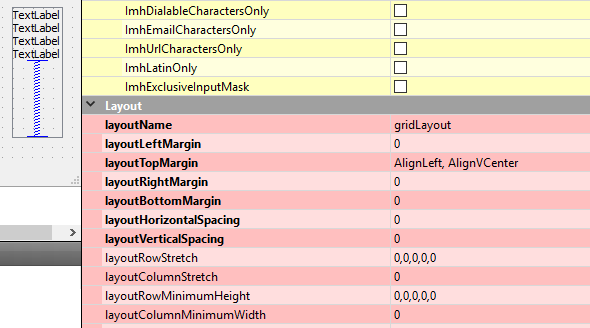
              alt text

              So maybe it does come from the NodeWidgets for some reason
              but you should be able to get rid of it.

              NiagarerN 1 Reply Last reply
              1
              • mrjjM mrjj

                @Niagarer
                Im not really sure where space comes from
                but its possible to have ScrollArea margin/borderless

                alt text

                So maybe it does come from the NodeWidgets for some reason
                but you should be able to get rid of it.

                NiagarerN Offline
                NiagarerN Offline
                Niagarer
                wrote on last edited by
                #7

                @mrjj
                Ok. Strange, but thanks for the input I will see if I find what's missing

                1 Reply Last reply
                0
                • NiagarerN Offline
                  NiagarerN Offline
                  Niagarer
                  wrote on last edited by Niagarer
                  #8

                  Thank you, you are right, I made a mistake:
                  I applied negative content margins on a layout which seems to result in positive minus border:

                  Qt 61.png
                  left: main_layout.setContentsMargins(6, 6, 6, 6)
                  right: main_layout.setContentsMargins(-6, -6, -6, -6)
                  I actually could have seen this in @mrjj's post... my bad

                  So, all I needed to do is to call

                  layout.setSpacing(0)
                  layout.setContentMargins(0, 0, 0, 0)
                  

                  on every layout in the extreme case.

                  Qt 62.png

                  I still haven't found a way to do all this through a stylesheet for the scrollarea though but at least this is one way of doing it.

                  1 Reply Last reply
                  0

                  • Login

                  • Login or register to search.
                  • First post
                    Last post
                  0
                  • Categories
                  • Recent
                  • Tags
                  • Popular
                  • Users
                  • Groups
                  • Search
                  • Get Qt Extensions
                  • Unsolved