
How to run a php script in Qt?
-
Hi!
I have a couple of scripts in php that can be run from the command line and they output text to the command line .
Can I issue a command line in qt, run scripts , and get text?@Mikeeeeee
yes you can
Edit: I can't be that much of a prick, here ya go:
https://doc.qt.io/qt-5/qprocess.html -
If I do this, I get error:
no matching function for call to 'QOverload ::of( )'
connect(process, QOverload ::of(&QProcess::finished), this, QOverload ::of(&ParserApi::replyCheckFines));
no matching function for call to 'QOverload ::of(void (ParserApi::*)())'
connect(process, QOverload ::of(&QProcess::finished), this, QOverload ::of(&ParserApi::replyCheckFines));How do I launch the command line correctly?
#include "parserapi.h" ParserApi::ParserApi() { process = new QProcess(this); //connect(process, &QProcess::readyReadStandardOutput, this, &ParserApi::replyCheckFines); //connect(process, &QProcess::finished, this, &ParserApi::replyCheckFines); //connect(process, QOverload<int, QProcess>::of(&QProcess::finished), this, QOverload<int, QProcess>::of(&ParserApi::replyCheckFines)); connect(process, QOverload<int, QProcess::ExitStatus>::of(&QProcess::finished), [=](int exitCode, QProcess::ExitStatus exitStatus){ replyCheckFines(); }); } void ParserApi::checkFines(QString numberCar, QString ctatePhoto) { // process->start(folderWithScript); // process->start("cmd /C php gopack.php check_fines У891ХС 750 9915647588 0"); process->start("cmd /C dir"); } void ParserApi::replyCheckFines() { qDebug()<<process->readAllStandardOutput(); } -
HI
You did not follow the docs and have your parameters in a QStringList.
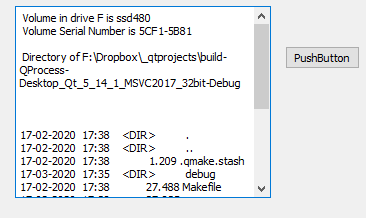
Nor can i see you call checkFines to try to start it. So that could be some of the issues.This sample runs dir and shows in a text browser widget when pressing a pushbutton.
void MainWindow::on_pushButton_2_pressed()
{
    QProcess *process = new QProcess(this);
    connect(process, &QProcess::started, []() {
        qDebug() << "Started!";
    });
    connect(process, &QProcess::readyRead, [this, process]() {
        QTextStream outputStream(process->readAllStandardOutput());
        ui->textBrowser->append(outputStream.readAll());
    });
    connect(process, &QProcess::readyReadStandardOutput, [this, process]() {
        QTextStream outputStream(process->readAllStandardOutput());
        ui->textBrowser->append(outputStream.readAll());
    });
    connect(process, &QProcess::readyReadStandardError, [this, process]() {
        QTextStream errorStream(process->readAllStandardError());
        ui->textBrowser->append(errorStream.readAll());
    });

    connect(process, qOverload<int, QProcess::ExitStatus>(
                &QProcess::finished), [this,process](int exitCode,
    QProcess::ExitStatus exitStatus) {
        ui->textBrowser->append(QString::number(exitCode) + " " + QString::number(exitStatus));
        process->deleteLater();
    });

    process->start("cmd.exe", QStringList()  << "/C" << "dir");
}
-
@mrjj said in How to run a php script in Qt?:
HI
You did not follow the docs and have your parameters in a QStringList.
Nor can i see you call checkFines to try to start it. So that could be some of the issues.
This sample runs dir and shows in a text browser widget when pressing a pushbutton.If I do this, I get error:
QProcess: Destroyed while process ("cmd.exe") is still running.
""#include "parserapi.h" ParserApi::ParserApi() { process = new QProcess(this); connect(process, QOverload<int, QProcess::ExitStatus>::of(&QProcess::finished), [=](int exitCode, QProcess::ExitStatus exitStatus){ replyCheckFines(); }); } void ParserApi::checkFines(QString numberCar, QString ctatePhoto) { process->start("cmd.exe", QStringList() << "/C" << "dir"); } void ParserApi::replyCheckFines() { qDebug()<<process->readAllStandardOutput(); } -
@mrjj said in How to run a php script in Qt?:
HI
You did not follow the docs and have your parameters in a QStringList.
Nor can i see you call checkFines to try to start it. So that could be some of the issues.
This sample runs dir and shows in a text browser widget when pressing a pushbutton.If I do this, I get error:
QProcess: Destroyed while process ("cmd.exe") is still running.
""#include "parserapi.h" ParserApi::ParserApi() { process = new QProcess(this); connect(process, QOverload<int, QProcess::ExitStatus>::of(&QProcess::finished), [=](int exitCode, QProcess::ExitStatus exitStatus){ replyCheckFines(); }); } void ParserApi::checkFines(QString numberCar, QString ctatePhoto) { process->start("cmd.exe", QStringList() << "/C" << "dir"); } void ParserApi::replyCheckFines() { qDebug()<<process->readAllStandardOutput(); }@Mikeeeeee
I don't think you're supposed to call yourreplyCheckFines()infinishedslot, I think by then the sub-process has gone? Try it @mrjj's way, do yourreadAllStandardOutput()in yourreadyRead...slots? I'm not sure, but worth a try?P.S.
QProcess: Destroyed while process ("cmd.exe") is still running.
You're not letting your
ParserApiinstance get deleted/go out of scope, and takingprocessmember variable with it, while the command has been started but not yet finished, are you? -
It didn 't work because the class object is destroyed after closing the constructor.
When I did so, everything workedParserApi *qqq = new ParserApi();@Mikeeeeee
Hi
well it sound like you had a out of scope issue but its hard to
say when you dont see the complete code.So now you are ready to run php.exe instead.
Make sure you also connect QProcess::ExitStatus signal and such so you
know when something goes wrong. -
It didn 't work because the class object is destroyed after closing the constructor.
When I did so, everything workedParserApi *qqq = new ParserApi();It didn 't work because the class object is destroyed after closing the constructor.
Ah, I did wonder if that message indicated you were in that situation. If you allow a
QProcessobject to get destructed while it is still running a command for you we can imagine why we get that message!I think you need to wait till the
finished(or errorred, of course) signal has arrived before destruction. People often callQProcess::deleteLater()from that slot as the safe place to destroy the object.


