
Select whole row in QTableWidget when radio button is checked
-
Hi,
I have a QTableWidget and the rows contain a column with a QRadioButton. When I check the radio button in a row which is not selected, I'd like to select this row automatically. How can I achieve this?
Thanks.
@panosk Call https://doc.qt.io/qt-5/qtableview.html#selectRow in a slot connected to https://doc.qt.io/qt-5/qabstractbutton.html#toggled
-
@jsulm ,
Thanks for the prompt reply. That's my intention but I can't figure it out. Since the rows are created dynamically, I'm creating the radio buttons in a slot, after the user clicks a button. In that slot, I'm using this connection after creating the radio buttonconnect(myRadioButton,&QRadioButton::toggled,this,&MyDialog::myOtherSlot);So, when the code runs in
myOtherSlot, I can't find a reference point for callingQTableView::selectRow. The current row, current index, etc, still point to the already selected row and not to the row in which the radio button was clicked.Apparently I'm missing sth obvious, so bare with me :).
-
Hi,
I have a QTableWidget and the rows contain a column with a QRadioButton. When I check the radio button in a row which is not selected, I'd like to select this row automatically. How can I achieve this?
Thanks.
@panosk you can use itemClicked signal
connect(ui->tableWidget,SIGNAL(itemClicked(QTableWidgetItem*)),this,SLOT(sl_ItemCLicked(QTableWidgetItem*)));
void sl_ItemCLicked(QTableWidgetItem *item)
{
ui->tableWidget->selectRow(item->row());
} -
@panosk you can use itemClicked signal
connect(ui->tableWidget,SIGNAL(itemClicked(QTableWidgetItem*)),this,SLOT(sl_ItemCLicked(QTableWidgetItem*)));
void sl_ItemCLicked(QTableWidgetItem *item)
{
ui->tableWidget->selectRow(item->row());
}@anil_arise
Hm, it seems it's not so obvious. When I click on the radio button, the click seems totally disconnected from the view --it's not passed to the table cell. I just checked your suggestion and it doesn't work when I click on the radio button, but it works if I click on a cell that doesn't have a widget. -
@jsulm ,
Thanks for the prompt reply. That's my intention but I can't figure it out. Since the rows are created dynamically, I'm creating the radio buttons in a slot, after the user clicks a button. In that slot, I'm using this connection after creating the radio buttonconnect(myRadioButton,&QRadioButton::toggled,this,&MyDialog::myOtherSlot);So, when the code runs in
myOtherSlot, I can't find a reference point for callingQTableView::selectRow. The current row, current index, etc, still point to the already selected row and not to the row in which the radio button was clicked.Apparently I'm missing sth obvious, so bare with me :).
@panosk said in Select whole row in QTableWidget when radio button is checked:
So, when the code runs in myOtherSlot, I can't find a reference point for calling QTableView::selectRow.
When I click on the radio button, the click seems totally disconnected from the view --it's not passed to the table cell.
Then can you not find where the radio button is in the table, if that's what's necessary to locate the row? (How have you put the radiobutton in ---
setCellWidget()? I wish you said....) -
Hi
It does work fine for me. It selects the row.
However, the RadioButton steals focus so
it will be drawn grey which is as expected when using setCellWidget.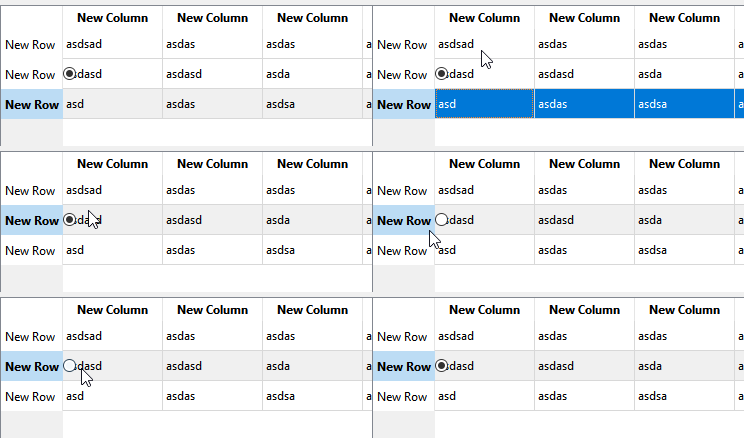
-
Hi
It does work fine for me. It selects the row.
However, the RadioButton steals focus so
it will be drawn grey which is as expected when using setCellWidget.@mrjj
Thank you for spending the time to check this. I also get the behavior I see in your screenshot, but still it's not what I want. I need the selection to actually change to the correct index. I'm checking with simpleqDebugs to see where the index is actually placed and it's not in the cell where the radio button is clicked. The signalitemClickedis not emitted when I toggle the radio button. The index only changes when I click on any other cell except the one with the radio button. -
OK, now I'm completely confused with
QRadioButton. It seems impossible to find out which radio button is actually checked so I can work on that row. Here is some code:This is a slot where I create the items and connect the
toggledsignal of each radio button to another slot.void ServiceDialog::addModel() { ... QRadioButton *rButton = new QRadioButton(ui->myTable); ui->myTable->setCellWidget(ui->myTable->rowCount()-1,5,rButton); //if this is the first item in the table, we want it to be enabled. if (ui->myTable->rowCount() == 1) { ui->myTable->selectRow(0); rButton->setChecked(true); } //We need to know when a radio button is clicked and act on that row connect(rButton,&QRadioButton::toggled,this,&ServiceDialog::setActiveModel); }void ServiceDialog::setActiveModel() { //Ugly, but it shows the confused state of the radio buttons for (auto row=0; row < ui->myTable->rowCount(); row++) { QRadioButton *button = qobject_cast<QRadioButton*>(ui->myTable->cellWidget(row,5)); if (button) { if (button->isChecked()) { // Surprise! Here, the previously checked button is actually checked!! but in the // table it appears unchecked!!, // so it's impossible to find out which radio button is actually checked // and work on that row } } } -
Don't work with cell widgets but use a proper QStyledItemDelegate
-
@anil_arise
Hm, it seems it's not so obvious. When I click on the radio button, the click seems totally disconnected from the view --it's not passed to the table cell. I just checked your suggestion and it doesn't work when I click on the radio button, but it works if I click on a cell that doesn't have a widget.@panosk try this sample example .
// in UI class
ui->tableWidget->setRowCount(10);
ui->tableWidget->setColumnCount(2);
for (int row=0;row<4;row++)
{
QTableWidgetItem *newItem1 = new QTableWidgetItem("123"+QString::number(row));
CustomRadioButton *rbutton = new CustomRadioButton(row);
connect(rbutton,SIGNAL(sendBtn_id(int,bool)),SLOT(sl_clicked(int,bool)));
ui->tableWidget->setCellWidget(row,0,rbutton);
ui->tableWidget->setItem(row, 1, newItem1);
}void sl_clicked(int index,bool ischecked)
{
if(index !=-1)
{
if(ischecked)
ui->tableWidget->selectRow(index);
else
ui->tableWidget->clearSelection();
}
}// custom radio button class
class CustomRadioButton:public QRadioButton
{
Q_OBJECT
public:
int btn_id;
CustomRadioButton(int id = 0) {
btn_id = id;
setText("Rbutton "+QString::number(id+1));
connect(this,SIGNAL(clicked(bool)),SLOT(sl_clicked(bool )));
}
signals:
void sendBtn_id(int id,bool checked);public slots:
void sl_clicked(bool ischecked)
{
emit sendBtn_id(btn_id,ischecked);
}};
-
@panosk try this sample example .
// in UI class
ui->tableWidget->setRowCount(10);
ui->tableWidget->setColumnCount(2);
for (int row=0;row<4;row++)
{
QTableWidgetItem *newItem1 = new QTableWidgetItem("123"+QString::number(row));
CustomRadioButton *rbutton = new CustomRadioButton(row);
connect(rbutton,SIGNAL(sendBtn_id(int,bool)),SLOT(sl_clicked(int,bool)));
ui->tableWidget->setCellWidget(row,0,rbutton);
ui->tableWidget->setItem(row, 1, newItem1);
}void sl_clicked(int index,bool ischecked)
{
if(index !=-1)
{
if(ischecked)
ui->tableWidget->selectRow(index);
else
ui->tableWidget->clearSelection();
}
}// custom radio button class
class CustomRadioButton:public QRadioButton
{
Q_OBJECT
public:
int btn_id;
CustomRadioButton(int id = 0) {
btn_id = id;
setText("Rbutton "+QString::number(id+1));
connect(this,SIGNAL(clicked(bool)),SLOT(sl_clicked(bool )));
}
signals:
void sendBtn_id(int id,bool checked);public slots:
void sl_clicked(bool ischecked)
{
emit sendBtn_id(btn_id,ischecked);
}};
@Christian-Ehrlicher
Thanks for the suggestion. Still I consider a custom delegate an overkill for such simple functionality, as my table is fairly simple and it will not contain more than a dozen rows.@anil_arise
Thank you for the code. I will try that too.In the meantime, I found a solution. The problem and the confusion was that when a radio button (or checkbox) is checked, two
toggledsignals are emitted -one for the radio button actually clicked and one for the previously checked radio button which changes to unchecked, as the buttons are set toautoExclusive. So, I worked with the model indexes and got the result I wanted (note that in the end I opted for aQCheckBox):void ServiceDialog::setActiveModel() { for (auto row = 0; row < ui->myTable->rowCount(); row++) { QCheckBox *box = qobject_cast<QCheckBox*>(ui->myTable->cellWidget(row,5)); if (box && box->isChecked()) { ui->myTable->setCurrentIndex(ui->myTable->model()->index(row,0)); ui->myTable->selectRow(ui->myTable->currentIndex().row()); theStringIwant = ui->myTable->item(ui->myTable->currentIndex().row(),0)->text(); break; } } ... }


