Skip to content
  • Categories
  • Recent
  • Tags
  • Popular
  • Users
  • Groups
  • Search
  • Get Qt
  • Unsolved
Collapse
Brand Logo
  1. Home
  2. Qt Development
  3. General and Desktop
  4. Qt option not showing in New File dialog.
Qt 6.11 is out! See what's new in the release blog

Qt option not showing in New File dialog.

Scheduled Pinned Locked Moved Unsolved General and Desktop
6 Posts 3 Posters 1.5k Views 1 Watching
  • Oldest to Newest
  • Newest to Oldest
  • Most Votes
Reply
  • Reply as topic
Log in to reply
This topic has been deleted. Only users with topic management privileges can see it.
  • L Offline
    L Offline
    lcleve
    wrote on last edited by
    #1

    Nothing listed under Files and Classes. QtCreator 4.11.0, MacOs 10.14.6. Therefore cannot select Qt option

    1 Reply Last reply
    0
    • mrjjM Offline
      mrjjM Offline
      mrjj
      Lifetime Qt Champion
      wrote on last edited by mrjj
      #2

      Hi and welcome to the forums.

      What is missing?

      This ?
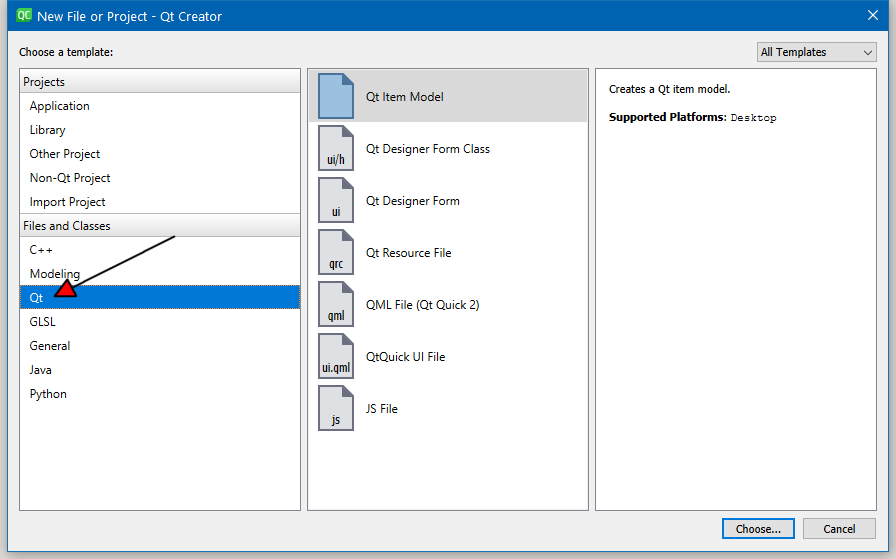
      alt text

      Can you choose Application and it list Qt Widget Application?

      Did you install XCode also ?
      Is this brand new Qt install or did you already created projects etc ?

      L 1 Reply Last reply
      2
      • mrjjM mrjj

        Hi and welcome to the forums.

        What is missing?

        This ?
        alt text

        Can you choose Application and it list Qt Widget Application?

        Did you install XCode also ?
        Is this brand new Qt install or did you already created projects etc ?

        L Offline
        L Offline
        lcleve
        wrote on last edited by
        #3

        @mrjj
        Everything under Files and Classes is missing. I can choose "Application" in the Above panel and then select QtWidgetApplication. This leads to opportunity to create a file. I have also selected "Application and then chosen "Qt for Python - Window" successfully, i.e. a file can be created, but it is not a .ui file. This is a newly installed application. I did install XCode and also pyside2. I am a complete newcomer just starting to go through the tutorials. Thanks very much for your help.

        lcleve

        jsulmJ 1 Reply Last reply
        0
        • L lcleve

          @mrjj
          Everything under Files and Classes is missing. I can choose "Application" in the Above panel and then select QtWidgetApplication. This leads to opportunity to create a file. I have also selected "Application and then chosen "Qt for Python - Window" successfully, i.e. a file can be created, but it is not a .ui file. This is a newly installed application. I did install XCode and also pyside2. I am a complete newcomer just starting to go through the tutorials. Thanks very much for your help.

          lcleve

          jsulmJ Offline
          jsulmJ Offline
          jsulm
          Lifetime Qt Champion
          wrote on last edited by jsulm
          #4

          @lcleve How did you install QtCreator and Qt?
          Try to install current Qt version also even if you're using PySide.

          https://forum.qt.io/topic/113070/qt-code-of-conduct

          1 Reply Last reply
          1
          • L Offline
            L Offline
            lcleve
            wrote on last edited by
            #5

            I downloaded from the Qt website several days ago.Version info is as follows:

            QtDesigner Version 5.12.5
            Qt

            1 Reply Last reply
            0
            • L Offline
              L Offline
              lcleve
              wrote on last edited by
              #6

              @lcleve said in Qt option not showing in New File dialog.:

              Sorry! hit wrong key. I downloaded several days ago the following versions: QtDesigner 5.12.5, Qt 5.12.5, QtDesigner 4.11.0, based on Qt5.14.0 (clang 10.0( Apple) 64 bit, Built on Dec 10, 2019 12:24:50, from revision 017ed74400. I have been able to find Qt.Designer in the file browser and to open it. It seems to work, but, as yet, I have not had the chance to convert the ui file to python. Any help would be appreciated.

              lclev

              1 Reply Last reply
              0

              • Login

              • Login or register to search.
              • First post
                Last post
              0
              • Categories
              • Recent
              • Tags
              • Popular
              • Users
              • Groups
              • Search
              • Get Qt
              • Unsolved