
Skip to content
  • Categories
  • Recent
  • Tags
  • Popular
  • Users
  • Groups
  • Search
  • Get Qt Extensions
  • Unsolved
Collapse
Brand Logo
  1. Home
  2. Qt Development
  3. General and Desktop
  4. QStackedWidget (index out of range)
Qt 6.11 is out! See what's new in the release blog

QStackedWidget (index out of range)

Scheduled Pinned Locked Moved Solved General and Desktop
19 Posts 6 Posters 2.4k Views 4 Watching
  • Oldest to Newest
  • Newest to Oldest
  • Most Votes
Reply
  • Reply as topic
Log in to reply
This topic has been deleted. Only users with topic management privileges can see it.
  • JonBJ JonB

    @ahsan737
    So print out the value of Index if you want to know why it is out of range! From your code if ui->stackedWidget->currentIndex() is presently on the last widget in the stack it's going to go out of range.

    ahsan737A Offline
    ahsan737A Offline
    ahsan737
    wrote on last edited by ahsan737
    #7

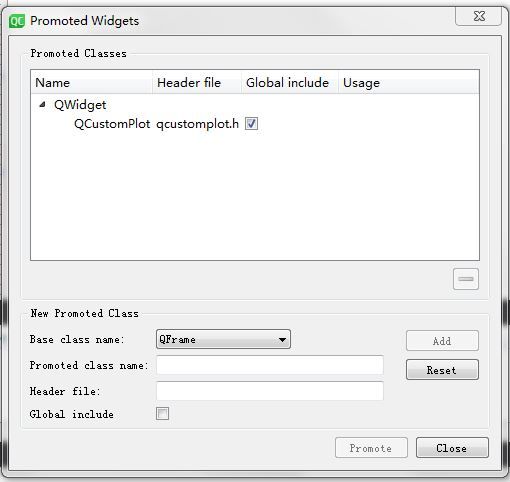
    @JonB I have noticed that a particular widget is causing the problem. Whenever I try to add that widget then the error appears. In that widget, I am plotting a line graph using QCustomPlot. Is that promoted widget causing the problem?

    捕获.JPG

    1 Reply Last reply
    0
    • mrjjM Offline
      mrjjM Offline
      mrjj
      Lifetime Qt Champion
      wrote on last edited by
      #8

      @ahsan737
      Hi
      Promoting a widget is merely an editor stunt, where it replaces the generic type with
      a user type in the code generator.
      As soon as code runs, it is no different from simply newing your own type.

      However, customplot might use a QList internally and maybe that's the one that
      gives this error.

      ahsan737A 1 Reply Last reply
      3
      • mrjjM mrjj

        @ahsan737
        Hi
        Promoting a widget is merely an editor stunt, where it replaces the generic type with
        a user type in the code generator.
        As soon as code runs, it is no different from simply newing your own type.

        However, customplot might use a QList internally and maybe that's the one that
        gives this error.

        ahsan737A Offline
        ahsan737A Offline
        ahsan737
        wrote on last edited by
        #9

        @mrjj this UI containing QCustomPlot and Graph works fine, but gives an error when I add it to QStackedWidget. How can it possibly be evaluated?

        mrjjM 1 Reply Last reply
        0
        • ahsan737A ahsan737

          @mrjj this UI containing QCustomPlot and Graph works fine, but gives an error when I add it to QStackedWidget. How can it possibly be evaluated?

          mrjjM Offline
          mrjjM Offline
          mrjj
          Lifetime Qt Champion
          wrote on last edited by
          #10

          @ahsan737
          Are you sure its not empty and you connected signals to some slot so it tried to do something ?
          Try adding a new QCustomPlot instead and see.

          ui->stackedWidget->addWidget(new QCustomPlot (this) );

          to see if that also gives same error.

          1 Reply Last reply
          0
          • ahsan737A ahsan737

            @JonB @sierdzio I have just loaded these widgets, and when I deploy on the device then the app crash at the start even before I do anything.

            Error

            F libFBC3.so: ASSERT failure in QList<T>::at: "index out of range",
            

            Move to next Index

            void MainWindow::_onNext()
            {
                int Index=ui->stackedWidget->currentIndex();
                Index++;
                ui->stackedWidget->setCurrentIndex(Index);
            }
            

            Added Widgets

                                    ui->stackedWidget->addWidget(&_screen);
                                    ui->stackedWidget->addWidget(&_newMeasure);
                                    ui->stackedWidget->addWidget(&_manual1);
                                    ui->stackedWidget->addWidget(&_manual2);
                                    ui->stackedWidget->addWidget(&_prep_1_1);
                                    ui->stackedWidget->addWidget(&_prep_1_2);
                                    ui->stackedWidget->addWidget(&_prep_1_3);
                                    ui->stackedWidget->addWidget(&_prep_3);
                                    ui->stackedWidget->addWidget(&_prep_4);
                                    ui->stackedWidget->addWidget(&_prep_5);
                                    ui->stackedWidget->addWidget(&_prep_6);
                                    ui->stackedWidget->addWidget(&_prep_7);   
                                    ui->stackedWidget->addWidget(&_prep_10);
                                    ui->stackedWidget->addWidget(&_prep_8);
                                    ui->stackedWidget->addWidget(&_prep_9);
                                    ui->stackedWidget->addWidget(&_prep_2);
                                    ui->stackedWidget->addWidget(&_static_1);
                                    ui->stackedWidget->addWidget(&_staticInstruct_1);
                                    ui->stackedWidget->addWidget(&_staticInstruct_2);
                                    ui->stackedWidget->addWidget(&_staticInstruct_3);
                                    ui->stackedWidget->addWidget(&_staticInstruct_4);
                                    ui->stackedWidget->addWidget(&_staticInstruct_5);
                                    ui->stackedWidget->addWidget(&_staticInstruct_6);
                                    ui->stackedWidget->addWidget(&_staticInstruct_7);
                                    ui->stackedWidget->addWidget(&_staticInstruct_8);
                                    ui->stackedWidget->addWidget(&_staticMeasure);
                                    ui->stackedWidget->addWidget(&_dynamicInstruct_1);
                                    ui->stackedWidget->addWidget(&_dynamicInstruct_2);
                                    ui->stackedWidget->addWidget(&_dynamicInstruct_3);
                                    ui->stackedWidget->addWidget(&_dynamicMeasure);
                                    ui->stackedWidget->addWidget(&_dynamicPrep);
                                    ui->stackedWidget->addWidget(&_saveData);
                                    ui->stackedWidget->addWidget(&_secondPrep_1);
                                    ui->stackedWidget->addWidget(&_secondPrep_2);
                                    ui->stackedWidget->addWidget(&_secondPrep_3);
                                    ui->stackedWidget->addWidget(&_secondPrep_4);
                                    ui->stackedWidget->addWidget(&_secondPrep_5);
                                    ui->stackedWidget->addWidget(&_secondPrep_6);
                                    ui->stackedWidget->addWidget(&_settings);
                                    ui->stackedWidget->addWidget(&_admin);
                                    ui->stackedWidget->addWidget(&_showdata);
                                    ui->stackedWidget->addWidget(&_btSettings);
            
            Christian EhrlicherC Offline
            Christian EhrlicherC Offline
            Christian Ehrlicher
            Lifetime Qt Champion
            wrote on last edited by
            #11

            @ahsan737 said in QStackedWidget (index out of range):

            Move to next Index

            Did you actually check what @JonB wrote?
            Can you post the complete backtrace?

            Qt Online Installer direct download: https://download.qt.io/official_releases/online_installers/
            Visit the Qt Academy at https://academy.qt.io/catalog

            1 Reply Last reply
            1
            • SGaistS Offline
              SGaistS Offline
              SGaist
              Lifetime Qt Champion
              wrote on last edited by
              #12

              Hi,

              void MainWindow::_onNext()
              {
              int Index=ui->stackedWidget->currentIndex();
              Index++;
              ui->stackedWidget->setCurrentIndex(Index);
              }

              You are missing the boundary check so suggested by @JonB.

              Interested in AI ? www.idiap.ch
              Please read the Qt Code of Conduct - https://forum.qt.io/topic/113070/qt-code-of-conduct

              1 Reply Last reply
              2
              • mrjjM Offline
                mrjjM Offline
                mrjj
                Lifetime Qt Champion
                wrote on last edited by
                #13

                Hi
                I'm not sure the stackedwidget in itself is to blame for the index out of range.
                If i do this
                ui->stackedWidget->setCurrentIndex(1000);
                in a blank GUI project. Nothing is shown and app just starts.
                Also in the inner code, the index is checked.

                QWidget *QStackedLayout::widget(int index) const
                {
                    Q_D(const QStackedLayout);
                     if (index < 0 || index >= d->list.size())
                        return nullptr;
                    return d->list.at(index)->widget();
                }
                
                
                SGaistS 1 Reply Last reply
                2
                • mrjjM mrjj

                  Hi
                  I'm not sure the stackedwidget in itself is to blame for the index out of range.
                  If i do this
                  ui->stackedWidget->setCurrentIndex(1000);
                  in a blank GUI project. Nothing is shown and app just starts.
                  Also in the inner code, the index is checked.

                  QWidget *QStackedLayout::widget(int index) const
                  {
                      Q_D(const QStackedLayout);
                       if (index < 0 || index >= d->list.size())
                          return nullptr;
                      return d->list.at(index)->widget();
                  }
                  
                  
                  SGaistS Offline
                  SGaistS Offline
                  SGaist
                  Lifetime Qt Champion
                  wrote on last edited by
                  #14

                  @mrjj Exactly what I was double checking :-)

                  Interested in AI ? www.idiap.ch
                  Please read the Qt Code of Conduct - https://forum.qt.io/topic/113070/qt-code-of-conduct

                  mrjjM 1 Reply Last reply
                  1
                  • SGaistS SGaist

                    @mrjj Exactly what I was double checking :-)

                    mrjjM Offline
                    mrjjM Offline
                    mrjj
                    Lifetime Qt Champion
                    wrote on last edited by
                    #15

                    @SGaist
                    Hi
                    I recalled having a off by one error with a stackedwidget and it seemed to just ignore it - back then so felt the urge to use the source.

                    To Make it more interesting, QCustomPlot seems to be using a QVector but
                    the actual error is
                    ASSERT failure in QList<T>

                    So I guess this calls for a back trace as Christian is after :)

                    1 Reply Last reply
                    2
                    • SGaistS Offline
                      SGaistS Offline
                      SGaist
                      Lifetime Qt Champion
                      wrote on last edited by
                      #16

                      @mrjj said in QStackedWidget (index out of range):

                      So I guess this calls for a back trace as Christian is after :)

                      Agreed

                      Interested in AI ? www.idiap.ch
                      Please read the Qt Code of Conduct - https://forum.qt.io/topic/113070/qt-code-of-conduct

                      1 Reply Last reply
                      0
                      • ahsan737A Offline
                        ahsan737A Offline
                        ahsan737
                        wrote on last edited by
                        #17

                        Thanks a lot, for your dedicated and kind response, the issue is resolved. It was being caused because the application was failing to read the initial configuration file as I mistakenly forgot calling a class in the startup. Silly yet frustrating mistake,

                        mrjjM 1 Reply Last reply
                        3
                        • ahsan737A ahsan737

                          Thanks a lot, for your dedicated and kind response, the issue is resolved. It was being caused because the application was failing to read the initial configuration file as I mistakenly forgot calling a class in the startup. Silly yet frustrating mistake,

                          mrjjM Offline
                          mrjjM Offline
                          mrjj
                          Lifetime Qt Champion
                          wrote on last edited by
                          #18

                          @ahsan737
                          Good you found it.
                          So the QList it had the error about was one of the widget that you inserted into the stacked so it seemed it was related to that ?

                          ahsan737A 1 Reply Last reply
                          0
                          • mrjjM mrjj

                            @ahsan737
                            Good you found it.
                            So the QList it had the error about was one of the widget that you inserted into the stacked so it seemed it was related to that ?
                            ahsan737A Offline
                            ahsan737A Offline
                            ahsan737
                            wrote on last edited by
                            #19

                            @mrjj yes, error was related to QList which was a part of the widget. and when I try to add that widget to stack then it makes the app crash.

                            1 Reply Last reply
                            1

                            • Login

                            • Login or register to search.
                            • First post
                              Last post
                            0
                            • Categories
                            • Recent
                            • Tags
                            • Popular
                            • Users
                            • Groups
                            • Search
                            • Get Qt Extensions
                            • Unsolved