Skip to content
  • Categories
  • Recent
  • Tags
  • Popular
  • Users
  • Groups
  • Search
  • Get Qt Extensions
  • Unsolved
Collapse
Brand Logo
  1. Home
  2. Qt Development
  3. General and Desktop
  4. Static compile of Qt Charts
Qt 6.11 is out! See what's new in the release blog

Static compile of Qt Charts

Scheduled Pinned Locked Moved Solved General and Desktop
20 Posts 3 Posters 6.6k Views 1 Watching
  • Oldest to Newest
  • Newest to Oldest
  • Most Votes
Reply
  • Reply as topic
Log in to reply
This topic has been deleted. Only users with topic management privileges can see it.
  • J Offline
    J Offline
    Jedd
    wrote on last edited by
    #5

    BTW, running configure --help didn't show any qtchart options, nor did I find any references in qfeatures.txt

    1 Reply Last reply
    0
    • SGaistS Offline
      SGaistS Offline
      SGaist
      Lifetime Qt Champion
      wrote on last edited by
      #6

      It's a module not an option like the SQL drivers.

      Interested in AI ? www.idiap.ch
      Please read the Qt Code of Conduct - https://forum.qt.io/topic/113070/qt-code-of-conduct

      1 Reply Last reply
      0
      • J Offline
        J Offline
        Jedd
        wrote on last edited by Jedd
        #7

        So it's built by default? OK, let me check my installation.

        OK, my static build is missing /lib/libQt5Charts_debug.a

        Or that's what happens when I attempt a build of the piechart example/

        make: *** No rule to make target /Users/jedd/Qt/5.8/static/lib/libQt5Charts_debug.a', needed by piechart.app/Contents/MacOS/piechart'. Stop.

        piechart builds fine dynamically.

        I'll look at compiling charts separately?

        1 Reply Last reply
        0
        • SGaistS Offline
          SGaistS Offline
          SGaist
          Lifetime Qt Champion
          wrote on last edited by
          #8

          Yes you can build the module by hand.

          If you did an out of source build, then just create the qtcharts folder there and use the classic combo of qmake/make/make install.

          Interested in AI ? www.idiap.ch
          Please read the Qt Code of Conduct - https://forum.qt.io/topic/113070/qt-code-of-conduct

          A 1 Reply Last reply
          1
          • J Offline
            J Offline
            Jedd
            wrote on last edited by
            #9

            Got it. Compiled qtcharts and copied the .a file to my static 5.8, then added:

            LIBS += -lQt5Charts

            To my .pro file.

            1 Reply Last reply
            0
            • SGaistS Offline
              SGaistS Offline
              SGaist
              Lifetime Qt Champion
              wrote on last edited by
              #10

              QT += charts should be enough in your .pro file

              Interested in AI ? www.idiap.ch
              Please read the Qt Code of Conduct - https://forum.qt.io/topic/113070/qt-code-of-conduct

              1 Reply Last reply
              2
              • J Offline
                J Offline
                Jedd
                wrote on last edited by
                #11

                Great, thanks for your replies!

                1 Reply Last reply
                0
                • SGaistS SGaist

                  Yes you can build the module by hand.

                  If you did an out of source build, then just create the qtcharts folder there and use the classic combo of qmake/make/make install.

                  A Offline
                  A Offline
                  AhmedAlshawi
                  wrote on last edited by AhmedAlshawi
                  #12

                  @SGaist

                  I have come across the same problem. I have a fully working dynamic build but have now tried a static build of Qt. However, after successfully building Qt statically and try to run, I get the following error:

                  :-1: error: Unknown module(s) in QT: charts datavisualization help

                  Apologies if this is a basic question, but could you please explain (for dummies) how to "build the module by hand"?

                  Edit: to complete a static build, I ran:

                  configure -opensource -confirm-license -static -platform win32-g++ -opengl desktop -prefix "C:\Qt\5.12.6\mingw73_64_static" -skip webengine -nomake tests -nomake examples
                  ...
                  mingw32-make
                  ...
                  mingw32-make install
                  ...
                  mingw32-make clean
                  
                  SGaistS 1 Reply Last reply
                  0
                  • A AhmedAlshawi

                    @SGaist

                    I have come across the same problem. I have a fully working dynamic build but have now tried a static build of Qt. However, after successfully building Qt statically and try to run, I get the following error:

                    :-1: error: Unknown module(s) in QT: charts datavisualization help

                    Apologies if this is a basic question, but could you please explain (for dummies) how to "build the module by hand"?

                    Edit: to complete a static build, I ran:

                    configure -opensource -confirm-license -static -platform win32-g++ -opengl desktop -prefix "C:\Qt\5.12.6\mingw73_64_static" -skip webengine -nomake tests -nomake examples
                    ...
                    mingw32-make
                    ...
                    mingw32-make install
                    ...
                    mingw32-make clean
                    
                    SGaistS Offline
                    SGaistS Offline
                    SGaist
                    Lifetime Qt Champion
                    wrote on last edited by
                    #13

                    @AhmedAlshawi hi, if you don't have QtCharts as part of your sources, you have to first download it.

                    Then the classic qmake/make/make install applies. Note that I recommend using out of source builds.

                    Interested in AI ? www.idiap.ch
                    Please read the Qt Code of Conduct - https://forum.qt.io/topic/113070/qt-code-of-conduct

                    A 1 Reply Last reply
                    1
                    • SGaistS SGaist

                      @AhmedAlshawi hi, if you don't have QtCharts as part of your sources, you have to first download it.

                      Then the classic qmake/make/make install applies. Note that I recommend using out of source builds.

                      A Offline
                      A Offline
                      AhmedAlshawi
                      wrote on last edited by
                      #14

                      @SGaist Thanks for the quick reply. I must admit I do not understand what the 'classic qmake/make/make install' means.

                      I downloaded the sources package as part of the installation for Qt, and within my sources folder 'Src' I do have the 'qtcharts' folder, but I do not have 'qthelp' or 'qtdatavisualisation' in the folder.

                      To build, should I copy the 'qtcharts' folder out of 'Src' and then build it? and how do I 'build' it?

                      Thanks a lot!

                      1 Reply Last reply
                      0
                      • SGaistS Offline
                        SGaistS Offline
                        SGaist
                        Lifetime Qt Champion
                        wrote on last edited by
                        #15

                        No, the idea is to create a folder outside of the source tree and do the build there.

                        For example:

                        mkdir -p /Users/jedd/build/qtcharts
                        cd /Users/jedd/build/qtcharts
                        /path/to/your/self_built/Qt/bin/qmake /path/to/qtcharts
                        make
                        make install
                        

                        Interested in AI ? www.idiap.ch
                        Please read the Qt Code of Conduct - https://forum.qt.io/topic/113070/qt-code-of-conduct

                        A 1 Reply Last reply
                        1
                        • SGaistS SGaist

                          No, the idea is to create a folder outside of the source tree and do the build there.

                          For example:

                          mkdir -p /Users/jedd/build/qtcharts
                          cd /Users/jedd/build/qtcharts
                          /path/to/your/self_built/Qt/bin/qmake /path/to/qtcharts
                          make
                          make install
                          
                          A Offline
                          A Offline
                          AhmedAlshawi
                          wrote on last edited by
                          #16

                          @SGaist So I followed the steps exactly and I get an error that 'make' can't be found.
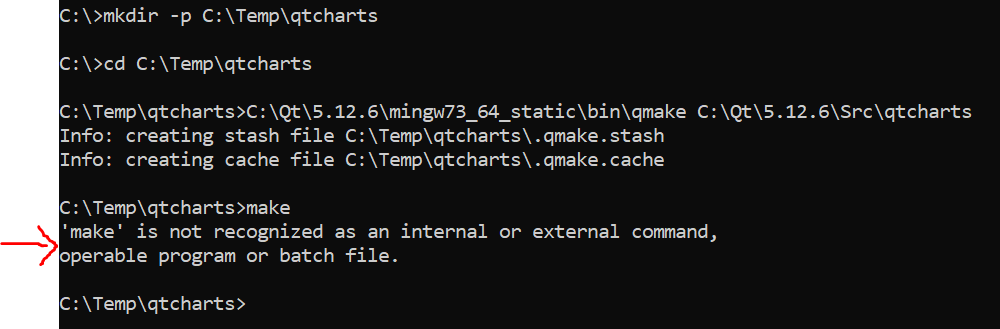
                          c24b2134-0865-4260-9f20-4d95e77dccf5-image.png

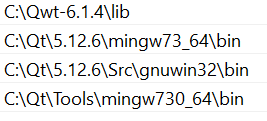
                          Here are the lines added into PATH
                          5bd12166-262e-4822-8103-3cdbccbd5268-image.png

                          Thank you :)

                          1 Reply Last reply
                          0
                          • SGaistS Offline
                            SGaistS Offline
                            SGaist
                            Lifetime Qt Champion
                            wrote on last edited by
                            #17

                            I wrote for a *nix OS.

                            In your case it's "mingw32-make".

                            Interested in AI ? www.idiap.ch
                            Please read the Qt Code of Conduct - https://forum.qt.io/topic/113070/qt-code-of-conduct

                            A 1 Reply Last reply
                            4
                            • SGaistS SGaist

                              I wrote for a *nix OS.

                              In your case it's "mingw32-make".

                              A Offline
                              A Offline
                              AhmedAlshawi
                              wrote on last edited by
                              #18

                              @SGaist Amazing thank you!! Worked a treat!

                              I now still get 'datavisualization' and 'help' as unknown modules, but I can't find these in the 'Src' folder. Can I download them separately or are they hidden somewhere?

                              Also, when I try and build my project using this static build, I have added "CONFIG += static" to the .pro file, but get these two errors:

                              1. :-1: error: Cannot find windeployqt.exe in "C:\Qt\5.12.6\mingw73_64_static\bin".
                              2. Cannot find winrtrunner.exe in "C:\Qt\5.12.6\mingw73_64_static\bin"

                              Any help is much appreciated. Cheers.

                              1 Reply Last reply
                              0
                              • SGaistS Offline
                                SGaistS Offline
                                SGaist
                                Lifetime Qt Champion
                                wrote on last edited by
                                #19

                                The help module likely comes from qttools as well as windeployqt.

                                All the sources should be available from the installer, but if not, then you can clone them from https://code.qt.io

                                Interested in AI ? www.idiap.ch
                                Please read the Qt Code of Conduct - https://forum.qt.io/topic/113070/qt-code-of-conduct

                                A 1 Reply Last reply
                                2
                                • SGaistS SGaist

                                  The help module likely comes from qttools as well as windeployqt.

                                  All the sources should be available from the installer, but if not, then you can clone them from https://code.qt.io

                                  A Offline
                                  A Offline
                                  AhmedAlshawi
                                  wrote on last edited by
                                  #20

                                  @SGaist
                                  Thank you so much, I built qttools in the same way and it fixed my problem completely!

                                  1 Reply Last reply
                                  0

                                  • Login

                                  • Login or register to search.
                                  • First post
                                    Last post
                                  0
                                  • Categories
                                  • Recent
                                  • Tags
                                  • Popular
                                  • Users
                                  • Groups
                                  • Search
                                  • Get Qt Extensions
                                  • Unsolved