
Qt Serial port Not Receive data until send data to mc.
-
What Qt version do you use? There were some problems with 5.12.x (@aha_1980: you know better) with the readyRead() signal.
-
What Qt version do you use? There were some problems with 5.12.x (@aha_1980: you know better) with the readyRead() signal.
@Christian-Ehrlicher said in Qt Serial port Not Receve data until send data to mc.:
12
iam using Qt 5.14.0 (MSVC 2017, 32 bit)
thanks for replay -
i used the blockingslave Example to Ensure the Micro Controller send data and received it correct without any missing in data i mean " if any input pin on micro controller status changes from low to high and vs versa send data over serial port to QT"
my problem the readyrad() signal doesn't emitted until i send any data to micro controller from qt and by the way i send data to micro controller suspenseful without no error or missing.//mainwindow.h #ifndef MAINWINDOW_H #define MAINWINDOW_H #include <QMainWindow> #include <QtDebug> QT_BEGIN_NAMESPACE namespace Ui { class MainWindow; } QT_END_NAMESPACE class QSerialPort ; class MainWindow : public QMainWindow { Q_OBJECT public: MainWindow(QWidget *parent = nullptr); ~MainWindow(); private slots: private: Ui::MainWindow *ui; //Serial QSerialPort *mc; //for Rs232 Cable NotArduino static const quint16 arduino_uno_vendor_id = 1367; //9025 ; static const quint16 arduino_uno_product_id = 8200; //67 ; QString mc_port_name; bool mc_is_available; }; #endif // MAINWINDOW_H
//mainwindow.cpp

#include "mainwindow.h"
#include "ui_mainwindow.h"
#include <QSerialPort>
#include <QSerialPortInfo>

    ui->setupUi(this);
   QMainWindow::showFullScreen();

    //********************************************DoSerialAutoConnect***********************************************//
    //**************************************************************************************************************//

MainWindow::MainWindow(QWidget *parent)
    : QMainWindow(parent )  //, Qt::FramelessWindowHint
    , ui(new Ui::MainWindow)
{
    mc_is_available = false;
    mc_port_name = "";
    mc = new QSerialPort(this);


    qDebug() << "Number of available ports: " << QSerialPortInfo::availablePorts().length();
    foreach(const QSerialPortInfo &serialPortInfo, QSerialPortInfo::availablePorts()){
        qDebug() << "Has vendor ID: " << serialPortInfo.hasVendorIdentifier();
        if(serialPortInfo.hasVendorIdentifier()){
            qDebug() << "Vendor ID: " << serialPortInfo.vendorIdentifier();
        }
        qDebug() << "Has Product ID: " << serialPortInfo.hasProductIdentifier();
        if(serialPortInfo.hasProductIdentifier()){
            qDebug() << "Product ID: " << serialPortInfo.productIdentifier();
        }
    }


    foreach(const QSerialPortInfo &serialPortInfo, QSerialPortInfo::availablePorts()){
        if(serialPortInfo.hasVendorIdentifier() && serialPortInfo.hasProductIdentifier()){
            if(serialPortInfo.vendorIdentifier() == arduino_uno_vendor_id){
                if(serialPortInfo.productIdentifier() == arduino_uno_product_id){
                    mc_port_name = serialPortInfo.portName();
                    mc_is_available = true;
                }
            }
        }
    }

    if(mc_is_available){
        // open and configure the serialport
        mc->setPortName(mc_port_name);   //QString("COM8")
        mc->open(QIODevice::ReadWrite);
        mc->setBaudRate(QSerialPort::Baud9600);
        mc->setDataBits(QSerialPort::Data8);
        mc->setParity(QSerialPort::NoParity);
        mc->setStopBits(QSerialPort::OneStop);
        mc->setFlowControl(QSerialPort::NoFlowControl);

        connect(mc, SIGNAL(readyRead()), this, SLOT(updateReceivedData()));
    }else{
        // give error message if not available
        QMessageBox::warning(this, "Port error", "Couldn't find the Arduino!");
    }
}

MainWindow::~MainWindow()
{
    delete ui;
    if(mc->isOpen()){
        mc->close();
    }
}


void MainWindow::updateReceivedData()
{
    // qDebug("received data\n");
    // arduino->waitForReadyRead(100);

    inBuffer = mc->readAll();
    while (mc->waitForReadyRead(10))
        inBuffer += mc->readAll();
    qDebug() << inBuffer;
please any help ;
Hi,
@Marco-Flad said in Qt Serial port Not Receve data until send data to mc.:
// open and configure the serialport
mc->setPortName(mc_port_name); //QString("COM8")
mc->open(QIODevice::ReadWrite);
mc->setBaudRate(QSerialPort::Baud9600);
mc->setDataBits(QSerialPort::Data8);
mc->setParity(QSerialPort::NoParity);
mc->setStopBits(QSerialPort::OneStop);
mc->setFlowControl(QSerialPort::NoFlowControl);Two things:
- Do the complete setup before calling open
- Check the return value of open, it might have failed and you don't check that case.
-
Hi,
@Marco-Flad said in Qt Serial port Not Receve data until send data to mc.:
// open and configure the serialport
mc->setPortName(mc_port_name); //QString("COM8")
mc->open(QIODevice::ReadWrite);
mc->setBaudRate(QSerialPort::Baud9600);
mc->setDataBits(QSerialPort::Data8);
mc->setParity(QSerialPort::NoParity);
mc->setStopBits(QSerialPort::OneStop);
mc->setFlowControl(QSerialPort::NoFlowControl);Two things:
- Do the complete setup before calling open
- Check the return value of open, it might have failed and you don't check that case.
@SGaist
i move open to down and checked if is isOpen() .
Everything that can return Boolean returns a true state and without errors.
the strange problem is
if i send any number of messages from micro controller this messages stored in buffer and not appear until readyread() is emitted
and readyread() not emitted until i send data to the micro controller i.e when i call arduino->write (" ");
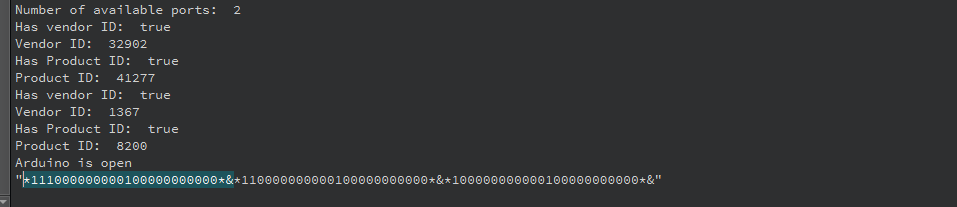
the hilighted is one message the three messages is sent from micro controller in different times but appears in debugger when i send data to micro controller .
-
@SGaist
i move open to down and checked if is isOpen() .
Everything that can return Boolean returns a true state and without errors.
the strange problem is
if i send any number of messages from micro controller this messages stored in buffer and not appear until readyread() is emitted
and readyread() not emitted until i send data to the micro controller i.e when i call arduino->write (" ");
the hilighted is one message the three messages is sent from micro controller in different times but appears in debugger when i send data to micro controller .
Hi @Marco-Flad,
my problem the readyrad() signal doesn't emitted until i send any data to micro controller
May it be that your microcontroller is exactly programmed like that? It does not seem unusual to me.
Anyway, you should first try the communication with a terminal program to ensure everything is working correctly before programming yourself.
Afterwards, you should try and study the Terminal example, you can get it from the examples section in Qt Creator.
And then you can come back to your own code.
Regards
-
Hi @Marco-Flad,
my problem the readyrad() signal doesn't emitted until i send any data to micro controller
May it be that your microcontroller is exactly programmed like that? It does not seem unusual to me.
Anyway, you should first try the communication with a terminal program to ensure everything is working correctly before programming yourself.
Afterwards, you should try and study the Terminal example, you can get it from the examples section in Qt Creator.
And then you can come back to your own code.
Regards
@aha_1980 said in Qt Serial port Not Receive data until send data to mc.:
your
Hi ,
iam sorry but i try Terminal program isn't work but PuTTY work well and blockingslave serial example work very well also in send and recive so i think the only way to use thriding like blocking slave example . -
Are you sure that you use Qt 5.14.0? Maybe you use Qt 5.13.1? Please check it again and again.
PS: As I see that you use Qt 5.13.1 && MinGW, according to your another post (with mutex).
-
Are you sure that you use Qt 5.14.0? Maybe you use Qt 5.13.1? Please check it again and again.
PS: As I see that you use Qt 5.13.1 && MinGW, according to your another post (with mutex).
-
@kuzulis
hi ,
ya you are right iam using C:\Qt\5.13.1 i notice it after locking in setting
but in (Help about Qt creator ) Based on 5.14.0 and
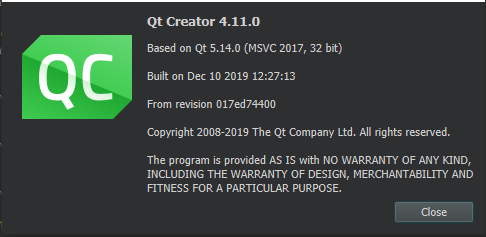
and in Manage kit only 5.13.1 so ho to update version
 image url)
thank you ,Hi @Marco-Flad,
your Qt Creator is build with Qt 5.14, but your kit is using Qt 5.13 - that explains your problems.
You can update your installation with the
MaintenanceToolinc:\Qt. I'd recommend to uninstall Qt 5.13.1 so you do not accidently use it again.Regards
-
Hi @Marco-Flad,
your Qt Creator is build with Qt 5.14, but your kit is using Qt 5.13 - that explains your problems.
You can update your installation with the
MaintenanceToolinc:\Qt. I'd recommend to uninstall Qt 5.13.1 so you do not accidently use it again.Regards


