
Skip to content
  • Categories
  • Recent
  • Tags
  • Popular
  • Users
  • Groups
  • Search
  • Get Qt Extensions
  • Unsolved
Collapse
Brand Logo
  1. Home
  2. Qt Development
  3. General and Desktop
  4. How to create an Arrow in QT

How to create an Arrow in QT

Scheduled Pinned Locked Moved Solved General and Desktop
19 Posts 3 Posters 12.8k Views 1 Watching
  • Oldest to Newest
  • Newest to Oldest
  • Most Votes
Reply
  • Reply as topic
Log in to reply
This topic has been deleted. Only users with topic management privileges can see it.
  • ManiRonM ManiRon

    @mrjj I saw the sample but i was not able to understand haw they have created the arrow thats why i asked for a simple sample

    mrjjM Offline
    mrjjM Offline
    mrjj
    Lifetime Qt Champion
    wrote on last edited by mrjj
    #6

    @ManiRon
    Ok.?
    its just the paint function you need..

    anyway, here it goes

    void DrawLineWithArrow(QPainter& painter, QPoint start, QPoint end) {
    
      painter.setRenderHint(QPainter::Antialiasing, true);
    
      qreal arrowSize = 40; // size of head
      painter.setPen(Qt::black);
      painter.setBrush(Qt::black);
    
      QLineF line(end, start);
    
      double angle = std::atan2(-line.dy(), line.dx());
      QPointF arrowP1 = line.p1() + QPointF(sin(angle + M_PI / 3) * arrowSize,
                                            cos(angle + M_PI / 3) * arrowSize);
      QPointF arrowP2 = line.p1() + QPointF(sin(angle + M_PI - M_PI / 3) * arrowSize,
                                            cos(angle + M_PI - M_PI / 3) * arrowSize);
    
      QPolygonF arrowHead;
      arrowHead.clear();
      arrowHead << line.p1() << arrowP1 << arrowP2;
      painter.drawLine(line);
      painter.drawPolygon(arrowHead);
    
    }
    ... call like
    DrawLineWithArrow(paint, QPoint(0, 0), QPoint(300, 300));
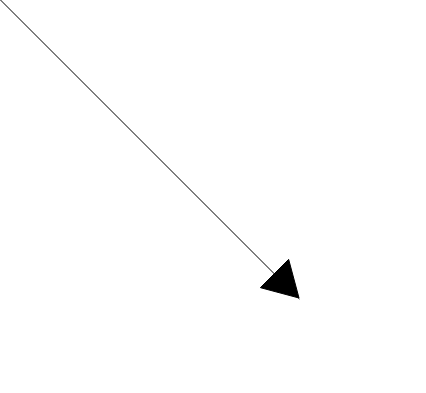
    

    alt text

    ManiRonM 1 Reply Last reply
    6
    • mrjjM mrjj

      @ManiRon
      Ok.?
      its just the paint function you need..

      anyway, here it goes

      void DrawLineWithArrow(QPainter& painter, QPoint start, QPoint end) {
      
        painter.setRenderHint(QPainter::Antialiasing, true);
      
        qreal arrowSize = 40; // size of head
        painter.setPen(Qt::black);
        painter.setBrush(Qt::black);
      
        QLineF line(end, start);
      
        double angle = std::atan2(-line.dy(), line.dx());
        QPointF arrowP1 = line.p1() + QPointF(sin(angle + M_PI / 3) * arrowSize,
                                              cos(angle + M_PI / 3) * arrowSize);
        QPointF arrowP2 = line.p1() + QPointF(sin(angle + M_PI - M_PI / 3) * arrowSize,
                                              cos(angle + M_PI - M_PI / 3) * arrowSize);
      
        QPolygonF arrowHead;
        arrowHead.clear();
        arrowHead << line.p1() << arrowP1 << arrowP2;
        painter.drawLine(line);
        painter.drawPolygon(arrowHead);
      
      }
      ... call like
      DrawLineWithArrow(paint, QPoint(0, 0), QPoint(300, 300));
      

      alt text

      ManiRonM Offline
      ManiRonM Offline
      ManiRon
      wrote on last edited by ManiRon
      #7

      @mrjj said in How to create an Arrow in QT:

      DrawLineWithArrow(paint, QPoint(0, 0), QPoint(300, 300));

      I tried to call like the way you mentioned (DrawLineWithArrow(paint, QPoint(0, 0), QPoint(300, 300));) but it is throwing error, Am i making any mistake ? This was the error

      C:\Qt\Qt5.5.0\Examples\Qt-5.5\widgets\graphicsview\diagramscene\mainwindow.cpp:87: error: no matching function for call to 'MainWindow::DrawLineWithArrow(QPainter*&, QPoint, QPoint)'
      DrawLineWithArrow(paint,QPoint(0,0), QPoint(0,0));
      ^

      mrjjM 1 Reply Last reply
      0
      • ManiRonM ManiRon

        @mrjj said in How to create an Arrow in QT:

        DrawLineWithArrow(paint, QPoint(0, 0), QPoint(300, 300));

        I tried to call like the way you mentioned (DrawLineWithArrow(paint, QPoint(0, 0), QPoint(300, 300));) but it is throwing error, Am i making any mistake ? This was the error

        C:\Qt\Qt5.5.0\Examples\Qt-5.5\widgets\graphicsview\diagramscene\mainwindow.cpp:87: error: no matching function for call to 'MainWindow::DrawLineWithArrow(QPainter*&, QPoint, QPoint)'
        DrawLineWithArrow(paint,QPoint(0,0), QPoint(0,0));
        ^

        mrjjM Offline
        mrjjM Offline
        mrjj
        Lifetime Qt Champion
        wrote on last edited by mrjj
        #8

        @ManiRon

        Hi
        You could show how you defined "paint" as that could help.

        If you call it from the painter function of the sample
        where paint is a pointer you need
        DrawLineWithArrow( * paint,QPoint(0,0), QPoint(330,330));

        Or simply change it to take a pointer and not a ref (&)

        If doubt plese show the complete code from where u call it.

        ManiRonM 3 Replies Last reply
        0
        • mrjjM mrjj

          @ManiRon

          Hi
          You could show how you defined "paint" as that could help.

          If you call it from the painter function of the sample
          where paint is a pointer you need
          DrawLineWithArrow( * paint,QPoint(0,0), QPoint(330,330));

          Or simply change it to take a pointer and not a ref (&)

          If doubt plese show the complete code from where u call it.

          ManiRonM Offline
          ManiRonM Offline
          ManiRon
          wrote on last edited by
          #9
          This post is deleted!
          1 Reply Last reply
          0
          • mrjjM mrjj

            @ManiRon

            Hi
            You could show how you defined "paint" as that could help.

            If you call it from the painter function of the sample
            where paint is a pointer you need
            DrawLineWithArrow( * paint,QPoint(0,0), QPoint(330,330));

            Or simply change it to take a pointer and not a ref (&)

            If doubt plese show the complete code from where u call it.

            ManiRonM Offline
            ManiRonM Offline
            ManiRon
            wrote on last edited by
            #10

            @mrjj I Found the error i didnt define the paint correctly

            1 Reply Last reply
            0
            • mrjjM mrjj

              @ManiRon

              Hi
              You could show how you defined "paint" as that could help.

              If you call it from the painter function of the sample
              where paint is a pointer you need
              DrawLineWithArrow( * paint,QPoint(0,0), QPoint(330,330));

              Or simply change it to take a pointer and not a ref (&)

              If doubt plese show the complete code from where u call it.

              ManiRonM Offline
              ManiRonM Offline
              ManiRon
              wrote on last edited by
              #11

              @mrjj

                              #include "mainwindow.h"
                              
                              #include "ui_mainwindow.h"
                              
                              #include "qpainter.h"
                              
                              #include "math.h"
                              
                              #include "cmath"
                              
                              #include "QPointF"
                              
                              #include "QPolygonF"


                              MainWindow::MainWindow(QWidget *parent) :
                              
                                  QMainWindow(parent),
                              
                                  ui(new Ui::MainWindow)
                              
                              {
                              
                                  ui->setupUi(this);


                                  QPainter paint;


                                  DrawLineWithArrow(paint,QPoint(0,0), QPoint(0,0));
                              
                              }


                              MainWindow::~MainWindow()
                              
                              {
                              
                                  delete ui;
                              
                              }
                              
                              void MainWindow::DrawLineWithArrow(QPainter& painter, QPoint start, QPoint end)
                              
                              {


                                painter.setRenderHint(QPainter::Antialiasing, true);


                                qreal arrowSize = 40; // size of head
                              
                                painter.setPen(Qt::black);
                              
                                painter.setBrush(Qt::black);


                                QLineF line(end, start);


                                double angle = std::atan2(-line.dy(), line.dx());
                              
                                QPointF arrowP1 = line.p1() + QPointF(sin(angle + M_PI / 3) * arrowSize,
                              
                                                                      cos(angle + M_PI / 3) * arrowSize);
                              
                                QPointF arrowP2 = line.p1() + QPointF(sin(angle + M_PI - M_PI / 3) * arrowSize,
                              
                                                                      cos(angle + M_PI - M_PI / 3) * arrowSize);


                                QPolygonF arrowHead;
                              
                                arrowHead.clear();
                              
                                arrowHead << line.p1() << arrowP1 << arrowP2;
                              
                                painter.drawLine(line);
                              
                                painter.drawPolygon(arrowHead);


                              }
              

              This is my whole code , Now my doubt is where i will be able to see this arrow

              jsulmJ 1 Reply Last reply
              0
              • ManiRonM ManiRon

                @mrjj

                                #include "mainwindow.h"
                                
                                #include "ui_mainwindow.h"
                                
                                #include "qpainter.h"
                                
                                #include "math.h"
                                
                                #include "cmath"
                                
                                #include "QPointF"
                                
                                #include "QPolygonF"


                                MainWindow::MainWindow(QWidget *parent) :
                                
                                    QMainWindow(parent),
                                
                                    ui(new Ui::MainWindow)
                                
                                {
                                
                                    ui->setupUi(this);


                                    QPainter paint;


                                    DrawLineWithArrow(paint,QPoint(0,0), QPoint(0,0));
                                
                                }


                                MainWindow::~MainWindow()
                                
                                {
                                
                                    delete ui;
                                
                                }
                                
                                void MainWindow::DrawLineWithArrow(QPainter& painter, QPoint start, QPoint end)
                                
                                {


                                  painter.setRenderHint(QPainter::Antialiasing, true);


                                  qreal arrowSize = 40; // size of head
                                
                                  painter.setPen(Qt::black);
                                
                                  painter.setBrush(Qt::black);


                                  QLineF line(end, start);


                                  double angle = std::atan2(-line.dy(), line.dx());
                                
                                  QPointF arrowP1 = line.p1() + QPointF(sin(angle + M_PI / 3) * arrowSize,
                                
                                                                        cos(angle + M_PI / 3) * arrowSize);
                                
                                  QPointF arrowP2 = line.p1() + QPointF(sin(angle + M_PI - M_PI / 3) * arrowSize,
                                
                                                                        cos(angle + M_PI - M_PI / 3) * arrowSize);


                                  QPolygonF arrowHead;
                                
                                  arrowHead.clear();
                                
                                  arrowHead << line.p1() << arrowP1 << arrowP2;
                                
                                  painter.drawLine(line);
                                
                                  painter.drawPolygon(arrowHead);


                                }
                

                This is my whole code , Now my doubt is where i will be able to see this arrow

                jsulmJ Offline
                jsulmJ Offline
                jsulm
                Lifetime Qt Champion
                wrote on last edited by jsulm
                #12

                @ManiRon You need to overwrite paintEvent to be able to paint! https://doc.qt.io/qt-5/qwidget.html#paintEvent
                "Now my doubt is where i will be able to see this arrow" - on the widget where you overwrite paintEvent.

                https://forum.qt.io/topic/113070/qt-code-of-conduct

                ManiRonM 2 Replies Last reply
                2
                • jsulmJ jsulm

                  @ManiRon You need to overwrite paintEvent to be able to paint! https://doc.qt.io/qt-5/qwidget.html#paintEvent
                  "Now my doubt is where i will be able to see this arrow" - on the widget where you overwrite paintEvent.

                  ManiRonM Offline
                  ManiRonM Offline
                  ManiRon
                  wrote on last edited by
                  #13

                  @jsulm I tried it on my Mainwindow and i was not able to see

                  1 Reply Last reply
                  0
                  • jsulmJ jsulm

                    @ManiRon You need to overwrite paintEvent to be able to paint! https://doc.qt.io/qt-5/qwidget.html#paintEvent
                    "Now my doubt is where i will be able to see this arrow" - on the widget where you overwrite paintEvent.

                    ManiRonM Offline
                    ManiRonM Offline
                    ManiRon
                    wrote on last edited by ManiRon
                    #14

                    @jsulm said in How to create an Arrow in QT:

                    You need to overwrite paintEvent to be able to paint!

                    You need to overwrite paintEvent to be able to paint!

                    I am new to this thats why , can you please explain How this can be done ?

                    jsulmJ 1 Reply Last reply
                    0
                    • ManiRonM ManiRon

                      @jsulm said in How to create an Arrow in QT:

                      You need to overwrite paintEvent to be able to paint!

                      You need to overwrite paintEvent to be able to paint!

                      I am new to this thats why , can you please explain How this can be done ?

                      jsulmJ Offline
                      jsulmJ Offline
                      jsulm
                      Lifetime Qt Champion
                      wrote on last edited by
                      #15

                      @ManiRon Take a look at this example: https://doc.qt.io/qt-5/qtwidgets-painting-basicdrawing-example.html

                      https://forum.qt.io/topic/113070/qt-code-of-conduct

                      ManiRonM 2 Replies Last reply
                      2
                      • jsulmJ jsulm

                        @ManiRon Take a look at this example: https://doc.qt.io/qt-5/qtwidgets-painting-basicdrawing-example.html

                        ManiRonM Offline
                        ManiRonM Offline
                        ManiRon
                        wrote on last edited by
                        #16

                        @jsulm
                        Thanks Sir, I got it and made it, Here i provide my working code so that it will be useful for others

                                 #include "mainwindow.h"
                                 
                                 #include "ui_mainwindow.h"
                                 
                                 #include "qpainter.h"
                                 
                                 #include "math.h"
                                 
                                 #include "cmath"
                                 
                                 #include "QPointF"
                                 
                                 #include "QPolygonF"
                                 
                                 #include "QPaintEvent"


                                 MainWindow::MainWindow(QWidget *parent) :
                                 
                                     QMainWindow(parent),
                                 
                                     ui(new Ui::MainWindow)
                                 
                                 {
                                 
                                     ui->setupUi(this);


                                     setBackgroundRole(QPalette::Base);
                                 
                                     setAutoFillBackground(true);


                                 }


                                 MainWindow::~MainWindow()
                                 
                                 {
                                 
                                     delete ui;
                                 
                                 }
                                 
                                 void MainWindow::DrawLineWithArrow(QPainter& painter, QPoint start, QPoint end)
                                 
                                 {


                                   painter.setRenderHint(QPainter::Antialiasing, true);


                                   qreal arrowSize = 40; // size of head
                                 
                                   painter.setPen(Qt::black);
                                 
                                   painter.setBrush(Qt::black);


                                   QLineF line(end, start);


                                   double angle = std::atan2(-line.dy(), line.dx());
                                 
                                   QPointF arrowP1 = line.p1() + QPointF(sin(angle + M_PI / 3) * arrowSize,
                                 
                                                                         cos(angle + M_PI / 3) * arrowSize);
                                 
                                   QPointF arrowP2 = line.p1() + QPointF(sin(angle + M_PI - M_PI / 3) * arrowSize,
                                 
                                                                         cos(angle + M_PI - M_PI / 3) * arrowSize);


                                   QPolygonF arrowHead;
                                 
                                   arrowHead.clear();
                                 
                                   arrowHead << line.p1() << arrowP1 << arrowP2;
                                 
                                   painter.drawLine(line);
                                 
                                   painter.drawPolygon(arrowHead);


                                 }
                                 
                                 void MainWindow::paintEvent(QPaintEvent *)
                                 
                                 {
                                 
                                     static const QPoint points[2] = {
                                 
                                         QPoint(50, 100),
                                 
                                         QPoint(20, 20),
                                 
                                     };
                                 
                                         QPainter painter(this);
                                 
                                         painter.setPen(pen);
                                 
                                         painter.setBrush(brush);


                                     painter.setRenderHint(QPainter::Antialiasing, true);


                                     qreal arrowSize = 40; // size of head
                                 
                                     painter.setPen(Qt::black);
                                 
                                     painter.setBrush(Qt::black);


                                     QLineF line(points[1], points[0]);


                                     double angle = std::atan2(-line.dy(), line.dx());
                                 
                                     QPointF arrowP1 = line.p1() + QPointF(sin(angle + M_PI / 3) * arrowSize,
                                 
                                                                           cos(angle + M_PI / 3) * arrowSize);
                                 
                                     QPointF arrowP2 = line.p1() + QPointF(sin(angle + M_PI - M_PI / 3) * arrowSize,
                                 
                                                                           cos(angle + M_PI - M_PI / 3) * arrowSize);


                                     QPolygonF arrowHead;
                                 
                                     arrowHead.clear();
                                 
                                     arrowHead << line.p1() << arrowP1 << arrowP2;
                                 
                                     painter.drawLine(line);
                                 
                                     painter.drawPolygon(arrowHead);


                                 //    painter.setRenderHint(QPainter::Antialiasing, false);
                                 
                                 //    painter.setPen(palette().dark().color());
                                 
                                 //    painter.setBrush(Qt::NoBrush);
                                 
                                 //    painter.drawRect(QRect(0, 0, width() - 1, height() - 1));


                                 //    painter.restore();


                                 }
                        
                        1 Reply Last reply
                        1
                        • jsulmJ jsulm

                          @ManiRon Take a look at this example: https://doc.qt.io/qt-5/qtwidgets-painting-basicdrawing-example.html

                          ManiRonM Offline
                          ManiRonM Offline
                          ManiRon
                          wrote on last edited by ManiRon
                          #17

                          @jsulm One more doubt if i want to use QPainterpath to draw the same arrow how this can be done

                          Why I ask the same in QPainterPath is that i want to use it in QCustomplot

                          mrjjM 1 Reply Last reply
                          0
                          • ManiRonM ManiRon

                            @jsulm One more doubt if i want to use QPainterpath to draw the same arrow how this can be done

                            Why I ask the same in QPainterPath is that i want to use it in QCustomplot

                            mrjjM Offline
                            mrjjM Offline
                            mrjj
                            Lifetime Qt Champion
                            wrote on last edited by mrjj
                            #18

                            @ManiRon said in How to create an Arrow in QT:

                            QPainterPath

                            Yes i think you can convert the code to use QPainterPath .
                            it has a line function
                            https://doc.qt.io/qt-5/qpainterpath.html#lineTo
                            and a
                            https://doc.qt.io/qt-5/qpainterpath.html#addPolygon
                            for the QPolygonF arrowHead;

                            ManiRonM 1 Reply Last reply
                            0
                            • mrjjM mrjj

                              @ManiRon said in How to create an Arrow in QT:

                              QPainterPath

                              Yes i think you can convert the code to use QPainterPath .
                              it has a line function
                              https://doc.qt.io/qt-5/qpainterpath.html#lineTo
                              and a
                              https://doc.qt.io/qt-5/qpainterpath.html#addPolygon
                              for the QPolygonF arrowHead;

                              ManiRonM Offline
                              ManiRonM Offline
                              ManiRon
                              wrote on last edited by
                              #19

                              @mrjj Thanks but i used QPixmap and it worked thanks all for helping me out

                              1 Reply Last reply
                              0

                              • Login

                              • Login or register to search.
                              • First post
                                Last post
                              0
                              • Categories
                              • Recent
                              • Tags
                              • Popular
                              • Users
                              • Groups
                              • Search
                              • Get Qt Extensions
                              • Unsolved