
QVTKwidget not shown in QtDesigner
-
@Mike5500
Hi
For that creator you need to compile the plugin with 2013 VS.
and 32 bit.Regarding the debug version, it will try to load the debug version of
Qts dlls. I have some issues with that and with Designer plugins.
It might work better for you.I was able to compile it in release mode with MSVC2015 64 bit. However the widget didn' t show in Designer left window but it worked. I will try as well a later version of qt (5.9.2)
Can this debug problem be solved? (I got some Qt*-d.dll missing errors earlier when i tried to start the generated .exe on the cmd line yes)
I really need to be able to debug my own code while using this QVTKwidget.
-
I was able to compile it in release mode with MSVC2015 64 bit. However the widget didn' t show in Designer left window but it worked. I will try as well a later version of qt (5.9.2)
Can this debug problem be solved? (I got some Qt*-d.dll missing errors earlier when i tried to start the generated .exe on the cmd line yes)
I really need to be able to debug my own code while using this QVTKwidget.
@Mike5500
If it did not not show it, in what did it work then?Clicking the exe / start from commandline is another issue.
To start from cmd, run
"C:\Qt\5.9.1\msvc2015_64\bin\qtenv2.bat"
first so it can find its Qt dlls.setting QT_DEBUG_PLUGINS=1 before running Creator shows more info
-
I used the .pro file and files from the project from this guy: https://github.com/UnaNancyOwen/qt_visualizer
I did edit it a bit so it could work in the newer environments, as described here: http://unanancyowen.com/en/pcl-with-qt/
It didn't show the QVTKWidget in the designer left side, but on the main window the widget was shown. When running the code (in release mode) it worked. (Earlier, the QVTKwidget was also shown in the left side of designer, but that suddenly disappeared ... dont know why ... Have seen other people describe similar things happening)
I used the all in one installer from this guy above so didnt have to recompile anything else than VTK and PCL.
-
I used the .pro file and files from the project from this guy: https://github.com/UnaNancyOwen/qt_visualizer
I did edit it a bit so it could work in the newer environments, as described here: http://unanancyowen.com/en/pcl-with-qt/
It didn't show the QVTKWidget in the designer left side, but on the main window the widget was shown. When running the code (in release mode) it worked. (Earlier, the QVTKwidget was also shown in the left side of designer, but that suddenly disappeared ... dont know why ... Have seen other people describe similar things happening)
I used the all in one installer from this guy above so didnt have to recompile anything else than VTK and PCL.
Just a note. If the projects include the widget directly it will work regardless of Qt used.
If you want to see it in Designer, the plugin must be compiled with same
compiler as the one used for Qt and also same Qt as Creator. ( to some degree ) -
@mrjj
To be a bit more detailed, we have the problem that we cannot run debug version of this pcl visualization demo https://github.com/UnaNancyOwen/qt_visualizer (we get a crash when trying to run it in the debugger).When run in the debugger:
Exception at 0x7fffff2e8238, code: 0xc0000005: read access violation at:
0x0, flags=0x0 (first chance)The release version runs fine it looks like.
I have read somewhere that this type of crash may be to some mixup between debug
version of libraries and release version of libraries but I am not sure.The VTK library files are in C:\Program Files\VTK\bin
Note: there are both vtkCommonCore-8.0.dll AND vtkCommonCore-8.0-gd.dll in
the same bin directory. However the debug files are separated by having a *-gd.dll type of filename.Any suggestion towards what to do and where to look to get the debug version to work?
-
@mrjj
To be a bit more detailed, we have the problem that we cannot run debug version of this pcl visualization demo https://github.com/UnaNancyOwen/qt_visualizer (we get a crash when trying to run it in the debugger).When run in the debugger:
Exception at 0x7fffff2e8238, code: 0xc0000005: read access violation at:
0x0, flags=0x0 (first chance)The release version runs fine it looks like.
I have read somewhere that this type of crash may be to some mixup between debug
version of libraries and release version of libraries but I am not sure.The VTK library files are in C:\Program Files\VTK\bin
Note: there are both vtkCommonCore-8.0.dll AND vtkCommonCore-8.0-gd.dll in
the same bin directory. However the debug files are separated by having a *-gd.dll type of filename.Any suggestion towards what to do and where to look to get the debug version to work?
@Mike5500
Ok, it though it was about the Designer plugin.Yes, mixing DLL and DLL-d for Qt might give crashes and even not a sure thing , its just best not to mix.
I would check:
Place a break point at main() and see if it crashes before reaching it.
If it crashes before, its most likely DLL related.Then I would check the run environment under Projects for the compiler/debug mode
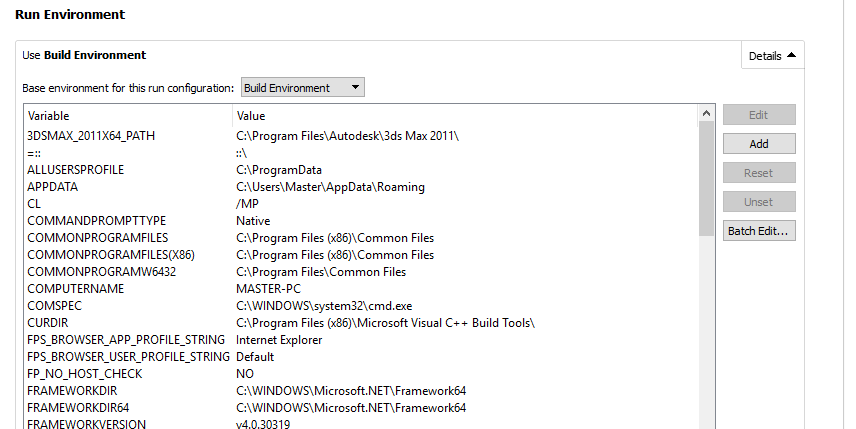
And check that there are paths for it to get the
C:\Program Files\VTK\bin
(i might rename the non debug dll to be sure its not loaded)I would also inspect the debug .exe with
http://www.dependencywalker.com/
and study what its going to load.Also just to be sure to ask.
You did compile the vtkCommonCore-8.0-gd.dll yourself with the same compiler as the
for the actual app it self? -
I was finnaly able to debug and compile and run the PCL visualization demo doing as I posted in this thread
https://forum.qt.io/topic/84542/debug-and-release-version-of-dll-conflict-in-qt-5-9-2-how-to-debug-and-solve/10.However the QVTKwidet is still not shown in the qt designer. There are dragging handles there, but nothing in the available widgets - In any case it seems to work.

I reacall reading something about promoting an other widget to a QVTKwidget somewhere else. Could that be the solution to inserting QVTKwidgets into a Qt Gui with Qt designer without having compiled the QVTKwidget with the same compiler that Qt was compiled with?

-
Yes promotion can be used for that.
then the sourced is just compiled with the rest of the program and have no further complications. -
Hello
I'm trying to compile VTK to use it in Qt. Now when building VTK with CMake I can see the following parameters:
--the maximum number of processors available to run MPI application (MPIEXEC_MAX_NUMPROCS)
--maximum number of threads vtkMultiThreader will allocate (VTK_MAX_THREADS)
--maximum number of processors available to run parallel application (VTK_MPI_MAX_NUMPROCS).
The default values are:
MPIEXEC_MAX_NUMPROCS = 2
VTK_MAX_THREADS = 64
VTK_MPI_MAX_NUMPROCS = 2
My computer has 2 cores, Windows 7 x64
If I'm going to use VTK as an external library to build my_app in Qt and in future use my_app on other computers that possibly have more than 2 cores and possibly use cluster calculations then should I change those parameters and set them to bigger values? What would you advise to me? -
Hi,
I would advise to ask that to the VTK folks as they are the more knowledgeable about their library.


