Skip to content
  • Categories
  • Recent
  • Tags
  • Popular
  • Users
  • Groups
  • Search
  • Get Qt Extensions
  • Unsolved
Collapse
Brand Logo
  1. Home
  2. Qt Development
  3. General and Desktop
  4. How to generate the barcode 128 in Qpixmap ?
Qt 6.11 is out! See what's new in the release blog

How to generate the barcode 128 in Qpixmap ?

Scheduled Pinned Locked Moved Solved General and Desktop
23 Posts 4 Posters 13.7k Views 3 Watching
  • Oldest to Newest
  • Newest to Oldest
  • Most Votes
Reply
  • Reply as topic
Log in to reply
This topic has been deleted. Only users with topic management privileges can see it.
  • M Mihaill

    This library not works https://github.com/ftylitak/qzxing, not work encoder.

    F Offline
    F Offline
    favoritas37
    wrote on last edited by
    #6

    @Mihaill QZXing encoder support only Qr Codes for now so it will not suit you.

    1 Reply Last reply
    0
    • M Offline
      M Offline
      Mihaill
      wrote on last edited by
      #7

      Clearly. But maybe you know how to encode using a font?

      1 Reply Last reply
      0
      • M Mihaill

        Found a class for encoding. Please help to use it
        .h

        #ifndef _PROMIXIS_CODE128_H
        #define _PROMIXIS_CODE128_H
        
        #include <QString>
        #include <QList>
        #include <QStringList>
        
        class Code128
        {
            typedef char * Symbol;
            enum Symbols { SYM_CodeC=99, SYM_CodeB = 100, SYM_StartA=103, SYM_StartB, SYM_StartC, SYM_Stop, SYM_NA };
            static Code128::Symbol symbols[108];
        
            enum Mode { MODE_A, MODE_B, MODE_C, IDLE };
            static Symbol symbolCode(quint8 c );
            static void addSymbolCodeChar( char c, QStringList & symbols, int & checksum );
            static void addSymbolCodeInt(quint8 value, QStringList & symbols, int & checksum );
            static quint8 digitCount( const QString & data, int startPos );
        
        public:
        
            typedef QList<quint8> BarCode;
        
            /* Code128 encoding of data
             *
             * Accepts characters in the basic ASCII set (ASCII values 32-126).
             * Maximum length is 100 characters, though I doubt any bar code
             * scanner will read that.
             *
             * Returns a list of bar widths. For example 2 3 1 4. This would mean
             * to draw a set of bars with widths 2, 3, 1 and 4. The odd numbered bars
             * are dark and the even numbered bars a light. 4 is the maximum width
             * returned.
             */
            static BarCode encode( const QString & data );
        
        };
        
        #endif // _PROMIXIS_CODE128_H
        

        .cpp

        /*
        
            Code128
        
            Code 128 is a very high-density barcode symbology. It is used
            for alphanumeric or numeric-only barcodes. This implementation
            can encode all 128 characters of ASCII. The implementation can
            switch between mode B and mode C to compress numbers.
        
            https://en.wikipedia.org/wiki/Code_128
        
        
            The MIT License (MIT)
        
            Copyright (c) 2013 Promixis, LLC
        
            Permission is hereby granted, free of charge, to any person obtaining a copy
            of this software and associated documentation files (the "Software"), to deal
            in the Software without restriction, including without limitation the rights
            to use, copy, modify, merge, publish, distribute, sublicense, and/or sell
            copies of the Software, and to permit persons to whom the Software is
            furnished to do so, subject to the following conditions:
        
            The above copyright notice and this permission notice shall be included in
            all copies or substantial portions of the Software.
        
            THE SOFTWARE IS PROVIDED "AS IS", WITHOUT WARRANTY OF ANY KIND, EXPRESS OR
            IMPLIED, INCLUDING BUT NOT LIMITED TO THE WARRANTIES OF MERCHANTABILITY,
            FITNESS FOR A PARTICULAR PURPOSE AND NONINFRINGEMENT. IN NO EVENT SHALL THE
            AUTHORS OR COPYRIGHT HOLDERS BE LIABLE FOR ANY CLAIM, DAMAGES OR OTHER
            LIABILITY, WHETHER IN AN ACTION OF CONTRACT, TORT OR OTHERWISE, ARISING FROM,
            OUT OF OR IN CONNECTION WITH THE SOFTWARE OR THE USE OR OTHER DEALINGS IN
            THE SOFTWARE.
        
        */
        
        #include "code128.h"
        
        Code128::Symbol Code128::symbols[108] = {
        
            "212222", "222122", "222221", "121223", "121322", "131222", "122213", "122312", "132212", "221213",
            "221312", "231212", "112232", "122132", "122231", "113222", "123122", "123221", "223211", "221132",
            "221231", "213212", "223112", "312131", "311222", "321122", "321221", "312212", "322112", "322211",
            "212123", "212321", "232121", "111323", "131123", "131321", "112313", "132113", "132311", "211313",
            "231113", "231311", "112133", "112331", "132131", "113123", "113321", "133121", "313121", "211331",
            "231131", "213113", "213311", "213131", "311123", "311321", "331121", "312113", "312311", "332111",
            "314111", "221411", "431111", "111224", "111422", "121124", "121421", "141122", "141221", "112214",
            "112412", "122114", "122411", "142112", "142211", "241211", "221114", "413111", "241112", "134111",
            "111242", "121142", "121241", "114212", "124112", "124211", "411212", "421112", "421211", "212141",
            "214121", "412121", "111143", "111341", "131141", "114113", "114311", "411113", "411311", "113141",
            "114131", "311141", "411131", "211412", "211214", "211232", "2331112", ""
        };
        
        
        Code128::Symbol Code128::symbolCode(quint8 c)
        {
            if ( c > SYM_Stop )
            {
                return symbols[107];
            }
        
            return symbols[c];
        }


        void Code128::addSymbolCodeChar(char c, QStringList &symbols, int &checksum)
        {
            // keep characters in valid range.
            if ( c < 32 )
            {
                c = 32;
            }
            if ( c > 126 )
            {
                c = 32;
            }
            quint8 value = (unsigned int)c - 32;
            Code128::Symbol symbol = symbolCode(value);
            symbols += symbol;
            checksum += value * ( symbols.count() == 1 ? 1 : symbols.count() - 1 );
        }
        
        void Code128::addSymbolCodeInt(quint8 value, QStringList &symbols, int &checksum)
        {
            Code128::Symbol symbol = symbolCode(value);
            symbols += symbol;
            checksum += value * ( symbols.count() == 1 ? 1 : symbols.count() - 1 );
        }
        
        quint8 Code128::digitCount(const QString &data, int startPos)
        {
            quint8 cnt = 0;
        
            for ( ;startPos < data.length();startPos++ )
            {
                if ( !data.at(startPos).isDigit() )
                {
                    break;
                }
                cnt++;
            }
        
            cnt &= 0xfe; // only pairs please.
            return cnt;
        }
        
        Code128::BarCode Code128::encode(const QString &data)
        {
            QStringList symbols;
            int checkSum = 0;
        
            if ( data.length() > 100 || data.length() == 0 )
            {
                return BarCode();
            }
        
            int pos = 0;
        
            Mode mode = IDLE;
        
            while ( pos < data.length() )
            {
                quint8 dc = digitCount(data, pos);
        
                if ( dc >= 4 )
                {
        
                    if ( mode != MODE_C )
                    {
                        if ( mode == IDLE )
                        {
                            addSymbolCodeInt(SYM_StartC, symbols, checkSum);
                        }
                        else
                        {
                            addSymbolCodeInt(SYM_CodeC, symbols, checkSum);
                        }
                        mode = MODE_C;
                    }
        
                    dc = dc>>1;
                    for ( int i=0; i < dc; i++ )
                    {
                        QString v = data.mid(pos,2);
                        int value = v.toInt();
                        addSymbolCodeInt(value, symbols, checkSum);
                        pos+=2;
                    }
                }
                else
                {
                    if ( mode != MODE_B )
                    {
                        if ( mode == IDLE )
                        {
                            addSymbolCodeInt(SYM_StartB, symbols, checkSum);
                        }
                        else
                        {
                            addSymbolCodeInt(SYM_CodeB, symbols, checkSum);
                        }
                        mode = MODE_B;
                    }
                    addSymbolCodeChar( data.at(pos).toLatin1(), symbols, checkSum );
                    pos++;
                }
            }
        
            quint8 remainder = checkSum % 103;
            addSymbolCodeInt(remainder, symbols, checkSum);
            addSymbolCodeInt(SYM_Stop, symbols, checkSum);
        
            QString code = symbols.join("");
            BarCode b;
            for(int i=0;i<code.length();i++)
            {
                QString v = code.at(i);
                b << v.toInt();
            }
        
            return b;
        }
        
        
        mrjjM Offline
        mrjjM Offline
        mrjj
        Lifetime Qt Champion
        wrote on last edited by
        #8

        @Mihaill said in How to generate the barcode 128 in Qpixmap ?:

        _PROMIXIS_CODE128_H

        Hi
        There is an example included
        https://github.com/promixis/Code128/blob/master/src/mainwindow.cpp
        did you try it ?

        M 1 Reply Last reply
        1
        • mrjjM mrjj

          @Mihaill said in How to generate the barcode 128 in Qpixmap ?:

          _PROMIXIS_CODE128_H

          Hi
          There is an example included
          https://github.com/promixis/Code128/blob/master/src/mainwindow.cpp
          did you try it ?

          M Offline
          M Offline
          Mihaill
          wrote on last edited by
          #9

          @mrjj I tried. It draws on QGraphicsScene. I need a picture or text to print. I don't need the output on the screen.

          mrjjM 1 Reply Last reply
          0
          • M Mihaill

            @mrjj I tried. It draws on QGraphicsScene. I need a picture or text to print. I don't need the output on the screen.

            mrjjM Offline
            mrjjM Offline
            mrjj
            Lifetime Qt Champion
            wrote on last edited by mrjj
            #10

            ok but you can render the scene to an image.

            QImage image(fn);
            QPainter painter(&image);
            painter.setRenderHint(QPainter::Antialiasing);
            scene.render(&painter);
            image.save("file_name.png")
            

            and you dont need to show the scene to user etc.

            M 1 Reply Last reply
            1
            • mrjjM mrjj

              ok but you can render the scene to an image.

              QImage image(fn);
              QPainter painter(&image);
              painter.setRenderHint(QPainter::Antialiasing);
              scene.render(&painter);
              image.save("file_name.png")
              

              and you dont need to show the scene to user etc.

              M Offline
              M Offline
              Mihaill
              wrote on last edited by Mihaill
              #11

              @mrjj It's dont works:

                  QImage image;
                  QPainter painter(&image);
                  painter.setRenderHint(QPainter::Antialiasing);
                  m_Scene.render(&painter);
              

              This works, but the first line is obtained more rest. I don't understand why. And there is a line on top. Please tell me how to remove it.

                  QRectF r =m_Barcode->boundingRect();
                  QPixmap pixmap(r.width(), r.height());
                  pixmap.fill(QColor(0, 0, 0, 0));
                  QPainter painter(&pixmap);
                  //painter.setBrush(QBrush(QColor(0, 0, 0, 0)));
                  painter.drawRect(r);
                  m_Scene.render(&painter);
                  //m_Scene.r
                  //m_Scene.render(&painter, QRectF(), m_Barcode->sceneBoundingRect());
                  painter.end();
              

              2.png

              1 Reply Last reply
              0
              • M Offline
                M Offline
                Mihaill
                wrote on last edited by
                #12

                It's work, but the barcode is not placed all and therefore not read the picture. How do I know the size of the barcode?

                    m_Barcode = new Code128Item();
                        m_Barcode->setWidth( 200 );
                        m_Barcode->setHeight( 80 );
                        m_Barcode->setPos(0,0);
                        m_Barcode->setText("Promixis");
                        m_Scene.addItem( m_Barcode );
                        m_Scene.update();
                        m_Barcode->update();
                    
                    //    QRectF r =m_Barcode->boundingRect();
                    //    QPixmap pixmap(r.width(), r.height());
                        QPixmap pixmap(m_Barcode->boundingRect().width(), 80);
                        pixmap.fill(QColor(0, 0, 0, 0));
                        QPainter painter(&pixmap);
                        //painter.setBrush(QBrush(QColor(0, 0, 0, 0)));
                        //painter.drawRect(r);
                        m_Scene.render(&painter);
                        //m_Scene.r
                        //m_Scene.render(&painter, QRectF(), m_Barcode->sceneBoundingRect());
                        painter.end();
                
                mrjjM 1 Reply Last reply
                0
                • M Mihaill

                  It's work, but the barcode is not placed all and therefore not read the picture. How do I know the size of the barcode?

                      m_Barcode = new Code128Item();
                          m_Barcode->setWidth( 200 );
                          m_Barcode->setHeight( 80 );
                          m_Barcode->setPos(0,0);
                          m_Barcode->setText("Promixis");
                          m_Scene.addItem( m_Barcode );
                          m_Scene.update();
                          m_Barcode->update();
                      
                      //    QRectF r =m_Barcode->boundingRect();
                      //    QPixmap pixmap(r.width(), r.height());
                          QPixmap pixmap(m_Barcode->boundingRect().width(), 80);
                          pixmap.fill(QColor(0, 0, 0, 0));
                          QPainter painter(&pixmap);
                          //painter.setBrush(QBrush(QColor(0, 0, 0, 0)));
                          //painter.drawRect(r);
                          m_Scene.render(&painter);
                          //m_Scene.r
                          //m_Scene.render(&painter, QRectF(), m_Barcode->sceneBoundingRect());
                          painter.end();
                  
                  mrjjM Offline
                  mrjjM Offline
                  mrjj
                  Lifetime Qt Champion
                  wrote on last edited by mrjj
                  #13

                  Hi
                  Im not sure what
                  ' but the barcode is not placed all and therefore not read the picture'
                  means ?

                  The rendered image is cut off ?

                  Anyway, did check out
                  void Code128Item::paint(QPainter *painter, const QStyleOptionGraphicsItem *option, QWidget *widget)
                  in code128item.cpp

                  It seems it would be easy to make a version that would just draw to an image as you want.
                  Its not really tied to QGraphicsScene and would work in a normal paintEvent.

                  M 1 Reply Last reply
                  0
                  • mrjjM mrjj

                    Hi
                    Im not sure what
                    ' but the barcode is not placed all and therefore not read the picture'
                    means ?

                    The rendered image is cut off ?

                    Anyway, did check out
                    void Code128Item::paint(QPainter *painter, const QStyleOptionGraphicsItem *option, QWidget *widget)
                    in code128item.cpp

                    It seems it would be easy to make a version that would just draw to an image as you want.
                    Its not really tied to QGraphicsScene and would work in a normal paintEvent.

                    M Offline
                    M Offline
                    Mihaill
                    wrote on last edited by Mihaill
                    #14

                    @mrjj Yes, the rendered image is clipped.

                    If you do so, the image is also cropped. Need as the otherwise set width QPixamp.

                        QPixmap pixmap(m_Barcode->boundingRect().width(), 80);
                        pixmap.fill(QColor(0, 0, 0, 0));
                        QPainter painter(&pixmap);
                        //painter.setBrush(QBrush(QColor(0, 0, 0, 0)));
                        //painter.drawRect(r);
                    //    m_Scene.render(&painter);
                    //    //m_Scene.render(&painter, QRectF(), m_Barcode->sceneBoundingRect());
                    //    painter.end();
                    
                        QWidget widget;
                        QStyleOptionGraphicsItem styleOptionGraphicsItem ;
                        m_Barcode->paint(&painter, &styleOptionGraphicsItem, &widget); //(QPainter *painter, const QStyleOptionGraphicsItem *option, QWidget *widget)
                    
                    1 Reply Last reply
                    0
                    • SGaistS Offline
                      SGaistS Offline
                      SGaist
                      Lifetime Qt Champion
                      wrote on last edited by
                      #15

                      Hi,

                      Take the code inside that method and apply it on a QImage.

                      Interested in AI ? www.idiap.ch
                      Please read the Qt Code of Conduct - https://forum.qt.io/topic/113070/qt-code-of-conduct

                      1 Reply Last reply
                      1
                      • mrjjM Offline
                        mrjjM Offline
                        mrjj
                        Lifetime Qt Champion
                        wrote on last edited by mrjj
                        #16

                        Hi
                        It turns out its not even using the other parameters (QStyleOptionGraphicsItem , widget) so you can directly just call it to paint on pixmap.

                           QPixmap pix(200, 80); // match the actual values if u change them
                            QPainter paint(&pix);
                            pix.fill( Qt::white );
                            m_Barcode->paint(&paint,nullptr, nullptr);
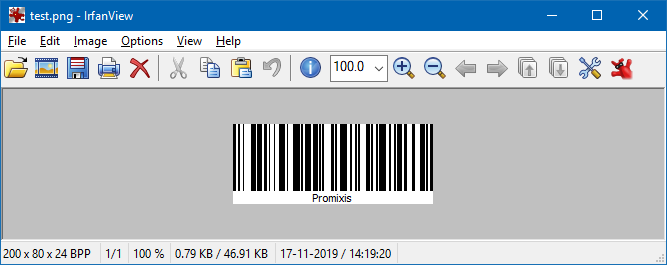
                            pix.save("e:/test.png");
                        

                        and get a perfect sized image.

                        alt text

                        M 1 Reply Last reply
                        1
                        • mrjjM mrjj

                          Hi
                          It turns out its not even using the other parameters (QStyleOptionGraphicsItem , widget) so you can directly just call it to paint on pixmap.

                             QPixmap pix(200, 80); // match the actual values if u change them
                              QPainter paint(&pix);
                              pix.fill( Qt::white );
                              m_Barcode->paint(&paint,nullptr, nullptr);
                              pix.save("e:/test.png");
                          

                          and get a perfect sized image.

                          alt text

                          M Offline
                          M Offline
                          Mihaill
                          wrote on last edited by
                          #17

                          @mrjj Strange, but I have such code clips picture.2.png

                          mrjjM 1 Reply Last reply
                          0
                          • M Offline
                            M Offline
                            Mihaill
                            wrote on last edited by
                            #18

                            The program or draws normally, or increases in 1,25 depending on the text. Why so?

                            1 Reply Last reply
                            0
                            • M Mihaill

                              @mrjj Strange, but I have such code clips picture.2.png

                              mrjjM Offline
                              mrjjM Offline
                              mrjj
                              Lifetime Qt Champion
                              wrote on last edited by
                              #19

                              @Mihaill
                              Very strange. it works flawless here.
                              You have the default sizes ?

                                 m_Barcode = new Code128Item();
                                  m_Barcode->setWidth( 200 );
                                  m_Barcode->setHeight( 80 );
                                  m_Barcode->setPos(0,0);
                                  m_Barcode->setText("Promixis");
                              
                                  QPixmap pix(200, 80); // MUST match the setWidth, setHeight
                                  QPainter paint(&pix);
                                  pix.fill( Qt::white );
                                  m_Barcode->paint(&paint,nullptr, nullptr);
                                  pix.save("e:/test.png");
                              
                              1 Reply Last reply
                              1
                              • mrjjM Offline
                                mrjjM Offline
                                mrjj
                                Lifetime Qt Champion
                                wrote on last edited by
                                #20

                                @Mihaill said in How to generate the barcode 128 in Qpixmap ?:

                                the program or draws normally, or increases in 1,25 depending on the text. Why so?

                                I dont know what this means ?

                                The images becomes bigger with bigger text ?
                                That is normal for barcode 128.
                                The data limit is normally 48 chars but its not hard limit and it will expand the barcode to the point where its too wide for pratical use.

                                1 Reply Last reply
                                0
                                • M Offline
                                  M Offline
                                  Mihaill
                                  wrote on last edited by
                                  #21

                                  I understand that the number of sticks is changing. But the pixel size of the image changes by 1.25 times or 1. And the picture is cropped and the barcode is not correct.
                                  2.png

                                  2.png
                                  Here 2 pictures of the same size, but one the size of the shaded zone higher in 1,25. Why so?

                                  mrjjM 1 Reply Last reply
                                  0
                                  • M Mihaill

                                    I understand that the number of sticks is changing. But the pixel size of the image changes by 1.25 times or 1. And the picture is cropped and the barcode is not correct.
                                    2.png

                                    2.png
                                    Here 2 pictures of the same size, but one the size of the shaded zone higher in 1,25. Why so?

                                    mrjjM Offline
                                    mrjjM Offline
                                    mrjj
                                    Lifetime Qt Champion
                                    wrote on last edited by mrjj
                                    #22

                                    @Mihaill
                                    Hi
                                    the programmer made it so, it seems.

                                    void Code128Item::paint(QPainter *painter, const QStyleOptionGraphicsItem *, QWidget *)
                                    {
                                        float lineWidth = m_Width / m_CodeLength;
                                    
                                    
                                        /*
                                         * This code tries to fit the barcode right inside the width. If the code
                                         * is too long this means that the bar width goes below one pixel. Which in
                                         * turn means we get no barcode. On printers this is not a problem too fast
                                         * as they have 600 DPI usually. Screens with 96 DPI run out faster.
                                         *
                                         */
                                    
                                    if ( !m_HighDPI )
                                        {
                                            lineWidth = qRound(lineWidth);
                                            if ( lineWidth < 1 )
                                            {
                                                lineWidth = 1;
                                            }
                                        }


                                    so it tries to fit in area and might alter the lineWidth. and hence the barcode has a different size.

                                    try
                                    m_Barcode->setHighDPI(true);
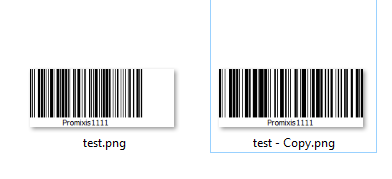
                                    alt text

                                    1 Reply Last reply
                                    1
                                    • M Offline
                                      M Offline
                                      Mihaill
                                      wrote on last edited by
                                      #23

                                      Thanks, now works fine

                                      1 Reply Last reply
                                      0

                                      • Login

                                      • Login or register to search.
                                      • First post
                                        Last post
                                      0
                                      • Categories
                                      • Recent
                                      • Tags
                                      • Popular
                                      • Users
                                      • Groups
                                      • Search
                                      • Get Qt Extensions
                                      • Unsolved