
Skip to content
  • Categories
  • Recent
  • Tags
  • Popular
  • Users
  • Groups
  • Search
  • Get Qt Extensions
  • Unsolved
Collapse
Brand Logo
  1. Home
  2. Qt Development
  3. General and Desktop
  4. 3 widgets in only one central widget

3 widgets in only one central widget

Scheduled Pinned Locked Moved Solved General and Desktop
14 Posts 5 Posters 2.9k Views 2 Watching
  • Oldest to Newest
  • Newest to Oldest
  • Most Votes
Reply
  • Reply as topic
Log in to reply
This topic has been deleted. Only users with topic management privileges can see it.
  • V VenAle17

    Hi jsum, can you give me some example? Because I don't understand.
    You think that i should create a pointer like QLed *led and then transforms it in a "children"? Sorry but i don't know how to do it...

    jsulmJ Offline
    jsulmJ Offline
    jsulm
    Lifetime Qt Champion
    wrote on last edited by
    #4

    @venale17

    QLed *led_1 = new QLed(m_plot);
    QLed *led_2 = new QLed(m_plot);
    

    Or, if you want to use a common widget as central widget:

    QWidget *centralWidget = new QWidget();
    m_plot = new WHAT_EVER_IT_IS(centralWidget);
    QLed *led_1 = new QLed(centralWidget);
    QLed *led_2 = new QLed(centralWidget);
    // Set up layouts here
    setCentralWidget(centralWidget);
    

    In the code you posted your leds are not put on any widgets and the layout you're using for them is not set on any widget or other layout.

    https://forum.qt.io/topic/113070/qt-code-of-conduct

    V 1 Reply Last reply
    4
    • jsulmJ jsulm

      @venale17

      QLed *led_1 = new QLed(m_plot);
      QLed *led_2 = new QLed(m_plot);
      

      Or, if you want to use a common widget as central widget:

      QWidget *centralWidget = new QWidget();
      m_plot = new WHAT_EVER_IT_IS(centralWidget);
      QLed *led_1 = new QLed(centralWidget);
      QLed *led_2 = new QLed(centralWidget);
      // Set up layouts here
      setCentralWidget(centralWidget);
      

      In the code you posted your leds are not put on any widgets and the layout you're using for them is not set on any widget or other layout.

      V Offline
      V Offline
      VenAle17
      wrote on last edited by
      #5

      @jsulm
      Ah, i'm sorry, i have another class where there are functions that creates and transforms the leds (the shape and the color) when some conditions are satisfied.

      1 Reply Last reply
      0
      • V Offline
        V Offline
        VenAle17
        wrote on last edited by
        #6

        0_1568989804764_a979804a-fd8f-4144-a099-6baf248143ac-image.png

        Ok now they're working. Now i have to fix this problem of overlapping, maybe i can divide the central widget in 2 section... but thanks for your help @jsulm

        1 Reply Last reply
        0
        • SGaistS Offline
          SGaistS Offline
          SGaist
          Lifetime Qt Champion
          wrote on last edited by
          #7

          Hi,

          Use the layouts you had before and put the main layout in the container widget.

          Interested in AI ? www.idiap.ch
          Please read the Qt Code of Conduct - https://forum.qt.io/topic/113070/qt-code-of-conduct

          1 Reply Last reply
          3
          • V Offline
            V Offline
            VenAle17
            wrote on last edited by
            #8

            Hi @SGaist,
            sorry but i don't understand what you mean with "container widget".
            I cannot write setCentralWidget(mainwidget) because qt give me an error

            mrjjM 1 Reply Last reply
            0
            • V VenAle17

              Hi @SGaist,
              sorry but i don't understand what you mean with "container widget".
              I cannot write setCentralWidget(mainwidget) because qt give me an error

              mrjjM Offline
              mrjjM Offline
              mrjj
              Lifetime Qt Champion
              wrote on last edited by
              #9

              @venale17 said in 3 widgets in only one central widget:

              "container widget".

              Hi
              that is just a term for the widget holding it all.
              From @jsulm code, its the centralWidget

              QWidget *centralWidget = new QWidget(); // this is our "container widget"
              m_plot = new QCustomPlot(centralWidget);
              QLed *led_1 = new QLed(centralWidget);
              QLed *led_2 = new QLed(centralWidget);
              // Set up layouts here
              setCentralWidget(centralWidget);
              

              what error do you get from this code ?

              1 Reply Last reply
              3
              • V Offline
                V Offline
                VenAle17
                wrote on last edited by
                #10

                Ok, maybe i understand:
                i wrote this:

                MainWindow::MainWindow(QWidget *parent) :
                    QMainWindow(parent),
                    m_plot(new QCustomPlot),
                    m_ui(new Ui::MainWindow),
                    m_luce(new Luce(m_plot)),
                    m_status(new QLabel),
                    m_console(new Console),
                    m_settings(new SettingsDialog),
                //! [1]
                    m_serial(new QSerialPort(this))
                //! [1]
                {
                //! [0]
                    m_ui->setupUi(this);
                    m_console->setEnabled(false);
                
                    QWidget *centralWidget = new QWidget(); // this is our "container widget"
                    m_plot = new QCustomPlot(centralWidget);
                    m_luce = new Luce(centralWidget);
                    
                    // Set up layouts here
                    QHBoxLayout *mainlayout = new QHBoxLayout(centralWidget);
                    mainlayout->addWidget(m_plot);
                    mainlayout->addWidget(m_luce);
                    setCentralWidget(centralWidget);
                [...]
                

                I create a pointer m_luce that describes the features of the leds and, with your examples i reach a good solution:
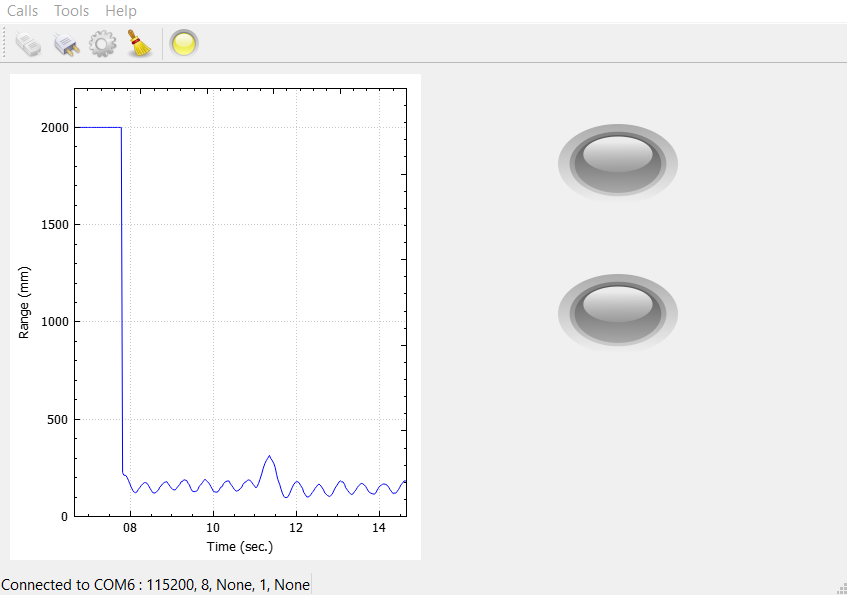
                0_1569048951823_1dde9514-e281-4845-b873-476845c28af2-image.png

                1 Reply Last reply
                0
                • mrjjM Offline
                  mrjjM Offline
                  mrjj
                  Lifetime Qt Champion
                  wrote on last edited by mrjj
                  #11

                  Hi
                  Super.
                  But you create them twice which is not needed.

                  you have
                  m_plot(new QCustomPlot), // you new them here
                  m_luce(new Luce(m_plot)),

                  so you can just do

                  QWidget *centralWidget = new QWidget(); // this is our "container widget"
                  m_plot = new QCustomPlot(centralWidget); we have new them already
                  m_luce = new Luce(centralWidget);

                  // Set up layouts here
                  QHBoxLayout *mainlayout = new QHBoxLayout(centralWidget);
                  mainlayout->addWidget(m_plot);
                  mainlayout->addWidget(m_luce);
                  
                  1 Reply Last reply
                  2
                  • V Offline
                    V Offline
                    VenAle17
                    wrote on last edited by
                    #12

                    Hi,
                    Yes, i have already changed it, but thanks for everything.

                    1 Reply Last reply
                    1
                    • A Offline
                      A Offline
                      alex17
                      wrote on last edited by
                      #13

                      Hi all,
                      I have the same problem again.
                      I don't change anything of the code, just the PC.
                      I reinstalled Qt and i noticed that:

                      ebbe6254-0749-4ea3-9db0-c1ee974de9ea-image.png

                      and this, is the code that i wrote, with you're helps:

                      m_ui->setupUi(this);
                          m_console->setEnabled(false);
                          QWidget *centralWidget = new QWidget(); // creo un container widget che raccolga i widget che creerò
                      
                              // Set up layouts here
                              QHBoxLayout *mainlayout = new QHBoxLayout(centralWidget);       //imposto un layout orizzontale
                              mainlayout->addWidget(m_plot);
                              mainlayout->addWidget(m_luce);
                              mainlayout->addStretch();
                              //aggiungo l'oggetto puntato da m_plot e m_luce all'interfaccia secondo il layout orizzontale
                              setCentralWidget(centralWidget);


                          setCentralWidget(centralWidget);
                      

                      Someone have any idea? How can i divide the central widget in two equal part, one for the plot and the other for the leds?

                      mrjjM 1 Reply Last reply
                      0
                      • A alex17

                        Hi all,
                        I have the same problem again.
                        I don't change anything of the code, just the PC.
                        I reinstalled Qt and i noticed that:

                        ebbe6254-0749-4ea3-9db0-c1ee974de9ea-image.png

                        and this, is the code that i wrote, with you're helps:

                        m_ui->setupUi(this);
                            m_console->setEnabled(false);
                            QWidget *centralWidget = new QWidget(); // creo un container widget che raccolga i widget che creerò
                        
                                // Set up layouts here
                                QHBoxLayout *mainlayout = new QHBoxLayout(centralWidget);       //imposto un layout orizzontale
                                mainlayout->addWidget(m_plot);
                                mainlayout->addWidget(m_luce);
                                mainlayout->addStretch();
                                //aggiungo l'oggetto puntato da m_plot e m_luce all'interfaccia secondo il layout orizzontale
                                setCentralWidget(centralWidget);


                            setCentralWidget(centralWidget);
                        

                        Someone have any idea? How can i divide the central widget in two equal part, one for the plot and the other for the leds?

                        mrjjM Offline
                        mrjjM Offline
                        mrjj
                        Lifetime Qt Champion
                        wrote on last edited by mrjj
                        #14

                        @alex17
                        hi
                        remove the line
                        mainlayout->addStretch();
                        and see.

                        in fast test with your code (using buttons )
                        (without that line.)
                        alt text

                        else it looks like ((with that line.))
                        alt text

                        as you insert the stretch after the other widgets.

                        1 Reply Last reply
                        0

                        • Login

                        • Login or register to search.
                        • First post
                          Last post
                        0
                        • Categories
                        • Recent
                        • Tags
                        • Popular
                        • Users
                        • Groups
                        • Search
                        • Get Qt Extensions
                        • Unsolved