
Skip to content
  • Categories
  • Recent
  • Tags
  • Popular
  • Users
  • Groups
  • Search
  • Get Qt Extensions
  • Unsolved
Collapse
Brand Logo
  1. Home
  2. Qt Development
  3. General and Desktop
  4. how to convert QCharRef to hex, int, binary

how to convert QCharRef to hex, int, binary

Scheduled Pinned Locked Moved Solved General and Desktop
14 Posts 4 Posters 1.9k Views
  • Oldest to Newest
  • Newest to Oldest
  • Most Votes
Reply
  • Reply as topic
Log in to reply
This topic has been deleted. Only users with topic management privileges can see it.
  • MijazM Mijaz

    @jsulm
    Header: #include <QRegularExpression>
    qmake: QT += core
    Since: Qt 5.0

    I am using qt4.8.7

    jsulmJ Offline
    jsulmJ Offline
    jsulm
    Lifetime Qt Champion
    wrote on last edited by
    #4

    @Mijaz Is there a question in your last post?
    Please post at least an understandable question if you want to get meaningful answers!
    If you use Qt4 then use https://doc.qt.io/archives/qt-4.8/qregexp.html

    https://forum.qt.io/topic/113070/qt-code-of-conduct

    1 Reply Last reply
    0
    • jsulmJ jsulm

      @Mijaz said in how to convert QCharRef to hex, int, binary:

      First I want to read only "0x752F15A".

      Regular expressions are your friend: https://doc.qt.io/qt-5/qregularexpression.html

      MijazM Offline
      MijazM Offline
      Mijaz
      wrote on last edited by
      #5

      @jsulm
      These are my questions.

      1. How I can read only "0x752F15A".?
      2. How I can convert this (0x752F15A) QCharRef into an equivalent binary.
      Christian EhrlicherC jsulmJ 2 Replies Last reply
      0
      • MijazM Mijaz

        @jsulm
        These are my questions.

        1. How I can read only "0x752F15A".?
        2. How I can convert this (0x752F15A) QCharRef into an equivalent binary.
        Christian EhrlicherC Offline
        Christian EhrlicherC Offline
        Christian Ehrlicher
        Lifetime Qt Champion
        wrote on last edited by
        #6

        @Mijaz said in how to convert QCharRef to hex, int, binary:

        How I can read only "0x752F15A".?

        As @jsulm already told you with QRegExp or with QByteArray/QString string modification functions: e.g. https://doc.qt.io/archives/qt-4.8/qstring.html#indexOf

        How I can convert this (0x752F15A) QCharRef into an equivalent binary.

        QString has functions for it: https://doc.qt.io/archives/qt-4.8/qstring.html#toInt

        Qt Online Installer direct download: https://download.qt.io/official_releases/online_installers/
        Visit the Qt Academy at https://academy.qt.io/catalog

        1 Reply Last reply
        2
        • MijazM Mijaz

          @jsulm
          These are my questions.

          1. How I can read only "0x752F15A".?
          2. How I can convert this (0x752F15A) QCharRef into an equivalent binary.
          jsulmJ Offline
          jsulmJ Offline
          jsulm
          Lifetime Qt Champion
          wrote on last edited by
          #7

          @Mijaz said in how to convert QCharRef to hex, int, binary:

          How I can read only "0x752F15A".?

          Please learn how to use regular expressions. This is something a programmer should know.

          For the second question: see https://doc.qt.io/qt-5/qstring.html#toInt

          https://forum.qt.io/topic/113070/qt-code-of-conduct

          1 Reply Last reply
          4
          • jsulmJ jsulm

            @Mijaz said in how to convert QCharRef to hex, int, binary:

            First I want to read only "0x752F15A".

            Regular expressions are your friend: https://doc.qt.io/qt-5/qregularexpression.html

            MijazM Offline
            MijazM Offline
            Mijaz
            wrote on last edited by
            #8

            @jsulm
            QProcess frq_bw;
            frq_bw.start("cat /sys/bus/iio/devices/iio:device1/out_voltage_rf_bandwidth");
            frq_bw.waitForFinished(-1); // will wait forever until finished
            QString Bandwith_freq = frq_bw.readAllStandardOutput();
            qDebug() << "current bandwith integer" << Bandwith_freq;
            bool ok2;

            1. qint64 Bandwith_full = Bandwith_freq.toInt(&ok2,10);
              int Bandwith_half=Bandwith_full/2;
              qDebug()<<"current half Bandwith integer = " << QString::number(Bandwith_half);

            // bandwidth cat and half it
            QProcess curr_lo;
            curr_lo.start("cat /sys/bus/iio/devices/iio:device1/out_altvoltage0_RX_LO_frequency");
            curr_lo.waitForFinished(-1); // will wait forever until finished
            QString LO_current = curr_lo.readAllStandardOutput();
            qDebug() << "current LO =" << LO_current;
            bool ok3;
            2) qint64 my_LO = LO_current.toInt(&ok3,10);
            qDebug() << "Current LO integer = " << my_LO ;

            Problem:

            1. qint64 Bandwith_full = Bandwith_freq.toInt(&ok2,10); converts string to integer correctly
            2. qint64 my_LO = LO_current.toInt(&ok3,10); retruns '0' but why?
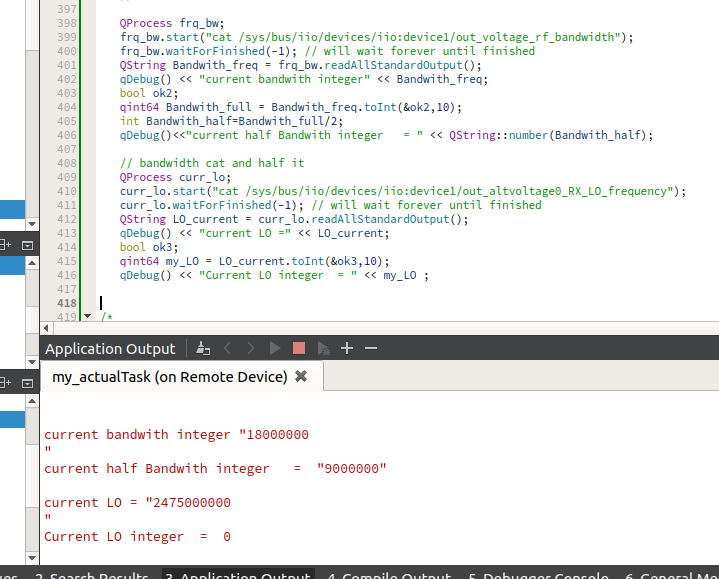
            Selection_030.png

            J.HilkJ 1 Reply Last reply
            0
            • MijazM Mijaz

              @jsulm
              QProcess frq_bw;
              frq_bw.start("cat /sys/bus/iio/devices/iio:device1/out_voltage_rf_bandwidth");
              frq_bw.waitForFinished(-1); // will wait forever until finished
              QString Bandwith_freq = frq_bw.readAllStandardOutput();
              qDebug() << "current bandwith integer" << Bandwith_freq;
              bool ok2;

              1. qint64 Bandwith_full = Bandwith_freq.toInt(&ok2,10);
                int Bandwith_half=Bandwith_full/2;
                qDebug()<<"current half Bandwith integer = " << QString::number(Bandwith_half);

              // bandwidth cat and half it
              QProcess curr_lo;
              curr_lo.start("cat /sys/bus/iio/devices/iio:device1/out_altvoltage0_RX_LO_frequency");
              curr_lo.waitForFinished(-1); // will wait forever until finished
              QString LO_current = curr_lo.readAllStandardOutput();
              qDebug() << "current LO =" << LO_current;
              bool ok3;
              2) qint64 my_LO = LO_current.toInt(&ok3,10);
              qDebug() << "Current LO integer = " << my_LO ;

              Problem:

              1. qint64 Bandwith_full = Bandwith_freq.toInt(&ok2,10); converts string to integer correctly
              2. qint64 my_LO = LO_current.toInt(&ok3,10); retruns '0' but why?

              Selection_030.png

              J.HilkJ Offline
              J.HilkJ Offline
              J.Hilk
              Moderators
              wrote on last edited by
              #9

              @Mijaz because 2 475 000 000 > 2 147 483 647 (max int_32t)-> to int failed


              Be aware of the Qt Code of Conduct, when posting : https://forum.qt.io/topic/113070/qt-code-of-conduct


              Q: What's that?
              A: It's blue light.
              Q: What does it do?
              A: It turns blue.

              MijazM 1 Reply Last reply
              1
              • J.HilkJ J.Hilk

                @Mijaz because 2 475 000 000 > 2 147 483 647 (max int_32t)-> to int failed

                MijazM Offline
                MijazM Offline
                Mijaz
                wrote on last edited by Mijaz
                #10

                @J-Hilk
                2^32= 4294967296 > 2475000000

                but I used qint64

                https://doc.qt.io/qt-5/qtglobal.html#qint64-typedef

                J.HilkJ 1 Reply Last reply
                0
                • MijazM Mijaz

                  @J-Hilk
                  2^32= 4294967296 > 2475000000

                  but I used qint64

                  https://doc.qt.io/qt-5/qtglobal.html#qint64-typedef

                  J.HilkJ Offline
                  J.HilkJ Offline
                  J.Hilk
                  Moderators
                  wrote on last edited by
                  #11

                  @Mijaz just because you assign the result to a qint64 doesn't mean that toInt() returns a qint64.

                  toLongLong returns a int64


                  Be aware of the Qt Code of Conduct, when posting : https://forum.qt.io/topic/113070/qt-code-of-conduct


                  Q: What's that?
                  A: It's blue light.
                  Q: What does it do?
                  A: It turns blue.

                  MijazM 1 Reply Last reply
                  2
                  • J.HilkJ J.Hilk

                    @Mijaz just because you assign the result to a qint64 doesn't mean that toInt() returns a qint64.

                    toLongLong returns a int64

                    MijazM Offline
                    MijazM Offline
                    Mijaz
                    wrote on last edited by
                    #12

                    @J-Hilk
                    then, what is the solution?

                    J.HilkJ 1 Reply Last reply
                    0
                    • MijazM Mijaz

                      @J-Hilk
                      then, what is the solution?

                      J.HilkJ Offline
                      J.HilkJ Offline
                      J.Hilk
                      Moderators
                      wrote on last edited by
                      #13

                      @Mijaz said in how to convert QCharRef to hex, int, binary:

                      @J-Hilk
                      then, what is the solution?

                      @J-Hilk said in how to convert QCharRef to hex, int, binary:

                      toLongLong returns a int64


                      Be aware of the Qt Code of Conduct, when posting : https://forum.qt.io/topic/113070/qt-code-of-conduct


                      Q: What's that?
                      A: It's blue light.
                      Q: What does it do?
                      A: It turns blue.

                      MijazM 1 Reply Last reply
                      1
                      • J.HilkJ J.Hilk

                        @Mijaz said in how to convert QCharRef to hex, int, binary:

                        @J-Hilk
                        then, what is the solution?

                        @J-Hilk said in how to convert QCharRef to hex, int, binary:

                        toLongLong returns a int64

                        MijazM Offline
                        MijazM Offline
                        Mijaz
                        wrote on last edited by
                        #14

                        @J-Hilk
                        Thank you very much. it works

                        1 Reply Last reply
                        1

                        • Login

                        • Login or register to search.
                        • First post
                          Last post
                        0
                        • Categories
                        • Recent
                        • Tags
                        • Popular
                        • Users
                        • Groups
                        • Search
                        • Get Qt Extensions
                        • Unsolved