Skip to content
  • Categories
  • Recent
  • Tags
  • Popular
  • Users
  • Groups
  • Search
  • Get Qt Extensions
  • Unsolved
Collapse
Brand Logo
  1. Home
  2. Qt Development
  3. General and Desktop
  4. Clonning from git gets stuck

Clonning from git gets stuck

Scheduled Pinned Locked Moved Unsolved General and Desktop
7 Posts 4 Posters 2.2k Views 3 Watching
  • Oldest to Newest
  • Newest to Oldest
  • Most Votes
Reply
  • Reply as topic
Log in to reply
This topic has been deleted. Only users with topic management privileges can see it.
  • A Offline
    A Offline
    Anonymous_Banned275
    wrote on last edited by
    #1

    What is correct command / syntax to clone code from git?

    Using https://code.qt.io/cgit/qt/qtbase.git

    Gets stuck
    cloning into qtbase

    Using https://code.qt.io/cgit/qt/qtbase.git/tree

    does not find "tree"

    1 Reply Last reply
    0
    • mrjjM Offline
      mrjjM Offline
      mrjj
      Lifetime Qt Champion
      wrote on last edited by
      #2

      Hi
      Please see
      https://wiki.qt.io/Building_Qt_5_from_Git
      and the Getting the source code section

      $ git clone git://code.qt.io/qt/qt5.git
      or (if you're behind a firewall and want to use the https protocol):

      $ git clone https://code.qt.io/qt/qt5.git
      Then check out the target branch (see Branch Guidelines):
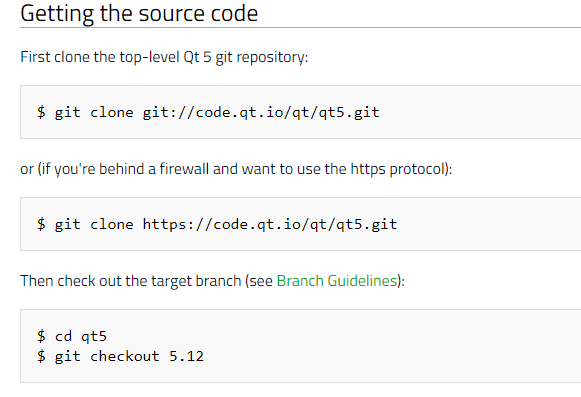
      alt text

      A 1 Reply Last reply
      6
      • mrjjM mrjj

        Hi
        Please see
        https://wiki.qt.io/Building_Qt_5_from_Git
        and the Getting the source code section

        $ git clone git://code.qt.io/qt/qt5.git
        or (if you're behind a firewall and want to use the https protocol):

        $ git clone https://code.qt.io/qt/qt5.git
        Then check out the target branch (see Branch Guidelines):

        alt text

        A Offline
        A Offline
        Anonymous_Banned275
        wrote on last edited by
        #3

        @mrjj
        I was missing the "software" update option in OS setup.
        But I was able to clone before that change using command.
        I did update repositories list anyway.

        However,
        now I cannot clone anything from https://code.qt.io/cgit/qt/qtbase.git, even using command .
        And I am successful cloning from another test repository - both using Qt or command.

        That looks as problem between Qt and that particular repository
        I need to verify if the repository is correct , but this "getting stuck cloning " does not help much.

        1 Reply Last reply
        0
        • SGaistS Offline
          SGaistS Offline
          SGaist
          Lifetime Qt Champion
          wrote on last edited by
          #4

          Hi,

          Because you are still using the wrong link.

          For example, using the git protocol it's: git://code.qt.io/qt/qtbase.git

          Interested in AI ? www.idiap.ch
          Please read the Qt Code of Conduct - https://forum.qt.io/topic/113070/qt-code-of-conduct

          A 1 Reply Last reply
          3
          • SGaistS SGaist

            Hi,

            Because you are still using the wrong link.

            For example, using the git protocol it's: git://code.qt.io/qt/qtbase.git

            A Offline
            A Offline
            Anonymous_Banned275
            wrote on last edited by
            #5

            @SGaist
            So why this works just fine ?

            https://code.qt.io/qt-creator/qt-creator.git

            SGaistS 1 Reply Last reply
            0
            • A Anonymous_Banned275

              @SGaist
              So why this works just fine ?

              https://code.qt.io/qt-creator/qt-creator.git

              SGaistS Offline
              SGaistS Offline
              SGaist
              Lifetime Qt Champion
              wrote on last edited by
              #6

              @AnneRanch because it's the correct path for the https protocol to clone Qt Creator.

              Interested in AI ? www.idiap.ch
              Please read the Qt Code of Conduct - https://forum.qt.io/topic/113070/qt-code-of-conduct

              1 Reply Last reply
              1
              • S Offline
                S Offline
                sousou
                wrote on last edited by
                #7

                i also get this problem.
                the trick is on the URL.
                You need remove the "cgit" from URL.
                Then it will work.

                1 Reply Last reply
                0

                • Login

                • Login or register to search.
                • First post
                  Last post
                0
                • Categories
                • Recent
                • Tags
                • Popular
                • Users
                • Groups
                • Search
                • Get Qt Extensions
                • Unsolved