
Academic question - how to manage Qt "many colors"?
-
@AnneRanch said in Academic question - how to manage Qt "many colors"?:
OK, after assigning tool tip in code I found no corresponding text in QDesigner. ( yes it compiles / runs and shows the tool tip !)
If you access and change UI-elements by using your code, these changes will not appear in your QtDesigner file afterwards.
It happens on runtime / while compilation and will not change your (QtDesigner-) GUI-definition file.@AnneRanch said in Academic question - how to manage Qt "many colors"?:
When I added file from examples I somehow used "#include ui_device.h"
But my form file is just "device.h" and I cannot find it to edit it.The
yourGUI.uifile (XML style, QtDesigner output,device.uiin your case, if you have one) contains your GUI definitions from QtDesigner and is translated intoui_device.h(C++ GUI Header) automatically.
Your "normal" (c++) header (device.h) includes this UI-header-file to provide you access to your GUI by code (fromdevice.cpp)In fact this process is repeated every time you compile your program, there is no need to edit files like
ui_someClassName.hor evensomeClassName.ui. The second one actually is editable with any text editor (XML code), if you know what you are doing, but I think nobody would recommend that. (stick with QtDesigner in terms of editing these*.ui-files)It's nice to know how these
moc,uic,qmakeprocesses work and what they do in general, but you dont have to understand every single detail :)@AnneRanch said in Academic question - how to manage Qt "many colors"?:
I got things mixed up pretty badly.
I need to find the actual XML code which "links" the "ui_x.h "file to the class.If you messed up your project, do a "cleanup" / "rebuild" or delete your build-folder from OS. Then run qmake / build again.
This will force new, clean UI-headers and build directories.@Pl45m4 said in Academic question - how to manage Qt "many colors"?:
@AnneRanch said in Academic question - how to manage Qt "many colors"?:
OK, after assigning tool tip in code I found no corresponding text in QDesigner. ( yes it compiles / runs and shows the tool tip !)
If you access and change UI-elements by using your code, these changes will not appear in your QtDesigner file afterwards.
It happens on runtime / while compilation and will not change your (QtDesigner-) GUI-definition file.@AnneRanch said in Academic question - how to manage Qt "many colors"?:
When I added file from examples I somehow used "#include ui_device.h"
But my form file is just "device.h" and I cannot find it to edit it.The
yourGUI.uifile (XML style, QtDesigner output,device.uiin your case, if you have one) contains your GUI definitions from QtDesigner and is translated intoui_device.h(C++ GUI Header) automatically.
Your "normal" (c++) header (device.h) includes this UI-header-file to provide you access to your GUI by code (fromdevice.cpp)In fact this process is repeated every time you compile your program, there is no need to edit files like
ui_someClassName.hor evensomeClassName.ui. The second one actually is editable with any text editor (XML code), if you know what you are doing, but I think nobody would recommend that. (stick with QtDesigner in terms of editing these*.ui-files)It's nice to know how these
moc,uic,qmakeprocesses work and what they do in general, but you dont have to understand every single detail :)OK, it is beginning to gel.
Using the following example , basically Qt generated "mainwindow" I like to get somebody to help me annotate the source code or just very if I am doing it right. It may be redundant or silly basic C++ stuff but with all these "automated " things going in Qt "background" I find it necessary to really understand the processes.Allow me to restate my goal - to have a simple GUI to run my data processing application. I am not after fancy graphics, just an interface ( for now ).
Here is my view at things as they are build .
Qt make runs GCC complier and builds plain C / C++ "main" .
Same process , with addition of XML and qmake (?) , builds source file for "main window"
The attached sample code contains
mainwindow header - standard C/C++ header file
ui_mainwindow "header" - a file created by QDesigner
the graphic is visible, editable using QDesigner
the "code " is build using XML during "compile" and
NOT transferred to any C source
AFTER compile there is an XML file somewhere (?) and since it is generated it should not be edited BUT is useful to find out what it is doingThen there is a standard C++ constructor , fine.
BUT how do I make sure the "ui_main window.h" IS the form this (?) constructor is using?
(Do I need refresher course on "this" command / syntax?)In my convoluted case I have been editing wrong form.
All this may be basic , child’s play for some, but it is driving me nuts.
I do not readily see C code changes I make in QDesigner form, should not edit invisible XML file during edit mode , but can add data processing code to constructor ( in this example) and execute it - sort-of "on top of XML" file.
My C++ code does not show in "form" and I am not sure if it is in XML either - it should not be there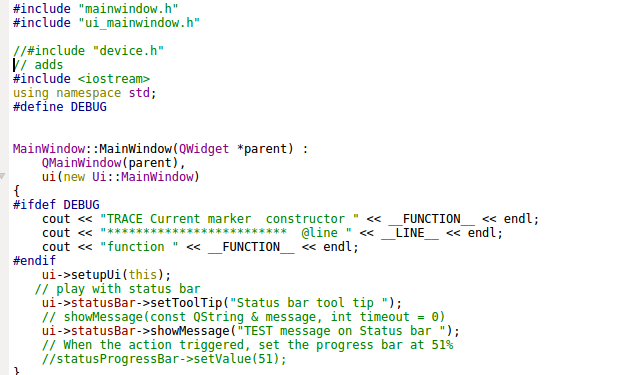
-
@AnneRanch said in Academic question - how to manage Qt "many colors"?:
OK, after assigning tool tip in code I found no corresponding text in QDesigner. ( yes it compiles / runs and shows the tool tip !)
If you access and change UI-elements by using your code, these changes will not appear in your QtDesigner file afterwards.
It happens on runtime / while compilation and will not change your (QtDesigner-) GUI-definition file.@AnneRanch said in Academic question - how to manage Qt "many colors"?:
When I added file from examples I somehow used "#include ui_device.h"
But my form file is just "device.h" and I cannot find it to edit it.The
yourGUI.uifile (XML style, QtDesigner output,device.uiin your case, if you have one) contains your GUI definitions from QtDesigner and is translated intoui_device.h(C++ GUI Header) automatically.
Your "normal" (c++) header (device.h) includes this UI-header-file to provide you access to your GUI by code (fromdevice.cpp)In fact this process is repeated every time you compile your program, there is no need to edit files like
ui_someClassName.hor evensomeClassName.ui. The second one actually is editable with any text editor (XML code), if you know what you are doing, but I think nobody would recommend that. (stick with QtDesigner in terms of editing these*.ui-files)It's nice to know how these
moc,uic,qmakeprocesses work and what they do in general, but you dont have to understand every single detail :)@AnneRanch said in Academic question - how to manage Qt "many colors"?:
I got things mixed up pretty badly.
I need to find the actual XML code which "links" the "ui_x.h "file to the class.If you messed up your project, do a "cleanup" / "rebuild" or delete your build-folder from OS. Then run qmake / build again.
This will force new, clean UI-headers and build directories.Your "normal" (c++) header (device.h) includes this UI-header-file to provide you access to your GUI by code (from device.cpp)
I have
#include C header
#include "ui_same name as C header "in cpp file
It was build that way by Qt new class process.
Is that OK? -
@AnneRanch You got some of it wrong, some of it right.
Here's how it goes:
You've got a mainwindow.h file with a
MainWindowclass declaration that you edit in a text editor as normal c++.
You've got a mainwindow.cpp file withMainWindowclass definition that you edit in a text editor as normal c++.
You've got a mainwindow.ui file in xml format that you edit with the designer. You don't need to touch xml directly in text editor.You press build.
qmake generates make rules that run moc on the mainwindow.h file and generate moc_mainwindow.cpp file
qmake generates make rules that run uic on the mainwindow.ui file and generate ui_mainwindow.h file
Files mainwindow.h, mainwindow.cpp, moc_mainwindow.cpp and ui_mainwindow.h, all standard c++, are sent to compiler.
mainwindow.ui (the xml) is not compiled or used at runtime. Its only purpose is generating ui_mainwindow.h and it's a one-way thing.Now as to actual contents of the files:
ui_mainwindow.h has a c++ class
Ui_MainWindowwith a single methodsetupUi(QMainWindow*)and an empty classUi::MainWindow(notice the namespace) that inherits fromUi_MainWindow.mainwindow.h has a forward declaration of that
Ui::MainWindowclass and a declaration of your classMainWindowwhich has a pointer member calleduiof typeUi::Mainwindow*(the class generated in ui_mainwindow.h).mainwindow.cpp includes your own mainwindow.h and the generated ui_mainwindow.h. It also has the definition of your class
MainWindow. In its constructor it creates an instance of the classUi::MainWindowand assigns it to theuivariable. Then it callsui->setupUi(this)and this is the c++ code that was generated from .ui file via uic, that adds all the widgets tothisand sets up all their properties. Theuimember is also how you interact with the generated content from your own code. It has members for all the widgets you set up in the designer.To reiterate - You edit mainwindow.h and mainwindow.cpp as normal c++. You edit the .ui file through the designer. You don't touch the generated files ui_xxx and moc_xxx.
EDIT: Updated to reflect SGaist's comment.
-
@AnneRanch You got some of it wrong, some of it right.
Here's how it goes:
You've got a mainwindow.h file with a
MainWindowclass declaration that you edit in a text editor as normal c++.
You've got a mainwindow.cpp file withMainWindowclass definition that you edit in a text editor as normal c++.
You've got a mainwindow.ui file in xml format that you edit with the designer. You don't need to touch xml directly in text editor.You press build.
qmake generates make rules that run moc on the mainwindow.h file and generate moc_mainwindow.cpp file
qmake generates make rules that run uic on the mainwindow.ui file and generate ui_mainwindow.h file
Files mainwindow.h, mainwindow.cpp, moc_mainwindow.cpp and ui_mainwindow.h, all standard c++, are sent to compiler.
mainwindow.ui (the xml) is not compiled or used at runtime. Its only purpose is generating ui_mainwindow.h and it's a one-way thing.Now as to actual contents of the files:
ui_mainwindow.h has a c++ class
Ui_MainWindowwith a single methodsetupUi(QMainWindow*)and an empty classUi::MainWindow(notice the namespace) that inherits fromUi_MainWindow.mainwindow.h has a forward declaration of that
Ui::MainWindowclass and a declaration of your classMainWindowwhich has a pointer member calleduiof typeUi::Mainwindow*(the class generated in ui_mainwindow.h).mainwindow.cpp includes your own mainwindow.h and the generated ui_mainwindow.h. It also has the definition of your class
MainWindow. In its constructor it creates an instance of the classUi::MainWindowand assigns it to theuivariable. Then it callsui->setupUi(this)and this is the c++ code that was generated from .ui file via uic, that adds all the widgets tothisand sets up all their properties. Theuimember is also how you interact with the generated content from your own code. It has members for all the widgets you set up in the designer.To reiterate - You edit mainwindow.h and mainwindow.cpp as normal c++. You edit the .ui file through the designer. You don't touch the generated files ui_xxx and moc_xxx.
EDIT: Updated to reflect SGaist's comment.
This.
Best summary of the Qt build / moc / compilation process I've seen (and probably the best you can find on the Internet)
-
One small correction: qmake doesn't run anything.
It will generate "build" rules corresponding to .ui files so that uic is run as @Chris-Kawa described and the same goes for QObject based class.
When build is pressed,
make(or its equivalent) follows these rules and calls the corresponding tools. -
@SGaist Thanks, I guess I simplified it one bit too much :)
-
This.
Best summary of the Qt build / moc / compilation process I've seen (and probably the best you can find on the Internet)
-
@Pl45m4 Interesting observation we could discuss / analyse, but later. I am scheduled for surgery so I'll be absent here for a spell.
-
@AnneRanch You got some of it wrong, some of it right.
Here's how it goes:
You've got a mainwindow.h file with a
MainWindowclass declaration that you edit in a text editor as normal c++.
You've got a mainwindow.cpp file withMainWindowclass definition that you edit in a text editor as normal c++.
You've got a mainwindow.ui file in xml format that you edit with the designer. You don't need to touch xml directly in text editor.You press build.
qmake generates make rules that run moc on the mainwindow.h file and generate moc_mainwindow.cpp file
qmake generates make rules that run uic on the mainwindow.ui file and generate ui_mainwindow.h file
Files mainwindow.h, mainwindow.cpp, moc_mainwindow.cpp and ui_mainwindow.h, all standard c++, are sent to compiler.
mainwindow.ui (the xml) is not compiled or used at runtime. Its only purpose is generating ui_mainwindow.h and it's a one-way thing.Now as to actual contents of the files:
ui_mainwindow.h has a c++ class
Ui_MainWindowwith a single methodsetupUi(QMainWindow*)and an empty classUi::MainWindow(notice the namespace) that inherits fromUi_MainWindow.mainwindow.h has a forward declaration of that
Ui::MainWindowclass and a declaration of your classMainWindowwhich has a pointer member calleduiof typeUi::Mainwindow*(the class generated in ui_mainwindow.h).mainwindow.cpp includes your own mainwindow.h and the generated ui_mainwindow.h. It also has the definition of your class
MainWindow. In its constructor it creates an instance of the classUi::MainWindowand assigns it to theuivariable. Then it callsui->setupUi(this)and this is the c++ code that was generated from .ui file via uic, that adds all the widgets tothisand sets up all their properties. Theuimember is also how you interact with the generated content from your own code. It has members for all the widgets you set up in the designer.To reiterate - You edit mainwindow.h and mainwindow.cpp as normal c++. You edit the .ui file through the designer. You don't touch the generated files ui_xxx and moc_xxx.
EDIT: Updated to reflect SGaist's comment.
@Chris-Kawa
Chris, you are "THE MAN".
I do not have much time to reply.
At this point I see Qt Creator as these "puzzle parts"
and estimated percentage of my understanding how the parts fits into the whole
C++ 99%
project 80%
main 90%
mainwindow need to really read and digest your post
application class 50%My next concern is
I can instantiate the app class in "main"
I can execute "button press" on mainwindowthe missing piece is how to execute app class function .
As stupid as it sounds , my guess is the app class instance is in wrong place thus still showing I do not fully get the relations between the GUI class "mainwindow" and "main". and the app class of course.
-
@Chris-Kawa
Chris, you are "THE MAN".
I do not have much time to reply.
At this point I see Qt Creator as these "puzzle parts"
and estimated percentage of my understanding how the parts fits into the whole
C++ 99%
project 80%
main 90%
mainwindow need to really read and digest your post
application class 50%My next concern is
I can instantiate the app class in "main"
I can execute "button press" on mainwindowthe missing piece is how to execute app class function .
As stupid as it sounds , my guess is the app class instance is in wrong place thus still showing I do not fully get the relations between the GUI class "mainwindow" and "main". and the app class of course.
@AnneRanch I guess you mean this:
#include <QApplication>
#include "mainwindow.h"

int main(int argc, char *argv[])
{
    QApplication app(argc, argv);
    MainWindow mainWin; // Your main window instance
    mainWin.show(); // This shows your main window on the screen, this call does not block
    return app.exec(); // This starts the Qt event loop (https://doc.qt.io/qt-5/qapplication.html#exec). exec() call does not return until your application is closed.
}


