
Skip to content
  • Categories
  • Recent
  • Tags
  • Popular
  • Users
  • Groups
  • Search
  • Get Qt Extensions
  • Unsolved
Collapse
Brand Logo
  1. Home
  2. Qt Development
  3. General and Desktop
  4. QToolTip::showText() for tree view
Qt 6.11 is out! See what's new in the release blog

QToolTip::showText() for tree view

Scheduled Pinned Locked Moved Unsolved General and Desktop
16 Posts 4 Posters 1.6k Views 1 Watching
  • Oldest to Newest
  • Newest to Oldest
  • Most Votes
Reply
  • Reply as topic
Log in to reply
This topic has been deleted. Only users with topic management privileges can see it.
  • A Offline
    A Offline
    Ayush Gupta
    wrote on last edited by
    #3

    I am trying below code for my tree view
    QToolTip::showText(QPoint(0,0),"Test");

    jsulmJ 1 Reply Last reply
    0
    • A Ayush Gupta

      I am trying below code for my tree view
      QToolTip::showText(QPoint(0,0),"Test");

      jsulmJ Offline
      jsulmJ Offline
      jsulm
      Lifetime Qt Champion
      wrote on last edited by
      #4

      @Ayush-Gupta This is clear, but where and when do you call showText()?

      https://forum.qt.io/topic/113070/qt-code-of-conduct

      1 Reply Last reply
      0
      • mrjjM Offline
        mrjjM Offline
        mrjj
        Lifetime Qt Champion
        wrote on last edited by mrjj
        #5

        @Ayush-Gupta said in QToolTip::showText() for tree view:

        QToolTip::showText(QPoint(0,0),"Test");

        That will show a tool tip up in top corner of the screen.

        Is that the issue ?

        If yes, please understand that ToolTip operates in screen coordinates so
        you have to translate the rect of the cell to global coordinates for the tooltip to be place correctly.

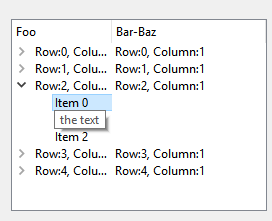
        Here is a sample for when you click on cell. you will will most likely use
        another signal to trigger it.

        void MainWindow::on_treeView_clicked(const QModelIndex &index)
        {
            // get the rect of the cell from index
            QRect cellRect = ui->treeView->visualRect(index);
            // then use mapToGlobal to convert it to globals and show tool tip
            QToolTip::showText(ui->treeView->viewport()->mapToGlobal( cellRect.topLeft() ), "the text", this);    
        }
        

        alt text

        1 Reply Last reply
        4
        • A Offline
          A Offline
          Ayush Gupta
          wrote on last edited by
          #6

          @mrjj said in QToolTip::showText() for tree view:

          cellRect

          I tried with this code but still the text is showing in wrong position i.e in upper left corner of treeview

          JonBJ 1 Reply Last reply
          0
          • A Ayush Gupta

            @mrjj said in QToolTip::showText() for tree view:

            cellRect

            I tried with this code but still the text is showing in wrong position i.e in upper left corner of treeview

            JonBJ Online
            JonBJ Online
            JonB
            wrote on last edited by
            #7

            @Ayush-Gupta
            Confirm (debug out) what the cellRect.topLeft() is returning for you?

            1 Reply Last reply
            3
            • A Offline
              A Offline
              Ayush Gupta
              wrote on last edited by
              #8

              it shows
              QPoint(0,0)

              mrjjM 1 Reply Last reply
              0
              • A Ayush Gupta

                it shows
                QPoint(0,0)

                mrjjM Offline
                mrjjM Offline
                mrjj
                Lifetime Qt Champion
                wrote on last edited by
                #9

                @Ayush-Gupta

                I would guess you then use an invalid index.
                so please check your index before use with
                index.isValid()

                If you ask visualRect(index); for an invalid index, you get invalid rect and hence 0,0

                So that is most likely what you are seeing.

                1 Reply Last reply
                2
                • A Offline
                  A Offline
                  Ayush Gupta
                  wrote on last edited by
                  #10

                  @mrjj I tried
                  index.isValid() it returns true for me.

                  JonBJ mrjjM 2 Replies Last reply
                  0
                  • A Ayush Gupta

                    @mrjj I tried
                    index.isValid() it returns true for me.

                    JonBJ Online
                    JonBJ Online
                    JonB
                    wrote on last edited by
                    #11
                    This post is deleted!
                    1 Reply Last reply
                    0
                    • A Ayush Gupta

                      @mrjj I tried
                      index.isValid() it returns true for me.

                      mrjjM Offline
                      mrjjM Offline
                      mrjj
                      Lifetime Qt Champion
                      wrote on last edited by mrjj
                      #12

                      @Ayush-Gupta

                      Without your actual code and details
                      i cannot guess why it does not work for you
                      since it worked well in a sample.

                      1 Reply Last reply
                      3
                      • A Offline
                        A Offline
                        Ayush Gupta
                        wrote on last edited by
                        #13

                        I am using QSortFilterProxyModel also in my tree view with my custom model?
                        Would it be a cause ?

                        mrjjM 1 Reply Last reply
                        0
                        • A Ayush Gupta

                          I am using QSortFilterProxyModel also in my tree view with my custom model?
                          Would it be a cause ?

                          mrjjM Offline
                          mrjjM Offline
                          mrjj
                          Lifetime Qt Champion
                          wrote on last edited by
                          #14

                          @Ayush-Gupta

                          Yes it might
                          and would explain the index be valid but has no
                          VisualRect we can count on.

                          I did not test it.

                          Please see if using
                          proxy->mapToSource(Index);

                          Does return a valid cell rect.
                          Look the returned QRect and see if it has valid values or not.

                          1 Reply Last reply
                          2
                          • A Offline
                            A Offline
                            Ayush Gupta
                            wrote on last edited by
                            #15

                            doing that I got
                            ASSERT: "!"QSortFilterProxyModel: index from wrong model passed to mapToSource

                            mrjjM 1 Reply Last reply
                            0
                            • A Ayush Gupta

                              doing that I got
                              ASSERT: "!"QSortFilterProxyModel: index from wrong model passed to mapToSource

                              mrjjM Offline
                              mrjjM Offline
                              mrjj
                              Lifetime Qt Champion
                              wrote on last edited by
                              #16

                              @Ayush-Gupta

                              ok, please consult the docs and make sure you are using it as intended. :)
                              also check the index you use is valid etc.

                              1 Reply Last reply
                              2

                              • Login

                              • Login or register to search.
                              • First post
                                Last post
                              0
                              • Categories
                              • Recent
                              • Tags
                              • Popular
                              • Users
                              • Groups
                              • Search
                              • Get Qt Extensions
                              • Unsolved