
Skip to content
  • Categories
  • Recent
  • Tags
  • Popular
  • Users
  • Groups
  • Search
  • Get Qt Extensions
  • Unsolved
Collapse
Brand Logo
  1. Home
  2. Qt Development
  3. General and Desktop
  4. QComboBox popup as TableView
Qt 6.11 is out! See what's new in the release blog

QComboBox popup as TableView

Scheduled Pinned Locked Moved Solved General and Desktop
3 Posts 3 Posters 487 Views 1 Watching
  • Oldest to Newest
  • Newest to Oldest
  • Most Votes
Reply
  • Reply as topic
Log in to reply
This topic has been deleted. Only users with topic management privileges can see it.
  • krzysieklfcK Offline
    krzysieklfcK Offline
    krzysieklfc
    wrote on last edited by krzysieklfc
    #1

    Hello,

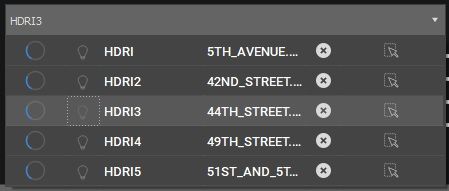
    I have a QComboBox for which I supplied QTableView and QAbstractTableModel in order to have combobox's popup contain some columns which indexes when clicked will behave just like buttons.

    The problem is that I need to prevent currently selected item from being changed based on which tableView index is being clicked so that I can have these indexes for extra functionality only.

    Also, I need to disable popup being closed on these indexes being pressed.

    Any ideas on how this can be done?
    123.jpg

    ComboBox::ComboBox(QWidget* parent) : QComboBox(parent)
    {
    	auto table = new LightsTableView{ this , this};
    	setView(table);
    	setModel(new ModelLights{});
    	setModelColumn(2);
    }
    
    1 Reply Last reply
    0
    • VRoninV Offline
      VRoninV Offline
      VRonin
      wrote on last edited by
      #3

      You need to install an event filter to manage QEvent::MouseButtonRelease to override the default behaviour

      "La mort n'est rien, mais vivre vaincu et sans gloire, c'est mourir tous les jours"
      ~Napoleon Bonaparte

      On a crusade to banish setIndexWidget() from the holy land of Qt

      1 Reply Last reply
      3
      • SGaistS Offline
        SGaistS Offline
        SGaist
        Lifetime Qt Champion
        wrote on last edited by
        #2

        Hi,

        This kind of interaction is a bit unusual. Can you explain the workflow you want to implement with that ?

        Interested in AI ? www.idiap.ch
        Please read the Qt Code of Conduct - https://forum.qt.io/topic/113070/qt-code-of-conduct

        1 Reply Last reply
        1
        • VRoninV Offline
          VRoninV Offline
          VRonin
          wrote on last edited by
          #3

          You need to install an event filter to manage QEvent::MouseButtonRelease to override the default behaviour

          "La mort n'est rien, mais vivre vaincu et sans gloire, c'est mourir tous les jours"
          ~Napoleon Bonaparte

          On a crusade to banish setIndexWidget() from the holy land of Qt

          1 Reply Last reply
          3

          • Login

          • Login or register to search.
          • First post
            Last post
          0
          • Categories
          • Recent
          • Tags
          • Popular
          • Users
          • Groups
          • Search
          • Get Qt Extensions
          • Unsolved