
Skip to content
  • Categories
  • Recent
  • Tags
  • Popular
  • Users
  • Groups
  • Search
  • Get Qt
  • Unsolved
Collapse
qtws26_logo

The Qt Event of the Year: Qt World Summit 2026

Save Your Spot >
Brand Logo
  1. Home
  2. Qt Development
  3. General and Desktop
  4. Can I create a frame with qt?
Qt 6.12 LTS is out! See what's new in the release blog

Can I create a frame with qt?

Scheduled Pinned Locked Moved Unsolved General and Desktop
35 Posts 4 Posters 24.9k Views 3 Watching
  • Oldest to Newest
  • Newest to Oldest
  • Most Votes
Reply
  • Reply as topic
Log in to reply
This topic has been deleted. Only users with topic management privileges can see it.
  • mrjjM mrjj

    Hi
    Its actually just normal QToolButtons with
    autoRaise set to true.

    V Offline
    V Offline
    vale88
    wrote on last edited by
    #25

    @mrjj Cattura.PNG

    I don't know how change gray color that have black border

    V 1 Reply Last reply
    0
    • V vale88

      @mrjj Cattura.PNG

      I don't know how change gray color that have black border

      V Offline
      V Offline
      vale88
      wrote on last edited by vale88
      #26

      @vale88 Cattura.PNG

      this color doesn't change..I don't know how I must do to change color of the tab, there are this gray and white in project

      mrjjM 1 Reply Last reply
      0
      • V vale88

        @vale88 Cattura.PNG

        this color doesn't change..I don't know how I must do to change color of the tab, there are this gray and white in project

        mrjjM Offline
        mrjjM Offline
        mrjj
        Lifetime Qt Champion
        wrote on last edited by mrjj
        #27

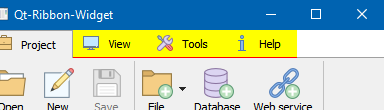
        @vale88
        Hi
        its the stylesheet in
        ribbon.cpp
        the
        "QTabBar::tab {"
        and
        "QTabBar::tab::!selected {"
        " border-bottom: 1px solid rgb(%4, %5, %6);"
        " background-color:#ffffff;"
        "}"
        and
        "QTabBar::tab:selected {"
        alt text

        V 1 Reply Last reply
        2
        • mrjjM mrjj

          @vale88
          Hi
          its the stylesheet in
          ribbon.cpp
          the
          "QTabBar::tab {"
          and
          "QTabBar::tab::!selected {"
          " border-bottom: 1px solid rgb(%4, %5, %6);"
          " background-color:#ffffff;"
          "}"
          and
          "QTabBar::tab:selected {"

          alt text

          V Offline
          V Offline
          vale88
          wrote on last edited by vale88
          #28

          @mrjj I wrote:

          QString styleSheetText = QString(
          "QTabWidget::pane {"
          " border-top: 1px solid rgb(255,255,255);"
          " position: absolute;"
          " top: -1px;"
          "}"
          ""
          "QTabBar::tab {"
          " padding-top: 5px;"
          " padding-bottom: 5px;"
          " padding-left: 10px;"
          " padding-right: 10px;"
          " margin-top: 1px;"
          "}"
          ""
          "QTabBar::tab::!selected {"
          " border-bottom: 1px solid rgb(0, 0, 0);"
          " background-color:#000000;"
          "}"
          ""
          "QTabBar::tab:selected {"
          " background-color: rgb(255, 255, 255);"
          " border-top: 1px solid rgb(%4, %5, %6);"
          " border-right: 1px solid rgb(%4, %5, %6);"
          " border-left: 1px solid rgb(%4, %5, %6);"
          " border-bottom: 1px solid rgb(%1, %2, %3);"
          "}"
          ""
          "QTabBar::tab:hover"
          "{"
          " background-color: rgb(0, 0, 255);"
          "}"
          ""
          "QTabBar::tab:selected:hover {"
          " background-color: rgb(%1, %10, %3);"
          "}"

          but it doesn't change, it's the same thing

          1 Reply Last reply
          0
          • mrjjM Offline
            mrjjM Offline
            mrjj
            Lifetime Qt Champion
            wrote on last edited by
            #29

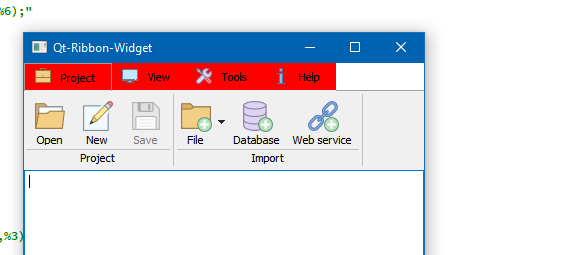
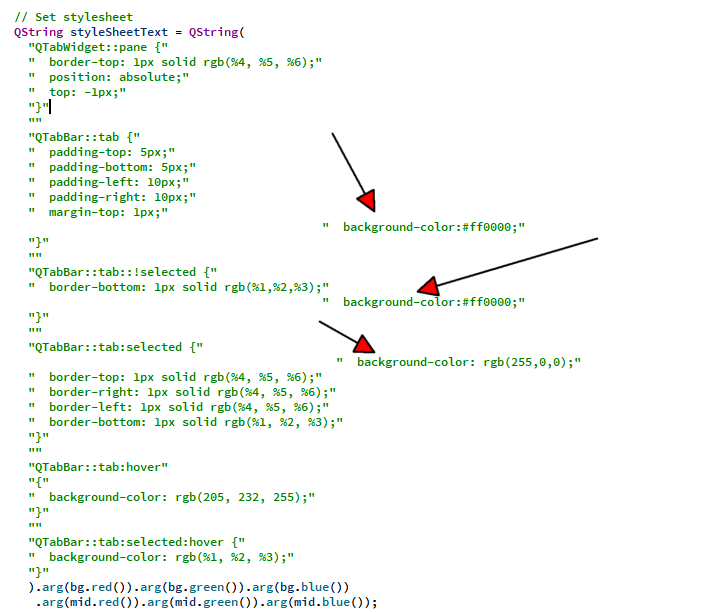
            Hi
            then you are not changing the right ones.
            alt text

            alt text

            V 1 Reply Last reply
            0
            • mrjjM mrjj

              Hi
              then you are not changing the right ones.

              alt text

              alt text

              V Offline
              V Offline
              vale88
              wrote on last edited by
              #30

              @mrjj I wrote:

               QString styleSheetText = QString(
                  "QTabWidget::pane {"
                  "  border-top: 1px solid rgb(255,255,255);"
                  "  position: absolute;"
                  "  backgound-color: #ff0000"
                  "  top: -1px;"
                  "}"
                  ""
                  "QTabBar::tab {"
                  "  padding-top: 5px;"
                  "  padding-bottom: 5px;"
                  "  padding-left: 10px;"
                  "  padding-right: 10px;"
                  "  margin-top: 1px;"
                  "}"
                  ""
                  "QTabBar::tab::!selected {"
                  "  border-bottom: 1px solid rgb(0, 0, 0);"
                  "  background-color:#ff0000;"
                  "}"
                  ""
                  "QTabBar::tab:selected {"
                  "  background-color: rgb(255, 0, 0);"
                  "  border-top: 1px solid rgb(%4, %5, %6);"
                  "  border-right: 1px solid rgb(%4, %5, %6);"
                  "  border-left: 1px solid rgb(%4, %5, %6);"
                  "  border-bottom: 1px solid rgb(%1, %2, %3);"
                  "}"
                  ""
                  "QTabBar::tab:hover"
                  "{"
                  "  background-color: rgb(0, 0, 255);"
                  "}"
                  ""
                  "QTabBar::tab:selected:hover {"
                  "  background-color: rgb(%1, %10, %3);"
                  "}"
                  ).arg(bg.red()).arg(bg.green()).arg(bg.blue())
                   .arg(mid.red()).arg(mid.green()).arg(mid.blue());
              

              but it's the same thing

              1 Reply Last reply
              0
              • mrjjM Offline
                mrjjM Offline
                mrjj
                Lifetime Qt Champion
                wrote on last edited by
                #31

                Hi
                Ok. works for me so
                either you are still doing it wrong
                or you have other stylesheets that effects it.

                V 1 Reply Last reply
                2
                • mrjjM mrjj

                  Hi
                  Ok. works for me so
                  either you are still doing it wrong
                  or you have other stylesheets that effects it.

                  V Offline
                  V Offline
                  vale88
                  wrote on last edited by vale88
                  #32

                  @mrjj I don't know...uff...can you send me ribbon.cpp code?
                  I don't understand why
                  if I write in this way and I remove all it's the same thing:

                  
                    // Determine default colors
                    QColor bg = qApp->palette().color(QPalette::Background);
                    QColor mid = qApp->palette().color(QPalette::Mid);
                  
                    // Note: the order in which the background/palette/stylesheet functions are
                    // called does matter. Should be same as in Qt designer.
                    setAutoFillBackground(true);
                  
                    // Set stylesheet
                    QString styleSheetText = QString(
                      ).arg(mid.red()).arg(mid.green()).arg(mid.blue())
                       .arg(mid.red()).arg(mid.green()).arg(mid.blue());
                  
                    setStyleSheet(styleSheetText);
                  
                    // Set background color
                    QPalette pal = palette();
                    pal.setColor(QPalette::Background, Qt::white);
                    setPalette(pal);
                  }
                  
                  
                  mrjjM 1 Reply Last reply
                  0
                  • V vale88

                    @mrjj I don't know...uff...can you send me ribbon.cpp code?
                    I don't understand why
                    if I write in this way and I remove all it's the same thing:

                    
                      // Determine default colors
                      QColor bg = qApp->palette().color(QPalette::Background);
                      QColor mid = qApp->palette().color(QPalette::Mid);
                    
                      // Note: the order in which the background/palette/stylesheet functions are
                      // called does matter. Should be same as in Qt designer.
                      setAutoFillBackground(true);
                    
                      // Set stylesheet
                      QString styleSheetText = QString(
                        ).arg(mid.red()).arg(mid.green()).arg(mid.blue())
                         .arg(mid.red()).arg(mid.green()).arg(mid.blue());
                    
                      setStyleSheet(styleSheetText);
                    
                      // Set background color
                      QPalette pal = palette();
                      pal.setColor(QPalette::Background, Qt::white);
                      setPalette(pal);
                    }
                    
                    
                    mrjjM Offline
                    mrjjM Offline
                    mrjj
                    Lifetime Qt Champion
                    wrote on last edited by
                    #33

                    @vale88
                    me nither and it just works here using the default project from the link

                    V 1 Reply Last reply
                    0
                    • mrjjM mrjj

                      @vale88
                      me nither and it just works here using the default project from the link

                      V Offline
                      V Offline
                      vale88
                      wrote on last edited by
                      #34

                      @mrjj said in Can I create a frame with qt?:

                      @vale88
                      me nither and it just works here using the default project from the link

                      but I see you put red and blue

                      mrjjM 1 Reply Last reply
                      0
                      • V vale88

                        @mrjj said in Can I create a frame with qt?:

                        @vale88
                        me nither and it just works here using the default project from the link

                        but I see you put red and blue

                        mrjjM Offline
                        mrjjM Offline
                        mrjj
                        Lifetime Qt Champion
                        wrote on last edited by
                        #35

                        @vale88
                        yeah same way regardless of the color.

                        1 Reply Last reply
                        0

                        • Login

                        • Login or register to search.
                        • First post
                          Last post
                        0
                        • Categories
                        • Recent
                        • Tags
                        • Popular
                        • Users
                        • Groups
                        • Search
                        • Get Qt
                        • Unsolved