Skip to content
  • Categories
  • Recent
  • Tags
  • Popular
  • Users
  • Groups
  • Search
  • Get Qt Extensions
  • Unsolved
Collapse
Brand Logo
  1. Home
  2. Qt Development
  3. General and Desktop
  4. Can I create a frame with qt?
Qt 6.11 is out! See what's new in the release blog

Can I create a frame with qt?

Scheduled Pinned Locked Moved Unsolved General and Desktop
35 Posts 4 Posters 24.3k Views 3 Watching
  • Oldest to Newest
  • Newest to Oldest
  • Most Votes
Reply
  • Reply as topic
Log in to reply
This topic has been deleted. Only users with topic management privileges can see it.
  • mrjjM mrjj

    @vale88
    Hi
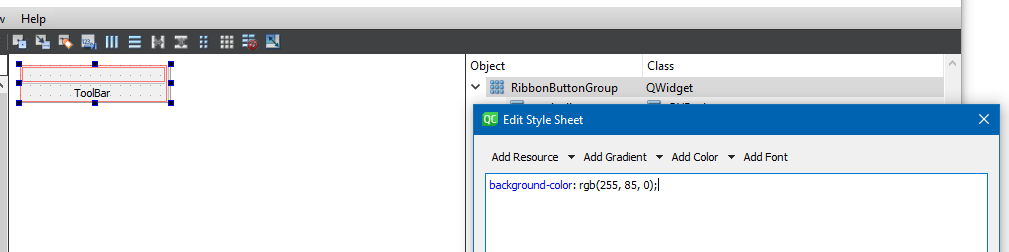
    I just open the Ui file and right click on top widget and then
    change style sheet and then click background color
    alt text

    V Offline
    V Offline
    vale88
    wrote on last edited by
    #17

    ok thanks

    mrjjM 1 Reply Last reply
    0
    • V vale88

      ok thanks

      mrjjM Offline
      mrjjM Offline
      mrjj
      Lifetime Qt Champion
      wrote on last edited by
      #18

      @vale88
      Also the same for
      alt text

      RibbonTabContent

      V 1 Reply Last reply
      1
      • mrjjM mrjj

        @vale88
        Also the same for
        alt text

        RibbonTabContent

        V Offline
        V Offline
        vale88
        wrote on last edited by
        #19

        @mrjj a question, when I click on a button of horizontal ribbon there is an effect, like I push a true button...how can I recreate this effect?

        mrjjM 1 Reply Last reply
        0
        • V vale88

          @mrjj a question, when I click on a button of horizontal ribbon there is an effect, like I push a true button...how can I recreate this effect?

          mrjjM Offline
          mrjjM Offline
          mrjj
          Lifetime Qt Champion
          wrote on last edited by
          #20

          @vale88
          You mean on the tabs?
          or on the buttons Open , New etc ?

          V 1 Reply Last reply
          0
          • mrjjM mrjj

            @vale88
            You mean on the tabs?
            or on the buttons Open , New etc ?

            V Offline
            V Offline
            vale88
            wrote on last edited by
            #21

            @mrjj on the button Open, New..ecc..when I push there is an effect

            Pl45m4P 1 Reply Last reply
            0
            • V vale88

              @mrjj on the button Open, New..ecc..when I push there is an effect

              Pl45m4P Offline
              Pl45m4P Offline
              Pl45m4
              wrote on last edited by
              #22

              @vale88

              What kind of effect? Animation? Fading? Or just the button changes?


              If debugging is the process of removing software bugs, then programming must be the process of putting them in.

              ~E. W. Dijkstra

              V 1 Reply Last reply
              0
              • Pl45m4P Pl45m4

                @vale88

                What kind of effect? Animation? Fading? Or just the button changes?

                V Offline
                V Offline
                vale88
                wrote on last edited by
                #23

                @Pl45m4 Maybe I solved:
                ui->toolButton->setStyleSheet("QToolButton { background-color: beige }");

                1 Reply Last reply
                0
                • mrjjM Offline
                  mrjjM Offline
                  mrjj
                  Lifetime Qt Champion
                  wrote on last edited by
                  #24

                  Hi
                  Its actually just normal QToolButtons with
                  autoRaise set to true.

                  V 1 Reply Last reply
                  0
                  • mrjjM mrjj

                    Hi
                    Its actually just normal QToolButtons with
                    autoRaise set to true.

                    V Offline
                    V Offline
                    vale88
                    wrote on last edited by
                    #25

                    @mrjj Cattura.PNG

                    I don't know how change gray color that have black border

                    V 1 Reply Last reply
                    0
                    • V vale88

                      @mrjj Cattura.PNG

                      I don't know how change gray color that have black border

                      V Offline
                      V Offline
                      vale88
                      wrote on last edited by vale88
                      #26

                      @vale88 Cattura.PNG

                      this color doesn't change..I don't know how I must do to change color of the tab, there are this gray and white in project

                      mrjjM 1 Reply Last reply
                      0
                      • V vale88

                        @vale88 Cattura.PNG

                        this color doesn't change..I don't know how I must do to change color of the tab, there are this gray and white in project

                        mrjjM Offline
                        mrjjM Offline
                        mrjj
                        Lifetime Qt Champion
                        wrote on last edited by mrjj
                        #27

                        @vale88
                        Hi
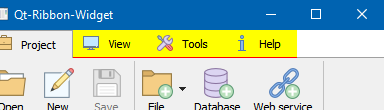
                        its the stylesheet in
                        ribbon.cpp
                        the
                        "QTabBar::tab {"
                        and
                        "QTabBar::tab::!selected {"
                        " border-bottom: 1px solid rgb(%4, %5, %6);"
                        " background-color:#ffffff;"
                        "}"
                        and
                        "QTabBar::tab:selected {"
                        alt text

                        V 1 Reply Last reply
                        2
                        • mrjjM mrjj

                          @vale88
                          Hi
                          its the stylesheet in
                          ribbon.cpp
                          the
                          "QTabBar::tab {"
                          and
                          "QTabBar::tab::!selected {"
                          " border-bottom: 1px solid rgb(%4, %5, %6);"
                          " background-color:#ffffff;"
                          "}"
                          and
                          "QTabBar::tab:selected {"

                          alt text

                          V Offline
                          V Offline
                          vale88
                          wrote on last edited by vale88
                          #28

                          @mrjj I wrote:

                          QString styleSheetText = QString(
                          "QTabWidget::pane {"
                          " border-top: 1px solid rgb(255,255,255);"
                          " position: absolute;"
                          " top: -1px;"
                          "}"
                          ""
                          "QTabBar::tab {"
                          " padding-top: 5px;"
                          " padding-bottom: 5px;"
                          " padding-left: 10px;"
                          " padding-right: 10px;"
                          " margin-top: 1px;"
                          "}"
                          ""
                          "QTabBar::tab::!selected {"
                          " border-bottom: 1px solid rgb(0, 0, 0);"
                          " background-color:#000000;"
                          "}"
                          ""
                          "QTabBar::tab:selected {"
                          " background-color: rgb(255, 255, 255);"
                          " border-top: 1px solid rgb(%4, %5, %6);"
                          " border-right: 1px solid rgb(%4, %5, %6);"
                          " border-left: 1px solid rgb(%4, %5, %6);"
                          " border-bottom: 1px solid rgb(%1, %2, %3);"
                          "}"
                          ""
                          "QTabBar::tab:hover"
                          "{"
                          " background-color: rgb(0, 0, 255);"
                          "}"
                          ""
                          "QTabBar::tab:selected:hover {"
                          " background-color: rgb(%1, %10, %3);"
                          "}"

                          but it doesn't change, it's the same thing

                          1 Reply Last reply
                          0
                          • mrjjM Offline
                            mrjjM Offline
                            mrjj
                            Lifetime Qt Champion
                            wrote on last edited by
                            #29

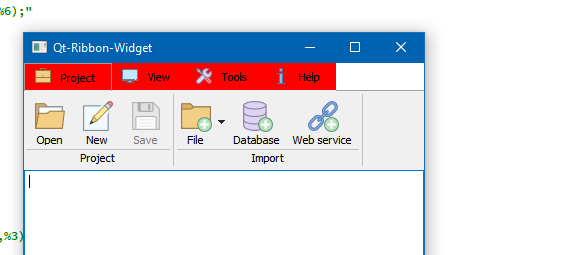
                            Hi
                            then you are not changing the right ones.
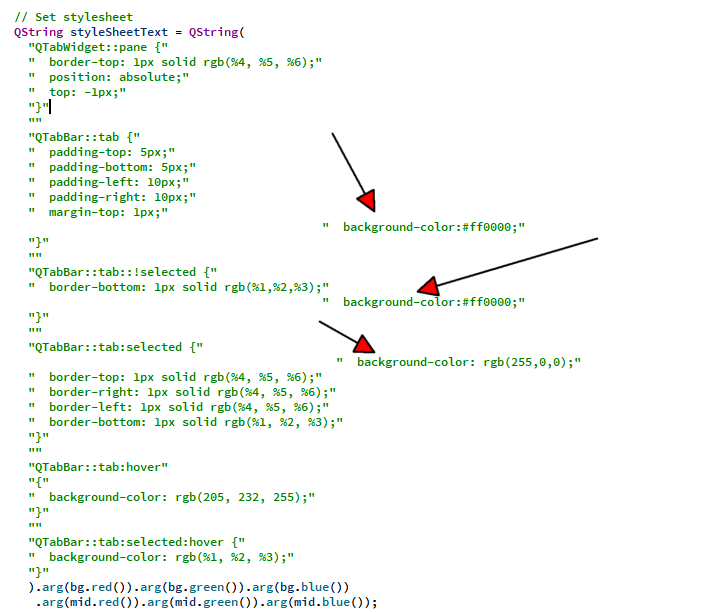
                            alt text

                            alt text

                            V 1 Reply Last reply
                            0
                            • mrjjM mrjj

                              Hi
                              then you are not changing the right ones.

                              alt text

                              alt text

                              V Offline
                              V Offline
                              vale88
                              wrote on last edited by
                              #30

                              @mrjj I wrote:

                               QString styleSheetText = QString(
                                  "QTabWidget::pane {"
                                  "  border-top: 1px solid rgb(255,255,255);"
                                  "  position: absolute;"
                                  "  backgound-color: #ff0000"
                                  "  top: -1px;"
                                  "}"
                                  ""
                                  "QTabBar::tab {"
                                  "  padding-top: 5px;"
                                  "  padding-bottom: 5px;"
                                  "  padding-left: 10px;"
                                  "  padding-right: 10px;"
                                  "  margin-top: 1px;"
                                  "}"
                                  ""
                                  "QTabBar::tab::!selected {"
                                  "  border-bottom: 1px solid rgb(0, 0, 0);"
                                  "  background-color:#ff0000;"
                                  "}"
                                  ""
                                  "QTabBar::tab:selected {"
                                  "  background-color: rgb(255, 0, 0);"
                                  "  border-top: 1px solid rgb(%4, %5, %6);"
                                  "  border-right: 1px solid rgb(%4, %5, %6);"
                                  "  border-left: 1px solid rgb(%4, %5, %6);"
                                  "  border-bottom: 1px solid rgb(%1, %2, %3);"
                                  "}"
                                  ""
                                  "QTabBar::tab:hover"
                                  "{"
                                  "  background-color: rgb(0, 0, 255);"
                                  "}"
                                  ""
                                  "QTabBar::tab:selected:hover {"
                                  "  background-color: rgb(%1, %10, %3);"
                                  "}"
                                  ).arg(bg.red()).arg(bg.green()).arg(bg.blue())
                                   .arg(mid.red()).arg(mid.green()).arg(mid.blue());
                              

                              but it's the same thing

                              1 Reply Last reply
                              0
                              • mrjjM Offline
                                mrjjM Offline
                                mrjj
                                Lifetime Qt Champion
                                wrote on last edited by
                                #31

                                Hi
                                Ok. works for me so
                                either you are still doing it wrong
                                or you have other stylesheets that effects it.

                                V 1 Reply Last reply
                                2
                                • mrjjM mrjj

                                  Hi
                                  Ok. works for me so
                                  either you are still doing it wrong
                                  or you have other stylesheets that effects it.

                                  V Offline
                                  V Offline
                                  vale88
                                  wrote on last edited by vale88
                                  #32

                                  @mrjj I don't know...uff...can you send me ribbon.cpp code?
                                  I don't understand why
                                  if I write in this way and I remove all it's the same thing:

                                  
                                    // Determine default colors
                                    QColor bg = qApp->palette().color(QPalette::Background);
                                    QColor mid = qApp->palette().color(QPalette::Mid);
                                  
                                    // Note: the order in which the background/palette/stylesheet functions are
                                    // called does matter. Should be same as in Qt designer.
                                    setAutoFillBackground(true);
                                  
                                    // Set stylesheet
                                    QString styleSheetText = QString(
                                      ).arg(mid.red()).arg(mid.green()).arg(mid.blue())
                                       .arg(mid.red()).arg(mid.green()).arg(mid.blue());
                                  
                                    setStyleSheet(styleSheetText);
                                  
                                    // Set background color
                                    QPalette pal = palette();
                                    pal.setColor(QPalette::Background, Qt::white);
                                    setPalette(pal);
                                  }
                                  
                                  
                                  mrjjM 1 Reply Last reply
                                  0
                                  • V vale88

                                    @mrjj I don't know...uff...can you send me ribbon.cpp code?
                                    I don't understand why
                                    if I write in this way and I remove all it's the same thing:

                                    
                                      // Determine default colors
                                      QColor bg = qApp->palette().color(QPalette::Background);
                                      QColor mid = qApp->palette().color(QPalette::Mid);
                                    
                                      // Note: the order in which the background/palette/stylesheet functions are
                                      // called does matter. Should be same as in Qt designer.
                                      setAutoFillBackground(true);
                                    
                                      // Set stylesheet
                                      QString styleSheetText = QString(
                                        ).arg(mid.red()).arg(mid.green()).arg(mid.blue())
                                         .arg(mid.red()).arg(mid.green()).arg(mid.blue());
                                    
                                      setStyleSheet(styleSheetText);
                                    
                                      // Set background color
                                      QPalette pal = palette();
                                      pal.setColor(QPalette::Background, Qt::white);
                                      setPalette(pal);
                                    }
                                    
                                    
                                    mrjjM Offline
                                    mrjjM Offline
                                    mrjj
                                    Lifetime Qt Champion
                                    wrote on last edited by
                                    #33

                                    @vale88
                                    me nither and it just works here using the default project from the link

                                    V 1 Reply Last reply
                                    0
                                    • mrjjM mrjj

                                      @vale88
                                      me nither and it just works here using the default project from the link

                                      V Offline
                                      V Offline
                                      vale88
                                      wrote on last edited by
                                      #34

                                      @mrjj said in Can I create a frame with qt?:

                                      @vale88
                                      me nither and it just works here using the default project from the link

                                      but I see you put red and blue

                                      mrjjM 1 Reply Last reply
                                      0
                                      • V vale88

                                        @mrjj said in Can I create a frame with qt?:

                                        @vale88
                                        me nither and it just works here using the default project from the link

                                        but I see you put red and blue

                                        mrjjM Offline
                                        mrjjM Offline
                                        mrjj
                                        Lifetime Qt Champion
                                        wrote on last edited by
                                        #35

                                        @vale88
                                        yeah same way regardless of the color.

                                        1 Reply Last reply
                                        0

                                        • Login

                                        • Login or register to search.
                                        • First post
                                          Last post
                                        0
                                        • Categories
                                        • Recent
                                        • Tags
                                        • Popular
                                        • Users
                                        • Groups
                                        • Search
                                        • Get Qt Extensions
                                        • Unsolved