
Install process made me give up (yes, this is about qmake)
-
Hello.
I can't believe this thing's installation process is so dodgy. I have invested a considerable amount of time to try different things to be able to open and build a single example.
The Maintenance tool updates itself, yet it always says it's outdated. At least it allows me to continue and finish the updates, but not before retrying at random times just because it just can't find the repository (so I need to add one by hand), but in the end, I can't find qmake, no matter what I do. Every "solution" I've read about ends with a magic reinstall and finally finding the file. Since I'm not that lucky, may someone tell me...
#1. Is it true that the installer certainly creates a qmake.exe file somewhere in the Qt filesystem? If yes, what could be a reason it's not being created? If not, what are my options? Build something from sources? I've reinstalled a bunch of times, using another bunch of MinGW versions, and the file does not appear.
As an absolute newbie to this toolkit, sorry about this idiot question, but...
#2. What's the point of having a builtin compiler (\Tools\QtCreator\bin\clang\bin), -well, if that's a compiler (according to the options)-, if you still need MinGW or MSVC? Why to bother with an incomplete internal tool chain?
I'm considering to install Visual Studio 2017 just for the C++ compiler, debugger etc. That's 11GB and I'm not amused. In fact, I feel demoralized to be honest. At least it's not a waste since I may try GTK there.
Anyway, thanks for reading and for any suggestion you can give me.
-
Hello.
I can't believe this thing's installation process is so dodgy. I have invested a considerable amount of time to try different things to be able to open and build a single example.
The Maintenance tool updates itself, yet it always says it's outdated. At least it allows me to continue and finish the updates, but not before retrying at random times just because it just can't find the repository (so I need to add one by hand), but in the end, I can't find qmake, no matter what I do. Every "solution" I've read about ends with a magic reinstall and finally finding the file. Since I'm not that lucky, may someone tell me...
#1. Is it true that the installer certainly creates a qmake.exe file somewhere in the Qt filesystem? If yes, what could be a reason it's not being created? If not, what are my options? Build something from sources? I've reinstalled a bunch of times, using another bunch of MinGW versions, and the file does not appear.
As an absolute newbie to this toolkit, sorry about this idiot question, but...
#2. What's the point of having a builtin compiler (\Tools\QtCreator\bin\clang\bin), -well, if that's a compiler (according to the options)-, if you still need MinGW or MSVC? Why to bother with an incomplete internal tool chain?
I'm considering to install Visual Studio 2017 just for the C++ compiler, debugger etc. That's 11GB and I'm not amused. In fact, I feel demoralized to be honest. At least it's not a waste since I may try GTK there.
Anyway, thanks for reading and for any suggestion you can give me.
@alvein said in Install process made me give up (yes, this is about qmake):
#1. Is it true that the installer certainly creates a qmake.exe file somewhere in the Qt filesystem? If yes, what could be a reason it's not being created? If not, what are my options? Build something from sources? I've reinstalled a bunch of times, using another bunch of MinGW versions, and the file does not appear.
Not exactly
the installer downloads pre compiled Qt Libraries, if you select one. Those come with a precompiled make ready to go.
For example, the default install path on windows and qt 5.12.4 (64bit MinGW version) would look like this:
c:/Qt/5.12.4/mingw73_64/bin/qmake.exeMaybe your installer is broken, where did you get it from and when?
You can build qt from sources easily enough, but it will take a while to compile, take a look here for informations:
https://doc.qt.io/qt-5/windows-building.html#2. What's the point of having a builtin compiler (\Tools\QtCreator\bin\clang\bin), -well, if that's a compiler (according to the options)-, if you still need MinGW or MSVC? Why to bother with an incomplete internal tool chain?
Microsoft doesn't allow for independent distribution of MSVC, but many people use it so the QtCompany provides precompiled libs for MSVC, for convince. Mingw is, iirc, shipped with the installer, if you select it.
Not beging able to have different tool chains inside QtCreator would be horrible. how would you for example work WindowsPC and develop for android?
Be aware of the Qt Code of Conduct, when posting : https://forum.qt.io/topic/113070/qt-code-of-conduct
Q: What's that?
A: It's blue light.
Q: What does it do?
A: It turns blue. -
@alvein said in Install process made me give up (yes, this is about qmake):
#1. Is it true that the installer certainly creates a qmake.exe file somewhere in the Qt filesystem? If yes, what could be a reason it's not being created? If not, what are my options? Build something from sources? I've reinstalled a bunch of times, using another bunch of MinGW versions, and the file does not appear.
Not exactly
the installer downloads pre compiled Qt Libraries, if you select one. Those come with a precompiled make ready to go.
For example, the default install path on windows and qt 5.12.4 (64bit MinGW version) would look like this:
c:/Qt/5.12.4/mingw73_64/bin/qmake.exeMaybe your installer is broken, where did you get it from and when?
You can build qt from sources easily enough, but it will take a while to compile, take a look here for informations:
https://doc.qt.io/qt-5/windows-building.html#2. What's the point of having a builtin compiler (\Tools\QtCreator\bin\clang\bin), -well, if that's a compiler (according to the options)-, if you still need MinGW or MSVC? Why to bother with an incomplete internal tool chain?
Microsoft doesn't allow for independent distribution of MSVC, but many people use it so the QtCompany provides precompiled libs for MSVC, for convince. Mingw is, iirc, shipped with the installer, if you select it.
Not beging able to have different tool chains inside QtCreator would be horrible. how would you for example work WindowsPC and develop for android?@j-hilk Thanks for your reply.
Look. I tried everything from qt.io. Normal installer, offline installer, and the maintenance tool to add or update components. And I'm talking about 5.13, which is the stable version available to download.
As for the second question. Let me rephrase it because it seems I wasn't clear. Inside that folder (\Tools\QtCreator\bin\clang\bin) there are some EXEs. They appear like an option for the C and C++ compilers. Hence, they are compilers. Correct? Well, my question is, what's the point of Qt Creator having its own compiler if not matter what you do, you still require the tool chain from either MinGW or MSVC?
Thanks again for your interest in helping me.
-
@j-hilk Thanks for your reply.
Look. I tried everything from qt.io. Normal installer, offline installer, and the maintenance tool to add or update components. And I'm talking about 5.13, which is the stable version available to download.
As for the second question. Let me rephrase it because it seems I wasn't clear. Inside that folder (\Tools\QtCreator\bin\clang\bin) there are some EXEs. They appear like an option for the C and C++ compilers. Hence, they are compilers. Correct? Well, my question is, what's the point of Qt Creator having its own compiler if not matter what you do, you still require the tool chain from either MinGW or MSVC?
Thanks again for your interest in helping me.
@alvein Qt Creator is not Qt, it is a standalone IDE that happens to be build in/with Qt. Since it is standalone it's going to need it's own dlls and helper executables. But there's no compiler or qmake in there.
5.13 is the latest version, but not the lates LTS. If you don't need new features, I would stick with the LTS versions.
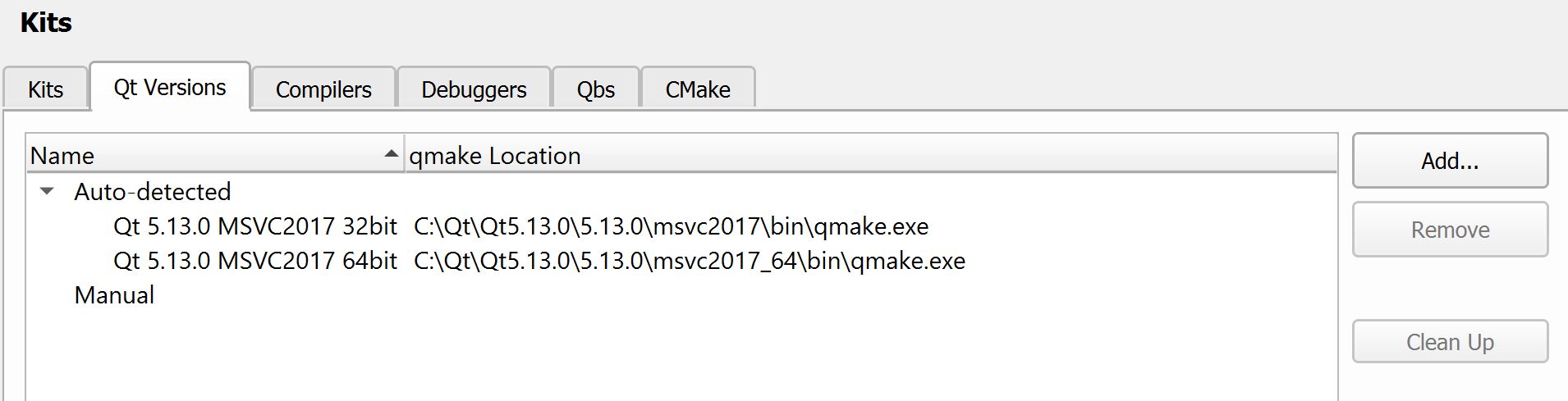
Maybe, your kit's aren't simply set up correctly, can you show is a screenshot from the options & Kits tab?
Kits, QtVersion & Compiler sub tabs
Be aware of the Qt Code of Conduct, when posting : https://forum.qt.io/topic/113070/qt-code-of-conduct
Q: What's that?
A: It's blue light.
Q: What does it do?
A: It turns blue. -
@alvein Qt Creator is not Qt, it is a standalone IDE that happens to be build in/with Qt. Since it is standalone it's going to need it's own dlls and helper executables. But there's no compiler or qmake in there.
5.13 is the latest version, but not the lates LTS. If you don't need new features, I would stick with the LTS versions.
Maybe, your kit's aren't simply set up correctly, can you show is a screenshot from the options & Kits tab?
Kits, QtVersion & Compiler sub tabs@j-hilk said in Install process made me give up (yes, this is about qmake):
@alvein Qt Creator is not Qt, it is a standalone IDE that happens to be build in/with Qt. Since it is standalone it's going to need it's own dlls and helper executables. But there's no compiler or qmake in there.
Before posting any screenshot, sorry, I dismissed the use of MinGW. That's the reason it looks like I'm not even trying. But keep reading.

OK. What you say about the IDE makes sense. But then why "Clang" (\Tools\QtCreator\bin\clang\bin) appears as an option for the compiler selection?
Which circumstances would make someone want to use Clang over MinGW or MSVC counterparts?
5.13 is the latest version, but not the lates LTS. If you don't need new features, I would stick with the LTS versions.
Maybe, your kit's aren't simply set up correctly, can you show is a screenshot from the options & Kits tab?
Kits, QtVersion & Compiler sub tabs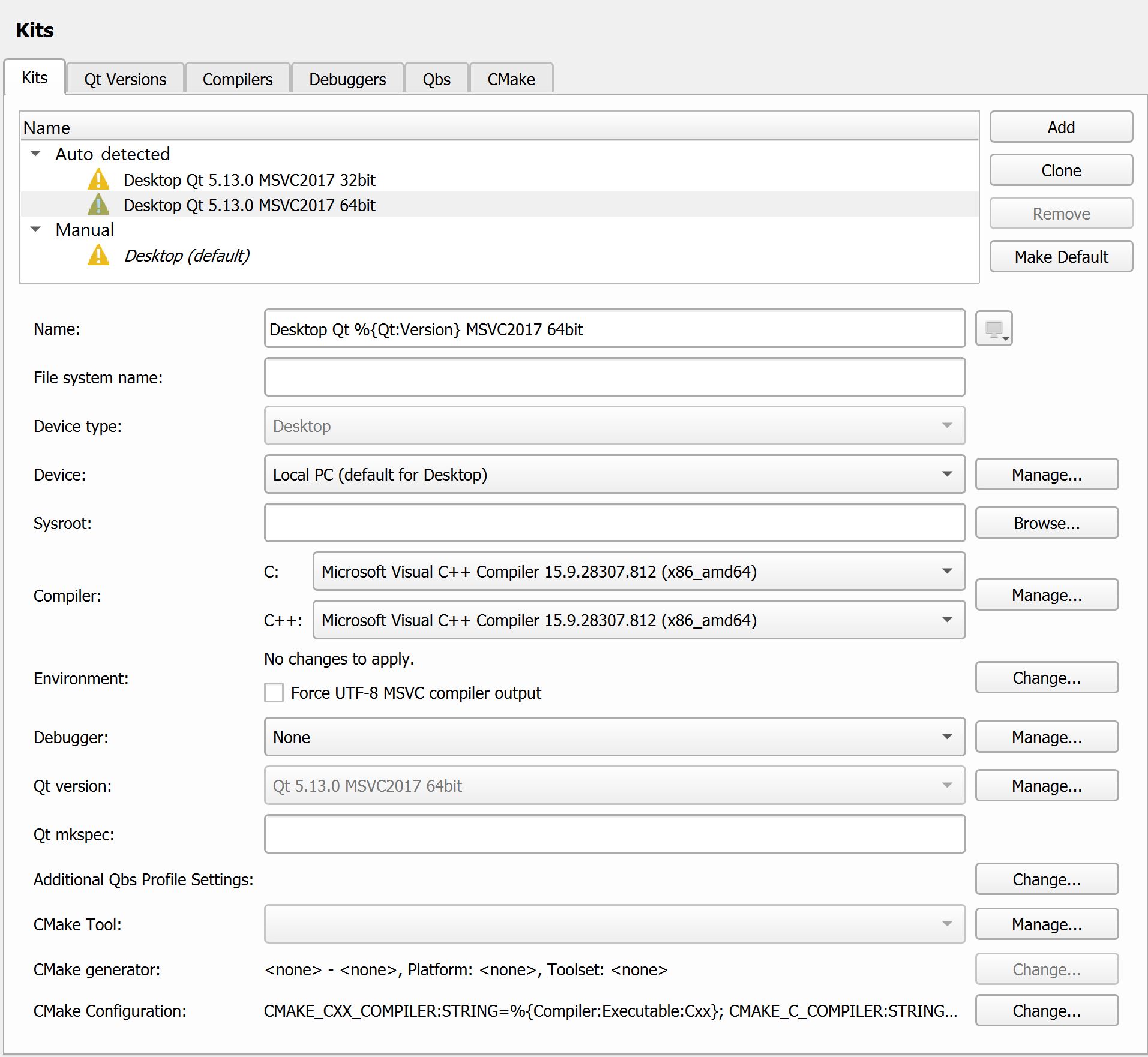
I installed Qt with MinGW, without MinGW (using the maintenance tool), and with or without some older versions of MinGW. Qt Creator was unable to correctly autodetect the tool chain, basically because that lovely QMake was never written in the filesystem.
So, under that premise, no matter what I did in the options, it was impossible to configure any valid kit anytime later and by hand.
I've resigned to install VS's 11GB and finally I'm able to build. So, if you recommend not to use 5.13, it's probably that there's something wrong (and random) with this specific version and MinGW. And I'm the one who got the red ballot.
Is 5.12 fine? I'll stick with MSVC (to my regret) for the moment, though.
-
@Alvein I feel the same actually, it takes less time to develop my software in something like GTK or Electron than to install Qt...
-
@j-hilk said in Install process made me give up (yes, this is about qmake):
@alvein Qt Creator is not Qt, it is a standalone IDE that happens to be build in/with Qt. Since it is standalone it's going to need it's own dlls and helper executables. But there's no compiler or qmake in there.
Before posting any screenshot, sorry, I dismissed the use of MinGW. That's the reason it looks like I'm not even trying. But keep reading.
OK. What you say about the IDE makes sense. But then why "Clang" (\Tools\QtCreator\bin\clang\bin) appears as an option for the compiler selection?
Which circumstances would make someone want to use Clang over MinGW or MSVC counterparts?
5.13 is the latest version, but not the lates LTS. If you don't need new features, I would stick with the LTS versions.
Maybe, your kit's aren't simply set up correctly, can you show is a screenshot from the options & Kits tab?
Kits, QtVersion & Compiler sub tabsI installed Qt with MinGW, without MinGW (using the maintenance tool), and with or without some older versions of MinGW. Qt Creator was unable to correctly autodetect the tool chain, basically because that lovely QMake was never written in the filesystem.
So, under that premise, no matter what I did in the options, it was impossible to configure any valid kit anytime later and by hand.
I've resigned to install VS's 11GB and finally I'm able to build. So, if you recommend not to use 5.13, it's probably that there's something wrong (and random) with this specific version and MinGW. And I'm the one who got the red ballot.
Is 5.12 fine? I'll stick with MSVC (to my regret) for the moment, though.
@alvein said in Install process made me give up (yes, this is about qmake):
why "Clang" (\Tools\QtCreator\bin\clang\bin) appears as an option for the compiler selection?
To properly answer your question, we must look at a bit of history.
One of the functionality that users expect from an IDE is code completion (a.k.a. IntelliSense in MSVC). For many years, Qt Creator contained its own custom code for code completion -- this involves a C++ code parser. However, maintaining a custom C++ parser is a Herculean task, especially now that the C++ language is getting updated every few years. It makes more sense to integrate a 3rd-party tool that already keeps up with the latest C++ developments. This is where Clang comes in.
Compared to MSVC and MinGW, Clang is a very young tool (first released in 2007) and it is still developing rapidly. More importantly though, it offers functionality that are not found in MSVC and MinGW: Clang allows users to easily hook into its core "engine" for parsing source code. This is exactly what Qt Creator needs for code completion, and this is why Clang is now included with Qt Creator.
Since this is all very new, there are a lot of rough edges still. Around the forum, and you'll find lots of users complaining that the code model in Qt Creator is now a lot slower and buggier than it used to be (e.g. https://forum.qt.io/topic/100762/qt-creator-clang-code-model-problems-collection ). So, for now, Qt Creator still offers the option to switch back to the old code model.
What about compilers for use in your own projects? Well, the Qt Project has supported MSVC and MinGW on Windows for countless years. "Support" for a toolchain means many things:
- Every single commit is tested on that toolchain before it gets merged into the Qt source code
- The Qt project releases pre-built packages for that toolchain
- When a customer rings up and says, "Hey, I'm using this toolchain with my project and XYZ broke," the Qt Company dedicates resources to investigate and fix the issue
As you can see from https://doc.qt.io/qt-5/supported-platforms.html and https://wiki.qt.io/Qt_5.13_Tools_and_Versions, there really is no hurry to add support for new toolchains. Each time a new toolchain is added, an old one must be dropped. So, it only makes sense to support the most widely-used (and stable!) toolchains. Examples of unsupported toolchains:
- MSVC 2019 is widely-used but it contains showstopping bugs, thus it is not supported.
- Clang is not widely-used on Windows yet, thus it is not supported.
TL;DR: Clang is included to provide code completion in Qt Creator. The Qt libraries support MSVC and MinGW but not Clang... yet.
Which circumstances would make someone want to use Clang over MinGW or MSVC counterparts?
As I implied above, Clang is the new-kid-on-the-block that shows lots of potential.
- Someone who is passionate about Clang can use Clang to build Qt from source. They can test things and help improve both Qt and Clang.
- Someone who wants to focus on their own projects should stick to a supported compiler and download pre-built Qt packages.
Is 5.12 fine?
Yes, 5.12 is a Long-Term Support version. It will be supported for longer than 5.13.
I installed Qt with MinGW, without MinGW (using the maintenance tool), and with or without some older versions of MinGW. Qt Creator was unable to correctly autodetect the tool chain, basically because that lovely QMake was never written in the filesystem.
I'm sorry to hear that you've had such difficulties. If you want to investigate further,
- My copy of qmake is at C:\Qt\5.12.4\mingw73_32\bin\qmake.exe
- My copy of MinGW is at C:\Qt\Tools\mingw730_32\bin\g++.exe
Qt Doc Search for browsers: forum.qt.io/topic/35616/web-browser-extension-for-improved-doc-searches
-
@alvein said in Install process made me give up (yes, this is about qmake):
I'm considering to install Visual Studio 2017 just for the C++ compiler,
Just as note.
Since they made the new install options
https://devblogs.microsoft.com/cppblog/the-lightweight-visual-studio-15-installer/
its possible to install and use the compiler (with Creator) in far, far less space than before. -
@alvein said in Install process made me give up (yes, this is about qmake):
why "Clang" (\Tools\QtCreator\bin\clang\bin) appears as an option for the compiler selection?
To properly answer your question, we must look at a bit of history.
One of the functionality that users expect from an IDE is code completion (a.k.a. IntelliSense in MSVC). For many years, Qt Creator contained its own custom code for code completion -- this involves a C++ code parser. However, maintaining a custom C++ parser is a Herculean task, especially now that the C++ language is getting updated every few years. It makes more sense to integrate a 3rd-party tool that already keeps up with the latest C++ developments. This is where Clang comes in.
Compared to MSVC and MinGW, Clang is a very young tool (first released in 2007) and it is still developing rapidly. More importantly though, it offers functionality that are not found in MSVC and MinGW: Clang allows users to easily hook into its core "engine" for parsing source code. This is exactly what Qt Creator needs for code completion, and this is why Clang is now included with Qt Creator.
Since this is all very new, there are a lot of rough edges still. Around the forum, and you'll find lots of users complaining that the code model in Qt Creator is now a lot slower and buggier than it used to be (e.g. https://forum.qt.io/topic/100762/qt-creator-clang-code-model-problems-collection ). So, for now, Qt Creator still offers the option to switch back to the old code model.
What about compilers for use in your own projects? Well, the Qt Project has supported MSVC and MinGW on Windows for countless years. "Support" for a toolchain means many things:
- Every single commit is tested on that toolchain before it gets merged into the Qt source code
- The Qt project releases pre-built packages for that toolchain
- When a customer rings up and says, "Hey, I'm using this toolchain with my project and XYZ broke," the Qt Company dedicates resources to investigate and fix the issue
As you can see from https://doc.qt.io/qt-5/supported-platforms.html and https://wiki.qt.io/Qt_5.13_Tools_and_Versions, there really is no hurry to add support for new toolchains. Each time a new toolchain is added, an old one must be dropped. So, it only makes sense to support the most widely-used (and stable!) toolchains. Examples of unsupported toolchains:
- MSVC 2019 is widely-used but it contains showstopping bugs, thus it is not supported.
- Clang is not widely-used on Windows yet, thus it is not supported.
TL;DR: Clang is included to provide code completion in Qt Creator. The Qt libraries support MSVC and MinGW but not Clang... yet.
Which circumstances would make someone want to use Clang over MinGW or MSVC counterparts?
As I implied above, Clang is the new-kid-on-the-block that shows lots of potential.
- Someone who is passionate about Clang can use Clang to build Qt from source. They can test things and help improve both Qt and Clang.
- Someone who wants to focus on their own projects should stick to a supported compiler and download pre-built Qt packages.
Is 5.12 fine?
Yes, 5.12 is a Long-Term Support version. It will be supported for longer than 5.13.
I installed Qt with MinGW, without MinGW (using the maintenance tool), and with or without some older versions of MinGW. Qt Creator was unable to correctly autodetect the tool chain, basically because that lovely QMake was never written in the filesystem.
I'm sorry to hear that you've had such difficulties. If you want to investigate further,
- My copy of qmake is at C:\Qt\5.12.4\mingw73_32\bin\qmake.exe
- My copy of MinGW is at C:\Qt\Tools\mingw730_32\bin\g++.exe
@jksh Magnificent explanation. Thank you very much.
@mrjj Thanks for pointing that out. It seems the options only appear in Community, Professional and Enterprise. Not Express.
...
Edit: Just to be clear for other people reading this, the qmake issue with MinGW was not solved. I assume that a previous version of Qt, like 5.12 should work flawless. But for the moment, I'm using MSVC since I got no more time to invest in the installation.
-
@jksh Magnificent explanation. Thank you very much.
@mrjj Thanks for pointing that out. It seems the options only appear in Community, Professional and Enterprise. Not Express.
...
Edit: Just to be clear for other people reading this, the qmake issue with MinGW was not solved. I assume that a previous version of Qt, like 5.12 should work flawless. But for the moment, I'm using MSVC since I got no more time to invest in the installation.
Hi
Just a note:
Community is the 'new' Express version as far as i understand it.
https://visualstudio.microsoft.com/vs/express/
And its not limited in any way compared to the pay for versions \o/
(except for big companies)


