Skip to content
  • Categories
  • Recent
  • Tags
  • Popular
  • Users
  • Groups
  • Search
  • Get Qt Extensions
  • Unsolved
Collapse
Brand Logo
  1. Home
  2. Qt Development
  3. General and Desktop
  4. no valid kits found - when configuring a project

no valid kits found - when configuring a project

Scheduled Pinned Locked Moved Solved General and Desktop
11 Posts 2 Posters 1.8k Views 1 Watching
  • Oldest to Newest
  • Newest to Oldest
  • Most Votes
Reply
  • Reply as topic
Log in to reply
This topic has been deleted. Only users with topic management privileges can see it.
  • SGaistS Offline
    SGaistS Offline
    SGaist
    Lifetime Qt Champion
    wrote on last edited by
    #2

    Hi and welcome to devnet,

    What exactly did you install ?

    Interested in AI ? www.idiap.ch
    Please read the Qt Code of Conduct - https://forum.qt.io/topic/113070/qt-code-of-conduct

    1 Reply Last reply
    0
    • B Offline
      B Offline
      bluestone
      wrote on last edited by bluestone
      #3

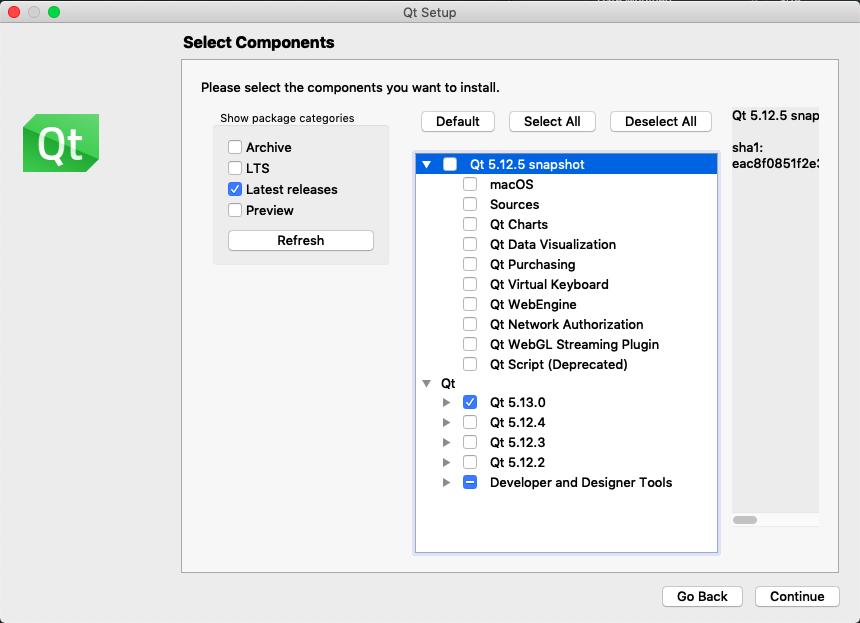
      I selected these components:
      0_1567103783303_Screenshot 2019-08-29 at 19.35.46.png

      Thanks

      PS
      "Qt Online Installer for macOS" from here:
      https://www.qt.io/download-qt-installer

      1 Reply Last reply
      0
      • SGaistS Offline
        SGaistS Offline
        SGaist
        Lifetime Qt Champion
        wrote on last edited by
        #4

        Looks good...

        What does the yellow triangle tell you on the auto-detects Qt version ?

        By the way, what version of Xcode are you using ?

        Interested in AI ? www.idiap.ch
        Please read the Qt Code of Conduct - https://forum.qt.io/topic/113070/qt-code-of-conduct

        B 1 Reply Last reply
        0
        • SGaistS SGaist

          Looks good...

          What does the yellow triangle tell you on the auto-detects Qt version ?

          By the way, what version of Xcode are you using ?

          B Offline
          B Offline
          bluestone
          wrote on last edited by
          #5

          @sgaist
          0_1567107575031_Screenshot 2019-08-29 at 20.39.12.png

          The version of Xcode is 10.3 (10G8).

          1 Reply Last reply
          0
          • SGaistS Offline
            SGaistS Offline
            SGaist
            Lifetime Qt Champion
            wrote on last edited by
            #6

            Take a look at the compiler tab, it seems clang has not been found.

            Interested in AI ? www.idiap.ch
            Please read the Qt Code of Conduct - https://forum.qt.io/topic/113070/qt-code-of-conduct

            B 1 Reply Last reply
            0
            • SGaistS SGaist

              Take a look at the compiler tab, it seems clang has not been found.

              B Offline
              B Offline
              bluestone
              wrote on last edited by
              #7

              @sgaist
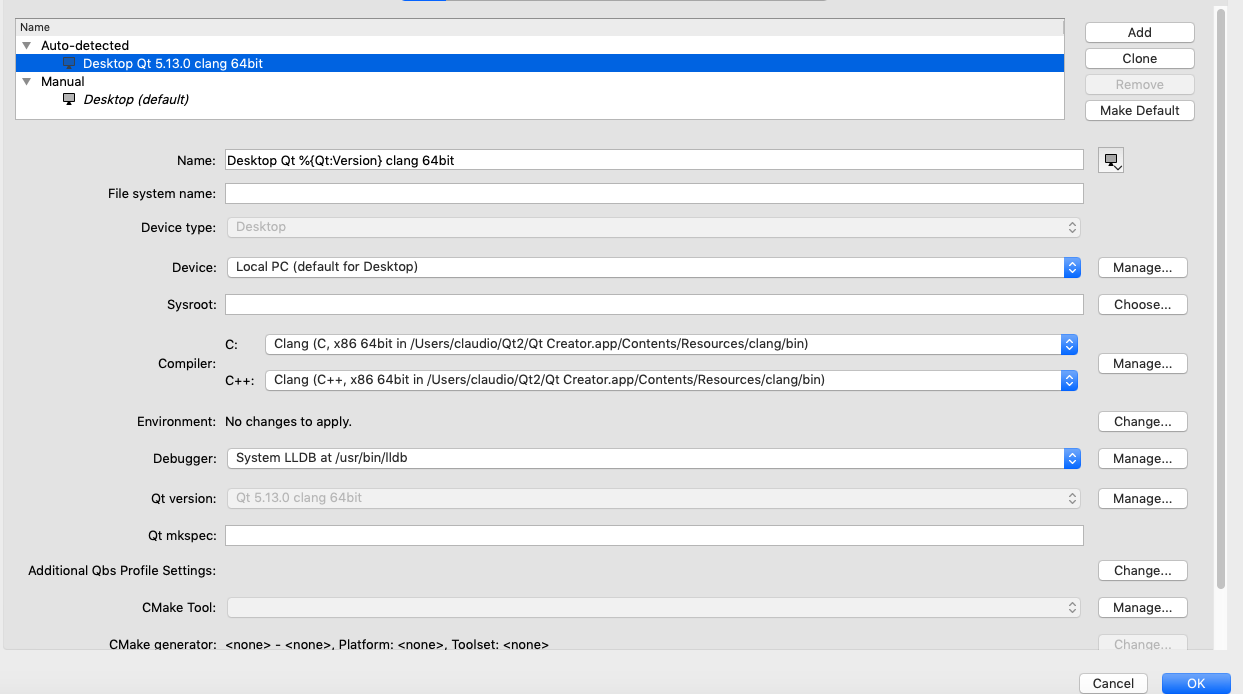
              I set the compilers:
              0_1567113457748_1.png

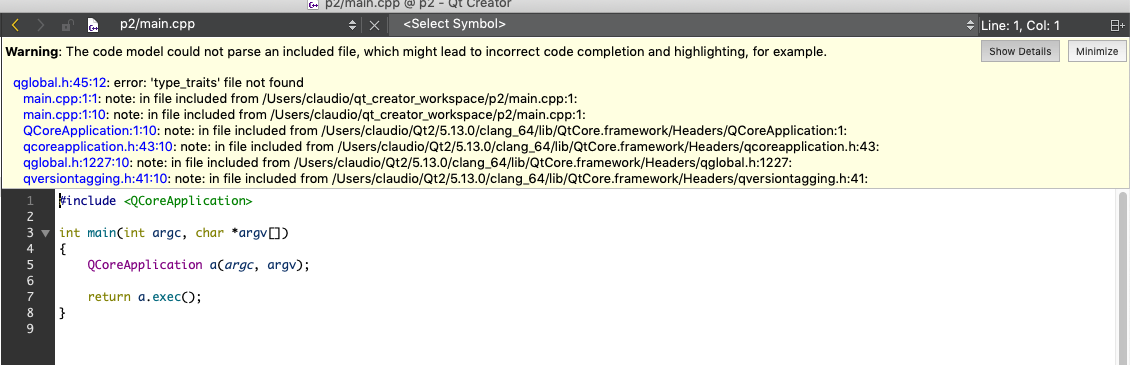
              Now I get this error:
              0_1567113495666_2.png

              1 Reply Last reply
              0
              • SGaistS Offline
                SGaistS Offline
                SGaist
                Lifetime Qt Champion
                wrote on last edited by
                #8

                You should use the one from Xcode, that is the only officially supported compiler. The one from Qt Creator is only there for the code model and not for compiling application.

                Did you install the command line tools from Xcode ?

                Interested in AI ? www.idiap.ch
                Please read the Qt Code of Conduct - https://forum.qt.io/topic/113070/qt-code-of-conduct

                B 1 Reply Last reply
                2
                • SGaistS SGaist

                  You should use the one from Xcode, that is the only officially supported compiler. The one from Qt Creator is only there for the code model and not for compiling application.

                  Did you install the command line tools from Xcode ?

                  B Offline
                  B Offline
                  bluestone
                  wrote on last edited by bluestone
                  #9

                  @SGaist
                  I have them installed.

                  They are in
                  /Library/Developer/CommandLineTools

                  Where can I find the C++ compiler?

                  1 Reply Last reply
                  0
                  • SGaistS Offline
                    SGaistS Offline
                    SGaist
                    Lifetime Qt Champion
                    wrote on last edited by
                    #10

                    In a terminal run xcode-select --install

                    Interested in AI ? www.idiap.ch
                    Please read the Qt Code of Conduct - https://forum.qt.io/topic/113070/qt-code-of-conduct

                    B 1 Reply Last reply
                    0
                    • SGaistS SGaist

                      In a terminal run xcode-select --install

                      B Offline
                      B Offline
                      bluestone
                      wrote on last edited by bluestone
                      #11

                      @sgaist
                      I solved:
                      0_1567115448020_Screenshot 2019-08-29 at 22.50.03.png

                      Thank you very much!

                      1 Reply Last reply
                      1

                      • Login

                      • Login or register to search.
                      • First post
                        Last post
                      0
                      • Categories
                      • Recent
                      • Tags
                      • Popular
                      • Users
                      • Groups
                      • Search
                      • Get Qt Extensions
                      • Unsolved