Skip to content
  • Categories
  • Recent
  • Tags
  • Popular
  • Users
  • Groups
  • Search
  • Get Qt Extensions
  • Unsolved
Collapse
Brand Logo
  1. Home
  2. Qt Development
  3. General and Desktop
  4. SubProjects
Qt 6.11 is out! See what's new in the release blog

SubProjects

Scheduled Pinned Locked Moved General and Desktop
23 Posts 3 Posters 4.5k Views 1 Watching
  • Oldest to Newest
  • Newest to Oldest
  • Most Votes
Reply
  • Reply as topic
Log in to reply
This topic has been deleted. Only users with topic management privileges can see it.
  • G gregoryjithin

    DESTDIR just move all the files
    and DLLDESTDIR moves the dll files.
    but i need to move the .lib files
    is there any other ways

    J.HilkJ Offline
    J.HilkJ Offline
    J.Hilk
    Moderators
    wrote on last edited by
    #4

    @gregoryjithin

    # copies the given files to the destination directory
    defineTest(copyToDestDir) {
        files = $$1
        dir = $$2
        # replace slashes in destination path for Windows
        win32:dir ~= s,/,\\,g
    
        for(file, files) {
            # replace slashes in source path for Windows
            win32:file ~= s,/,\\,g
    
            QMAKE_POST_LINK += $$QMAKE_COPY_DIR $$shell_quote($$file) $$shell_quote($$dir) $$escape_expand(\\n\\t)
        }
    
        export(QMAKE_POST_LINK)
    }
    
    copyToDestDir(from, to)
    

    Be aware of the Qt Code of Conduct, when posting : https://forum.qt.io/topic/113070/qt-code-of-conduct


    Q: What's that?
    A: It's blue light.
    Q: What does it do?
    A: It turns blue.

    G 1 Reply Last reply
    2
    • J.HilkJ J.Hilk

      @gregoryjithin

      # copies the given files to the destination directory
      defineTest(copyToDestDir) {
          files = $$1
          dir = $$2
          # replace slashes in destination path for Windows
          win32:dir ~= s,/,\\,g
      
          for(file, files) {
              # replace slashes in source path for Windows
              win32:file ~= s,/,\\,g
      
              QMAKE_POST_LINK += $$QMAKE_COPY_DIR $$shell_quote($$file) $$shell_quote($$dir) $$escape_expand(\\n\\t)
          }
      
          export(QMAKE_POST_LINK)
      }
      
      copyToDestDir(from, to)
      
      G Offline
      G Offline
      gregoryjithin
      wrote on last edited by
      #5

      @j-hilk can you explain the code

      J.HilkJ 1 Reply Last reply
      0
      • G gregoryjithin

        @j-hilk can you explain the code

        J.HilkJ Offline
        J.HilkJ Offline
        J.Hilk
        Moderators
        wrote on last edited by
        #6

        @gregoryjithin
        the code & and comments should make it rather self explanatory, don't you think?


        Be aware of the Qt Code of Conduct, when posting : https://forum.qt.io/topic/113070/qt-code-of-conduct


        Q: What's that?
        A: It's blue light.
        Q: What does it do?
        A: It turns blue.

        G 1 Reply Last reply
        0
        • J.HilkJ J.Hilk

          @gregoryjithin
          the code & and comments should make it rather self explanatory, don't you think?

          G Offline
          G Offline
          gregoryjithin
          wrote on last edited by gregoryjithin
          #7

          @j-hilk i think it just copy the file.
          but I need to organize my build. when i build my app i need to put all the .lib files produced by the sub-projects in to a lib folder in the project directory. also I need to put other files to bin folder in my project directory

          J.HilkJ 1 Reply Last reply
          0
          • G gregoryjithin

            @j-hilk i think it just copy the file.
            but I need to organize my build. when i build my app i need to put all the .lib files produced by the sub-projects in to a lib folder in the project directory. also I need to put other files to bin folder in my project directory

            J.HilkJ Offline
            J.HilkJ Offline
            J.Hilk
            Moderators
            wrote on last edited by
            #8

            @gregoryjithin it copies the whole content of on folder into the other


            Be aware of the Qt Code of Conduct, when posting : https://forum.qt.io/topic/113070/qt-code-of-conduct


            Q: What's that?
            A: It's blue light.
            Q: What does it do?
            A: It turns blue.

            G 1 Reply Last reply
            0
            • J.HilkJ J.Hilk

              @gregoryjithin it copies the whole content of on folder into the other

              G Offline
              G Offline
              gregoryjithin
              wrote on last edited by gregoryjithin
              #9

              @j-hilk that's the point. I don't need it.
              I already told you what I need in the above reply

              G 1 Reply Last reply
              0
              • G gregoryjithin

                @j-hilk that's the point. I don't need it.
                I already told you what I need in the above reply

                G Offline
                G Offline
                gregoryjithin
                wrote on last edited by
                #10

                @gregoryjithin said in SubProjects:

                @j-hilk that's the point. I don't need it.
                I already told you what I need in the above reply

                is there anyone can help me........................................................?

                1 Reply Last reply
                0
                • G gregoryjithin

                  DESTDIR just move all the files
                  and DLLDESTDIR moves the dll files.
                  but i need to move the .lib files
                  is there any other ways

                  sierdzioS Offline
                  sierdzioS Offline
                  sierdzio
                  Moderators
                  wrote on last edited by
                  #11

                  @gregoryjithin said in SubProjects:

                  DESTDIR just move all the files

                  What are "all"?

                  You can use OBJECTS_DIR, RCC_DIR, UIC_DIR and UI_DIR to redirect all build artifacts elsewhere. See https://github.com/sierdzio/spdr/blob/master/definitions.pri (does a different thing, but could help).

                  (Z(:^

                  G 1 Reply Last reply
                  2
                  • sierdzioS sierdzio

                    @gregoryjithin said in SubProjects:

                    DESTDIR just move all the files

                    What are "all"?

                    You can use OBJECTS_DIR, RCC_DIR, UIC_DIR and UI_DIR to redirect all build artifacts elsewhere. See https://github.com/sierdzio/spdr/blob/master/definitions.pri (does a different thing, but could help).

                    G Offline
                    G Offline
                    gregoryjithin
                    wrote on last edited by gregoryjithin
                    #12

                    @sierdzio it doesn't move the .lib file
                    and unfortunately i need that.
                    is there any other way

                    sierdzioS 1 Reply Last reply
                    0
                    • G gregoryjithin

                      @sierdzio it doesn't move the .lib file
                      and unfortunately i need that.
                      is there any other way

                      sierdzioS Offline
                      sierdzioS Offline
                      sierdzio
                      Moderators
                      wrote on last edited by
                      #13

                      @gregoryjithin said in SubProjects:

                      @sierdzio it doesn't move the .lib file
                      and unfortunately i need that.
                      is there any other way

                      Perhaps you've just run into this bug. This is especially tricky in subprojects. Do you run with CONFIG+=ordered in your main .pro file? It can help (although it is considered bad practice).

                      (Z(:^

                      G 1 Reply Last reply
                      0
                      • sierdzioS sierdzio

                        @gregoryjithin said in SubProjects:

                        @sierdzio it doesn't move the .lib file
                        and unfortunately i need that.
                        is there any other way

                        Perhaps you've just run into this bug. This is especially tricky in subprojects. Do you run with CONFIG+=ordered in your main .pro file? It can help (although it is considered bad practice).

                        G Offline
                        G Offline
                        gregoryjithin
                        wrote on last edited by gregoryjithin
                        #14

                        @sierdzio NO.
                        i just used Depends keyword.
                        0_1566301126625_5a141585-1f8f-4dc4-8e65-cbec3b1bcaa6-image.png
                        here is my pro file.

                        and I used pri file to configure the build
                        here is it.
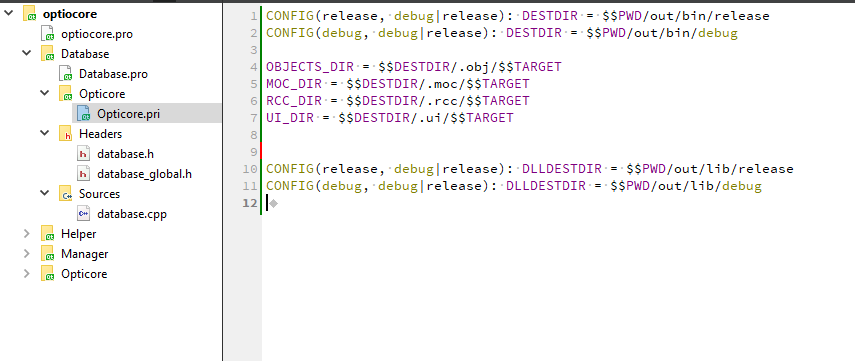
                        0_1566301205772_b785fb21-3135-46de-b79a-905716e328e4-image.png

                        i need to move .lib files generated by the subprojects to $$PWD/out/lib/debug
                        but itt move all the other files too.

                        J.HilkJ 1 Reply Last reply
                        0
                        • G gregoryjithin

                          @sierdzio NO.
                          i just used Depends keyword.
                          0_1566301126625_5a141585-1f8f-4dc4-8e65-cbec3b1bcaa6-image.png
                          here is my pro file.

                          and I used pri file to configure the build
                          here is it.
                          0_1566301205772_b785fb21-3135-46de-b79a-905716e328e4-image.png

                          i need to move .lib files generated by the subprojects to $$PWD/out/lib/debug
                          but itt move all the other files too.

                          J.HilkJ Offline
                          J.HilkJ Offline
                          J.Hilk
                          Moderators
                          wrote on last edited by
                          #15

                          @gregoryjithin
                          that's actually exactly for what I use the post link function, that I posted earlier, use for

                          DESTDIR = plugins
                          
                          # copies the given files to the destination directory
                          defineTest(copyToDestDir) {
                              files = $$1
                              dir = $$2
                              # replace slashes in destination path for Windows
                              win32:dir ~= s,/,\\,g
                          
                              for(file, files) {
                                  # replace slashes in source path for Windows
                                  win32:file ~= s,/,\\,g
                          
                                  QMAKE_POST_LINK += $$QMAKE_COPY_DIR $$shell_quote($$file) $$shell_quote($$dir) $$escape_expand(\\n\\t)
                              }
                          
                              export(QMAKE_POST_LINK)
                          }
                          
                          copyToDestDir(plugins, ../../MainApplication/deployment/plugins/subProject1)
                          

                          Be aware of the Qt Code of Conduct, when posting : https://forum.qt.io/topic/113070/qt-code-of-conduct


                          Q: What's that?
                          A: It's blue light.
                          Q: What does it do?
                          A: It turns blue.

                          G 1 Reply Last reply
                          1
                          • J.HilkJ J.Hilk

                            @gregoryjithin
                            that's actually exactly for what I use the post link function, that I posted earlier, use for

                            DESTDIR = plugins
                            
                            # copies the given files to the destination directory
                            defineTest(copyToDestDir) {
                                files = $$1
                                dir = $$2
                                # replace slashes in destination path for Windows
                                win32:dir ~= s,/,\\,g
                            
                                for(file, files) {
                                    # replace slashes in source path for Windows
                                    win32:file ~= s,/,\\,g
                            
                                    QMAKE_POST_LINK += $$QMAKE_COPY_DIR $$shell_quote($$file) $$shell_quote($$dir) $$escape_expand(\\n\\t)
                                }
                            
                                export(QMAKE_POST_LINK)
                            }
                            
                            copyToDestDir(plugins, ../../MainApplication/deployment/plugins/subProject1)
                            
                            G Offline
                            G Offline
                            gregoryjithin
                            wrote on last edited by gregoryjithin
                            #16

                            @j-hilk
                            where do i put this function
                            also I am using windows .
                            what you mean by

                            replace slashes in destination path for Windows

                            this. I didn't understand.
                            can you please explain

                            J.HilkJ 1 Reply Last reply
                            0
                            • G gregoryjithin

                              @j-hilk
                              where do i put this function
                              also I am using windows .
                              what you mean by

                              replace slashes in destination path for Windows

                              this. I didn't understand.
                              can you please explain

                              J.HilkJ Offline
                              J.HilkJ Offline
                              J.Hilk
                              Moderators
                              wrote on last edited by
                              #17

                              @gregoryjithin
                              it would go inside the project file of your sub projects (once in each, where you want top copy the dlls away from)

                              QMake uses / as separator that, that won't work for the native copy call on windows, so win32:file ~= s,/,\\,g automatically replaces those, if windows is detected as the target OS


                              Be aware of the Qt Code of Conduct, when posting : https://forum.qt.io/topic/113070/qt-code-of-conduct


                              Q: What's that?
                              A: It's blue light.
                              Q: What does it do?
                              A: It turns blue.

                              1 Reply Last reply
                              1
                              • G Offline
                                G Offline
                                gregoryjithin
                                wrote on last edited by gregoryjithin
                                #18

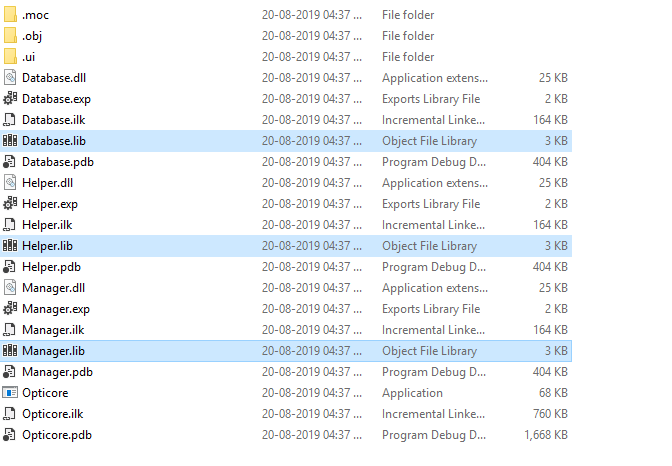
                                it copied all files
                                0_1566302874195_3bc724cc-8a85-4d68-9163-04c6bf60f178-image.png
                                but i need only the highlighted lib files.
                                any way to filter them.

                                J.HilkJ 1 Reply Last reply
                                0
                                • G gregoryjithin

                                  it copied all files
                                  0_1566302874195_3bc724cc-8a85-4d68-9163-04c6bf60f178-image.png
                                  but i need only the highlighted lib files.
                                  any way to filter them.

                                  J.HilkJ Offline
                                  J.HilkJ Offline
                                  J.Hilk
                                  Moderators
                                  wrote on last edited by
                                  #19

                                  @gregoryjithin
                                  I'm unsure,

                                  qmake has a contains check
                                  https://doc.qt.io/qt-5/qmake-test-function-reference.html#contains-variablename-value

                                  so maybe :

                                  for(file, files) {
                                          # replace slashes in source path for Windows
                                          win32:file ~= s,/,\\,g
                                  
                                          contains(file, lib){
                                              QMAKE_POST_LINK += $$QMAKE_COPY_DIR $$shell_quote($$file) $$shell_quote($$dir) $$escape_expand(\\n\\t)
                                          }
                                      }
                                  

                                  untested however


                                  Be aware of the Qt Code of Conduct, when posting : https://forum.qt.io/topic/113070/qt-code-of-conduct


                                  Q: What's that?
                                  A: It's blue light.
                                  Q: What does it do?
                                  A: It turns blue.

                                  1 Reply Last reply
                                  1
                                  • G Offline
                                    G Offline
                                    gregoryjithin
                                    wrote on last edited by
                                    #20

                                    @j-hilk said in SubProjects:

                                    contains(file, lib){

                                    No luck bro.
                                    It copy all the files and remove directories but no filtering
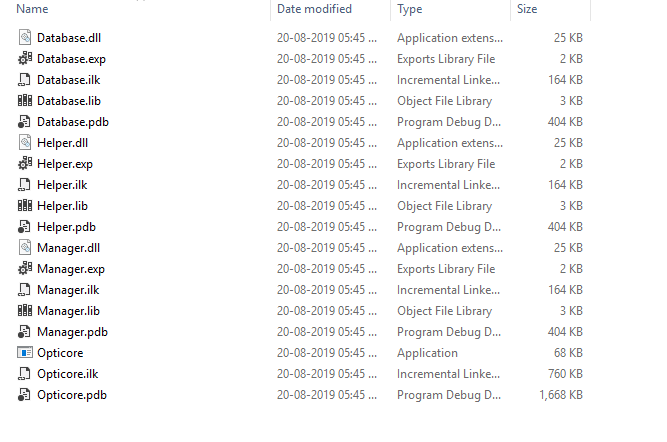
                                    0_1566303442884_eb773af4-624c-4747-a362-6518867735ae-image.png

                                    G 1 Reply Last reply
                                    0
                                    • G gregoryjithin

                                      @j-hilk said in SubProjects:

                                      contains(file, lib){

                                      No luck bro.
                                      It copy all the files and remove directories but no filtering
                                      0_1566303442884_eb773af4-624c-4747-a362-6518867735ae-image.png

                                      G Offline
                                      G Offline
                                      gregoryjithin
                                      wrote on last edited by
                                      #21

                                      @gregoryjithin said in SubProjects:

                                      @j-hilk said in SubProjects:

                                      contains(file, lib){

                                      No luck bro.
                                      It copy all the files and remove directories but no filtering
                                      0_1566303442884_eb773af4-624c-4747-a362-6518867735ae-image.png

                                      any one can help me ..................?

                                      J.HilkJ 1 Reply Last reply
                                      0
                                      • G gregoryjithin

                                        @gregoryjithin said in SubProjects:

                                        @j-hilk said in SubProjects:

                                        contains(file, lib){

                                        No luck bro.
                                        It copy all the files and remove directories but no filtering
                                        0_1566303442884_eb773af4-624c-4747-a362-6518867735ae-image.png

                                        any one can help me ..................?

                                        J.HilkJ Offline
                                        J.HilkJ Offline
                                        J.Hilk
                                        Moderators
                                        wrote on last edited by
                                        #22

                                        @gregoryjithin
                                        I'm afraid, I'm out of my depths, I use it as is. Took it over from a coworker 😞

                                        Maybe someone else can help you more


                                        Be aware of the Qt Code of Conduct, when posting : https://forum.qt.io/topic/113070/qt-code-of-conduct


                                        Q: What's that?
                                        A: It's blue light.
                                        Q: What does it do?
                                        A: It turns blue.

                                        G 1 Reply Last reply
                                        0
                                        • J.HilkJ J.Hilk

                                          @gregoryjithin
                                          I'm afraid, I'm out of my depths, I use it as is. Took it over from a coworker 😞

                                          Maybe someone else can help you more

                                          G Offline
                                          G Offline
                                          gregoryjithin
                                          wrote on last edited by gregoryjithin
                                          #23

                                          @j-hilk said in SubProjects:

                                          @gregoryjithin
                                          I'm afraid, I'm out of my depths, I use it as is. Took it over from a coworker 😞

                                          Maybe someone else can help you more

                                          anyway thanks for your response 😇

                                          1 Reply Last reply
                                          0

                                          • Login

                                          • Login or register to search.
                                          • First post
                                            Last post
                                          0
                                          • Categories
                                          • Recent
                                          • Tags
                                          • Popular
                                          • Users
                                          • Groups
                                          • Search
                                          • Get Qt Extensions
                                          • Unsolved