Skip to content
  • Categories
  • Recent
  • Tags
  • Popular
  • Users
  • Groups
  • Search
  • Get Qt Extensions
  • Unsolved
Collapse
Brand Logo
  1. Home
  2. Qt Development
  3. General and Desktop
  4. Focus ring around tree/table views?
Forum Updated to NodeBB v4.3 + New Features

Focus ring around tree/table views?

Scheduled Pinned Locked Moved Unsolved General and Desktop
33 Posts 5 Posters 10.7k Views 3 Watching
  • Oldest to Newest
  • Newest to Oldest
  • Most Votes
Reply
  • Reply as topic
Log in to reply
This topic has been deleted. Only users with topic management privileges can see it.
  • D davecotter

    @j-hilk well, it turns out not to have mattered. With 1 OR 2 colons, you get the same result, one pixel wide border, not the number of pixels you specify. Even your example, specifying 4px, it only shows a 1px border. but thanks for the test!

    J.HilkJ Offline
    J.HilkJ Offline
    J.Hilk
    Moderators
    wrote on last edited by
    #14

    @davecotter you're welcome 😉

    strange I can confirm that, but the pixel size used to make a difference 🤔


    Be aware of the Qt Code of Conduct, when posting : https://forum.qt.io/topic/113070/qt-code-of-conduct


    Q: What's that?
    A: It's blue light.
    Q: What does it do?
    A: It turns blue.

    1 Reply Last reply
    0
    • D Offline
      D Offline
      davecotter
      wrote on last edited by
      #15

      @mpergand said in Focus ring around tree/table views?:

      treeView->setAttribute(Qt::WA_MacShowFocusRect);

      note i tried this on the mac just to SEE it, and got exactly nothing. is there no way to accomplish this?

      again i ask: how does the text edit control (on mac) do it? that looks great!

      Pl45m4P M 2 Replies Last reply
      0
      • D davecotter

        @mpergand said in Focus ring around tree/table views?:

        treeView->setAttribute(Qt::WA_MacShowFocusRect);

        note i tried this on the mac just to SEE it, and got exactly nothing. is there no way to accomplish this?

        again i ask: how does the text edit control (on mac) do it? that looks great!

        Pl45m4P Offline
        Pl45m4P Offline
        Pl45m4
        wrote on last edited by
        #16

        @davecotter

        Qt::WA_MacShowFocusRect will create a QFocusFrame around the specific widget. If setting that flag doesnt work for you, you could try to build a QFocusFrame directly.

        https://doc.qt.io/archives/qt-4.8/qfocusframe.html


        If debugging is the process of removing software bugs, then programming must be the process of putting them in.

        ~E. W. Dijkstra

        1 Reply Last reply
        1
        • D davecotter

          @mpergand said in Focus ring around tree/table views?:

          treeView->setAttribute(Qt::WA_MacShowFocusRect);

          note i tried this on the mac just to SEE it, and got exactly nothing. is there no way to accomplish this?

          again i ask: how does the text edit control (on mac) do it? that looks great!

          M Offline
          M Offline
          mpergand
          wrote on last edited by
          #17

          @davecotter said in Focus ring around tree/table views?:

          @mpergand said in Focus ring around tree/table views?:

          treeView->setAttribute(Qt::WA_MacShowFocusRect);

          note i tried this on the mac just to SEE it, and got exactly nothing. is there no way to accomplish this?

          It works for me on MacOS 10.9, Qt 5.6
          QFocusFrame doesn't work on Mac on the config above,
          but works well on Linux (Ubuntu mate 18.04)

          1 Reply Last reply
          0
          • D Offline
            D Offline
            davecotter
            wrote on last edited by
            #18

            i have tried to use Qt::WA_MacShowFocusRect on mac and see nothing. can you show a screen shot of what you see?

            M 1 Reply Last reply
            0
            • D davecotter

              i have tried to use Qt::WA_MacShowFocusRect on mac and see nothing. can you show a screen shot of what you see?

              M Offline
              M Offline
              mpergand
              wrote on last edited by
              #19

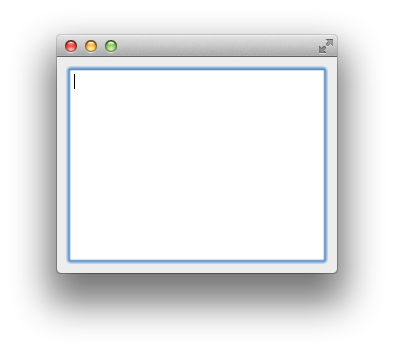
              @davecotter
              Focus-Ring.png

              edit=new QTextEdit;
              edit->setAttribute(Qt::WA_MacShowFocusRect);
              groupLayout->addWidget(edit);
              
              1 Reply Last reply
              0
              • D Offline
                D Offline
                davecotter
                wrote on last edited by
                #20

                sorry, i wasn't talking about a text edit widget. that already works without my having to do anything.

                i'm talking about putting a focus ring around a QTreeView and a QTableView.

                and in that case it only shows the ring when the view has focus right? i don't have to manage that part myself, right?

                M 1 Reply Last reply
                0
                • D davecotter

                  sorry, i wasn't talking about a text edit widget. that already works without my having to do anything.

                  i'm talking about putting a focus ring around a QTreeView and a QTableView.

                  and in that case it only shows the ring when the view has focus right? i don't have to manage that part myself, right?

                  M Offline
                  M Offline
                  mpergand
                  wrote on last edited by mpergand
                  #21

                  @davecotter
                  It's work with QTable/TreeView as well !
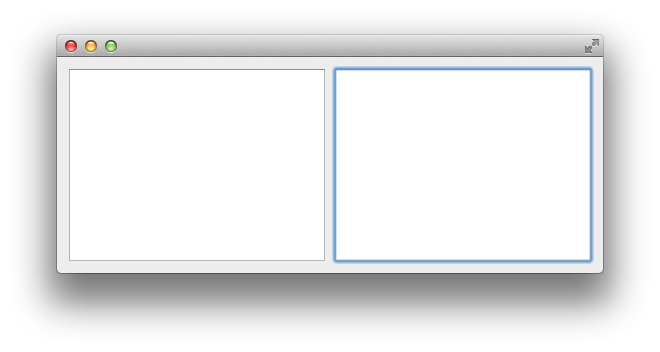
                  Focus-Ring2.png

                     QTreeView* edit=new QTreeView;
                     edit->setAttribute(Qt::WA_MacShowFocusRect);
                     groupLayout->addWidget(edit);
                     edit=new QTreeView;
                     edit->setAttribute(Qt::WA_MacShowFocusRect);
                     groupLayout->addWidget(edit);
                  

                  [EDIT]
                  For me, QTable and QTreeView have the focus ring by default (without setAttribute(Qt::WA_MacShowFocusRect);)
                  but for QTextEdit Qt::WA_MacShowFocusRect is needed.

                  1 Reply Last reply
                  2
                  • D Offline
                    D Offline
                    davecotter
                    wrote on last edited by
                    #22

                    huh, for me the text edit gets a ring automatically, and no matter what i do i can't get the tree or table view to get it.

                    note i'm setting it all up in Qt Designer, then programmatically adding the ring around tree/table views, to no avail.

                    M 1 Reply Last reply
                    0
                    • D davecotter

                      huh, for me the text edit gets a ring automatically, and no matter what i do i can't get the tree or table view to get it.

                      note i'm setting it all up in Qt Designer, then programmatically adding the ring around tree/table views, to no avail.

                      M Offline
                      M Offline
                      mpergand
                      wrote on last edited by mpergand
                      #23

                      @davecotter said in Focus ring around tree/table views?:

                      note i'm setting it all up in Qt Designer, then programmatically adding the ring around tree/table views, to no avail.

                      Check if the focus policy is not set to NoFocus.
                      On the code above, If I add :

                      edit->setFocusPolicy(Qt::NoFocus);
                      

                      Obviously the focus ring doesn't appear anymore.

                      1 Reply Last reply
                      0
                      • D Offline
                        D Offline
                        davecotter
                        wrote on last edited by
                        #24

                        Yes the views default to having "strongFocus". I have recreated the minimal project, which also does not show focus rings even with all the code correct as specified above.

                        If anyone has a couple free minutes, please download and run this project, and tell me what's wrong?

                        1 Reply Last reply
                        0
                        • M Offline
                          M Offline
                          mpergand
                          wrote on last edited by
                          #25

                          Your project works as expected for me.
                          But I can't test above Qt 5.8 and MacOs 10.9.
                          Maybe a bug in more recent Qt versions ?

                          1 Reply Last reply
                          0
                          • D Offline
                            D Offline
                            davecotter
                            wrote on last edited by davecotter
                            #26

                            well i am on macOS 10.14 and Qt 5.13.0

                            1 Reply Last reply
                            0
                            • D Offline
                              D Offline
                              davecotter
                              wrote on last edited by
                              #27

                              @mpergand said in Focus ring around tree/table views?:

                              WA_MacShowFocusRect

                              can anyone try on latest Qt?

                              1 Reply Last reply
                              0
                              • D Offline
                                D Offline
                                davecotter
                                wrote on last edited by
                                #28

                                @mpergand or anyone, can you reproduce the problem? that the focus ring is 1px no matter what? if you see CORRECT results (nice ring like around the search box) can you screen shot that and tell me what version of Qt you're using?

                                i still can not for the life of me get this ring to look good

                                M 1 Reply Last reply
                                0
                                • D Offline
                                  D Offline
                                  davecotter
                                  wrote on last edited by
                                  #29

                                  if i embed the views inside a QFrame, with 3px borders, then draw the focus on the QFrames, that looks good. i can tab between all 3 items and the borders look good (if the wrong color).

                                  but that leaves the wrong QObject with the focus. i need the tree/table views to have actual focus.

                                  soi try to do this:

                                  treeFrame->setFocusProxy(treeView);
                                  tableFrame->setFocusProxy(tableView);

                                  then the edit text and tree frame look good, but the table view is back to looking all wrong again (1 pixel border)

                                  good:
                                  Screen Shot 2020-06-05 at 9.32.55 PM.png

                                  good:
                                  Screen Shot 2020-06-05 at 9.33.00 PM.png

                                  bad:
                                  Screen Shot 2020-06-05 at 9.33.06 PM.png

                                  why 1 pixel? the code is correct.

                                  I've a new minimal project if some kind soul (who likes karaoke?) could take a look?
                                  http://kjams.com/downloads/qfocustest.zip

                                  thanks

                                  -dave

                                  JonBJ 1 Reply Last reply
                                  1
                                  • D davecotter

                                    @mpergand or anyone, can you reproduce the problem? that the focus ring is 1px no matter what? if you see CORRECT results (nice ring like around the search box) can you screen shot that and tell me what version of Qt you're using?

                                    i still can not for the life of me get this ring to look good

                                    M Offline
                                    M Offline
                                    mpergand
                                    wrote on last edited by
                                    #30

                                    @davecotter said in Focus ring around tree/table views?:

                                    @mpergand or anyone, can you reproduce the problem? that the focus ring is 1px no matter what? if you see CORRECT results (nice ring like around the search box) can you screen shot that and tell me what version of Qt you're using?

                                    i still can not for the life of me get this ring to look good

                                    I'm currently proceeding to a major update of my developement system.
                                    I hope looking at your issue in a few days.

                                    1 Reply Last reply
                                    1
                                    • D davecotter

                                      if i embed the views inside a QFrame, with 3px borders, then draw the focus on the QFrames, that looks good. i can tab between all 3 items and the borders look good (if the wrong color).

                                      but that leaves the wrong QObject with the focus. i need the tree/table views to have actual focus.

                                      soi try to do this:

                                      treeFrame->setFocusProxy(treeView);
                                      tableFrame->setFocusProxy(tableView);

                                      then the edit text and tree frame look good, but the table view is back to looking all wrong again (1 pixel border)

                                      good:
                                      Screen Shot 2020-06-05 at 9.32.55 PM.png

                                      good:
                                      Screen Shot 2020-06-05 at 9.33.00 PM.png

                                      bad:
                                      Screen Shot 2020-06-05 at 9.33.06 PM.png

                                      why 1 pixel? the code is correct.

                                      I've a new minimal project if some kind soul (who likes karaoke?) could take a look?
                                      http://kjams.com/downloads/qfocustest.zip

                                      thanks

                                      -dave

                                      JonBJ Online
                                      JonBJ Online
                                      JonB
                                      wrote on last edited by
                                      #31

                                      @davecotter
                                      Please take this lightheartedly, but she's spelt Eleanor Rigby :)
                                      Probably not the cause of your issue, but it does imply you are typing these in by hand!?

                                      1 Reply Last reply
                                      0
                                      • D Offline
                                        D Offline
                                        davecotter
                                        wrote on last edited by davecotter
                                        #32

                                        does it seem strange that every API for "focus rings" and even one i hacked together, doesn't work?

                                        • setting a frame using styles DOES NOT WORK
                                        • using the explicit API QFocusFrame DOES NOT WORK
                                        • using the mac-only "Qt::WA_MacShowFocusRect" attribute DOES NOT WORK

                                        or: i have not been able to understand the doc well enough to cause any of them to work

                                        1 Reply Last reply
                                        0
                                        • D Offline
                                          D Offline
                                          davecotter
                                          wrote on last edited by
                                          #33

                                          I've updated the example project so you can test six different implementations of "focus ring", none of which are 100% successful.

                                          The only one that comes close is kTest_PARENT_STYLE, and only on mac. On windows i can't for the LIFE of me make ANY focus ring bigger than 1 pixel, which is just too small. I really need 3 pixels in order to keep the UI appearing the same as the previous (10 year old, 32bit) app.

                                          -dave

                                          1 Reply Last reply
                                          0

                                          • Login

                                          • Login or register to search.
                                          • First post
                                            Last post
                                          0
                                          • Categories
                                          • Recent
                                          • Tags
                                          • Popular
                                          • Users
                                          • Groups
                                          • Search
                                          • Get Qt Extensions
                                          • Unsolved