
Skip to content
  • Categories
  • Recent
  • Tags
  • Popular
  • Users
  • Groups
  • Search
  • Get Qt Extensions
  • Unsolved
Collapse
Brand Logo
  1. Home
  2. Qt Development
  3. General and Desktop
  4. Icon in QComboBox is not visible

Icon in QComboBox is not visible

Scheduled Pinned Locked Moved Unsolved General and Desktop
11 Posts 4 Posters 3.3k Views 3 Watching
  • Oldest to Newest
  • Newest to Oldest
  • Most Votes
Reply
  • Reply as topic
Log in to reply
This topic has been deleted. Only users with topic management privileges can see it.
  • SGaistS Offline
    SGaistS Offline
    SGaist
    Lifetime Qt Champion
    wrote on last edited by
    #2

    Hi,

    How are you setting up that combobox ?
    Where does these images come from ?

    Interested in AI ? www.idiap.ch
    Please read the Qt Code of Conduct - https://forum.qt.io/topic/113070/qt-code-of-conduct

    krzysieklfcK 1 Reply Last reply
    0
    • SGaistS SGaist

      Hi,

      How are you setting up that combobox ?
      Where does these images come from ?

      krzysieklfcK Offline
      krzysieklfcK Offline
      krzysieklfc
      wrote on last edited by
      #3

      @SGaist Hello,

      I have a QTableView, which takes its data from proxied QFileSystemModel.
      Once a cell is selected, I add an entry with the icon from the selected row and current text from this combobox.

      void addItem(const QModelIndex& index)
      {
      	auto firstIndex = model->index(index.row(), 0);
      	auto index_val = model->data(firstIndex);
      
      	auto icon_val = model->data(firstIndex, QFileSystemModel::FileIconRole);
      	auto name = comboBox->currentText();
      
      	comboBox->addItem(icon_val.value<QIcon>(), name);
      }
      
      connect(tableView, &QTableView::doubleClicked,
            [](const QModelIndex& const index) {
                  addItem(index);
      });
      
      1 Reply Last reply
      0
      • SGaistS Offline
        SGaistS Offline
        SGaist
        Lifetime Qt Champion
        wrote on last edited by
        #4

        I think you'll have to implement that yourself.

        See the code proposed in this stack overflow answer to get started.

        Interested in AI ? www.idiap.ch
        Please read the Qt Code of Conduct - https://forum.qt.io/topic/113070/qt-code-of-conduct

        krzysieklfcK 1 Reply Last reply
        3
        • SGaistS SGaist

          I think you'll have to implement that yourself.

          See the code proposed in this stack overflow answer to get started.

          krzysieklfcK Offline
          krzysieklfcK Offline
          krzysieklfc
          wrote on last edited by
          #5

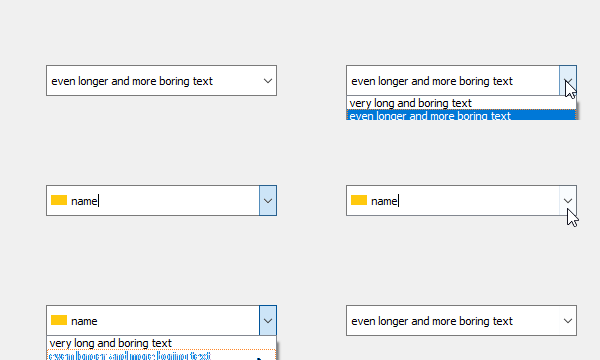
          @SGaist Thanks. This solution seems to work pretty nicely. I have set QComboBox to my custom QLineEdit and styled it to appear transparent.

          The only thing that is bothering me now is that QComboBox automatically offsets it's lineedit as soon as an icon entry is added.

          imgur

          What can I do about that?

          1 Reply Last reply
          0
          • mrjjM Offline
            mrjjM Offline
            mrjj
            Lifetime Qt Champion
            wrote on last edited by
            #6

            Hi
            Do you set the LineEditIcon icon first as true empty icon ? ( so it dont have 2)

            ui->comboBox->setLineEdit( new LineEditIcon(QIcon(), this) );
            

            It looks like you have a transparent image in front so maybe you gave it a default size empty icon and not just invalid one?
            alt text

            krzysieklfcK 1 Reply Last reply
            1
            • mrjjM mrjj

              Hi
              Do you set the LineEditIcon icon first as true empty icon ? ( so it dont have 2)

              ui->comboBox->setLineEdit( new LineEditIcon(QIcon(), this) );
              

              It looks like you have a transparent image in front so maybe you gave it a default size empty icon and not just invalid one?

              alt text

              krzysieklfcK Offline
              krzysieklfcK Offline
              krzysieklfc
              wrote on last edited by
              #7

              @mrjj Hello,

              Here's my code. I can't figure out what I'm missing. I would be grateful if you could take a look.

              myWidget::myWidget(QWidget* parent) :
              	lineEdit{ new LineEditIcon{QIcon(), this} }
              
              {
              	ui->setupUi(this);
              	ui->comboBox_2->setLineEdit(lineEdit);
              	ui->comboBox_2->setInsertPolicy(QComboBox::NoInsert);
              	
              	...
              	
              	connect(tableView, &QTableView::doubleClicked,
              		this, &myWidget::addOrUpdateItem);
              	
              	connect(ui->comboBox_2, QOverload<int>::of(&QComboBox::currentIndexChanged),
              		this, &myWidget::changeIcon);
              }
              
              void myWidget::addOrUpdateItem(const QModelIndex& index)
              {
              	auto firstIndex = model->index(index.row(), 0);
              	auto index_val = model->data(firstIndex);
              	
              	auto icon_val = model->data(firstIndex, QFileSystemModel::FileIconRole);
              	auto name = comboBox->currentText();
              	
              	...
              	
              	if (something) // add new item
              	{
              		ui->comboBox_2->addItem(icon_val.value<QIcon>(), name);
              		lineEdit->setIcon(icon_val.value<QIcon>());
              	}
              	else // change current item
              	{
              		auto current_index = ui->comboBox_2->currentIndex();
              		ui->comboBox_2->setItemIcon(current_index, icon_val.value<QIcon>());
              		lineEdit->setIcon(icon_val.value<QIcon>());
              		
              	}
              }
              
              void myWidget::changeIcon(int index)
              {
              	auto icon = ui->comboBox_2->itemIcon(index);
              	lineEdit->setIcon(icon);
              }
              
              
              class LineEditIcon : public QLineEdit
              {
              	Q_OBJECT
              
              public:
              	LineEditIcon(const QIcon icon, QWidget* parent = nullptr)
              	{
              		setIcon(icon);
              		setPlaceholderText("HDRI");
              		setStyleSheet("font-size: 11pt;"
              			"background-color: transparent;"
              			"border-color: transparent;");
              		setFrame(false);
              	};
              	
              	~LineEditIcon(){};
              	
              	void setIcon(QIcon icon)
              	{
              		m_icon = icon;
              		if (m_icon.isNull())
              			setTextMargins(1, 1, 1, 1);
              		else
              			setTextMargins(36, 1, 1, 1);
              	};
              
              protected:
              	virtual void paintEvent(QPaintEvent* event)
              	{
              		QLineEdit::paintEvent(event);
              		
              		if (!m_icon.isNull()) {
              			QPainter painter(this);
              			auto pxm = m_icon.pixmap(height() * 2 - 3, height() - 6);
              			painter.drawPixmap(0, 3, pxm);	
              		}
              	};
              
              private:
              	QIcon m_icon;
              };
              

              0_1563991889015_combobox.jpg
              0_1563991591424_combobox_icon2.gif

              1 Reply Last reply
              0
              • SGaistS Offline
                SGaistS Offline
                SGaist
                Lifetime Qt Champion
                wrote on last edited by
                #8

                What OS are you on ?

                Interested in AI ? www.idiap.ch
                Please read the Qt Code of Conduct - https://forum.qt.io/topic/113070/qt-code-of-conduct

                krzysieklfcK 1 Reply Last reply
                1
                • SGaistS SGaist

                  What OS are you on ?

                  krzysieklfcK Offline
                  krzysieklfcK Offline
                  krzysieklfc
                  wrote on last edited by
                  #9

                  @SGaist Windows 10

                  1 Reply Last reply
                  1
                  • krzysieklfcK Offline
                    krzysieklfcK Offline
                    krzysieklfc
                    wrote on last edited by
                    #10

                    I managed to solve the problem with the following:

                    ui->comboBox->setIconSize(QSize{0, 0});
                    ui->comboBox_2->setLineEdit(lineEditIcon);
                    ui->comboBox_2->view()->setIconSize(QSize{ 48,24 });
                    

                    then I can simply call:

                    combobox->addItem(icon, name);
                    lineEditIcon->setIcon(icon);
                    
                    1 Reply Last reply
                    0
                    • krzysieklfcK krzysieklfc

                      I have added an entry to the editable QComboBox, but it's icon is not visible in the linedit field.

                      auto icon_val = model->data(firstIndex, QFileSystemModel::FileIconRole);
                      comboBox->addItem(icon_val.value<QIcon>(), name);

                      

                      Imgur

                      C Offline
                      C Offline
                      Caleb1527
                      wrote on last edited by Caleb1527
                      #11

                      @krzysieklfc said in Icon in QComboBox is not visible:

                      I have added an entry to the editable QComboBox, but it's icon is not visible in the linedit field. TelltheBell

                      auto icon_val = model->data(firstIndex, QFileSystemModel::FileIconRole);
                      comboBox->addItem(icon_val.value<QIcon>(), name);
                      

                      Imgur

                      Same issue ... except I could not get it right in any dimensions.

                      1 Reply Last reply
                      0

                      • Login

                      • Login or register to search.
                      • First post
                        Last post
                      0
                      • Categories
                      • Recent
                      • Tags
                      • Popular
                      • Users
                      • Groups
                      • Search
                      • Get Qt Extensions
                      • Unsolved