
Skip to content
  • Categories
  • Recent
  • Tags
  • Popular
  • Users
  • Groups
  • Search
  • Get Qt Extensions
  • Unsolved
Collapse
Brand Logo
  1. Home
  2. Qt Development
  3. General and Desktop
  4. How to reset the time on x-axis of a graph?
Qt 6.11 is out! See what's new in the release blog

How to reset the time on x-axis of a graph?

Scheduled Pinned Locked Moved Solved General and Desktop
20 Posts 4 Posters 4.1k Views 2 Watching
  • Oldest to Newest
  • Newest to Oldest
  • Most Votes
Reply
  • Reply as topic
Log in to reply
This topic has been deleted. Only users with topic management privileges can see it.
  • VRoninV Offline
    VRoninV Offline
    VRonin
    wrote on last edited by
    #10

    What is not working?

    "La mort n'est rien, mais vivre vaincu et sans gloire, c'est mourir tous les jours"
    ~Napoleon Bonaparte

    On a crusade to banish setIndexWidget() from the holy land of Qt

    halimaH 1 Reply Last reply
    0
    • VRoninV VRonin

      What is not working?

      halimaH Offline
      halimaH Offline
      halima
      wrote on last edited by
      #11

      @vronin My code note working

      jsulmJ 1 Reply Last reply
      0
      • halimaH halima

        @vronin My code note working

        jsulmJ Offline
        jsulmJ Offline
        jsulm
        Lifetime Qt Champion
        wrote on last edited by
        #12

        @halima said in How to reset the time on x-axis of a graph?:

        My code note working

        That's clear.
        What EXACTLY is not working?

        https://forum.qt.io/topic/113070/qt-code-of-conduct

        halimaH 1 Reply Last reply
        0
        • jsulmJ jsulm

          @halima said in How to reset the time on x-axis of a graph?:

          My code note working

          That's clear.
          What EXACTLY is not working?

          halimaH Offline
          halimaH Offline
          halima
          wrote on last edited by halima
          #13

          @jsulm The max of XAxis is always 09:33:18 it's not moving when a new Data added.
          This is my current code : (this function is called with a Timer every 200ms)

           QVector<QPointF> m_buffer =  chart_1->series()[0].serie->pointsVector();//currentSerie.serie->pointsVector() ;
              if(m_buffer.length() > 2000){
                  m_buffer.remove(0);
              }
          
              ElapsedTimer .start(); //global variable
              chart_1->chart()->axes(Qt::Horizontal).back()->setMin(ElapsedTimer .elapsed());
              chart_1->chart()->axes(Qt::Horizontal).back()->setMax(ElapsedTimer .elapsed()+10);
          
              m_buffer.append(QPointF(QDateTime::currentDateTime().toMSecsSinceEpoch(), qrand() % ((10 + 1) - 1) + 1));
              chart_1->series()[0].serie->replace(m_buffer);
          
              QApplication::processEvents();
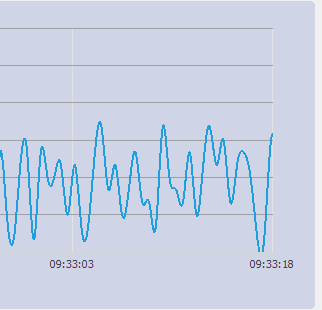
          

          0_1564558471618_56a63da9-23b5-43fd-8424-c1285ffd5185-image.png

          1 Reply Last reply
          0
          • halimaH halima

            @VRonin I have the same problem, I'm trying to use QElapsedTimer with QChart, can you help me to do that please. This is my code :

            classe.cpp

            void MaClasse::updateChart(){
                 ElapsedTimer .start(); //global variable
                 chart_1->chart()->axes(Qt::Horizontal).back()->setMin(ElapsedTimer .elapsed());
                chart_1->chart()->axes(Qt::Horizontal).back()->setMax(ElapsedTimer .elapsed()+10);
             chart_1->series()[0].serie->replace(buffer_0);
             QApplication::processEvents();
            }
            
            jsulmJ Offline
            jsulmJ Offline
            jsulm
            Lifetime Qt Champion
            wrote on last edited by
            #14

            @halima said in How to reset the time on x-axis of a graph?:

            void MaClasse::updateChart(){
            ElapsedTimer .start();

            Why do you start the timer here?!

            https://forum.qt.io/topic/113070/qt-code-of-conduct

            1 Reply Last reply
            1
            • halimaH Offline
              halimaH Offline
              halima
              wrote on last edited by halima
              #15

              I'm using two timers :

              //first timer to execute slot 
              QTimer *timer 
               connect(timer,&QTimer::timeout,this,&CL_SubWin_Chart::updateChart);
              timer->start(200);
              //second timer to update XAxis
              void MaClasse::updateChart(){
               QElapsedTimer ElapsedTimer;
              ElapsedTimer .start();
              
              chart_1->chart()->axes(Qt::Horizontal).back()->setMin(ElapsedTimer .elapsed());
              chart_1->chart()->axes(Qt::Horizontal).back()->setMax(ElapsedTimer .elapsed()+10);
              ...
              }
              

              But the xAxis not move!

              jsulmJ 1 Reply Last reply
              0
              • halimaH halima

                I'm using two timers :

                //first timer to execute slot 
                QTimer *timer 
                 connect(timer,&QTimer::timeout,this,&CL_SubWin_Chart::updateChart);
                timer->start(200);
                //second timer to update XAxis
                void MaClasse::updateChart(){
                 QElapsedTimer ElapsedTimer;
                ElapsedTimer .start();
                
                chart_1->chart()->axes(Qt::Horizontal).back()->setMin(ElapsedTimer .elapsed());
                chart_1->chart()->axes(Qt::Horizontal).back()->setMax(ElapsedTimer .elapsed()+10);
                ...
                }
                

                But the xAxis not move!

                jsulmJ Offline
                jsulmJ Offline
                jsulm
                Lifetime Qt Champion
                wrote on last edited by
                #16

                @halima But why do you need this ElapsedTimer which you start inside updateChart()?
                You will always get more or less same value from elapsed() I think.

                https://forum.qt.io/topic/113070/qt-code-of-conduct

                halimaH 1 Reply Last reply
                1
                • jsulmJ jsulm

                  @halima But why do you need this ElapsedTimer which you start inside updateChart()?
                  You will always get more or less same value from elapsed() I think.

                  halimaH Offline
                  halimaH Offline
                  halima
                  wrote on last edited by halima
                  #17

                  @jsulm you're right it works without this timer but I do this to update xAxis values because I need to have a real time ploting .

                  The chart serie start like this :
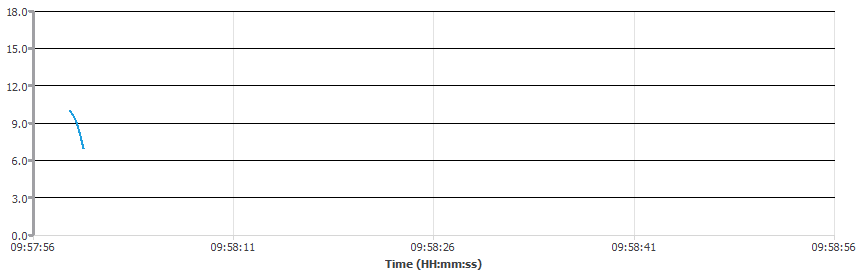
                  0_1564559898602_430bcb87-96b0-4138-973d-2d55d598535f-image.png

                  The final Chart, New Data after09:58:56 is not displayed!
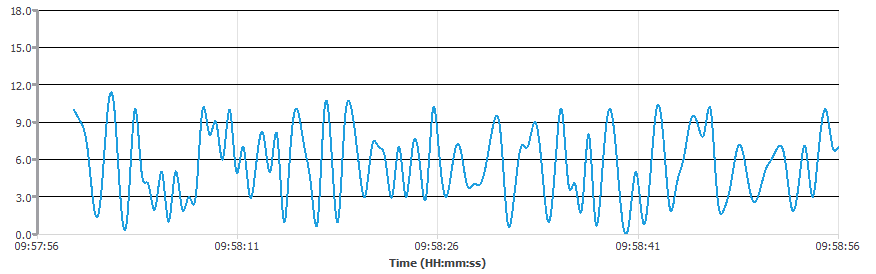
                  0_1564559974416_a6a036cc-e091-4933-aa4a-4951900e267e-image.png

                  jsulmJ 1 Reply Last reply
                  0
                  • halimaH halima

                    @jsulm you're right it works without this timer but I do this to update xAxis values because I need to have a real time ploting .

                    The chart serie start like this :
                    0_1564559898602_430bcb87-96b0-4138-973d-2d55d598535f-image.png

                    The final Chart, New Data after09:58:56 is not displayed!
                    0_1564559974416_a6a036cc-e091-4933-aa4a-4951900e267e-image.png

                    jsulmJ Offline
                    jsulmJ Offline
                    jsulm
                    Lifetime Qt Champion
                    wrote on last edited by
                    #18

                    @halima I suggest to move

                    QElapsedTimer ElapsedTimer;
                    

                    to your MaClasse (as member variable)
                    And this to the constructor:

                    ElapsedTimer .start();
                    

                    then it should work.

                    https://forum.qt.io/topic/113070/qt-code-of-conduct

                    halimaH 1 Reply Last reply
                    2
                    • jsulmJ jsulm

                      @halima I suggest to move

                      QElapsedTimer ElapsedTimer;
                      

                      to your MaClasse (as member variable)
                      And this to the constructor:

                      ElapsedTimer .start();
                      

                      then it should work.

                      halimaH Offline
                      halimaH Offline
                      halima
                      wrote on last edited by halima
                      #19

                      @jsulm i did this and it's still not working :(

                      //constructor
                      MaClasse::MaClasse(){   
                          ElapsedTimer .start();
                      }
                      
                      //slot
                      void void MaClasse::updateChart(){
                      
                          QVector<QPointF> m_buffer =  chart_1->series()[0].serie->pointsVector();
                          if(m_buffer.length() > 2000){       
                              m_buffer.remove(0);
                          }
                      
                          chart_1->chart()->axes(Qt::Horizontal).back()->setMin(ElapsedTimer .elapsed());
                          chart_1->chart()->axes(Qt::Horizontal).back()->setMax(ElapsedTimer .elapsed()+10);
                      
                          m_buffer.append(QPointF(QDateTime::currentDateTime().toMSecsSinceEpoch(), qrand() % ((10 + 1) - 1) + 1));
                          chart_1->series()[0].serie->replace(m_buffer);
                      
                          QApplication::processEvents();
                      }
                      
                      1 Reply Last reply
                      0
                      • halimaH Offline
                        halimaH Offline
                        halima
                        wrote on last edited by
                        #20

                        I solved the problem with doing this :

                         chart_1->chart()->axes(Qt::Horizontal).back()->setMin(QDateTime::fromMSecsSinceEpoch(m_buffer[0].x()));
                            chart_1->chart()->axes(Qt::Horizontal).back()->setMax(QDateTime::currentDateTime().addSecs(1));
                        

                        it works perfectly.
                        Thank you guys! @jsulm @VRonin

                        1 Reply Last reply
                        2

                        • Login

                        • Login or register to search.
                        • First post
                          Last post
                        0
                        • Categories
                        • Recent
                        • Tags
                        • Popular
                        • Users
                        • Groups
                        • Search
                        • Get Qt Extensions
                        • Unsolved