
Skip to content
  • Categories
  • Recent
  • Tags
  • Popular
  • Users
  • Groups
  • Search
  • Get Qt Extensions
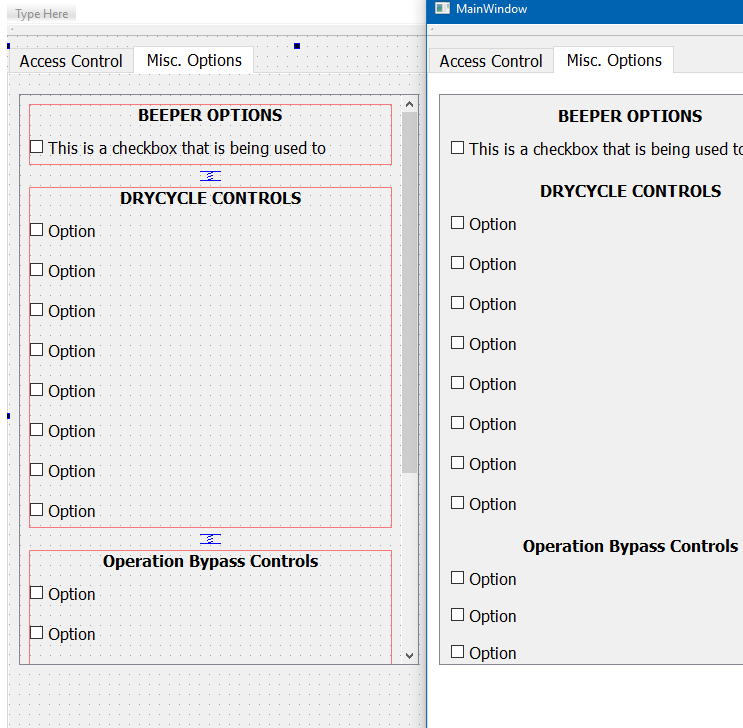
  • Unsolved
Collapse
Brand Logo
  1. Home
  2. Qt Development
  3. General and Desktop
  4. Form popping bug
Qt 6.11 is out! See what's new in the release blog

Form popping bug

Scheduled Pinned Locked Moved Solved General and Desktop
18 Posts 5 Posters 2.1k Views 3 Watching
  • Oldest to Newest
  • Newest to Oldest
  • Most Votes
Reply
  • Reply as topic
Log in to reply
This topic has been deleted. Only users with topic management privileges can see it.
  • O Offline
    O Offline
    Omni_Philm
    wrote on last edited by
    #2

    Basically, there is a small discrepancy between what is being displayed in the designer and what is actually displayed at runtime. Until a user clicks on a checkbox, then the form pops back into place

    1 Reply Last reply
    0
    • SGaistS Offline
      SGaistS Offline
      SGaist
      Lifetime Qt Champion
      wrote on last edited by
      #3

      Hi,

      A minimal compilable example would be nice indeed.

      Did you try with a more recent version of Qt ?
      Are you using the one provided by your distribution ?

      Interested in AI ? www.idiap.ch
      Please read the Qt Code of Conduct - https://forum.qt.io/topic/113070/qt-code-of-conduct

      O 1 Reply Last reply
      0
      • SGaistS SGaist

        Hi,

        A minimal compilable example would be nice indeed.

        Did you try with a more recent version of Qt ?
        Are you using the one provided by your distribution ?

        O Offline
        O Offline
        Omni_Philm
        wrote on last edited by
        #4

        @SGaist

        Ok, then I will create one for you and update the post accordingly.

        I am using the Qt version provided with the distro which is 5.9. The project requires that I use the one that goes along with the distro version.

        1 Reply Last reply
        0
        • SGaistS Offline
          SGaistS Offline
          SGaist
          Lifetime Qt Champion
          wrote on last edited by
          #5

          While I understand that requirement, testing with a more recent version will let you know whether your issue was solved in between.

          Interested in AI ? www.idiap.ch
          Please read the Qt Code of Conduct - https://forum.qt.io/topic/113070/qt-code-of-conduct

          1 Reply Last reply
          1
          • O Offline
            O Offline
            Omni_Philm
            wrote on last edited by
            #6

            @SGaist

            I have now finished the minimal example. This bug appears in Qt 5.9. Please let me know if you see it on your end.

            https://www.dropbox.com/s/9x5t50a0bj4i1ga/WidgetsPoppingBugDemo.zip?dl=0

            1 Reply Last reply
            0
            • SGaistS Offline
              SGaistS Offline
              SGaist
              Lifetime Qt Champion
              wrote on last edited by
              #7

              Hi,

              Can you post a picture of before and after ?

              I can't reproduce that on macOS with Qt 5.13

              Interested in AI ? www.idiap.ch
              Please read the Qt Code of Conduct - https://forum.qt.io/topic/113070/qt-code-of-conduct

              1 Reply Last reply
              1
              • O Omni_Philm

                Hello all,

                This might be a long short but I figure I would post here first.

                I have a bug on a form where when I click on a checkbox during runtime, the formatting of the form (such as placement of the checkboxes/textbox) "pop" into place. Then, the formatting of the form matches what I have in the designer. Before clicking on the checkbox, the widgets are placed similiarly to what is in the designer. The relative positions are about the same.

                I am not sure what could be causing this bug. I am currently working with Qt5.9 on linux mint latest version at the time of this writing.

                Has anyone ran into this issue before? I am thinking to create a demo program that behaves as to what I described above. Please let me know if this is needed and I can create it.

                Thank you.

                Edit:

                Here is a link to a zip file for the minimal example:

                https://www.dropbox.com/s/9x5t50a0bj4i1ga/WidgetsPoppingBugDemo.zip?dl=0

                Gojir4G Offline
                Gojir4G Offline
                Gojir4
                wrote on last edited by
                #8

                @Omni_Philm Is'nt the issue the stylesheet which you are applying on the checkbox having focus ?

                1 Reply Last reply
                0
                • mrjjM Offline
                  mrjjM Offline
                  mrjj
                  Lifetime Qt Champion
                  wrote on last edited by
                  #9

                  Hi
                  Seems perfectly normal in Qt5.13, wind 10
                  alt text

                  1 Reply Last reply
                  0
                  • O Offline
                    O Offline
                    Omni_Philm
                    wrote on last edited by Omni_Philm
                    #10

                    Hey Guys, sorry for the delayed response!

                    But here are the before/after pictures of what is occuring (a part of the text is cut off because it doesn't entirely fit on within the window of the QScrollArea but I think that you will be able to tell which picture has the full text and which doesn't)

                    Here is before:
                    0_1563216840616_beforeClick.png

                    Here is after:
                    0_1563216766465_afterClick.png

                    1 Reply Last reply
                    0
                    • SGaistS Offline
                      SGaistS Offline
                      SGaist
                      Lifetime Qt Champion
                      wrote on last edited by
                      #11

                      What version of Linux Minus are you running ?

                      Interested in AI ? www.idiap.ch
                      Please read the Qt Code of Conduct - https://forum.qt.io/topic/113070/qt-code-of-conduct

                      O 1 Reply Last reply
                      0
                      • SGaistS SGaist

                        What version of Linux Minus are you running ?

                        O Offline
                        O Offline
                        Omni_Philm
                        wrote on last edited by
                        #12

                        @SGaist

                        I am running Linux mint 19.1

                        1 Reply Last reply
                        0
                        • SGaistS Offline
                          SGaistS Offline
                          SGaist
                          Lifetime Qt Champion
                          wrote on last edited by
                          #13

                          What desktop environment are you running ?

                          Interested in AI ? www.idiap.ch
                          Please read the Qt Code of Conduct - https://forum.qt.io/topic/113070/qt-code-of-conduct

                          O 1 Reply Last reply
                          0
                          • SGaistS SGaist

                            What desktop environment are you running ?

                            O Offline
                            O Offline
                            Omni_Philm
                            wrote on last edited by
                            #14

                            @SGaist

                            I will give you the full specs. Currently developing on a laptop becuase I don't need that much horsepower:

                            Operating System: Linux Mint 19.1 Cinnamon

                            Cinnamon Version: 4.0.8

                            Linux Kernel: 4.15.0-20-generic

                            Processor: Intel Pentium P6100 @ 2.00 GHz

                            Memory: 5.6 GB

                            HDD: 300 GB

                            Intel Graphics card

                            1 Reply Last reply
                            0
                            • SGaistS Offline
                              SGaistS Offline
                              SGaist
                              Lifetime Qt Champion
                              wrote on last edited by
                              #15

                              Are you using the Qt version provided with Mint ?

                              Can you check with a more recent version ?

                              Interested in AI ? www.idiap.ch
                              Please read the Qt Code of Conduct - https://forum.qt.io/topic/113070/qt-code-of-conduct

                              O 1 Reply Last reply
                              0
                              • SGaistS SGaist

                                Are you using the Qt version provided with Mint ?

                                Can you check with a more recent version ?

                                O Offline
                                O Offline
                                Omni_Philm
                                wrote on last edited by
                                #16

                                @SGaist

                                I blieve that the answer to these questions are already in the forum.

                                I understand the purpose of utilizing a more recent version; however, as stated above project requirements dictate that I use Qt version 5.9 or earlier (down to 5.6). So there is no real point in checking if the bug is fixed in more recent versions.

                                Now, if the bug is fixed in more recent versions, then a bug report could have been filed. If this is the case, then I would still need to search google or the community for the specific bug. For now, I can assume that the bug was fixed in later versions. So far, I haven't found a bug report that matches the bug that I am observing. But I will keep checking.

                                From previous posts, yes I am using the version that comes with Mint.

                                jsulmJ 1 Reply Last reply
                                0
                                • O Omni_Philm

                                  @SGaist

                                  I blieve that the answer to these questions are already in the forum.

                                  I understand the purpose of utilizing a more recent version; however, as stated above project requirements dictate that I use Qt version 5.9 or earlier (down to 5.6). So there is no real point in checking if the bug is fixed in more recent versions.

                                  Now, if the bug is fixed in more recent versions, then a bug report could have been filed. If this is the case, then I would still need to search google or the community for the specific bug. For now, I can assume that the bug was fixed in later versions. So far, I haven't found a bug report that matches the bug that I am observing. But I will keep checking.

                                  From previous posts, yes I am using the version that comes with Mint.

                                  jsulmJ Online
                                  jsulmJ Online
                                  jsulm
                                  Lifetime Qt Champion
                                  wrote on last edited by jsulm
                                  #17

                                  @Omni_Philm said in Form popping bug:

                                  For now, I can assume that the bug was fixed in later versions

                                  Before searching you should make sure it really was fixed. This is why @SGaist suggested to test with more recent version. If the bug was not fixed you will waste your time searching for the bug report.
                                  If the bug isn't in Qt 5.13 and you can't find the bug report you can do binary search to find the Qt release were it was fixed:
                                  You take Qt between 5.9 and 5.13 check it. If the bug is not there you check between 5.9 and that version else between that version and 5.13. Continue until you found exact version. If you have exact version you can check which patches went into it - one of them (could be more than one actually) should be the fix.

                                  https://forum.qt.io/topic/113070/qt-code-of-conduct

                                  1 Reply Last reply
                                  0
                                  • O Offline
                                    O Offline
                                    Omni_Philm
                                    wrote on last edited by
                                    #18

                                    Hello all,

                                    Thank you for all of the help. I am pretty sure that I solved the bug. I applied the fix to a number of different forms on the interface and I haven't seen the bug pop up.

                                    In my scrollAreaWidgetContents container, I changed the layoutSizeContraint from the default value to SetMinandMaxSize.

                                    So far, this fix has worked for me. I will now mark this as solved.

                                    Again, thank you all for your help. I hope that this will help someone else after me.

                                    1 Reply Last reply
                                    0

                                    • Login

                                    • Login or register to search.
                                    • First post
                                      Last post
                                    0
                                    • Categories
                                    • Recent
                                    • Tags
                                    • Popular
                                    • Users
                                    • Groups
                                    • Search
                                    • Get Qt Extensions
                                    • Unsolved