Skip to content
  • Categories
  • Recent
  • Tags
  • Popular
  • Users
  • Groups
  • Search
  • Get Qt Extensions
  • Unsolved
Collapse
Brand Logo
  1. Home
  2. Qt Development
  3. General and Desktop
  4. QLabel snap to ScrollBar
Qt 6.11 is out! See what's new in the release blog

QLabel snap to ScrollBar

Scheduled Pinned Locked Moved Solved General and Desktop
47 Posts 4 Posters 9.6k Views 1 Watching
  • Oldest to Newest
  • Newest to Oldest
  • Most Votes
Reply
  • Reply as topic
Log in to reply
This topic has been deleted. Only users with topic management privileges can see it.
  • M Mikeeeeee

    @mrjj said in QLabel snap to ScrollBar:

    ImageViewer * MyImg = new ImageViewer(this);

    So I get the error: no matching constructor for initialization of 'ImageViewer'

    mrjjM Offline
    mrjjM Offline
    mrjj
    Lifetime Qt Champion
    wrote on last edited by
    #6

    @Mikeeeeee
    well its constructor is
    ImageViewer();
    so it doesn't take a parent. you change that so it can be imbedded into what you like.

    1 Reply Last reply
    0
    • M Offline
      M Offline
      Mikeeeeee
      wrote on last edited by
      #7

      How to set picture? Need a method to move from private to public?

      mrjjM 1 Reply Last reply
      0
      • M Mikeeeeee

        How to set picture? Need a method to move from private to public?

        mrjjM Offline
        mrjjM Offline
        mrjj
        Lifetime Qt Champion
        wrote on last edited by
        #8

        @Mikeeeeee
        hi
        yes you can make setImage public

        1 Reply Last reply
        0
        • M Offline
          M Offline
          Mikeeeeee
          wrote on last edited by Mikeeeeee
          #9

          I did so:

              QImage mapImage(":/Images/Images/mapMain.png");
              ImageViewer* myImageViewer  = new ImageViewer();
              myImageViewer->setImage(mapImage);
          

          I have a label: ui->labelMap
          How do I set to myImageViewer to ui->labelMap?

          mrjjM 1 Reply Last reply
          0
          • M Mikeeeeee

            I did so:

                QImage mapImage(":/Images/Images/mapMain.png");
                ImageViewer* myImageViewer  = new ImageViewer();
                myImageViewer->setImage(mapImage);
            

            I have a label: ui->labelMap
            How do I set to myImageViewer to ui->labelMap?

            mrjjM Offline
            mrjjM Offline
            mrjj
            Lifetime Qt Champion
            wrote on last edited by
            #10

            @Mikeeeeee
            You cannot put whole viewer into a Label.
            However, you can use myImageViewer instead of
            ui->labelMap

            1 Reply Last reply
            0
            • M Offline
              M Offline
              Mikeeeeee
              wrote on last edited by
              #11

              But how to use? How to do this?

              mrjjM 1 Reply Last reply
              0
              • M Mikeeeeee

                But how to use? How to do this?

                mrjjM Offline
                mrjjM Offline
                mrjj
                Lifetime Qt Champion
                wrote on last edited by
                #12

                @Mikeeeeee
                well do you have ui->labelMap in layout ?
                then just insert myImageViewer into that.

                1 Reply Last reply
                0
                • M Offline
                  M Offline
                  Mikeeeeee
                  wrote on last edited by
                  #13

                  How to do this? I created ui->label Map in the designer.

                  mrjjM 1 Reply Last reply
                  0
                  • M Mikeeeeee

                    How to do this? I created ui->label Map in the designer.

                    mrjjM Offline
                    mrjjM Offline
                    mrjj
                    Lifetime Qt Champion
                    wrote on last edited by
                    #14

                    @Mikeeeeee
                    but is it a layout?

                    1 Reply Last reply
                    0
                    • M Offline
                      M Offline
                      Mikeeeeee
                      wrote on last edited by
                      #15

                      I appent ui->label in the ui->gridLayout_2

                      1 Reply Last reply
                      0
                      • M Offline
                        M Offline
                        Mikeeeeee
                        wrote on last edited by
                        #16

                        Also I have an empty ui->verticalLayout

                        1 Reply Last reply
                        0
                        • mrjjM Offline
                          mrjjM Offline
                          mrjj
                          Lifetime Qt Champion
                          wrote on last edited by
                          #17

                          @Mikeeeeee said in QLabel snap to ScrollBar:

                          ui->gridLayout_2

                          ok then do
                          ui->gridLayout_2->addWidget(myImageViewer);
                          You can delete the label if u wish.

                          1 Reply Last reply
                          0
                          • M Offline
                            M Offline
                            Mikeeeeee
                            wrote on last edited by
                            #18

                            Cool, works. And how to reconfigure the mouse wheel to zoom in?

                            mrjjM 1 Reply Last reply
                            0
                            • M Mikeeeeee

                              Cool, works. And how to reconfigure the mouse wheel to zoom in?

                              mrjjM Offline
                              mrjjM Offline
                              mrjj
                              Lifetime Qt Champion
                              wrote on last edited by
                              #19

                              @Mikeeeeee
                              Its not a configure option. Its new code :)
                              You can override (add) wheelEvent ( QWheelEvent * event ) to the
                              ImageViewer class and change the size of the inner QLabel *imageLabel;
                              to create a zoom in effect.
                              Or create your on drawing function like here
                              https://stackoverflow.com/questions/6650219/zooming-function-on-a-qwidget

                              1 Reply Last reply
                              1
                              • M Offline
                                M Offline
                                Mikeeeeee
                                wrote on last edited by
                                #20

                                I tried to do so, but it does not work. Please tell me how to set up the signal?

                                connect(imageLabel, &QWidget:: wheelEvent(), this, &ImageViewer::zoomIn);
                                
                                mrjjM 1 Reply Last reply
                                0
                                • M Mikeeeeee

                                  I tried to do so, but it does not work. Please tell me how to set up the signal?

                                  connect(imageLabel, &QWidget:: wheelEvent(), this, &ImageViewer::zoomIn);
                                  
                                  mrjjM Offline
                                  mrjjM Offline
                                  mrjj
                                  Lifetime Qt Champion
                                  wrote on last edited by mrjj
                                  #21

                                  @Mikeeeeee
                                  Hi
                                  Its not a signal but a virtual function.
                                  You have to override it.

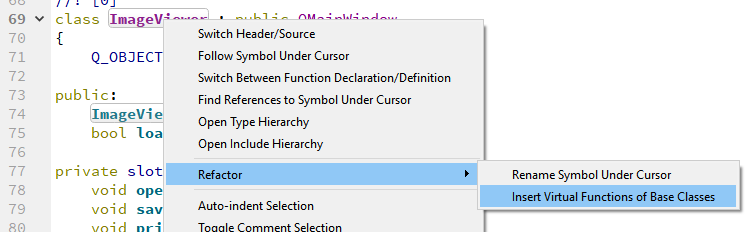
                                  Right clik on the class name
                                  alt text
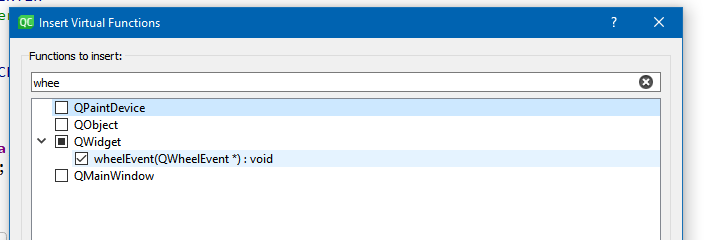
                                  Then select
                                  alt text
                                  and you get the function

                                  protected:
                                      virtual void wheelEvent(QWheelEvent *event) override
                                      {
                                      }
                                  

                                  Then do same right click again and select

                                  alt text

                                  to move the body of function to the cpp file.

                                  Now you can try to implement your zoom.

                                  J.HilkJ 1 Reply Last reply
                                  2
                                  • M Offline
                                    M Offline
                                    Mikeeeeee
                                    wrote on last edited by
                                    #22

                                    Thanks, did so and zoom works:

                                    void ImageViewer::wheelEvent(QWheelEvent *event)
                                    {
                                        zoomIn();
                                    }
                                    

                                    But how to add a slot to the reverse rotation of the mouse wheel?
                                    And when I rotate the mouse wheel verticalScrollBar also receives a signal and moves. How to disable verticalScrollBar from (QWheelEvent *event)?

                                    1 Reply Last reply
                                    0
                                    • mrjjM Offline
                                      mrjjM Offline
                                      mrjj
                                      Lifetime Qt Champion
                                      wrote on last edited by mrjj
                                      #23

                                      @Mikeeeeee said in QLabel snap to ScrollBar:

                                      wheelEvent

                                      Hi
                                      Both up and down comes to wheelEvent
                                      check out.
                                      event->delta()
                                      it changes based on direction.

                                      
                                      void ImageViewer::wheelEvent(QWheelEvent *event)
                                      {
                                          qDebug() << " delta" << event->delta();
                                          qDebug() << " delta" << event->angleDelta();
                                          int nDeg = event->delta();
                                          if (nDeg > 0)
                                              zoomOut();
                                          else if (nDeg < 0)
                                              zoomIn();
                                      
                                          event->accept();
                                      }
                                      
                                      • How to disable verticalScrollBar from (QWheelEvent *event)?

                                      You can try to hide them.
                                      scrollArea->setHorizontalScrollBarPolicy( Qt::ScrollBarAlwaysOff );
                                      scrollArea->setVerticalScrollBarPolicy( Qt::ScrollBarAlwaysOff );
                                      Else you need to use an event filter on the scrollarea's viewport to eat the
                                      QWheelEvent events so it dont see them.

                                      You do need event filer as not to have it scroll funny.

                                      Add this to the class

                                      bool ImageViewer::eventFilter(QObject *obj, QEvent *event)
                                      {
                                          if (event->type() == QEvent::Wheel) {
                                              // Don't propagate
                                              return true;
                                          }
                                          // Other events should propagate
                                          return false;
                                      }
                                      
                                      and in its constructor, set the filter
                                      
                                      scrollArea->viewport()->installEventFilter(this);
                                      

                                      Then it zooms pretty fine :)

                                      1 Reply Last reply
                                      3
                                      • M Offline
                                        M Offline
                                        Mikeeeeee
                                        wrote on last edited by
                                        #24

                                        Thanks so much. It works. Is it possible to split a QLabel on the coordinates 100*100 and add a small button on top of the QLabel ?

                                        jsulmJ 1 Reply Last reply
                                        0
                                        • M Mikeeeeee

                                          Thanks so much. It works. Is it possible to split a QLabel on the coordinates 100*100 and add a small button on top of the QLabel ?

                                          jsulmJ Offline
                                          jsulmJ Offline
                                          jsulm
                                          Lifetime Qt Champion
                                          wrote on last edited by
                                          #25

                                          @Mikeeeeee said in QLabel snap to ScrollBar:

                                          split a QLabel

                                          What does this mean?
                                          Yes, you can put a button on top of a label.

                                          https://forum.qt.io/topic/113070/qt-code-of-conduct

                                          1 Reply Last reply
                                          0

                                          • Login

                                          • Login or register to search.
                                          • First post
                                            Last post
                                          0
                                          • Categories
                                          • Recent
                                          • Tags
                                          • Popular
                                          • Users
                                          • Groups
                                          • Search
                                          • Get Qt Extensions
                                          • Unsolved