Qt 5.12.3 for UWP Kit not Loading
-
After installing MSVC2019 all the kits for MSVC2017 are no longer loading, working in QT creator. I thought no problem I will just re-install Qt. I have tried re-installing Qt, MSVC2019 and MSVC2017 all with the same result. It seems like it is not finding the compiler?
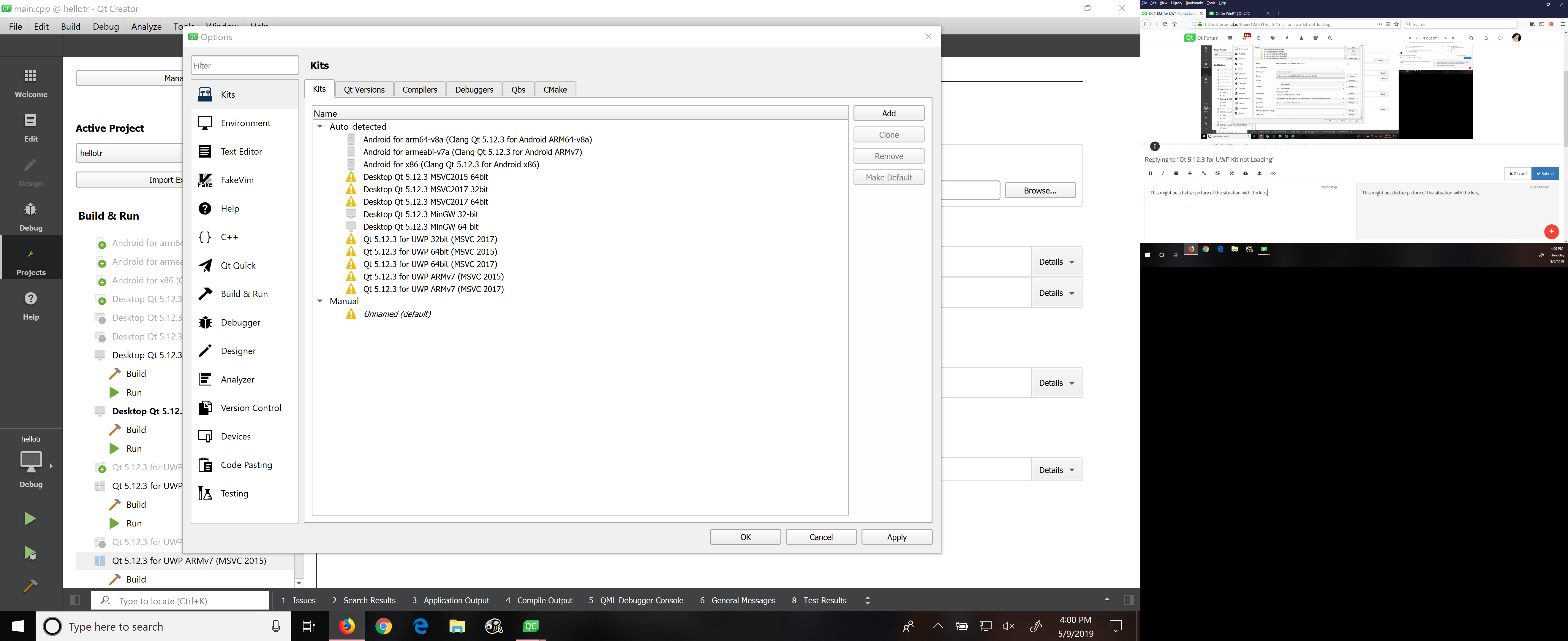
Here is a screen shot of the kit management page,

I guess MSVC2019 moved the compiler and now I have no idea where it is?
Any ideas? This is the latest version of Qt 5.12.3, QtCreator 4.9, Windows 10
I guess the only thing I haven't tried is removing MSVC 2019 and trying it then?
BTW I am pretty sure this all worked fine before I installed MSVC 2019, sigh.
One other thing is I observe the Qt folder is deleted, yet all the previous project information is still there when I reinstall Qt. I guess it does not get deleted from the registry? Does that sound right?
Thanks for any ideas.
-
After installing MSVC2019 all the kits for MSVC2017 are no longer loading, working in QT creator. I thought no problem I will just re-install Qt. I have tried re-installing Qt, MSVC2019 and MSVC2017 all with the same result. It seems like it is not finding the compiler?
Here is a screen shot of the kit management page,
I guess MSVC2019 moved the compiler and now I have no idea where it is?
Any ideas? This is the latest version of Qt 5.12.3, QtCreator 4.9, Windows 10
I guess the only thing I haven't tried is removing MSVC 2019 and trying it then?
BTW I am pretty sure this all worked fine before I installed MSVC 2019, sigh.
One other thing is I observe the Qt folder is deleted, yet all the previous project information is still there when I reinstall Qt. I guess it does not get deleted from the registry? Does that sound right?
Thanks for any ideas.
-
@ndt_mike Can you show the "Compilers" tab?
Which QtCreator version are you using?
https://doc.qt.io/qt-5/windows.html does not mentioned VS2019 as supported. -
@ndt_mike Can you show the "Compilers" tab?
Which QtCreator version are you using?
https://doc.qt.io/qt-5/windows.html does not mentioned VS2019 as supported.@jsulm Thanks well I have MSVC 2017 on the machine.
QtCreator 4.9
I guess I will try uninstalling everything today. Only install MSVC2017 make sure that works, and then try and install Qt 5.13?
It seems like the compilers have moved with the MSVC 2019 install I will probably look into this a bit as well.
-
@jsulm Thanks well I have MSVC 2017 on the machine.
QtCreator 4.9
I guess I will try uninstalling everything today. Only install MSVC2017 make sure that works, and then try and install Qt 5.13?
It seems like the compilers have moved with the MSVC 2019 install I will probably look into this a bit as well.
-
Thanks for the help. I am going to mark this closed.
Seems like loading MSVS 2019 does something to the MSVS2017 install. I was able to get it to run on a new machine without either Qt or MSVS already installed. I was able to get QtCreator running and compiling on the machine I had previously loaded MSVS 2019 installed but it was still doing flaky things.