
LNK1117 Syntac Error in Option "". in QTCreator
-
Hi and welcome to devnet,
What project is that ?
Do you get the same error if you build a default created project ? -
it only happens in this project.
I tryed to write a Qt Designer Plugin which uses open CV. I get the error when i try to compile the plugin application.
My pro file looks like this:
QT += widgets uiplugin
CONFIG += plugin
CONFIG += c++14
TEMPLATE = lib
DEFINES += FILTERPLUGINDESIGNER_LIBRARY

TARGET = $$qtLibraryTarget($$TARGET)
INSTALLS += target

windows {
    target.path = $$(QTDIR)/../../Tools/QtCreator/bin/plugins/designer

    release:target_lib.files = $$OUT_PWD/release/$${TARGET}.lib
    debug:target_lib.files = $$OUT_PWD/debug/$${TARGET}.lib
    target_lib.path = $$(QTDIR)/../../Tools/QtCreator/bin/plugins/designer
    INSTALLS += target_librelease

    INCLUDEPATH += $$(OPENCV_HOME)/../../include
    LIBS += -L$$(OPENCV_HOME)/lib \
        -lopencv_world410
}
I added to Build Environment the opencv library (I compiled it with MSVC 2017 32 bit):
Set OPENCV_HOME to E:\Cpp_Projekte_library\OpenCV\opencv\build\x86\vc15
Set Path to E:\Cpp_Projekte_library\OpenCV\opencv\build\x86\vc15\bin;The Kit I use is Desktop QT 5.12.2 MSVC2017 32bit.
-
Hi
This project ?
https://github.com/PacktPublishing/Mastering-Qt-5/tree/master/Chapter_07 -
yes that one but i used the latest version opencv-4.1.0-vc14_vc15.
Since it only came with x64lib i builded the x86 lib myself with cmake but it looks like it wont link and give the error when i try to build the filter plugin designer
-
yes that one but i used the latest version opencv-4.1.0-vc14_vc15.
Since it only came with x64lib i builded the x86 lib myself with cmake but it looks like it wont link and give the error when i try to build the filter plugin designer
@sandro4912
Hi
Why not try small project linking to that OpenCV DLL to see if its the reason?
You seem to do it right and used the same compiler for app/plugin and openCV so
the usual suspects seem ruled out. -
i linked opencv in a minimal project and also run it with Qt_5_12_2_MSVC2017_32bit in debug it run with no problems.
i used this test
#include "MainWindow.h"
#include "ui_MainWindow.h"

#include <opencv2/core/core.hpp>
#include <opencv2/highgui/highgui.hpp>

MainWindow::MainWindow(QWidget *parent) :
    QMainWindow(parent),
    ui(new Ui::MainWindow)
{
    ui->setupUi(this);

    // read an image
    cv::Mat image = cv::imread("E://1.jpg", 1);
    // create image window named "My Image"
    cv::namedWindow("My Image");
    // show the image on window
    cv::imshow("My Image", image);
}

MainWindow::~MainWindow()
{
    delete ui;
}
QT += core gui greaterThan(QT_MAJOR_VERSION, 4): QT += widgets TARGET = untitled TEMPLATE = app CONFIG += c++11 INCLUDEPATH += E:\Cpp_Projekte\_library\OpenCV\opencv\build\include LIBS += -LE:/Cpp_Projekte/_library/OpenCV/opencv/build/x86/vc15/lib \ -lopencv_world410 SOURCES += \ main.cpp \ MainWindow.cpp HEADERS += \ MainWindow.h FORMS += \ MainWindow.uiHowever when it try to run it in release it get this error:
23:49:17: Running steps for project untitled...
23:49:17: Configuration unchanged, skipping qmake step.
23:49:17: Starting: "E:\Qt\Tools\QtCreator\bin\jom.exe"
	E:\Qt\Tools\QtCreator\bin\jom.exe -f Makefile.Release
	link /NOLOGO /DYNAMICBASE /NXCOMPAT /INCREMENTAL:NO /SUBSYSTEM:WINDOWS "/MANIFESTDEPENDENCY:type='win32' name='Microsoft.Windows.Common-Controls' version='6.0.0.0' publicKeyToken='6595b64144ccf1df' language='*' processorArchitecture='*'" /MANIFEST:embed /OUT:release\untitled.exe @C:\Users\GOD\AppData\Local\Temp\untitled.exe.7620.0.jom
LINK : fatal error LNK1181: Eingabedatei "\.obj" kann nicht geöffnet werden.
jom: C:\Users\GOD\Documents\build-untitled-Desktop_Qt_5_12_2_MSVC2017_32bit-Release\Makefile.Release [release\untitled.exe] Error 1181
jom: C:\Users\GOD\Documents\build-untitled-Desktop_Qt_5_12_2_MSVC2017_32bit-Release\Makefile [release] Error 2
23:49:18: The process "E:\Qt\Tools\QtCreator\bin\jom.exe" exited with code 2.
Error while building/deploying project untitled (kit: Desktop Qt 5.12.2 MSVC2017 32bit)
When executing step "Make"
23:49:18: Elapsed time: 00:00.
The error i get is (Sorry for the german i think the message comes from my os):
:-1: error: LNK1181: Eingabedatei "\.obj" kann nicht geöffnet werden.

(It says Input file .\obj cannot be opened)
I have the feeling we shoukd solve this issue and solve with it the other one....
-
Hi
Im pretty sure its somehow related.
the line
LIBS += -LE:/Cpp_Projekte/_library/OpenCV/opencv/build/x86/vc15/lib \ -lopencv_world410
i wonder if the \ is out of place when in one line ? -
that solved the issue now i can run the simple example in debug and release.
However the real application still throws the strange error:
09:44:07: Running steps for project ch07-image-filter...
09:44:07: Configuration unchanged, skipping qmake step.
09:44:07: Starting: "E:\Qt\Tools\QtCreator\bin\jom.exe"
	cd filter-plugin-designer\ && ( if not exist Makefile E:\Qt\5.12.2\msvc2017\bin\qmake.exe -o Makefile E:\Cpp_Projekte\QT\ch07-image-filter\filter-plugin-designer\filter-plugin-designer.pro -spec win32-msvc ) && E:\Qt\Tools\QtCreator\bin\jom.exe -f Makefile
	E:\Qt\Tools\QtCreator\bin\jom.exe -f Makefile.Release
	cd image-filter\ && ( if not exist Makefile E:\Qt\5.12.2\msvc2017\bin\qmake.exe -o Makefile E:\Cpp_Projekte\QT\ch07-image-filter\image-filter\image-filter.pro -spec win32-msvc ) && E:\Qt\Tools\QtCreator\bin\jom.exe -f Makefile
	E:\Qt\Tools\QtCreator\bin\jom.exe -f Makefile.Release
	link /NOLOGO /DYNAMICBASE /NXCOMPAT /INCREMENTAL:NO /SUBSYSTEM:WINDOWS "/MANIFESTDEPENDENCY:type='win32' name='Microsoft.Windows.Common-Controls' version='6.0.0.0' publicKeyToken='6595b64144ccf1df' language='*' processorArchitecture='*'" /MANIFEST:embed /OUT:release\image-filter.exe @C:\Users\GOD\AppData\Local\Temp\image-filter.exe.7596.0.jom
LINK : fatal error LNK1117: Syntaxfehler in Option "".
jom: E:\Cpp_Projekte\QT\build-ch07-image-filter-Desktop_Qt_5_12_2_MSVC2017_32bit-Release\image-filter\Makefile.Release [release\image-filter.exe] Error 1117
jom: E:\Cpp_Projekte\QT\build-ch07-image-filter-Desktop_Qt_5_12_2_MSVC2017_32bit-Release\image-filter\Makefile [release] Error 2
jom: E:\Cpp_Projekte\QT\build-ch07-image-filter-Desktop_Qt_5_12_2_MSVC2017_32bit-Release\Makefile [sub-image-filter-make_first] Error 2
09:44:07: The process "E:\Qt\Tools\QtCreator\bin\jom.exe" exited with code 2.
Error while building/deploying project ch07-image-filter (kit: Desktop Qt 5.12.2 MSVC2017 32bit)
When executing step "Make"
09:44:07: Elapsed time: 00:00.
i changed the pro file to:
INCLUDEPATH += $$(OPENCV_HOME)/../../include
LIBS += -L$$(OPENCV_HOME)/lib -lopencv_world410
however i also tryed out to add the absolute path like in the simple example but no changes
-
Hi
just for test.
Could you please use the exact same way as in mini sample?INCLUDEPATH += E:\Cpp_Projekte_library\OpenCV\opencv\build\include
LIBS += -LE:/Cpp_Projekte/_library/OpenCV/opencv/build/x86/vc15/lib -lopencv_world410just to rule out it has anything to do with $$(OPENCV_HOME)
-
-
i tred that but still get the same error
@sandro4912 Please make sure there are no outdated Makefiles in your source or build folder.
Then I'd close Creator, delete the build folder and the .pro.user and then open the project again to start from a clean state.
Regards
-
@sandro4912 said in LNK1117 Syntac Error in Option "". in QTCreator:
fatal error LNK1117
Seems to be slightly known
https://social.msdn.microsoft.com/Forums/vstudio/en-US/e8f311e3-3d09-4291-be1b-65eec4c814ff/link-fatal-error-lnk1117-syntax-error-in-option-quotquot?forum=vclanguageDo you use Creator or the visual STudio Editor ?
-
I use the Creator.
I made the project new from scratch. Now it compiles and seems to create the plugin.dll
I assume it was maybe really some old files in the build folder.
However now i have annother problem. It looks like the form editor does not want to load the plug in correctly.

Any ideas what could cause this?
-
Hi
Well make sure the plugin can find the openVC dlls.
Also that is in release mode,
and check you about Creator dialog
that compiler and Qt version used matches. -
The output of the dll creation looks like this:
10:14:41: Running steps for project ch07-image-filter...
10:14:41: Configuration unchanged, skipping qmake step.
10:14:41: Starting: "E:\Qt\Tools\QtCreator\bin\jom.exe"
	cd filter-plugin-designer\ && ( if not exist Makefile E:\Qt\5.12.2\msvc2017\bin\qmake.exe -o Makefile E:\Cpp_Projekte\QT\ch07-image-filter\filter-plugin-designer\filter-plugin-designer.pro -spec win32-msvc "CONFIG+=qtquickcompiler" ) && E:\Qt\Tools\QtCreator\bin\jom.exe -f Makefile
	E:\Qt\Tools\QtCreator\bin\jom.exe -f Makefile.Release
10:14:41: The process "E:\Qt\Tools\QtCreator\bin\jom.exe" exited normally.
10:14:41: Starting: "E:\Qt\Tools\QtCreator\bin\jom.exe" install
	cd filter-plugin-designer\ && ( if not exist Makefile E:\Qt\5.12.2\msvc2017\bin\qmake.exe -o Makefile E:\Cpp_Projekte\QT\ch07-image-filter\filter-plugin-designer\filter-plugin-designer.pro -spec win32-msvc "CONFIG+=qtquickcompiler" ) && E:\Qt\Tools\QtCreator\bin\jom.exe -f Makefile install
	E:\Qt\Tools\QtCreator\bin\jom.exe -f Makefile.Release install
	copy /y release\filter-plugin-designer.dll E:\Qt\Tools\QtCreator\bin\plugins\designer\filter-plugin-designer.dll
        1 Datei(en) kopiert.
10:14:41: The process "E:\Qt\Tools\QtCreator\bin\jom.exe" exited normally.
10:14:41: Elapsed time: 00:00.
Im using Qt Creator Based on Qt 5.12.2 (MSVC 2017, 32 bit)
I compiled the opencv binaries with Visual Studio 2017 x86
I used the Kit Desktop_Qt_5_12_2_MSVC2017_32bit-ReleaseIt should be compiled in release mode right?
From my understanding this shouldn't be a mismatch.
-
The output of the dll creation looks like this:
10:14:41: Running steps for project ch07-image-filter...
10:14:41: Configuration unchanged, skipping qmake step.
10:14:41: Starting: "E:\Qt\Tools\QtCreator\bin\jom.exe"
	cd filter-plugin-designer\ && ( if not exist Makefile E:\Qt\5.12.2\msvc2017\bin\qmake.exe -o Makefile E:\Cpp_Projekte\QT\ch07-image-filter\filter-plugin-designer\filter-plugin-designer.pro -spec win32-msvc "CONFIG+=qtquickcompiler" ) && E:\Qt\Tools\QtCreator\bin\jom.exe -f Makefile
	E:\Qt\Tools\QtCreator\bin\jom.exe -f Makefile.Release
10:14:41: The process "E:\Qt\Tools\QtCreator\bin\jom.exe" exited normally.
10:14:41: Starting: "E:\Qt\Tools\QtCreator\bin\jom.exe" install
	cd filter-plugin-designer\ && ( if not exist Makefile E:\Qt\5.12.2\msvc2017\bin\qmake.exe -o Makefile E:\Cpp_Projekte\QT\ch07-image-filter\filter-plugin-designer\filter-plugin-designer.pro -spec win32-msvc "CONFIG+=qtquickcompiler" ) && E:\Qt\Tools\QtCreator\bin\jom.exe -f Makefile install
	E:\Qt\Tools\QtCreator\bin\jom.exe -f Makefile.Release install
	copy /y release\filter-plugin-designer.dll E:\Qt\Tools\QtCreator\bin\plugins\designer\filter-plugin-designer.dll
        1 Datei(en) kopiert.
10:14:41: The process "E:\Qt\Tools\QtCreator\bin\jom.exe" exited normally.
10:14:41: Elapsed time: 00:00.
Im using Qt Creator Based on Qt 5.12.2 (MSVC 2017, 32 bit)
I compiled the opencv binaries with Visual Studio 2017 x86
I used the Kit Desktop_Qt_5_12_2_MSVC2017_32bit-ReleaseIt should be compiled in release mode right?
From my understanding this shouldn't be a mismatch.
@sandro4912
yes seems to be exactly the same. Qt / compiler wise.
Well, then it must be something with openCV dlls it cant find.
try to place the needed dlls next to the plugin. -
what do you mean with putting them next to the plugin?
At the moment i get them from this folder:
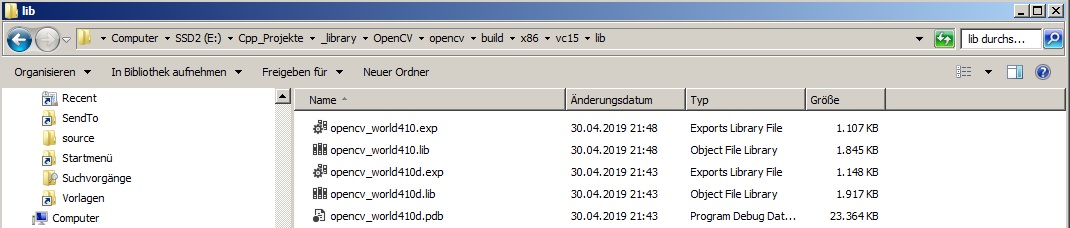
Also i compiled opencv the static lib and not the dll could that be an issue?
-
@sandro4912
Hi
well ifs its static it is part of the plugin so
it cant be that.I assume openCV is happy to be static. ?
-
Yes i assume so. After all i used these libs in the short test application to test if opencv works. There everything seemed to work.
I used cmake to setup the opencv for compilation. is there maybe something set which doesn't go well with qt plugin?


