Skip to content
  • Categories
  • Recent
  • Tags
  • Popular
  • Users
  • Groups
  • Search
  • Get Qt Extensions
  • Unsolved
Collapse
Brand Logo
  1. Home
  2. Qt Development
  3. General and Desktop
  4. How to change Qtreeview expand or collapse icon position
Forum Updated to NodeBB v4.3 + New Features

How to change Qtreeview expand or collapse icon position

Scheduled Pinned Locked Moved Unsolved General and Desktop
27 Posts 3 Posters 10.7k Views 2 Watching
  • Oldest to Newest
  • Newest to Oldest
  • Most Votes
Reply
  • Reply as topic
Log in to reply
This topic has been deleted. Only users with topic management privileges can see it.
  • sierdzioS Offline
    sierdzioS Offline
    sierdzio
    Moderators
    wrote on last edited by
    #6

    Even supplying custom branch pictures does not help? Have you tried reimplementing drawBranches() then?

    (Z(:^

    A 1 Reply Last reply
    0
    • sierdzioS sierdzio

      Even supplying custom branch pictures does not help? Have you tried reimplementing drawBranches() then?

      A Offline
      A Offline
      abdullahzubair109
      wrote on last edited by
      #7

      @sierdzio i tried to reimplement drawBranch function.. i studied the source code from here : https://code.woboq.org/qt5/qtbase/src/widgets/itemviews/qtreeview.cpp.html#_ZNK9QTreeView12drawBranchesEP8QPainterRK5QRectRK11QModelIndex but i couldn't find out which portion draws the expand icon.. 0_1555509408099_Screenshot from 2019-04-17 19-46-48.png

      1 Reply Last reply
      0
      • mrjjM Offline
        mrjjM Offline
        mrjj
        Lifetime Qt Champion
        wrote on last edited by
        #8

        Hi
        Just as a note.
        You can also do

        class MyStyleProxy : public QProxyStyle
        {
        public:
            MyStyleProxy(): QProxyStyle() { }
        public:
            virtual void drawPrimitive(PrimitiveElement pe, const QStyleOption *opt, QPainter *p,
                                       const QWidget *w) const override
            {
                QStyleOption option = *opt;
                if ( pe == PE_IndicatorBranch )
                    option.rect.adjust(25, 0, 0, 0);        
        
                QProxyStyle::drawPrimitive(pe, &option, p, w);
        
            }
        
        };
        

        Which does move it but it will overlay text then.
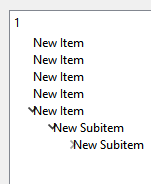
        alt text

        A 3 Replies Last reply
        1
        • mrjjM mrjj

          Hi
          Just as a note.
          You can also do

          class MyStyleProxy : public QProxyStyle
          {
          public:
              MyStyleProxy(): QProxyStyle() { }
          public:
              virtual void drawPrimitive(PrimitiveElement pe, const QStyleOption *opt, QPainter *p,
                                         const QWidget *w) const override
              {
                  QStyleOption option = *opt;
                  if ( pe == PE_IndicatorBranch )
                      option.rect.adjust(25, 0, 0, 0);        
          
                  QProxyStyle::drawPrimitive(pe, &option, p, w);
          
              }
          
          };
          

          Which does move it but it will overlay text then.
          alt text

          A Offline
          A Offline
          abdullahzubair109
          wrote on last edited by
          #9

          @mrjj yes that's a good idea.. thanks.

          1 Reply Last reply
          0
          • mrjjM mrjj

            Hi
            Just as a note.
            You can also do

            class MyStyleProxy : public QProxyStyle
            {
            public:
                MyStyleProxy(): QProxyStyle() { }
            public:
                virtual void drawPrimitive(PrimitiveElement pe, const QStyleOption *opt, QPainter *p,
                                           const QWidget *w) const override
                {
                    QStyleOption option = *opt;
                    if ( pe == PE_IndicatorBranch )
                        option.rect.adjust(25, 0, 0, 0);        
            
                    QProxyStyle::drawPrimitive(pe, &option, p, w);
            
                }
            
            };
            

            Which does move it but it will overlay text then.
            alt text

            A Offline
            A Offline
            abdullahzubair109
            wrote on last edited by
            #10

            @mrjj it is working.. but unfortunately as i click on items, they become invisible

            1 Reply Last reply
            0
            • mrjjM mrjj

              Hi
              Just as a note.
              You can also do

              class MyStyleProxy : public QProxyStyle
              {
              public:
                  MyStyleProxy(): QProxyStyle() { }
              public:
                  virtual void drawPrimitive(PrimitiveElement pe, const QStyleOption *opt, QPainter *p,
                                             const QWidget *w) const override
                  {
                      QStyleOption option = *opt;
                      if ( pe == PE_IndicatorBranch )
                          option.rect.adjust(25, 0, 0, 0);        
              
                      QProxyStyle::drawPrimitive(pe, &option, p, w);
              
                  }
              
              };
              

              Which does move it but it will overlay text then.
              alt text

              A Offline
              A Offline
              abdullahzubair109
              wrote on last edited by
              #11

              @mrjj i overrode drawBranches ..

              void TreeView::drawBranches(QPainter *painter, const QRect &rect, const QModelIndex &index) const
              {
              	
                      QRect newRect = rect;
              	newRect.moveLeft(10);
              	QTreeView::drawBranches(painter, rect, index);
              
              }
              

              you are right.. it is overlaying text.. any way to overcome it??

              mrjjM 1 Reply Last reply
              0
              • A abdullahzubair109

                @mrjj i overrode drawBranches ..

                void TreeView::drawBranches(QPainter *painter, const QRect &rect, const QModelIndex &index) const
                {
                	
                        QRect newRect = rect;
                	newRect.moveLeft(10);
                	QTreeView::drawBranches(painter, rect, index);
                
                }
                

                you are right.. it is overlaying text.. any way to overcome it??

                mrjjM Offline
                mrjjM Offline
                mrjj
                Lifetime Qt Champion
                wrote on last edited by
                #12

                @abdullahzubair109
                There is also a https://doc.qt.io/qt-5/qtreeview.html#drawRow
                that i assume, draws the text.
                So I guess you must change that also to move the text also.

                A 1 Reply Last reply
                0
                • mrjjM mrjj

                  @abdullahzubair109
                  There is also a https://doc.qt.io/qt-5/qtreeview.html#drawRow
                  that i assume, draws the text.
                  So I guess you must change that also to move the text also.

                  A Offline
                  A Offline
                  abdullahzubair109
                  wrote on last edited by
                  #13

                  @mrjj unfortunately i got no success with drawRow.. changed header offset but now the focus rect doesn't cover the whole row.. it excludes offset

                  mrjjM 1 Reply Last reply
                  0
                  • A abdullahzubair109

                    @mrjj unfortunately i got no success with drawRow.. changed header offset but now the focus rect doesn't cover the whole row.. it excludes offset

                    mrjjM Offline
                    mrjjM Offline
                    mrjj
                    Lifetime Qt Champion
                    wrote on last edited by
                    #14

                    @abdullahzubair109
                    Hmm , well i guess that's kinda expected if we just offset the
                    rect.
                    I wonder if we combined it with a delegate if we could get text offset working while selection would still
                    cover the normal area. but i didnt test it.

                    A 2 Replies Last reply
                    0
                    • mrjjM mrjj

                      @abdullahzubair109
                      Hmm , well i guess that's kinda expected if we just offset the
                      rect.
                      I wonder if we combined it with a delegate if we could get text offset working while selection would still
                      cover the normal area. but i didnt test it.

                      A Offline
                      A Offline
                      abdullahzubair109
                      wrote on last edited by
                      #15

                      @mrjj well let me test

                      1 Reply Last reply
                      0
                      • mrjjM mrjj

                        @abdullahzubair109
                        Hmm , well i guess that's kinda expected if we just offset the
                        rect.
                        I wonder if we combined it with a delegate if we could get text offset working while selection would still
                        cover the normal area. but i didnt test it.

                        A Offline
                        A Offline
                        abdullahzubair109
                        wrote on last edited by
                        #16

                        @mrjj can you kindly post a pseudo code?? i tried modifying QStyleOptionViewItem rect under paint function.. but got weird result

                        mrjjM 1 Reply Last reply
                        0
                        • A abdullahzubair109

                          @mrjj can you kindly post a pseudo code?? i tried modifying QStyleOptionViewItem rect under paint function.. but got weird result

                          mrjjM Offline
                          mrjjM Offline
                          mrjj
                          Lifetime Qt Champion
                          wrote on last edited by
                          #17

                          @abdullahzubair109
                          well that was my idea too but altering the options rect might do strange stuff and
                          we might end up needing to draw the text manually for it to be possible.

                          • but got weird result
                            in what way ?
                          A 1 Reply Last reply
                          0
                          • mrjjM mrjj

                            @abdullahzubair109
                            well that was my idea too but altering the options rect might do strange stuff and
                            we might end up needing to draw the text manually for it to be possible.

                            • but got weird result
                              in what way ?
                            A Offline
                            A Offline
                            abdullahzubair109
                            wrote on last edited by
                            #18

                            @mrjj i am using painter->drawText();

                            mrjjM 1 Reply Last reply
                            0
                            • A abdullahzubair109

                              @mrjj i am using painter->drawText();

                              mrjjM Offline
                              mrjjM Offline
                              mrjj
                              Lifetime Qt Champion
                              wrote on last edited by
                              #19

                              @abdullahzubair109
                              Hi
                              tested a bit.
                              seems to be possible
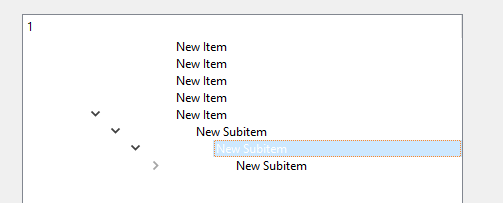
                              alt text

                              class TextDelegate : public QStyledItemDelegate
                              {
                              
                              public:
                                  TextDelegate(QObject *parent)
                                      : QStyledItemDelegate(parent)
                                  {
                              
                                  }
                                  QSize sizeHint(const QStyleOptionViewItem &option, const QModelIndex &index) const
                                  {
                                      QSize ret = QStyledItemDelegate::sizeHint(option, index);
                                      return ret;
                                  }
                                  void paint(QPainter *painter, const QStyleOptionViewItem &option,
                                             const QModelIndex &index) const
                                  {
                                      QStyleOptionViewItem itemOption(option);
                              
                                      initStyleOption(&itemOption, index);
                                      itemOption.rect.adjust(130, 0, 0, 0);
                                      QApplication::style()->drawControl(QStyle::CE_ItemViewItem, &itemOption, painter, nullptr);
                              
                                  }
                              };
                              

                              ui->treeWidget->setStyle( new MyStyleProxy );
                              ui->treeWidget->setItemDelegate( new TextDelegate(this) );

                              A 1 Reply Last reply
                              1
                              • mrjjM mrjj

                                @abdullahzubair109
                                Hi
                                tested a bit.
                                seems to be possible
                                alt text

                                class TextDelegate : public QStyledItemDelegate
                                {
                                
                                public:
                                    TextDelegate(QObject *parent)
                                        : QStyledItemDelegate(parent)
                                    {
                                
                                    }
                                    QSize sizeHint(const QStyleOptionViewItem &option, const QModelIndex &index) const
                                    {
                                        QSize ret = QStyledItemDelegate::sizeHint(option, index);
                                        return ret;
                                    }
                                    void paint(QPainter *painter, const QStyleOptionViewItem &option,
                                               const QModelIndex &index) const
                                    {
                                        QStyleOptionViewItem itemOption(option);
                                
                                        initStyleOption(&itemOption, index);
                                        itemOption.rect.adjust(130, 0, 0, 0);
                                        QApplication::style()->drawControl(QStyle::CE_ItemViewItem, &itemOption, painter, nullptr);
                                
                                    }
                                };
                                

                                ui->treeWidget->setStyle( new MyStyleProxy );
                                ui->treeWidget->setItemDelegate( new TextDelegate(this) );

                                A Offline
                                A Offline
                                abdullahzubair109
                                wrote on last edited by
                                #20

                                @mrjj i tried something like this, but didn't work

                                void StyledDelegate::paint(QPainter *painter, const QStyleOptionViewItem &option, const QModelIndex &index) const
                                {
                                
                                	if (index.column() == 0) {
                                	
                                		QString qs = index.data().toString();
                                		QPoint pt = option.rect.center(); 
                                		pt += QPoint(40, 0);
                                		painter->drawText( pt, qs);
                                	}
                                	QStyledItemDelegate::paint(painter, option, index);
                                
                                }
                                
                                mrjjM 1 Reply Last reply
                                0
                                • A abdullahzubair109

                                  @mrjj i tried something like this, but didn't work

                                  void StyledDelegate::paint(QPainter *painter, const QStyleOptionViewItem &option, const QModelIndex &index) const
                                  {
                                  
                                  	if (index.column() == 0) {
                                  	
                                  		QString qs = index.data().toString();
                                  		QPoint pt = option.rect.center(); 
                                  		pt += QPoint(40, 0);
                                  		painter->drawText( pt, qs);
                                  	}
                                  	QStyledItemDelegate::paint(painter, option, index);
                                  
                                  }
                                  
                                  mrjjM Offline
                                  mrjjM Offline
                                  mrjj
                                  Lifetime Qt Champion
                                  wrote on last edited by
                                  #21

                                  @abdullahzubair109
                                  ok, but what was wrong ? it didnt move text ?

                                  A 1 Reply Last reply
                                  0
                                  • mrjjM mrjj

                                    @abdullahzubair109
                                    ok, but what was wrong ? it didnt move text ?

                                    A Offline
                                    A Offline
                                    abdullahzubair109
                                    wrote on last edited by
                                    #22

                                    @mrjj nope

                                    mrjjM 1 Reply Last reply
                                    0
                                    • A abdullahzubair109

                                      @mrjj nope

                                      mrjjM Offline
                                      mrjjM Offline
                                      mrjj
                                      Lifetime Qt Champion
                                      wrote on last edited by
                                      #23

                                      @abdullahzubair109
                                      well the style+delegate works fine but selection starts at text.
                                      If you really want seletion to start at icon, you have to dig into
                                      drawControl and implement the part you want.
                                      you can use
                                      https://code.woboq.org/qt5/qtbase/src/widgets/styles/qcommonstyle.cpp.html
                                      to easy dig around source.

                                      A 1 Reply Last reply
                                      0
                                      • mrjjM mrjj

                                        @abdullahzubair109
                                        well the style+delegate works fine but selection starts at text.
                                        If you really want seletion to start at icon, you have to dig into
                                        drawControl and implement the part you want.
                                        you can use
                                        https://code.woboq.org/qt5/qtbase/src/widgets/styles/qcommonstyle.cpp.html
                                        to easy dig around source.

                                        A Offline
                                        A Offline
                                        abdullahzubair109
                                        wrote on last edited by
                                        #24

                                        @mrjj thanks for your time.. i will check tomorrow .. when you are free, can you look at my code in more details why drawText didn't work??

                                        mrjjM 1 Reply Last reply
                                        0
                                        • A abdullahzubair109

                                          @mrjj thanks for your time.. i will check tomorrow .. when you are free, can you look at my code in more details why drawText didn't work??

                                          mrjjM Offline
                                          mrjjM Offline
                                          mrjj
                                          Lifetime Qt Champion
                                          wrote on last edited by
                                          #25

                                          @abdullahzubair109
                                          well you call both
                                          painter->drawText( pt, qs); and
                                          QStyledItemDelegate::paint
                                          so maybe it just overrode your text.

                                          A 1 Reply Last reply
                                          0

                                          • Login

                                          • Login or register to search.
                                          • First post
                                            Last post
                                          0
                                          • Categories
                                          • Recent
                                          • Tags
                                          • Popular
                                          • Users
                                          • Groups
                                          • Search
                                          • Get Qt Extensions
                                          • Unsolved