
Skip to content
  • Categories
  • Recent
  • Tags
  • Popular
  • Users
  • Groups
  • Search
  • Get Qt Extensions
  • Unsolved
Collapse
Brand Logo
  1. Home
  2. Qt Development
  3. QML and Qt Quick
  4. qwidget can`t effect transparent background

qwidget can`t effect transparent background

Scheduled Pinned Locked Moved Unsolved QML and Qt Quick
7 Posts 3 Posters 1.9k Views 2 Watching
  • Oldest to Newest
  • Newest to Oldest
  • Most Votes
Reply
  • Reply as topic
Log in to reply
This topic has been deleted. Only users with topic management privileges can see it.
  • W Offline
    W Offline
    Windyz
    wrote on last edited by Windyz
    #1

    hello,

    I making fullscreen window by 2 Layers.
    but I can`t effect transparent background with foreground layer.
    (background is fully white.)

    please check this code in my fault.


    Widget::Widget(QWidget *parent)
    : QWidget(parent)
    {
    QPalette pal;
    QPixmap bg(":/Image/bkgnd.jpg");
    pal.setBrush(QPalette::Background,bg);
    setAutoFillBackground((false));
    setPalette(pal);

    // This code is working.(Background Layer)
    this->setWindowFlags(Qt::FramelessWindowHint);
    this->setAttribute(Qt::WA_TranslucentBackground);
    
    QQuickView *qmlView = new QQuickView;
    qmlView->setSource(QUrl::fromLocalFile("QML/main.qml"));
    
    QWidget *container = QWidget::createWindowContainer(qmlView, this);
    container->setFixedSize(1920,1080);
    container->setAutoFillBackground(false);
    
    // Problem : This code is not working.(Foreground Layer)
    container->setWindowFlags(Qt::FramelessWindowHint);
    container->setAttribute(Qt::WA_TranslucentBackground);
    
    QVBoxLayout *layout = new QVBoxLayout(this);
    setLayout(layout);
    setGeometry(container->geometry());
    layout->addWidget(container);
    

    }

    1 Reply Last reply
    0
    • SGaistS Offline
      SGaistS Offline
      SGaist
      Lifetime Qt Champion
      wrote on last edited by
      #2

      Hi and welcome to devnet,

      I'm really not sure you can have a transparent widget with a QtQuick content.

      What kind of GUI are you trying to build like that ?

      Interested in AI ? www.idiap.ch
      Please read the Qt Code of Conduct - https://forum.qt.io/topic/113070/qt-code-of-conduct

      W 1 Reply Last reply
      1
      • SGaistS SGaist

        Hi and welcome to devnet,

        I'm really not sure you can have a transparent widget with a QtQuick content.

        What kind of GUI are you trying to build like that ?

        W Offline
        W Offline
        Windyz
        wrote on last edited by
        #3

        @SGaist hello, thanks for kindly reply.
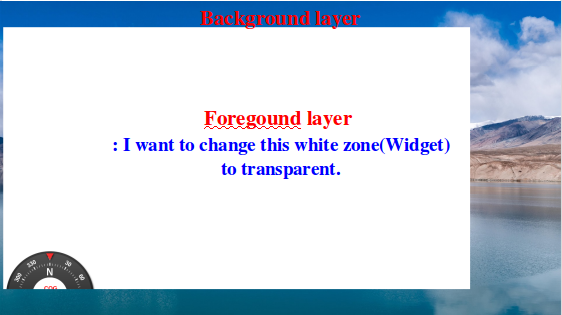
        I want to this;
        0_1555286785495_screenshot_addtext_3.png

        1 Reply Last reply
        0
        • SGaistS Offline
          SGaistS Offline
          SGaist
          Lifetime Qt Champion
          wrote on last edited by
          #4

          Why mix widgets and QtQuick ?

          Interested in AI ? www.idiap.ch
          Please read the Qt Code of Conduct - https://forum.qt.io/topic/113070/qt-code-of-conduct

          W 1 Reply Last reply
          0
          • SGaistS SGaist

            Why mix widgets and QtQuick ?

            W Offline
            W Offline
            Windyz
            wrote on last edited by Windyz
            #5

            @SGaist I want to make qml GUI(QQuickView) on the current widget code(QWidget).
            anyway, I think another way to this;
            but I can`t merge 2 GUIs(QWidget + QQuickView).

            /////main.cpp
            int main(int argc, char *argv[])
            {
            QApplication app(argc, argv);
            QQuickView *view = new QQuickView();
            Mapwidget *mapwidget = new Mapwidget();
            view->setSource(QUrl("qrc:/QML/main.qml"));
            view->setColor(QColor(Qt::transparent));

            QHBoxLayout *layout = new QHBoxLayout(mapwidget);
            QWidget *container = QWidget::createWindowContainer(view);
            container->setFixedSize(1920,1080);
            container->setAutoFillBackground(false);

            mapwidget->setLayout(layout);
            layout->setMargin(0);
            layout->addWidget(container);
            mapwidget->showFullScreen();
            return app.exec();
            }

            ///mapwidget.cpp
            Mapwidget::Mapwidget(QWidget *parent)
            : QWidget(parent)
            {
            QPalette pal;
            QPixmap bg(":/Image/bkgnd.jpg");
            pal.setBrush(QPalette::Background,bg);
            setPalette(pal);
            }

            1 Reply Last reply
            0
            • J.HilkJ Offline
              J.HilkJ Offline
              J.Hilk
              Moderators
              wrote on last edited by
              #6

              Mixing QML and QWidgets in such a way that one is (partially)transparent to the other is, as far as I know, not possible.

              Or at least I never managed it.

              May very well be because they rely on totally different rendering mechanics.


              Be aware of the Qt Code of Conduct, when posting : https://forum.qt.io/topic/113070/qt-code-of-conduct


              Q: What's that?
              A: It's blue light.
              Q: What does it do?
              A: It turns blue.

              1 Reply Last reply
              0
              • SGaistS Offline
                SGaistS Offline
                SGaist
                Lifetime Qt Champion
                wrote on last edited by
                #7

                You have QQuickWidget that you can use to have a QtQuick interface in a widget application. However, I don't think it will solve your problem.

                From your code, I don't understand the use of QWidget for just the background of your GUI. Why not go full QtQuick ?

                Interested in AI ? www.idiap.ch
                Please read the Qt Code of Conduct - https://forum.qt.io/topic/113070/qt-code-of-conduct

                1 Reply Last reply
                0

                • Login

                • Login or register to search.
                • First post
                  Last post
                0
                • Categories
                • Recent
                • Tags
                • Popular
                • Users
                • Groups
                • Search
                • Get Qt Extensions
                • Unsolved