
TAB key is not working in PYQT5
-
Hi Mr. jsulm, this is my whole code,
from PyQt5 import QtCore, QtGui, QtWidgets class Ui_MainWindow(object): def setupUi(self, MainWindow): MainWindow.setObjectName("MainWindow") MainWindow.resize(800, 600) self.centralwidget = QtWidgets.QWidget(MainWindow) self.centralwidget.setObjectName("centralwidget") self.lineEdit = QtWidgets.QLineEdit(self.centralwidget) self.lineEdit.setGeometry(QtCore.QRect(282, 130, 181, 41)) self.lineEdit.setObjectName("lineEdit") self.label = QtWidgets.QLabel(self.centralwidget) self.label.setGeometry(QtCore.QRect(216, 140, 51, 20)) font = QtGui.QFont() font.setPointSize(15) self.label.setFont(font) self.label.setObjectName("label") self.label_2 = QtWidgets.QLabel(self.centralwidget) self.label_2.setGeometry(QtCore.QRect(210, 210, 51, 41)) font = QtGui.QFont() font.setPointSize(15) self.label_2.setFont(font) self.label_2.setObjectName("label_2") self.textBrowser = QtWidgets.QTextBrowser(self.centralwidget) self.textBrowser.setGeometry(QtCore.QRect(280, 210, 91, 41)) sizePolicy = QtWidgets.QSizePolicy(QtWidgets.QSizePolicy.Expanding, QtWidgets.QSizePolicy.Fixed) sizePolicy.setHorizontalStretch(0) sizePolicy.setVerticalStretch(0) sizePolicy.setHeightForWidth(self.textBrowser.sizePolicy().hasHeightForWidth()) self.textBrowser.setSizePolicy(sizePolicy) self.textBrowser.setVerticalScrollBarPolicy(QtCore.Qt.ScrollBarAlwaysOff) self.textBrowser.setSizeAdjustPolicy(QtWidgets.QAbstractScrollArea.AdjustToContents) self.textBrowser.setTabChangesFocus(False) self.textBrowser.setObjectName("textBrowser") MainWindow.setCentralWidget(self.centralwidget) self.menubar = QtWidgets.QMenuBar(MainWindow) self.menubar.setGeometry(QtCore.QRect(0, 0, 800, 21)) self.menubar.setObjectName("menubar") MainWindow.setMenuBar(self.menubar) self.statusbar = QtWidgets.QStatusBar(MainWindow) self.statusbar.setObjectName("statusbar") MainWindow.setStatusBar(self.statusbar) #self.Handel_Buttons() self.retranslateUi(MainWindow) QtCore.QMetaObject.connectSlotsByName(MainWindow) def keyPressEvent(self, event): key = event.key() if key == QtCore.Qt.Key_Tab: #self.ID() print('xxx') def retranslateUi(self, MainWindow): _translate = QtCore.QCoreApplication.translate MainWindow.setWindowTitle(_translate("MainWindow", "MainWindow")) self.label.setText(_translate("MainWindow", "ID")) self.label_2.setText(_translate("MainWindow", "D.O.B")) if __name__ == "__main__": import sys app = QtWidgets.QApplication(sys.argv) MainWindow = QtWidgets.QMainWindow() ui = Ui_MainWindow() ui.setupUi(MainWindow) MainWindow.show() sys.exit(app.exec_()) -
Hi Mr. jsulm, this is my whole code,
from PyQt5 import QtCore, QtGui, QtWidgets class Ui_MainWindow(object): def setupUi(self, MainWindow): MainWindow.setObjectName("MainWindow") MainWindow.resize(800, 600) self.centralwidget = QtWidgets.QWidget(MainWindow) self.centralwidget.setObjectName("centralwidget") self.lineEdit = QtWidgets.QLineEdit(self.centralwidget) self.lineEdit.setGeometry(QtCore.QRect(282, 130, 181, 41)) self.lineEdit.setObjectName("lineEdit") self.label = QtWidgets.QLabel(self.centralwidget) self.label.setGeometry(QtCore.QRect(216, 140, 51, 20)) font = QtGui.QFont() font.setPointSize(15) self.label.setFont(font) self.label.setObjectName("label") self.label_2 = QtWidgets.QLabel(self.centralwidget) self.label_2.setGeometry(QtCore.QRect(210, 210, 51, 41)) font = QtGui.QFont() font.setPointSize(15) self.label_2.setFont(font) self.label_2.setObjectName("label_2") self.textBrowser = QtWidgets.QTextBrowser(self.centralwidget) self.textBrowser.setGeometry(QtCore.QRect(280, 210, 91, 41)) sizePolicy = QtWidgets.QSizePolicy(QtWidgets.QSizePolicy.Expanding, QtWidgets.QSizePolicy.Fixed) sizePolicy.setHorizontalStretch(0) sizePolicy.setVerticalStretch(0) sizePolicy.setHeightForWidth(self.textBrowser.sizePolicy().hasHeightForWidth()) self.textBrowser.setSizePolicy(sizePolicy) self.textBrowser.setVerticalScrollBarPolicy(QtCore.Qt.ScrollBarAlwaysOff) self.textBrowser.setSizeAdjustPolicy(QtWidgets.QAbstractScrollArea.AdjustToContents) self.textBrowser.setTabChangesFocus(False) self.textBrowser.setObjectName("textBrowser") MainWindow.setCentralWidget(self.centralwidget) self.menubar = QtWidgets.QMenuBar(MainWindow) self.menubar.setGeometry(QtCore.QRect(0, 0, 800, 21)) self.menubar.setObjectName("menubar") MainWindow.setMenuBar(self.menubar) self.statusbar = QtWidgets.QStatusBar(MainWindow) self.statusbar.setObjectName("statusbar") MainWindow.setStatusBar(self.statusbar) #self.Handel_Buttons() self.retranslateUi(MainWindow) QtCore.QMetaObject.connectSlotsByName(MainWindow) def keyPressEvent(self, event): key = event.key() if key == QtCore.Qt.Key_Tab: #self.ID() print('xxx') def retranslateUi(self, MainWindow): _translate = QtCore.QCoreApplication.translate MainWindow.setWindowTitle(_translate("MainWindow", "MainWindow")) self.label.setText(_translate("MainWindow", "ID")) self.label_2.setText(_translate("MainWindow", "D.O.B")) if __name__ == "__main__": import sys app = QtWidgets.QApplication(sys.argv) MainWindow = QtWidgets.QMainWindow() ui = Ui_MainWindow() ui.setupUi(MainWindow) MainWindow.show() sys.exit(app.exec_())@monamour Did you make sure keyPressEvent called?
-
@jsulm I don't know if I did call it or not I just run the program then press 'TAB' from the keyboard.
@monamour It's not you who calls it.
Simply dodef keyPressEvent(self, event): print("keyPressEvent called") key = event.key() if key == QtCore.Qt.Key_Tab: #self.ID() print('xxx')and see whether "keyPressEvent called" is printed...
-
@monamour It's not you who calls it.
Simply dodef keyPressEvent(self, event): print("keyPressEvent called") key = event.key() if key == QtCore.Qt.Key_Tab: #self.ID() print('xxx')and see whether "keyPressEvent called" is printed...
-
@monamour It's not you who calls it.
Simply dodef keyPressEvent(self, event): print("keyPressEvent called") key = event.key() if key == QtCore.Qt.Key_Tab: #self.ID() print('xxx')and see whether "keyPressEvent called" is printed...
@jsulm Hi, Now the code has changed to,
def keyPressEvent(self):
        print('HI')
        if QtCore.Qt.Key_Tab:
            self.ID()
'ID function'
 def ID(self):
        number = self.lineEdit.text()
            digit = int(number[5])
            digit1 = int(number[6])
            digit2 = int(number[3])
            digit3 = int(number[4])
            digit4 = int(number[1])
            digit5 = int(number[2])
``
self.textBrowser.append ('%d%d/%d%d/19%d%d' % (digit, digit1,digit2,digit3,digit4,digit5))
it's printed the statement 'HI', however, error when execute the function 'ID' ,
 digit = int(number[5])
IndexError: string index out of range
Thanks,
-
The key event listener shouldn't go under the UI class. It needs to be under the QWidget subclass being displayed...in your case QMainWindow. the UI class doesn't inherit from a base that supplies that method, so it will never be called.
The dystopian literature that served as a warning in my youth has become an instruction manual in my elder years.
-
The key event listener shouldn't go under the UI class. It needs to be under the QWidget subclass being displayed...in your case QMainWindow. the UI class doesn't inherit from a base that supplies that method, so it will never be called.
@Kent-Dorfman Hi dear, this the whole code,
from PyQt5 import QtCore, QtGui, QtWidgets

class Ui_MainWindow(object):
    def setupUi(self, MainWindow):
        MainWindow.setObjectName("MainWindow")
        MainWindow.resize(800, 600)
        self.centralwidget = QtWidgets.QWidget(MainWindow)
        self.centralwidget.setObjectName("centralwidget")
        self.lineEdit = QtWidgets.QLineEdit(self.centralwidget)
        self.lineEdit.setGeometry(QtCore.QRect(282, 130, 181, 41))
        self.lineEdit.setObjectName("lineEdit")
        self.label = QtWidgets.QLabel(self.centralwidget)
        self.label.setGeometry(QtCore.QRect(216, 140, 51, 20))
        font = QtGui.QFont()
        font.setPointSize(15)
        self.label.setFont(font)
        self.label.setObjectName("label")
        self.label_2 = QtWidgets.QLabel(self.centralwidget)
        self.label_2.setGeometry(QtCore.QRect(210, 210, 51, 41))
        font = QtGui.QFont()
        font.setPointSize(15)
        self.label_2.setFont(font)
        self.label_2.setObjectName("label_2")
        self.textBrowser = QtWidgets.QTextBrowser(self.centralwidget)
        self.textBrowser.setGeometry(QtCore.QRect(280, 210, 91, 41))
        sizePolicy = QtWidgets.QSizePolicy(QtWidgets.QSizePolicy.Expanding, QtWidgets.QSizePolicy.Fixed)
        sizePolicy.setHorizontalStretch(0)
        sizePolicy.setVerticalStretch(0)
        sizePolicy.setHeightForWidth(self.textBrowser.sizePolicy().hasHeightForWidth())
        self.textBrowser.setSizePolicy(sizePolicy)
        self.textBrowser.setVerticalScrollBarPolicy(QtCore.Qt.ScrollBarAlwaysOff)
        self.textBrowser.setSizeAdjustPolicy(QtWidgets.QAbstractScrollArea.AdjustToContents)
        self.textBrowser.setTabChangesFocus(False)
        self.textBrowser.setObjectName("textBrowser")
        self.pushButton = QtWidgets.QPushButton(self.centralwidget)
        self.pushButton.setGeometry(QtCore.QRect(290, 290, 75, 23))
        self.pushButton.setObjectName("pushButton")
        MainWindow.setCentralWidget(self.centralwidget)
        self.menubar = QtWidgets.QMenuBar(MainWindow)
        self.menubar.setGeometry(QtCore.QRect(0, 0, 800, 21))
        self.menubar.setObjectName("menubar")
        MainWindow.setMenuBar(self.menubar)
        self.statusbar = QtWidgets.QStatusBar(MainWindow)
        self.statusbar.setObjectName("statusbar")
        MainWindow.setStatusBar(self.statusbar)
        self.retranslateUi(MainWindow)
        QtCore.QMetaObject.connectSlotsByName(MainWindow)

        self.Handel_Buttons()
        self.keyPressEvent()

    def retranslateUi(self, MainWindow):
        _translate = QtCore.QCoreApplication.translate
        MainWindow.setWindowTitle(_translate("MainWindow", "MainWindow"))
        self.label.setText(_translate("MainWindow", "ID"))
        self.label_2.setText(_translate("MainWindow", "D.O.B"))
        self.pushButton.setText(_translate("MainWindow", "PushButton"))

    def Handel_Buttons(self):
        self.pushButton.clicked.connect(self.ID)


    def keyPressEvent(self):
        print('HI')
        if QtCore.Qt.Key_Tab:
            self.ID()


    def ID(self):
         number = self.lineEdit.text()
         #number = '279121100762'
        #print(int(number[5]))
         digit = int(number[5])
         digit1 = int(number[6])
         digit2 = int(number[3])
         digit3 = int(number[4])
         digit4 = int(number[1])
         digit5 = int(number[2])
        #self.textBrowser.append(str[digit,digit1])

         self.textBrowser.append ('%d%d/%d%d/19%d%d' % (digit, digit1,digit2,digit3,digit4,digit5))


if __name__ == "__main__":
    import sys
    app = QtWidgets.QApplication(sys.argv)
    MainWindow = QtWidgets.QMainWindow()
    ui = Ui_MainWindow()
    ui.setupUi(MainWindow)
    MainWindow.show()
    sys.exit(app.exec_())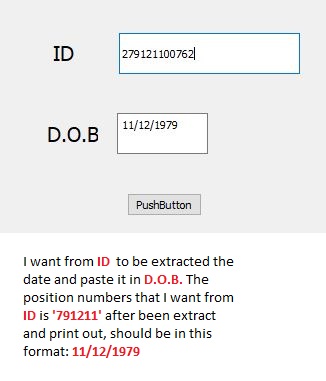
-
I see that, but it's still wrong...you need to subclass your main window and override the key event handler there.
The dystopian literature that served as a warning in my youth has become an instruction manual in my elder years.
-
I see that, but it's still wrong...you need to subclass your main window and override the key event handler there.
@Kent-Dorfman Please check it after it has edited it again. Many thanks,
-
based on what you REALLY ARE TRYING TO DO, forget about the tab key and follow the path discussed in <This Link>
@Kent-Dorfman Many thanks,


