
Writing to the serial port crashes my application
-
@jsulm
yeah, I check for the pointer being valid and not null by using below code , open was just another check that I recently introduced...
if( mSerialManager->controlPort != NULL)
{
QByteArray data = Datamanager::getInstance()->getItemFromOutQueueCtrl();
int size = mSerialManager->controlPort->write(data);
}@asthana said in Writing to the serial port crashes my application:
int size = mSerialManager->controlPort->write(data);
Does it crash at this line?
-
exactly, as per debug trace it goes to the qt internal function call i.e
inline qint64 write(const QByteArray &data)
{ return write(data.constData(), data.size()); } in QIODevice.h and segmentation fault.
and checked the size of data as well its never zero. -
Hi, I'm guessing that the QByteArray is torned down before all the bytes are transmitted, you could try to use a waitForBytesWritten() before the destructor of the QByteArray:
if( mSerialManager->controlPort != NULL)
{
    QByteArray data = Datamanager::getInstance()->getItemFromOutQueueCtrl();
    int size = mSerialManager->controlPort->write(data);
    mSerialManager->controlPort->waitForBytesWritten(-1);
}
or you could turn the QByteArray into a static one:
if( mSerialManager->controlPort != NULL) { static QByteArray data = Datamanager::getInstance()->getItemFromOutQueueCtrl(); int size = mSerialManager->controlPort->write(data); } -
@jsulm
yeah, I check for the pointer being valid and not null by using below code , open was just another check that I recently introduced...
if( mSerialManager->controlPort != NULL)
{
QByteArray data = Datamanager::getInstance()->getItemFromOutQueueCtrl();
int size = mSerialManager->controlPort->write(data);
}@asthana said in Writing to the serial port crashes my application:
if( mSerialManager->controlPort != NULL)
And where do you check for mSerialManager != nullptr? Or is it guaranteed that it can never be nullptr? And is controlPort really correctly initialized and not a dangling pointer?
-
Hi, I'm guessing that the QByteArray is torned down before all the bytes are transmitted, you could try to use a waitForBytesWritten() before the destructor of the QByteArray:
if( mSerialManager->controlPort != NULL)
{
    QByteArray data = Datamanager::getInstance()->getItemFromOutQueueCtrl();
    int size = mSerialManager->controlPort->write(data);
    mSerialManager->controlPort->waitForBytesWritten(-1);
}
or you could turn the QByteArray into a static one:
if( mSerialManager->controlPort != NULL) { static QByteArray data = Datamanager::getInstance()->getItemFromOutQueueCtrl(); int size = mSerialManager->controlPort->write(data); }@hskoglund
"mSerialManager->controlPort->waitForBytesWritten(-1);" actually slows down the application and since I am communication it to User Interface for display , the screen hangs and don't show any activity for sometime. I also tried giving a delay through this
i.e "waitForBytesWritten(20)" this works fine in terms of screen updates but still it crashes. -
Debug Trace
Function: QIODevice::write(QByteArray const&)
0x4a3bc1 <+0x0025> mov %ebx,0x4(%esp)
0x4a3bc5 <+0x0029> mov %esi,0x8(%esp)
0x4a3bc9 <+0x002d> mov %eax,(%esp)
0x4a3bcc <+0x0030> mov %edx,%ecx
0x4a3bce <+0x0032> mov 0x544914,%eax
0x4a3bd3 <+0x0037> call *%eax
0x4a3bd5 <+0x0039> sub $0xc,%esp
0x4a3bd8 <+0x003c> lea -0x8(%ebp),%esp
0x4a3bdb <+0x003f> pop %ebx
0x4a3bdc <+0x0040> pop %esi
0x4a3bdd <+0x0041> pop %ebp
0x4a3bde <+0x0042> ret $0x4
Function: _ZN9QIODevice5writeERK10QByteArray
0x4a3be1 <+0x0045> nop
0x4a3be2 <+0x0046> nop
0x4a3be3 <+0x0047> nopPlease find the attched screenshot for the same
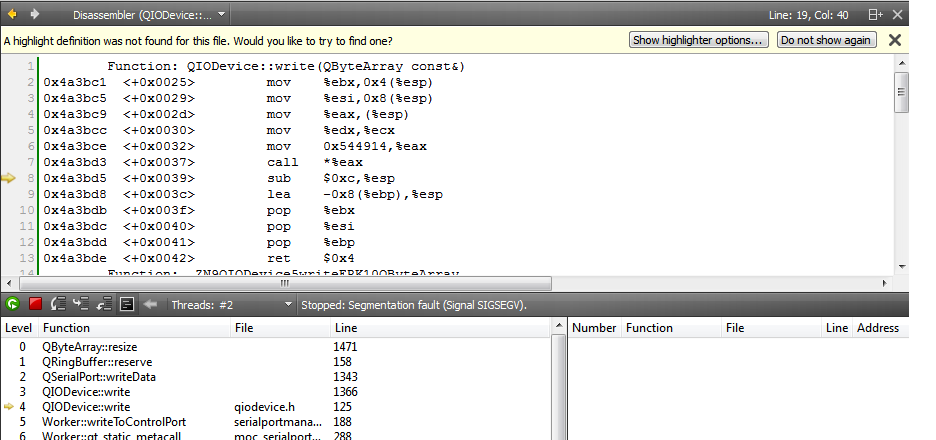
-
Debug Trace
Function: QIODevice::write(QByteArray const&)
0x4a3bc1 <+0x0025> mov %ebx,0x4(%esp)
0x4a3bc5 <+0x0029> mov %esi,0x8(%esp)
0x4a3bc9 <+0x002d> mov %eax,(%esp)
0x4a3bcc <+0x0030> mov %edx,%ecx
0x4a3bce <+0x0032> mov 0x544914,%eax
0x4a3bd3 <+0x0037> call *%eax
0x4a3bd5 <+0x0039> sub $0xc,%esp
0x4a3bd8 <+0x003c> lea -0x8(%ebp),%esp
0x4a3bdb <+0x003f> pop %ebx
0x4a3bdc <+0x0040> pop %esi
0x4a3bdd <+0x0041> pop %ebp
0x4a3bde <+0x0042> ret $0x4
Function: _ZN9QIODevice5writeERK10QByteArray
0x4a3be1 <+0x0045> nop
0x4a3be2 <+0x0046> nop
0x4a3be3 <+0x0047> nopPlease find the attched screenshot for the same
@asthana I don't think the QByteArray is the problem.
Please rather check @Christian-Ehrlicher's suggestion:
And where do you check for mSerialManager != nullptr? Or is it guaranteed that it can never be nullptr? And is controlPort really correctly initialized and not a dangling pointer?
That seems much more a possible cause for your problem.
Regards
-
I assume that you use a multiple threads (as I can see from your screenshoot with the 'Worker' class). If so, then you do it wrong... It is my assumption.
-
@asthana I don't think the QByteArray is the problem.
Please rather check @Christian-Ehrlicher's suggestion:
And where do you check for mSerialManager != nullptr? Or is it guaranteed that it can never be nullptr? And is controlPort really correctly initialized and not a dangling pointer?
That seems much more a possible cause for your problem.
Regards
@aha_1980
actually it can be,
from the looks of it, the serial port is threaded ( I take this from the naming of the class and the thread count)And from the looks of it,
Datamanager::getInstance()->getItemFromOutQueueCtrl();may very well become invalid during the write process. As it seams to be a singleton and may be accessed by different threads?
One shouldn't do that, but it won't result in a compiler error. -
I assume that you use a multiple threads (as I can see from your screenshoot with the 'Worker' class). If so, then you do it wrong... It is my assumption.
@kuzulis
Yeah, there are two threads that read and write to the port, so to check on that I stopped sending any data from User Interface(UI) that my application was reading and only write the data to the port which is sent to UI .
But still the problem is there. -
@asthana ,
Just read about the right way using the threads. You should to create the QSP instance and to call its methods only from the same thread.
E.g. if your worker was created in context of thread #2, then Worker::writeToControlPort() should be called too from the context of thread #2. Check the right thread id, just use QThread::currentThreadId() in ctor of Worker and inside of Worker::writeToControlPort() to see that this ID same.
PS: Read documentation, it is a main advice to you, before asking on a forum!!! It is simple...
-
@kuzulis said in Writing to the serial port crashes my application:
QThread::currentThreadId()
I hope that I am not making any mistake, please find the code for your reference
-
//Created in the constructor of the SerialPortManager Class
// do the control serial port reading in a thread
Worker* readCtrl = new Worker(this);
readCtrl->moveToThread(&readThreadControl);
connect(&readThreadControl, &QThread::finished, readCtrl, &QObject::deleteLater);
connect(this, SIGNAL(startCtrlRead()), readCtrl,SLOT(readFromControlPort()));
readThreadControl.start();// do the control serial port writing in a thread
Worker* writeCtrl = new Worker(this);
writeCtrl->moveToThread(&writeThreadControl);
connect(&writeThreadControl, &QThread::finished, writeCtrl, &QObject::deleteLater);
connect(this, SIGNAL(startCtrlWrite()), writeCtrl,SLOT(writeToControlPort()));
writeThreadControl.start();
So here are two threads created on for read and write
How read works
1.Main Thread has a connect call that listens to any data coming to the serial port
connect(controlPort, SIGNAL(readyRead()), this, SLOT(readDataFromCtrl()));2. void SerialPortManager::readDataFromCtrl()
{ emit startCtrlRead();}Here at this point read worker thread is called.
3. void Worker::readFromControlPort()
{
if( mSerialManager->controlPort != NULL)
{
QByteArray data = mSerialManager->controlPort->readAll();
Datamanager::getInstance()->addToInQueueCtrl(data);
}
}
4.void Datamanager::addToInQueueCtrl(QByteArray msgData)
{
mInQueueCtrl.append(msgData);
emit inQueueCtrlHasItem();
}
So from here we can read the data from the queueHow Write works
-
The data is framed and added to the write queue.
Datamanager::getInstance()->addToOutQueueCtrl(msgData); -
addToOutQueueCtrl() emits the signal which is handled by the write worker thread and SLOT writeToControlPort() is called .
-
void Datamanager::addToOutQueueCtrl(QByteArray msgData)
{
mOutQueueCtrl.append(msgData);
emit outQueueCtrlHasItem();
} -
connect(Datamanager::getInstance(),SIGNAL(outQueueCtrlHasItem()),
serialPortManager,SLOT(writeDataToCtrl())); -
void SerialPortManager::writeDataToCtrl()
{
emit startCtrlWrite();
} -
Here is what write worker thread executes the SLOT and write the data to port
-
void Worker::writeToControlPort()
{
if( mSerialManager->controlPort != NULL)
{
while( !Datamanager::getInstance()->isOutQueueCtrlEmpty())
{
QByteArray data = Datamanager::getInstance()->getItemFromOutQueueCtrl();
int size = mSerialManager->controlPort->write(data);
if( size > 0)
{
qDebug() << "Control Serial Port Write Succesful: " << size ;
}
else
{
qDebug() << "Control Serial Port Write Error: " << size ;
}
}
}
else
{
qDebug() << "NO Serial Port Connection to Write ";
}
}
I can understand that it can be common thread problem, but it was working fine for a long time .
I will check for the thread ID as well to make sure on that part. -
-
I don't want to understand your code, you should do it himself, sorry.


