
My first QML app's problem on macOS High Sierra
-
@SGaist
Thank you really very much. You solved my issue and I finally could install that simple project on my iPhone.After that I tested one of my recent complete projects. So I transferred it onto macOS and opened it by Qt Creator. And while my iPhone was connected to macOS, ran the project, then I got the error:
xcodebuid failed.Then I opened the projects .xcodeproj file. Firstly it was this way, with signing errors once again:
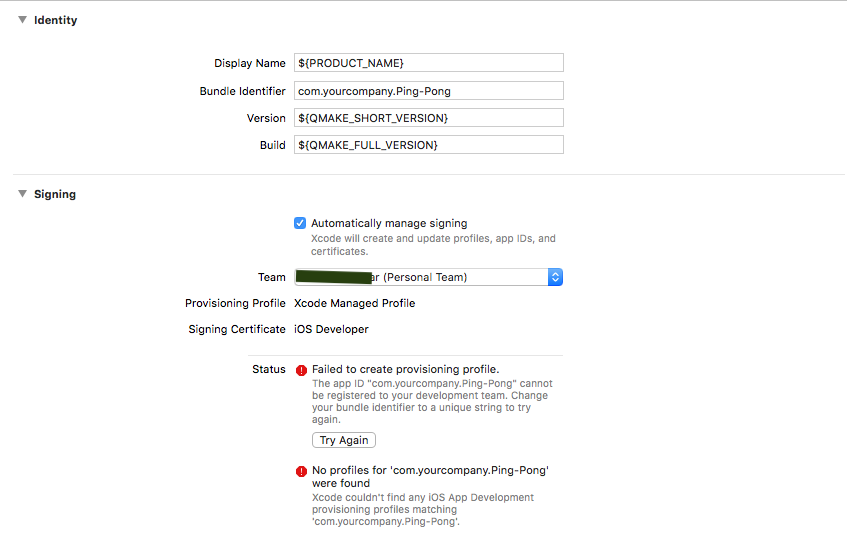
Then I changed the string of "Bundle Identifier" by adding a word as shown below, and the signing errors were vanished afterwards:
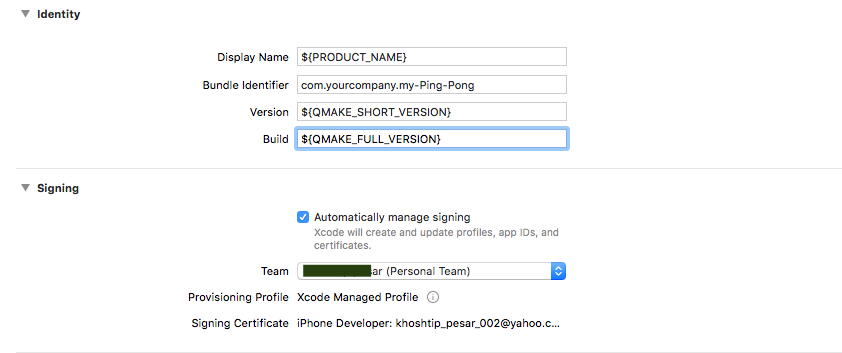
Then closed that menu and went back to Xcode -> Devices -> Setup device complete.
Then ran the project once again:
Still get this error:xcodebuid failed.So I got back to the .xcodeproj file and saw astonishingly the previous settings, shown in the first screenshot above, has returned!
Should I have saved that change in the Bundle Identifier before closing it? If so, what is the appropriate way of this, please?
Apparently the problem is much more vast that affected Apple, Facebook and many more companies! [And me too, just right this time when I went for iOS developing for the first time! :( ]
-
@SGaist
Thank you really very much. You solved my issue and I finally could install that simple project on my iPhone.After that I tested one of my recent complete projects. So I transferred it onto macOS and opened it by Qt Creator. And while my iPhone was connected to macOS, ran the project, then I got the error:
xcodebuid failed.Then I opened the projects .xcodeproj file. Firstly it was this way, with signing errors once again:
Then I changed the string of "Bundle Identifier" by adding a word as shown below, and the signing errors were vanished afterwards:
Then closed that menu and went back to Xcode -> Devices -> Setup device complete.
Then ran the project once again:
Still get this error:xcodebuid failed.So I got back to the .xcodeproj file and saw astonishingly the previous settings, shown in the first screenshot above, has returned!
Should I have saved that change in the Bundle Identifier before closing it? If so, what is the appropriate way of this, please?
Apparently the problem is much more vast that affected Apple, Facebook and many more companies! [And me too, just right this time when I went for iOS developing for the first time! :( ]
@tomy that is not unexpected, the Xcode project file is generated on each compile.
But to battle your issues.
Make the changes you want in Xcode (it has the better editor for this)
go to your build folder and find the Info.plist file.
Copy and paste that file to your source files
inside your pro file add the following:ios{ QMAKE_INFO_PLIST =Info.plist // if it's inside a folder specify that too e.g. myFolder/Info.plist }now, your settings are not generated each compile time, but are taken from the info.plist file
Be aware of the Qt Code of Conduct, when posting : https://forum.qt.io/topic/113070/qt-code-of-conduct
Q: What's that?
A: It's blue light.
Q: What does it do?
A: It turns blue. -
@tomy that is not unexpected, the Xcode project file is generated on each compile.
But to battle your issues.
Make the changes you want in Xcode (it has the better editor for this)
go to your build folder and find the Info.plist file.
Copy and paste that file to your source files
inside your pro file add the following:ios{ QMAKE_INFO_PLIST =Info.plist // if it's inside a folder specify that too e.g. myFolder/Info.plist }now, your settings are not generated each compile time, but are taken from the info.plist file
-
Copy and paste that file to your source files
Do you mean the project's original directory, where the .pro file exists, by "source files", please?
@tomy It doesn't really matter where exactly you paste the file. But if you place it besides the pro file (same folder) you can simply write
QMAKE_INFO_PLIST =Info.plistwithout specifying an absolute or relative path on your own.
Be aware of the Qt Code of Conduct, when posting : https://forum.qt.io/topic/113070/qt-code-of-conduct
Q: What's that?
A: It's blue light.
Q: What does it do?
A: It turns blue. -
@tomy It doesn't really matter where exactly you paste the file. But if you place it besides the pro file (same folder) you can simply write
QMAKE_INFO_PLIST =Info.plistwithout specifying an absolute or relative path on your own.@J.Hilk said in
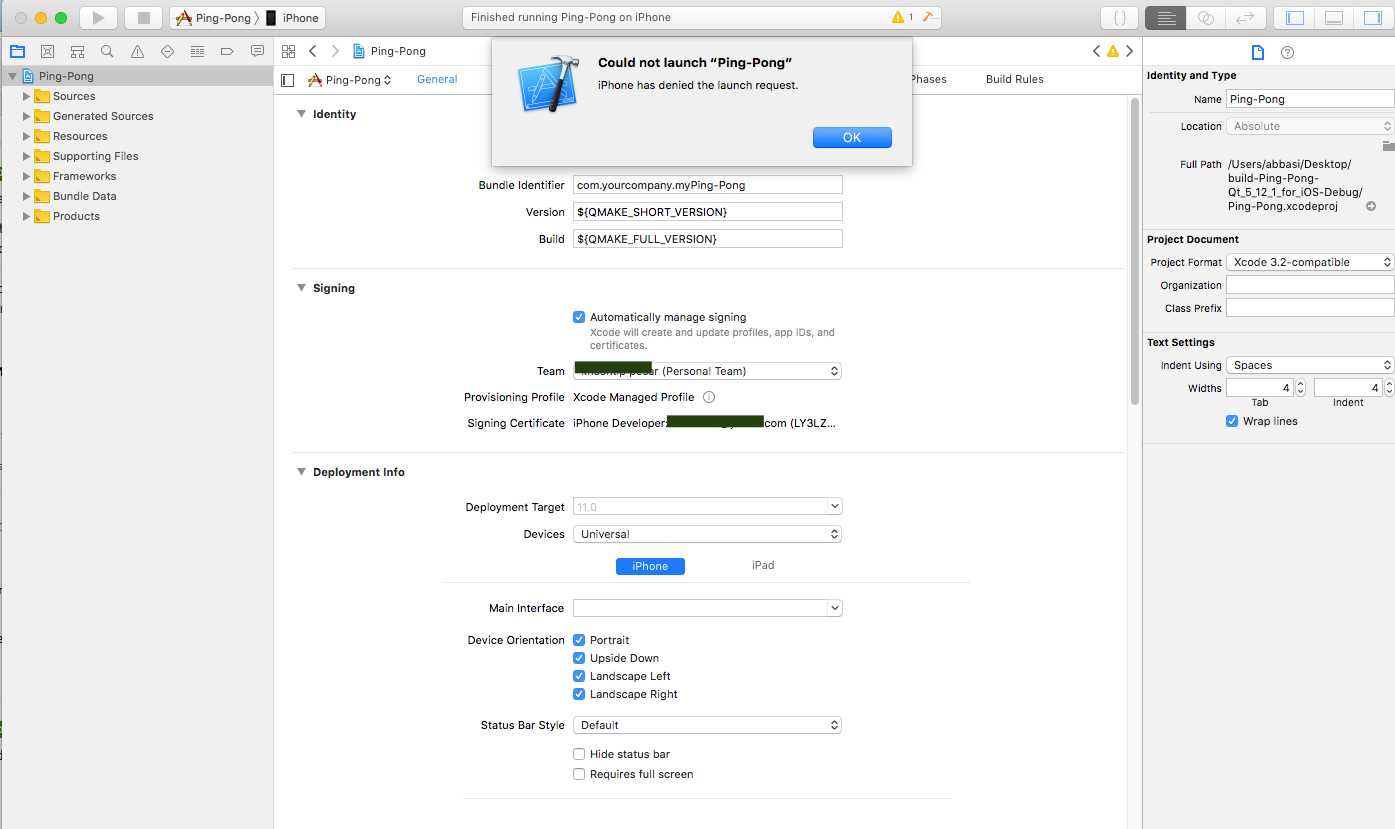
After these, I used the "build and then run the current scheme" button on Xcode to install the app on my iPhone. Xcode firstly responded by a message to me that I need to trust the developer (myself) on the iPhone => I did this and re-ran that button (on Xcode). This time it says:
-
@J.Hilk said in
After these, I used the "build and then run the current scheme" button on Xcode to install the app on my iPhone. Xcode firstly responded by a message to me that I need to trust the developer (myself) on the iPhone => I did this and re-ran that button (on Xcode). This time it says:
@tomy never had this one oO
but check this thread
https://stackoverflow.com/questions/45421179/xcode-9-error-iphone-has-denied-the-launch-requesthas a couple of different solutions offered
Be aware of the Qt Code of Conduct, when posting : https://forum.qt.io/topic/113070/qt-code-of-conduct
Q: What's that?
A: It's blue light.
Q: What does it do?
A: It turns blue. -
@tomy never had this one oO
but check this thread
https://stackoverflow.com/questions/45421179/xcode-9-error-iphone-has-denied-the-launch-requesthas a couple of different solutions offered
@J.Hilk said in
I unchecked "product->scheme->edit scheme->info->debug executable" checkbox and Xcode installed the app on the iPhone.
Is it a correct choice, according to your experience, please?
One other problem is, when installing this app on Android its icon is shown on the device, but on my iPhone the icon is not shown:

-
@J.Hilk said in
I unchecked "product->scheme->edit scheme->info->debug executable" checkbox and Xcode installed the app on the iPhone.
Is it a correct choice, according to your experience, please?
One other problem is, when installing this app on Android its icon is shown on the device, but on my iPhone the icon is not shown:
@tomy that is because for android, you define the icon inside the AndroidManifest.xml in iOS you define the icon via th info.plist
for example:
<key>CFBundleIcons</key>
	<dict>
		<key>CFBundlePrimaryIcon</key>
		<dict>
			<key>CFBundleIconFiles</key>
			<array>
				<string>AppIcon20x20</string>
				<string>AppIcon29x29</string>
				<string>AppIcon40x40</string>
				<string>AppIcon60x60</string>
			</array>
			<key>CFBundleIconName</key>
			<string>AppIcon</string>
		</dict>
	</dict>
how ever Xcode has a nice drag and drop handling for the icons,

Be aware of the Qt Code of Conduct, when posting : https://forum.qt.io/topic/113070/qt-code-of-conduct
Q: What's that?
A: It's blue light.
Q: What does it do?
A: It turns blue. -
@tomy that is because for android, you define the icon inside the AndroidManifest.xml in iOS you define the icon via th info.plist
for example:
<key>CFBundleIcons</key>
	<dict>
		<key>CFBundlePrimaryIcon</key>
		<dict>
			<key>CFBundleIconFiles</key>
			<array>
				<string>AppIcon20x20</string>
				<string>AppIcon29x29</string>
				<string>AppIcon40x40</string>
				<string>AppIcon60x60</string>
			</array>
			<key>CFBundleIconName</key>
			<string>AppIcon</string>
		</dict>
	</dict>
how ever Xcode has a nice drag and drop handling for the icons,
@J.Hilk Hi, thank you.
I put two .png files for LaunchImage (1792 X 828) and AppIcon (size: 120X120), as shown below:
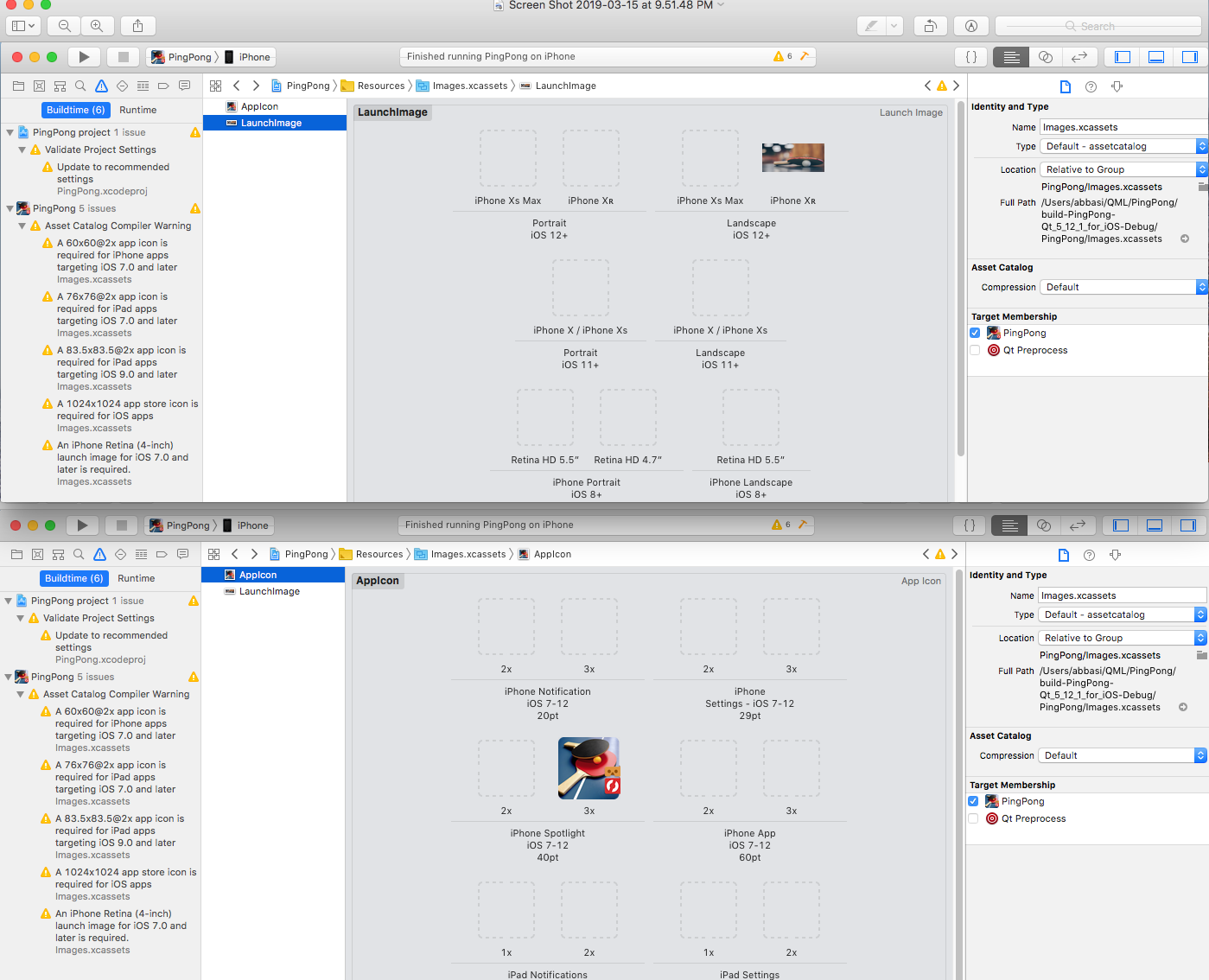
When installing the app was finished by hitting the play button on Xcode, the AppIcon is set nicely on the app on my iPhone 5s, but the LaunchImage doesn't appear when running the app!
Where have I made a mistake as the reason for this please?
-
@J.Hilk Hi, thank you.
I put two .png files for LaunchImage (1792 X 828) and AppIcon (size: 120X120), as shown below:
When installing the app was finished by hitting the play button on Xcode, the AppIcon is set nicely on the app on my iPhone 5s, but the LaunchImage doesn't appear when running the app!
Where have I made a mistake as the reason for this please?
@tomy mmh
I'm unsure.
Personal I use a LaunchScreen.storyboard for that
Here an example from stack overflow on how to create that:
https://stackoverflow.com/questions/37951817/launch-screen-storyboard-with-centered-image-ios/2
Be aware of the Qt Code of Conduct, when posting : https://forum.qt.io/topic/113070/qt-code-of-conduct
Q: What's that?
A: It's blue light.
Q: What does it do?
A: It turns blue. -
@tomy mmh
I'm unsure.
Personal I use a LaunchScreen.storyboard for that
Here an example from stack overflow on how to create that:
https://stackoverflow.com/questions/37951817/launch-screen-storyboard-with-centered-image-ios/2 -
I used the page with screenshots and although height and width weren't automatically adjusted using the menu (when setting the values), but manually, the launch screen was properly centralized. I also suspect there will be a way to set a "launch screen" for Android too, but what I found was all of "splash screen" in lieu of "launch screen"on Android apps.
One strange thing throughout this succeeded iOS launch screen applying process was that I always get the error "xcodefaild" when I build the app using the iOS kit on Qt Creator. I'm not certain whether or not it takes place for other develpers and it's common for that stage.


