
Skip to content
  • Categories
  • Recent
  • Tags
  • Popular
  • Users
  • Groups
  • Search
  • Get Qt Extensions
  • Unsolved
Collapse
Brand Logo
  1. Home
  2. Qt Development
  3. General and Desktop
  4. QScrollArea doesn't dynamically create Scroll Bars

QScrollArea doesn't dynamically create Scroll Bars

Scheduled Pinned Locked Moved Unsolved General and Desktop
5 Posts 4 Posters 950 Views 1 Watching
  • Oldest to Newest
  • Newest to Oldest
  • Most Votes
Reply
  • Reply as topic
Log in to reply
This topic has been deleted. Only users with topic management privileges can see it.
  • G Offline
    G Offline
    gblessed
    wrote on last edited by
    #1

    Hi, I created a QScrollArea widget and placed some labels on it. However when the texts are longer, it doesn't dynamically add a scrollbar. How do I add it manually? Thanks in anticipation

    1 Reply Last reply
    0
    • mrjjM Offline
      mrjjM Offline
      mrjj
      Lifetime Qt Champion
      wrote on last edited by
      #2

      Hi
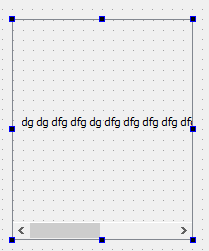
      Right click a free area on the ScrollArea and apply layout from menu.
      It should then show scrollbars.
      alt text

      G 1 Reply Last reply
      2
      • mrjjM mrjj

        Hi
        Right click a free area on the ScrollArea and apply layout from menu.
        It should then show scrollbars.
        alt text

        G Offline
        G Offline
        gblessed
        wrote on last edited by
        #3

        @mrjj hi, thanks for your time so far. am quite confused, because when I do it in designer mode it works , however when I do it by coding it doesn't work. Am placing the scrollArea on Qstackedwidget.
        This describes what I did :
        vlayout-> addwidget(mylabel);
        scrollarea->setlayout(vlayout);
        pagelayout->add widget(scrollarea); //QVBox object
        page->set layout(pagelayout);//stackedwidget's pahr

        jsulmJ 1 Reply Last reply
        0
        • G gblessed

          @mrjj hi, thanks for your time so far. am quite confused, because when I do it in designer mode it works , however when I do it by coding it doesn't work. Am placing the scrollArea on Qstackedwidget.
          This describes what I did :
          vlayout-> addwidget(mylabel);
          scrollarea->setlayout(vlayout);
          pagelayout->add widget(scrollarea); //QVBox object
          page->set layout(pagelayout);//stackedwidget's pahr

          jsulmJ Offline
          jsulmJ Offline
          jsulm
          Lifetime Qt Champion
          wrote on last edited by
          #4

          @gblessed You can check the generated code when using the designer to compare it to your own code.

          https://forum.qt.io/topic/113070/qt-code-of-conduct

          1 Reply Last reply
          1
          • E Offline
            E Offline
            etla
            wrote on last edited by
            #5

            I had a similar problem earlier. This is the relevant code in my main():

              MainPanel *mainPanel = new MainPanel;
            
              QScrollArea *area = new QScrollArea;
              area->setWidget(mainPanel);
              area->setVerticalScrollBarPolicy(Qt::ScrollBarAlwaysOff);
              area->setMaximumSize(mainPanel->size() + QSize(2, 0));
              area->setMinimumHeight(mainPanel->height());
            
              MainWindow *mainWindow = new MainWindow;
              mainWindow->setCentralWidget(area);
              mainWindow->show();
            

            Two notes:
            MainWindow inherits QMainWindow.
            The addition of QSize(2,0) is only there because otherwise the scroll bar never disappeared.

            Now, the problem I had was that MainPanel contains an clickable image but QScrollArea didn't detect the size of it. That is until I added this in the MainWindow constructor:

                QImage image(getPanelImage().c_str());
                setMinimumSize(image.size());
                setMaximumSize(image.size());
            

            Those two last lines are probably what you're looking for. Don't know if this is the RIGHT way to do it, but it worked. ;)

            Code in haste; debug in leisure.

            1 Reply Last reply
            1

            • Login

            • Login or register to search.
            • First post
              Last post
            0
            • Categories
            • Recent
            • Tags
            • Popular
            • Users
            • Groups
            • Search
            • Get Qt Extensions
            • Unsolved