
Skip to content
  • Categories
  • Recent
  • Tags
  • Popular
  • Users
  • Groups
  • Search
  • Get Qt Extensions
  • Unsolved
Collapse
Brand Logo
  1. Home
  2. Qt Development
  3. General and Desktop
  4. Remove close icon on last QTabWidget
Qt 6.11 is out! See what's new in the release blog

Remove close icon on last QTabWidget

Scheduled Pinned Locked Moved Solved General and Desktop
5 Posts 3 Posters 2.0k Views 3 Watching
  • Oldest to Newest
  • Newest to Oldest
  • Most Votes
Reply
  • Reply as topic
Log in to reply
This topic has been deleted. Only users with topic management privileges can see it.
  • M Offline
    M Offline
    Mark81
    wrote on last edited by
    #1

    I would provide a simple way to add and remove tabs from QTabBar. The first thought was to set a "plus" icon to the last tab and set the closeable property to true. When the use click on the last tab I insert a new one in the previous position. To remove one just click on the 'x' icon. It works, but it's not fine to have both plus and close icons on the last tab.

    Is there a way to hide the close icon only for the last tab?
    It's ok the opposite: add a plus icon (or whatever) on the right of the last tab.

    1 Reply Last reply
    0
    • SGaistS Offline
      SGaistS Offline
      SGaist
      Lifetime Qt Champion
      wrote on last edited by
      #2

      Hi,

      Would the corner widget using a button do the trick ?

      Interested in AI ? www.idiap.ch
      Please read the Qt Code of Conduct - https://forum.qt.io/topic/113070/qt-code-of-conduct

      M 1 Reply Last reply
      3
      • mrjjM Offline
        mrjjM Offline
        mrjj
        Lifetime Qt Champion
        wrote on last edited by
        #3

        Hi
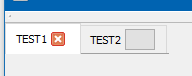
        Well if you insert new widget, it does hide the close button.
        bar->setTabButton(1,QTabBar::ButtonPosition::RightSide,new QPushButton(bar) );
        alt text

        M 1 Reply Last reply
        3
        • SGaistS SGaist

          Hi,

          Would the corner widget using a button do the trick ?

          M Offline
          M Offline
          Mark81
          wrote on last edited by
          #4

          @SGaist yep, it actually does. I had to try it because I didn't understand how it works...

          1 Reply Last reply
          0
          • mrjjM mrjj

            Hi
            Well if you insert new widget, it does hide the close button.
            bar->setTabButton(1,QTabBar::ButtonPosition::RightSide,new QPushButton(bar) );
            alt text

            M Offline
            M Offline
            Mark81
            wrote on last edited by
            #5

            @mrjj This is another good hint. Thanks!

            1 Reply Last reply
            0

            • Login

            • Login or register to search.
            • First post
              Last post
            0
            • Categories
            • Recent
            • Tags
            • Popular
            • Users
            • Groups
            • Search
            • Get Qt Extensions
            • Unsolved