Skip to content
  • Categories
  • Recent
  • Tags
  • Popular
  • Users
  • Groups
  • Search
  • Get Qt Extensions
  • Unsolved
Collapse
Brand Logo
  1. Home
  2. Qt Development
  3. General and Desktop
  4. Error to Build the QMYSQL Plugin on macOS High Sierra

Error to Build the QMYSQL Plugin on macOS High Sierra

Scheduled Pinned Locked Moved Unsolved General and Desktop
9 Posts 4 Posters 1.8k Views 1 Watching
  • Oldest to Newest
  • Newest to Oldest
  • Most Votes
Reply
  • Reply as topic
Log in to reply
This topic has been deleted. Only users with topic management privileges can see it.
  • A Offline
    A Offline
    Albert Huert
    wrote on last edited by
    #1

    Hi,
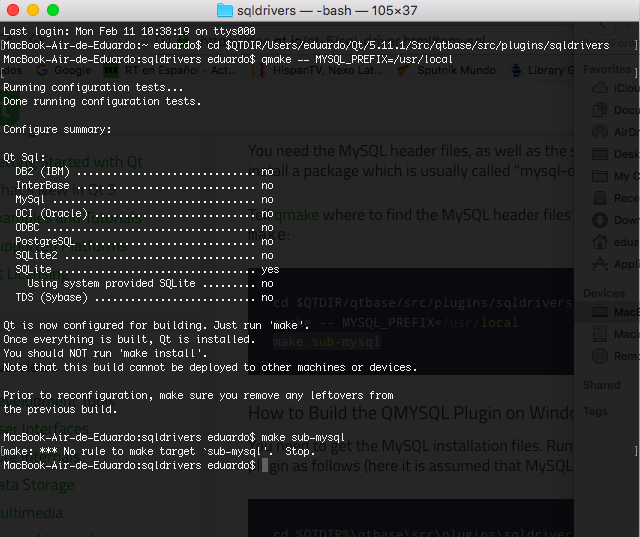
    I am following the procedure shown in the qt documentation, but when trying to build the QMysql plugin it shows me the following error, make: *** No rule to make target `sub-mysql '. Stop. I have a question about the address to use in MYSQL_PREFIX =. I leave the screenshot with the addresses you use. Thanks for the help.
    0_1549905638626_sqldrivers.png
    0_1549905664896_mysql_prefix.png 0_1549905679191_terminal2.png

    1 Reply Last reply
    0
    • S Offline
      S Offline
      Silderan
      wrote on last edited by
      #2

      Not sure at all, as I'm Windows user and the error I see is not the same.
      But, did you run configure script before trying to build the plugin?

      I'm in my own calvary trying to build this too xD

      A 2 Replies Last reply
      0
      • SGaistS Offline
        SGaistS Offline
        SGaist
        Lifetime Qt Champion
        wrote on last edited by
        #3

        Hi,

        /usr/local is likely incomplete. You have to provide that path where the MySQL files can be found.

        Interested in AI ? www.idiap.ch
        Please read the Qt Code of Conduct - https://forum.qt.io/topic/113070/qt-code-of-conduct

        A 1 Reply Last reply
        0
        • S Silderan

          Not sure at all, as I'm Windows user and the error I see is not the same.
          But, did you run configure script before trying to build the plugin?

          I'm in my own calvary trying to build this too xD

          A Offline
          A Offline
          Albert Huert
          wrote on last edited by
          #4

          @Silderan said in Error to Build the QMYSQL Plugin on macOS High Sierra:

          configure script

          Hi, Which configure script ??

          1 Reply Last reply
          0
          • SGaistS SGaist

            Hi,

            /usr/local is likely incomplete. You have to provide that path where the MySQL files can be found.

            A Offline
            A Offline
            Albert Huert
            wrote on last edited by
            #5

            @SGaist
            Hi, whats MySQL file? I'm not sure what files are, to know the path that needs to be added to MYSQL_PREFIX =, but I've already added the paths of the screenshop and it shows me the same error.
            0_1549933840812_lib.png

            0_1549933884580_header.png

            jsulmJ 1 Reply Last reply
            0
            • A Albert Huert

              @SGaist
              Hi, whats MySQL file? I'm not sure what files are, to know the path that needs to be added to MYSQL_PREFIX =, but I've already added the paths of the screenshop and it shows me the same error.
              0_1549933840812_lib.png

              0_1549933884580_header.png

              jsulmJ Offline
              jsulmJ Offline
              jsulm
              Lifetime Qt Champion
              wrote on last edited by
              #6

              @Albert-Huert You need to provide the path to MySQL (the one containing lib and include)

              https://forum.qt.io/topic/113070/qt-code-of-conduct

              1 Reply Last reply
              0
              • S Offline
                S Offline
                Silderan
                wrote on last edited by
                #7

                In this doc you'll find:
                0_1549957585950_d341bca3-f475-4dc0-881c-09fe5f098741-image.png

                So, to setup the building you deed to execute some like this:
                configure -sql-mysql MYSQL_PREFIX=<path-where-mysql-libs-and-headers-are>
                Configure script (in your case) is in $QTDIR/Users/eduardo/Qt/5.11.1/Src/

                After that, you're able to run the qmake command as you did. But check where your MySQL headers and libs are. Maybe, as @SGaist and @jsulm said, /user/local/ it's not where this files are.

                1 Reply Last reply
                0
                • A Offline
                  A Offline
                  Albert Huert
                  wrote on last edited by
                  #8

                  I have searched the web and in books how to connect to my database and they say that I should add the file libmysql.so, but I have already downloaded all versions of MySQL and do not have that file only dynamic and static libraries. Does anyone know what version of MySQL that file has ??

                  1 Reply Last reply
                  0
                  • S Silderan

                    Not sure at all, as I'm Windows user and the error I see is not the same.
                    But, did you run configure script before trying to build the plugin?

                    I'm in my own calvary trying to build this too xD

                    A Offline
                    A Offline
                    Albert Huert
                    wrote on last edited by
                    #9

                    @Silderan Hi,
                    You can use microsoft SQL server in window, I did not have problems in windows using sql server is very simple.

                    1 Reply Last reply
                    0

                    • Login

                    • Login or register to search.
                    • First post
                      Last post
                    0
                    • Categories
                    • Recent
                    • Tags
                    • Popular
                    • Users
                    • Groups
                    • Search
                    • Get Qt Extensions
                    • Unsolved