Skip to content
  • Categories
  • Recent
  • Tags
  • Popular
  • Users
  • Groups
  • Search
  • Get Qt Extensions
  • Unsolved
Collapse
Brand Logo
  1. Home
  2. Qt Development
  3. General and Desktop
  4. Debug Build Error on 5.12 - ASSERT: "xs == xData.data() + xData.size()"

Debug Build Error on 5.12 - ASSERT: "xs == xData.data() + xData.size()"

Scheduled Pinned Locked Moved Unsolved General and Desktop
18 Posts 4 Posters 2.4k Views 1 Watching
  • Oldest to Newest
  • Newest to Oldest
  • Most Votes
Reply
  • Reply as topic
Log in to reply
This topic has been deleted. Only users with topic management privileges can see it.
  • EatonCodeE Offline
    EatonCodeE Offline
    EatonCode
    wrote on last edited by EatonCode
    #3

    @aha_1980

    There are no stop points in my code that I can check.

    It keeps giving me this error.

    ASSERT: "xs == xData.data() + xData.size()" in file scenegraph\qsgbasicinternalimagenode.cpp, line 271

    which is not part of my code.

    https://www.eatoncode.com/resources/shareit/Qt_Creator_2018-12-09_07.15.59.png

    Maybe it's a new check on images? I have over 60 images, I have no idea how to clear the libpng warning if that's the issue?

    Here it the application OutPut

    Program: D:\Qt\5.12.0\msvc2017_64\bin\Qt5Cored.dll
    Module: 5.12.0
    File: scenegraph\qsgbasicinternalimagenode.cpp
    Line: 271
    
    ASSERT: "xs == xData.data() + xData.size()" in file scenegraph\qsgbasicinternalimagenode.cpp, line 271
    

    Hum... The error only happens in debug mode. When I reset to Release and rebuild the program runs without any problems.

    1 Reply Last reply
    0
    • Christian EhrlicherC Online
      Christian EhrlicherC Online
      Christian Ehrlicher
      Lifetime Qt Champion
      wrote on last edited by
      #4

      Please run it in the debugger as @aha_1980 suggested to get a proper backtrace so you can see why the assertion is hit.
      The reason why it works in release mode is that there are no assertions active - assertions are a pure debug helper stuff

      Qt Online Installer direct download: https://download.qt.io/official_releases/online_installers/
      Visit the Qt Academy at https://academy.qt.io/catalog

      1 Reply Last reply
      2
      • EatonCodeE Offline
        EatonCodeE Offline
        EatonCode
        wrote on last edited by
        #5

        @Christian-Ehrlicher

        Am I missing something about the debugger?

        https://www.eatoncode.com/resources/shareit/Desktop_2018-12-09_09.12.47.mp4

        Thanks.

        1 Reply Last reply
        0
        • Christian EhrlicherC Online
          Christian EhrlicherC Online
          Christian Ehrlicher
          Lifetime Qt Champion
          wrote on last edited by
          #6

          You have to go up the stack in the stack trace window...

          Qt Online Installer direct download: https://download.qt.io/official_releases/online_installers/
          Visit the Qt Academy at https://academy.qt.io/catalog

          EatonCodeE 1 Reply Last reply
          0
          • Christian EhrlicherC Christian Ehrlicher

            You have to go up the stack in the stack trace window...

            EatonCodeE Offline
            EatonCodeE Offline
            EatonCode
            wrote on last edited by
            #7

            @Christian-Ehrlicher said in Debug Build Error on 5.12 - ASSERT: "xs == xData.data() + xData.size()":

            You have to go up the stack in the stack trace window...

            @Christian-Ehrlicher - I never did figure it out. tried watching youtube videoes to see what I am missing. I am just going back to an earlier version because it's not breaking at the excepting it's just dying in the main. And when I Retry I am not getting the same error point in QT Creator.

            1 Reply Last reply
            0
            • mrjjM Offline
              mrjjM Offline
              mrjj
              Lifetime Qt Champion
              wrote on last edited by
              #8

              Hi
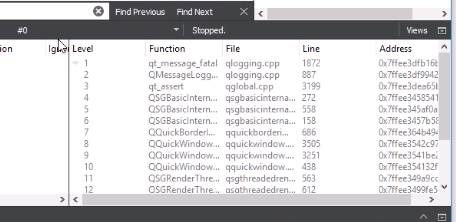
              Didnt the video contain the wanted trace ?
              alt text

              1 Reply Last reply
              0
              • EatonCodeE Offline
                EatonCodeE Offline
                EatonCode
                wrote on last edited by EatonCode
                #9

                @mrjj I am not sure Qt is providing the Traceback.

                The application just quits with a C++ Error. Here is a video. I have to Abort, Retry or Ignore.

                I am not quite sure if I select Retry, I am getting the correct info from the Stack Trace.

                https://www.eatoncode.com/resources/shareit/Desktop_2018-12-11_00.02.06.mp4

                If you have any advise, it would be helpful.

                1 Reply Last reply
                0
                • EatonCodeE Offline
                  EatonCodeE Offline
                  EatonCode
                  wrote on last edited by
                  #10

                  I have finally created a reproduce-able issue with an example.

                  Here is the video

                  https://www.eatoncode.com/resources/shareit/Desktop_2019-02-02_23.44.44.mp4

                  Here is the code.

                  https://www.eatoncode.com/resources/shareit/buttonqt/demobuttons.zip

                  So far it works from 5.9 - 5.11.3, but it breaks on 5.12.0, 5.12.1 and 5.13.0 Alpha

                  In debug mode, I get the xData.data error but I can run in release mode but the hover images do not display correctly on my buttons.

                  I am using MSVS 2017 32 and 64 bit versions.

                  Thanks for your help in advance.

                  1 Reply Last reply
                  1
                  • Christian EhrlicherC Online
                    Christian EhrlicherC Online
                    Christian Ehrlicher
                    Lifetime Qt Champion
                    wrote on last edited by
                    #11

                    From my pov this assert was there already in the previous version but you never used the Qt debug libs.
                    The calculation for the assert looks wrong to me - I've created a bug report: https://bugreports.qt.io/browse/QTBUG-73472

                    Qt Online Installer direct download: https://download.qt.io/official_releases/online_installers/
                    Visit the Qt Academy at https://academy.qt.io/catalog

                    EatonCodeE 1 Reply Last reply
                    3
                    • Christian EhrlicherC Christian Ehrlicher

                      From my pov this assert was there already in the previous version but you never used the Qt debug libs.
                      The calculation for the assert looks wrong to me - I've created a bug report: https://bugreports.qt.io/browse/QTBUG-73472

                      EatonCodeE Offline
                      EatonCodeE Offline
                      EatonCode
                      wrote on last edited by
                      #12

                      @Christian-Ehrlicher Thanks for looking into my issue, I do appreciate it.

                      1 Reply Last reply
                      0
                      • EatonCodeE Offline
                        EatonCodeE Offline
                        EatonCode
                        wrote on last edited by
                        #13

                        It appears this bug was fixed in 5.12.3 and works in 5.12.4 But does not work correctly in 5.13.0.

                        Can we carry over the bug fix from 5.12.3 and include it in 5.13.0 ?

                        1 Reply Last reply
                        0
                        • Christian EhrlicherC Online
                          Christian EhrlicherC Online
                          Christian Ehrlicher
                          Lifetime Qt Champion
                          wrote on last edited by
                          #14

                          There is a daily merge from 5.12 to 5.13 to dev so it should appear in 5.13.1.

                          Qt Online Installer direct download: https://download.qt.io/official_releases/online_installers/
                          Visit the Qt Academy at https://academy.qt.io/catalog

                          EatonCodeE 1 Reply Last reply
                          1
                          • EatonCodeE Offline
                            EatonCodeE Offline
                            EatonCode
                            wrote on last edited by
                            #15

                            Correction...

                            The fix was on 5.12.3

                            Looks like it's broke on 5.12.4 again.. for some reason it looks like this.

                            https://www.eatoncode.com/resources/shareit/qtbug_73742_2019-06-24_07.18.28.png

                            https://www.eatoncode.com/resources/shareit/Desktop_2019-06-24_07.28.31.mp4

                            At least there is not a fatal error, it's just NOT displaying correctly according to the docs

                            Buttons works on
                            5.6.X - 5.11.X
                            5.12.0 - 5.12.2 - Broke with Error listed above.
                            5.12.3 - Buttons work perfectly again
                            5.12.4 - No Error But Example has display issues with 4 square backgrounds. (See above screenshot and movie clip)
                            5.13.0 - Has same fatal error as 5.12.2

                            @Christian-Ehrlicher - Ok, I will be checking out 5.13.1 once it comes out. Thanks for the help.

                            1 Reply Last reply
                            0
                            • Christian EhrlicherC Christian Ehrlicher

                              There is a daily merge from 5.12 to 5.13 to dev so it should appear in 5.13.1.

                              EatonCodeE Offline
                              EatonCodeE Offline
                              EatonCode
                              wrote on last edited by
                              #16

                              @Christian-Ehrlicher I updated my Qt because of a maintenance update. Now it seems that 5.12.3 is not working.

                              Is this truly a bug or should I use a different approach?

                              https://www.eatoncode.com/resources/shareit/qtbug_73742_-_Qt_Creator_2019-07-20_14.38.39.png

                              Thanks in advance.

                              aha_1980A 1 Reply Last reply
                              0
                              • EatonCodeE EatonCode

                                @Christian-Ehrlicher I updated my Qt because of a maintenance update. Now it seems that 5.12.3 is not working.

                                Is this truly a bug or should I use a different approach?

                                https://www.eatoncode.com/resources/shareit/qtbug_73742_-_Qt_Creator_2019-07-20_14.38.39.png

                                Thanks in advance.

                                aha_1980A Offline
                                aha_1980A Offline
                                aha_1980
                                Lifetime Qt Champion
                                wrote on last edited by
                                #17

                                Hi @EatonCode,

                                You should report the issues on https://bugreports.qt.io/browse/QTBUG-73472

                                That is the only way to reach the responsible maintainers.

                                Regards

                                Qt has to stay free or it will die.

                                EatonCodeE 1 Reply Last reply
                                2
                                • aha_1980A aha_1980

                                  Hi @EatonCode,

                                  You should report the issues on https://bugreports.qt.io/browse/QTBUG-73472

                                  That is the only way to reach the responsible maintainers.

                                  Regards

                                  EatonCodeE Offline
                                  EatonCodeE Offline
                                  EatonCode
                                  wrote on last edited by
                                  #18

                                  @aha_1980 Hey Thanks... I was not exactly sure I could place or update a bug request myself. But obviously, I can. I uploaded the current bug request.

                                  1 Reply Last reply
                                  1

                                  • Login

                                  • Login or register to search.
                                  • First post
                                    Last post
                                  0
                                  • Categories
                                  • Recent
                                  • Tags
                                  • Popular
                                  • Users
                                  • Groups
                                  • Search
                                  • Get Qt Extensions
                                  • Unsolved