
Skip to content
  • Categories
  • Recent
  • Tags
  • Popular
  • Users
  • Groups
  • Search
  • Get Qt
  • Unsolved
Collapse
qtws26_logo

The Qt Event of the Year: Qt World Summit 2026

Save Your Spot >
Brand Logo
  1. Home
  2. Qt Development
  3. General and Desktop
  4. Debug Build Error on 5.12 - ASSERT: "xs == xData.data() + xData.size()"
Qt 6.12 LTS is out! See what's new in the release blog

Debug Build Error on 5.12 - ASSERT: "xs == xData.data() + xData.size()"

Scheduled Pinned Locked Moved Unsolved General and Desktop
18 Posts 4 Posters 3.8k Views 1 Watching
  • Oldest to Newest
  • Newest to Oldest
  • Most Votes
Reply
  • Reply as topic
Log in to reply
This topic has been deleted. Only users with topic management privileges can see it.
  • EatonCodeE EatonCode

    I have a program I have been working on since 5.6 and it's been working great with each new version of QT.

    Until 5.12, I am getting this error.

    https://www.eatoncode.com/resources/shareit/Qt_Creator_2018-12-08_16.40.32.png

    https://www.eatoncode.com/resources/shareit/Microsoft_Visual_C%2B%2B_Runtime_Library_2018-12-08_16.42.50.png

    "scenegraph\qsgbasicinternalimagenode.cpp" is not part of my program, is this a bug or is there something I need to fix?

    When I bump the program back to 5.11.3 everything works correctly.

    Thanks in advance.

    aha_1980A Offline
    aha_1980A Offline
    aha_1980
    Lifetime Qt Champion
    wrote on last edited by
    #2

    @EatonCode run your program in a debugger. when it crashes, inspect the stack trace and go up until you reach your code.

    Then you'll see what happens.

    Good luck!

    Qt has to stay free or it will die.

    1 Reply Last reply
    2
    • EatonCodeE Offline
      EatonCodeE Offline
      EatonCode
      wrote on last edited by EatonCode
      #3

      @aha_1980

      There are no stop points in my code that I can check.

      It keeps giving me this error.

      ASSERT: "xs == xData.data() + xData.size()" in file scenegraph\qsgbasicinternalimagenode.cpp, line 271

      which is not part of my code.

      https://www.eatoncode.com/resources/shareit/Qt_Creator_2018-12-09_07.15.59.png

      Maybe it's a new check on images? I have over 60 images, I have no idea how to clear the libpng warning if that's the issue?

      Here it the application OutPut

      Program: D:\Qt\5.12.0\msvc2017_64\bin\Qt5Cored.dll
      Module: 5.12.0
      File: scenegraph\qsgbasicinternalimagenode.cpp
      Line: 271
      
      ASSERT: "xs == xData.data() + xData.size()" in file scenegraph\qsgbasicinternalimagenode.cpp, line 271
      

      Hum... The error only happens in debug mode. When I reset to Release and rebuild the program runs without any problems.

      1 Reply Last reply
      0
      • Christian EhrlicherC Online
        Christian EhrlicherC Online
        Christian Ehrlicher
        Lifetime Qt Champion
        wrote on last edited by
        #4

        Please run it in the debugger as @aha_1980 suggested to get a proper backtrace so you can see why the assertion is hit.
        The reason why it works in release mode is that there are no assertions active - assertions are a pure debug helper stuff

        Qt Online Installer direct download: https://download.qt.io/official_releases/online_installers/
        Visit the Qt Academy at https://academy.qt.io/catalog

        1 Reply Last reply
        2
        • EatonCodeE Offline
          EatonCodeE Offline
          EatonCode
          wrote on last edited by
          #5

          @Christian-Ehrlicher

          Am I missing something about the debugger?

          https://www.eatoncode.com/resources/shareit/Desktop_2018-12-09_09.12.47.mp4

          Thanks.

          1 Reply Last reply
          0
          • Christian EhrlicherC Online
            Christian EhrlicherC Online
            Christian Ehrlicher
            Lifetime Qt Champion
            wrote on last edited by
            #6

            You have to go up the stack in the stack trace window...

            Qt Online Installer direct download: https://download.qt.io/official_releases/online_installers/
            Visit the Qt Academy at https://academy.qt.io/catalog

            EatonCodeE 1 Reply Last reply
            0
            • Christian EhrlicherC Christian Ehrlicher

              You have to go up the stack in the stack trace window...

              EatonCodeE Offline
              EatonCodeE Offline
              EatonCode
              wrote on last edited by
              #7

              @Christian-Ehrlicher said in Debug Build Error on 5.12 - ASSERT: "xs == xData.data() + xData.size()":

              You have to go up the stack in the stack trace window...

              @Christian-Ehrlicher - I never did figure it out. tried watching youtube videoes to see what I am missing. I am just going back to an earlier version because it's not breaking at the excepting it's just dying in the main. And when I Retry I am not getting the same error point in QT Creator.

              1 Reply Last reply
              0
              • mrjjM Offline
                mrjjM Offline
                mrjj
                Lifetime Qt Champion
                wrote on last edited by
                #8

                Hi
                Didnt the video contain the wanted trace ?
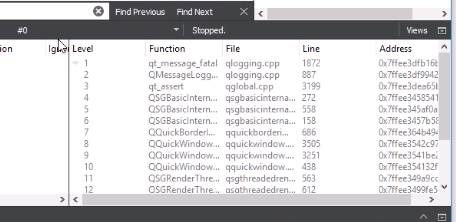
                alt text

                1 Reply Last reply
                0
                • EatonCodeE Offline
                  EatonCodeE Offline
                  EatonCode
                  wrote on last edited by EatonCode
                  #9

                  @mrjj I am not sure Qt is providing the Traceback.

                  The application just quits with a C++ Error. Here is a video. I have to Abort, Retry or Ignore.

                  I am not quite sure if I select Retry, I am getting the correct info from the Stack Trace.

                  https://www.eatoncode.com/resources/shareit/Desktop_2018-12-11_00.02.06.mp4

                  If you have any advise, it would be helpful.

                  1 Reply Last reply
                  0
                  • EatonCodeE Offline
                    EatonCodeE Offline
                    EatonCode
                    wrote on last edited by
                    #10

                    I have finally created a reproduce-able issue with an example.

                    Here is the video

                    https://www.eatoncode.com/resources/shareit/Desktop_2019-02-02_23.44.44.mp4

                    Here is the code.

                    https://www.eatoncode.com/resources/shareit/buttonqt/demobuttons.zip

                    So far it works from 5.9 - 5.11.3, but it breaks on 5.12.0, 5.12.1 and 5.13.0 Alpha

                    In debug mode, I get the xData.data error but I can run in release mode but the hover images do not display correctly on my buttons.

                    I am using MSVS 2017 32 and 64 bit versions.

                    Thanks for your help in advance.

                    1 Reply Last reply
                    1
                    • Christian EhrlicherC Online
                      Christian EhrlicherC Online
                      Christian Ehrlicher
                      Lifetime Qt Champion
                      wrote on last edited by
                      #11

                      From my pov this assert was there already in the previous version but you never used the Qt debug libs.
                      The calculation for the assert looks wrong to me - I've created a bug report: https://bugreports.qt.io/browse/QTBUG-73472

                      Qt Online Installer direct download: https://download.qt.io/official_releases/online_installers/
                      Visit the Qt Academy at https://academy.qt.io/catalog

                      EatonCodeE 1 Reply Last reply
                      3
                      • Christian EhrlicherC Christian Ehrlicher

                        From my pov this assert was there already in the previous version but you never used the Qt debug libs.
                        The calculation for the assert looks wrong to me - I've created a bug report: https://bugreports.qt.io/browse/QTBUG-73472

                        EatonCodeE Offline
                        EatonCodeE Offline
                        EatonCode
                        wrote on last edited by
                        #12

                        @Christian-Ehrlicher Thanks for looking into my issue, I do appreciate it.

                        1 Reply Last reply
                        0
                        • EatonCodeE Offline
                          EatonCodeE Offline
                          EatonCode
                          wrote on last edited by
                          #13

                          It appears this bug was fixed in 5.12.3 and works in 5.12.4 But does not work correctly in 5.13.0.

                          Can we carry over the bug fix from 5.12.3 and include it in 5.13.0 ?

                          1 Reply Last reply
                          0
                          • Christian EhrlicherC Online
                            Christian EhrlicherC Online
                            Christian Ehrlicher
                            Lifetime Qt Champion
                            wrote on last edited by
                            #14

                            There is a daily merge from 5.12 to 5.13 to dev so it should appear in 5.13.1.

                            Qt Online Installer direct download: https://download.qt.io/official_releases/online_installers/
                            Visit the Qt Academy at https://academy.qt.io/catalog

                            EatonCodeE 1 Reply Last reply
                            1
                            • EatonCodeE Offline
                              EatonCodeE Offline
                              EatonCode
                              wrote on last edited by
                              #15

                              Correction...

                              The fix was on 5.12.3

                              Looks like it's broke on 5.12.4 again.. for some reason it looks like this.

                              https://www.eatoncode.com/resources/shareit/qtbug_73742_2019-06-24_07.18.28.png

                              https://www.eatoncode.com/resources/shareit/Desktop_2019-06-24_07.28.31.mp4

                              At least there is not a fatal error, it's just NOT displaying correctly according to the docs

                              Buttons works on
                              5.6.X - 5.11.X
                              5.12.0 - 5.12.2 - Broke with Error listed above.
                              5.12.3 - Buttons work perfectly again
                              5.12.4 - No Error But Example has display issues with 4 square backgrounds. (See above screenshot and movie clip)
                              5.13.0 - Has same fatal error as 5.12.2

                              @Christian-Ehrlicher - Ok, I will be checking out 5.13.1 once it comes out. Thanks for the help.

                              1 Reply Last reply
                              0
                              • Christian EhrlicherC Christian Ehrlicher

                                There is a daily merge from 5.12 to 5.13 to dev so it should appear in 5.13.1.

                                EatonCodeE Offline
                                EatonCodeE Offline
                                EatonCode
                                wrote on last edited by
                                #16

                                @Christian-Ehrlicher I updated my Qt because of a maintenance update. Now it seems that 5.12.3 is not working.

                                Is this truly a bug or should I use a different approach?

                                https://www.eatoncode.com/resources/shareit/qtbug_73742_-_Qt_Creator_2019-07-20_14.38.39.png

                                Thanks in advance.

                                aha_1980A 1 Reply Last reply
                                0
                                • EatonCodeE EatonCode

                                  @Christian-Ehrlicher I updated my Qt because of a maintenance update. Now it seems that 5.12.3 is not working.

                                  Is this truly a bug or should I use a different approach?

                                  https://www.eatoncode.com/resources/shareit/qtbug_73742_-_Qt_Creator_2019-07-20_14.38.39.png

                                  Thanks in advance.

                                  aha_1980A Offline
                                  aha_1980A Offline
                                  aha_1980
                                  Lifetime Qt Champion
                                  wrote on last edited by
                                  #17

                                  Hi @EatonCode,

                                  You should report the issues on https://bugreports.qt.io/browse/QTBUG-73472

                                  That is the only way to reach the responsible maintainers.

                                  Regards

                                  Qt has to stay free or it will die.

                                  EatonCodeE 1 Reply Last reply
                                  2
                                  • aha_1980A aha_1980

                                    Hi @EatonCode,

                                    You should report the issues on https://bugreports.qt.io/browse/QTBUG-73472

                                    That is the only way to reach the responsible maintainers.

                                    Regards

                                    EatonCodeE Offline
                                    EatonCodeE Offline
                                    EatonCode
                                    wrote on last edited by
                                    #18

                                    @aha_1980 Hey Thanks... I was not exactly sure I could place or update a bug request myself. But obviously, I can. I uploaded the current bug request.

                                    1 Reply Last reply
                                    1

                                    • Login

                                    • Login or register to search.
                                    • First post
                                      Last post
                                    0
                                    • Categories
                                    • Recent
                                    • Tags
                                    • Popular
                                    • Users
                                    • Groups
                                    • Search
                                    • Get Qt
                                    • Unsolved