Skip to content
  • Categories
  • Recent
  • Tags
  • Popular
  • Users
  • Groups
  • Search
  • Get Qt
  • Unsolved
Collapse
Brand Logo
  1. Home
  2. Qt Development
  3. General and Desktop
  4. Is it a bug in qt-creator?
Qt 6.12 LTS is out! See what's new in the release blog

Is it a bug in qt-creator?

Scheduled Pinned Locked Moved Unsolved General and Desktop
11 Posts 5 Posters 1.9k Views 1 Watching
  • Oldest to Newest
  • Newest to Oldest
  • Most Votes
Reply
  • Reply as topic
Log in to reply
This topic has been deleted. Only users with topic management privileges can see it.
  • LimerL Limer

    qt-creator version: 4.5.1
    qt-version: 5.10.1

    When use c++ log library https://github.com/SergiusTheBest/plog,
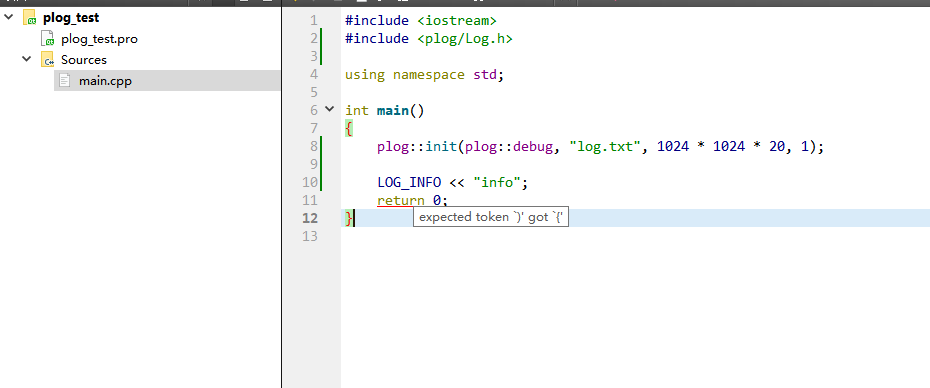
    0_1548833626201_QQ截图20190130153334.png

    Though it appears a red underline, but it is no problem to build this project with no warings and errors result. (I have restart the qt-creator several times, but it didn't work, still exist a red underline)

    But, if I add a line after the LOG_INFO, the red underline will disappear.
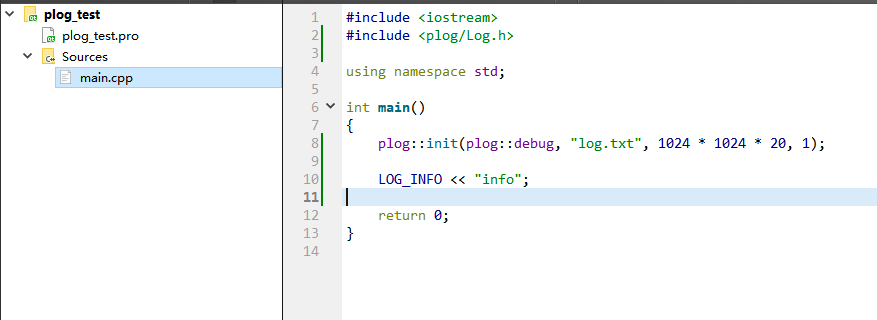
    0_1548833818002_QQ截图20190130153648.png

    And then I create a same and plain c++ project in visual studio 2015,
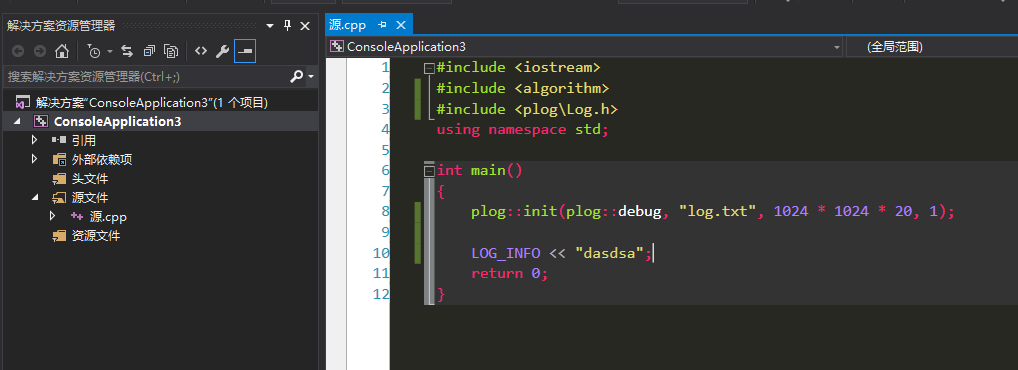
    0_1548833975289_QQ截图20190130153927.png

    It's ok, no red underline.

    So, is this a bug in qt-creator?

    Tip: The plog library is header-only library, you can check this problem easily! Remember give your qt & qt-creator's version if you don't have the same problem, Thanks a lot in advance!

    ---------edit------------------

    I also tried the latest qt-creator 4.8.1, the problem is still existed.
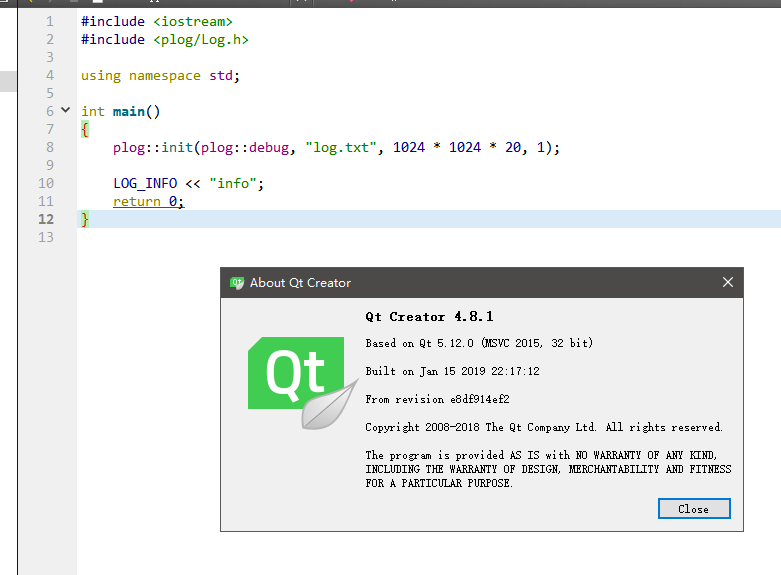
    0_1548835501873_QQ截图20190130160353.png

    J.HilkJ Offline
    J.HilkJ Offline
    J.Hilk
    Moderators
    wrote on last edited by
    #2

    hi, @Limer

    I would say It's at least unusal,
    4.5.1 is a rather old QtCreator version, before declaring any kind of bug, I would sugges updating to a newer/the newest version of it.

    That beeing 4.8.1 and check if it's still reproduceable there.


    Be aware of the Qt Code of Conduct, when posting : https://forum.qt.io/topic/113070/qt-code-of-conduct


    Q: What's that?
    A: It's blue light.
    Q: What does it do?
    A: It turns blue.

    LimerL 1 Reply Last reply
    1
    • J.HilkJ J.Hilk

      hi, @Limer

      I would say It's at least unusal,
      4.5.1 is a rather old QtCreator version, before declaring any kind of bug, I would sugges updating to a newer/the newest version of it.

      That beeing 4.8.1 and check if it's still reproduceable there.

      LimerL Offline
      LimerL Offline
      Limer
      wrote on last edited by
      #3

      @J.Hilk Yes, I have add the latest version test, but still failed.

      J.HilkJ jsulmJ 2 Replies Last reply
      0
      • LimerL Limer

        @J.Hilk Yes, I have add the latest version test, but still failed.

        J.HilkJ Offline
        J.HilkJ Offline
        J.Hilk
        Moderators
        wrote on last edited by
        #4

        @Limer
        well in that case I would take this to
        https://bugreports.qt.io

        and open a bug report.

        You can post a link to the open ticket, so people can follow/have a cross reference


        Be aware of the Qt Code of Conduct, when posting : https://forum.qt.io/topic/113070/qt-code-of-conduct


        Q: What's that?
        A: It's blue light.
        Q: What does it do?
        A: It turns blue.

        1 Reply Last reply
        0
        • LimerL Limer

          @J.Hilk Yes, I have add the latest version test, but still failed.

          jsulmJ Offline
          jsulmJ Offline
          jsulm
          Lifetime Qt Champion
          wrote on last edited by
          #5

          @Limer My guess is: it is the CLang code model. You can disable that plug-in and see whether it "fixes" the issue.

          https://forum.qt.io/topic/113070/qt-code-of-conduct

          LimerL 1 Reply Last reply
          0
          • jsulmJ jsulm

            @Limer My guess is: it is the CLang code model. You can disable that plug-in and see whether it "fixes" the issue.

            LimerL Offline
            LimerL Offline
            Limer
            wrote on last edited by Limer
            #6

            @jsulm

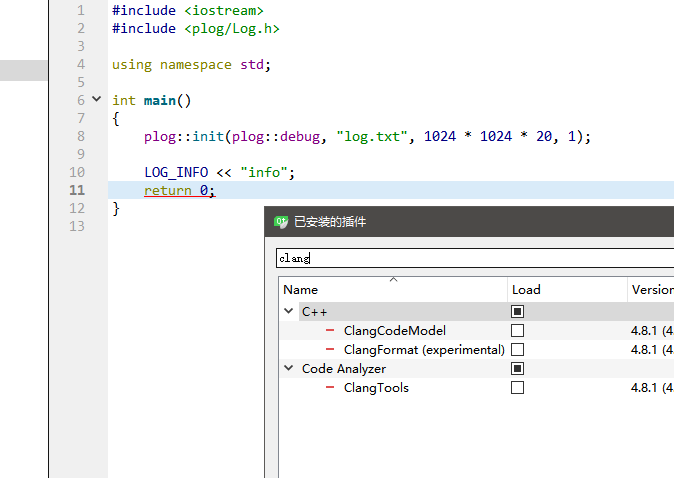
            no, i checked it.(disable plugin and then restart qt-creator)

            0_1548836038402_QQ截图20190130161344.png

            1 Reply Last reply
            0
            • Christian EhrlicherC Offline
              Christian EhrlicherC Offline
              Christian Ehrlicher
              Lifetime Qt Champion
              wrote on last edited by
              #7

              How does your LOG_INFO macro look like?

              Qt Online Installer direct download: https://download.qt.io/official_releases/online_installers/
              Visit the Qt Academy at https://academy.qt.io/catalog

              LimerL 1 Reply Last reply
              0
              • Christian EhrlicherC Christian Ehrlicher

                How does your LOG_INFO macro look like?

                LimerL Offline
                LimerL Offline
                Limer
                wrote on last edited by
                #8

                @Christian-Ehrlicher

                #define IF_LOG_(instance, severity)     if (!plog::get<instance>() || !plog::get<instance>()->checkSeverity(severity)) {;} else
                
                #define LOG_(instance, severity)        IF_LOG_(instance, severity) (*plog::get<instance>()) += plog::Record(severity, PLOG_GET_FUNC(), __LINE__, PLOG_GET_FILE(), PLOG_GET_THIS()).ref()
                
                #define LOG(severity)                   LOG_(PLOG_DEFAULT_INSTANCE, severity)
                
                #define LOG_INFO                        LOG(plog::info)
                
                1 Reply Last reply
                0
                • Christian EhrlicherC Offline
                  Christian EhrlicherC Offline
                  Christian Ehrlicher
                  Lifetime Qt Champion
                  wrote on last edited by
                  #9

                  Don't see anything obvious which could fool the parser, sorry.

                  Qt Online Installer direct download: https://download.qt.io/official_releases/online_installers/
                  Visit the Qt Academy at https://academy.qt.io/catalog

                  LimerL 1 Reply Last reply
                  0
                  • Christian EhrlicherC Christian Ehrlicher

                    Don't see anything obvious which could fool the parser, sorry.

                    LimerL Offline
                    LimerL Offline
                    Limer
                    wrote on last edited by Limer
                    #10

                    @Christian-Ehrlicher Yes, although it hava no effect on the project building, the red underline is so uncomfortable for me ( a little obsessive-compulsive, haha... )

                    You can try it yourself, just need no more than 5 miuntes.

                    1 Reply Last reply
                    0
                    • M Offline
                      M Offline
                      mpergand
                      wrote on last edited by
                      #11

                      I experienced the same behavior with my own macros but on linux only, not on MacOs.

                      1 Reply Last reply
                      0

                      • Login

                      • Login or register to search.
                      • First post
                        Last post
                      0
                      • Categories
                      • Recent
                      • Tags
                      • Popular
                      • Users
                      • Groups
                      • Search
                      • Get Qt
                      • Unsolved