
Skip to content
  • Categories
  • Recent
  • Tags
  • Popular
  • Users
  • Groups
  • Search
  • Get Qt Extensions
  • Unsolved
Collapse
Brand Logo
  1. Home
  2. Qt Development
  3. General and Desktop
  4. Using different Views with one model and different data

Using different Views with one model and different data

Scheduled Pinned Locked Moved Unsolved General and Desktop
22 Posts 3 Posters 4.9k Views 1 Watching
  • Oldest to Newest
  • Newest to Oldest
  • Most Votes
Reply
  • Reply as topic
Log in to reply
This topic has been deleted. Only users with topic management privileges can see it.
  • W Wuzi

    @JonB said in Using different Views with one model and different data:

    So what does "this does not work" mean?

    The functions will never called. Everytime the modelfunction will be called, not the proxy function

    JonBJ Offline
    JonBJ Offline
    JonB
    wrote on last edited by
    #4

    @Wuzi
    Then do you think you should show the code for that which you wrote?

    1 Reply Last reply
    0
    • W Offline
      W Offline
      Wuzi
      wrote on last edited by
      #5

      ok I set the wrong prefix, but my idea will not work
      Main.cpp:

          SignalNamesProxyModel* proxy_signal_names = new SignalNamesProxyModel(this);
          proxy_signal_names->setSourceModel(m_data.getSignalNames());
          m_listview_signal->setModel(proxy_signal_names);es());
      

      My plan was to set the row to a negative number, so I know in the model, that this will get different data:

      Proxymodel.cpp:

      QVariant SignalNamesProxyModel::data(const QModelIndex &index, int role) const {
      
          const QAbstractItemModel * model = index.model();
          QString value = sourceModel()->data(model->index(-1,index.row()),role).toString();
          return value;
      }
      

      Model.cpp:

      QVariant SignalData::data(const QModelIndex &index, int role) const {
      
          int row = index.row();
          int column = index.column();
      
      
          if (role == Qt::DisplayRole){
              if(row >= 0){
                  return m_data[row][column];
              }else if(row == -1){
                  return m_column_names[column];
              }else if(row == -2){
                  return m_column_units[column];
              }
          }
      
          return QVariant();
      }
      

      But this does not work, because when I set the row to a negative number, the column becomes -1 too.

      Is there another way to get different data?

      1 Reply Last reply
      0
      • SGaistS Offline
        SGaistS Offline
        SGaist
        Lifetime Qt Champion
        wrote on last edited by
        #6

        Hi,

        Wouldn't the KConcatenateRowsProxyModel do what you want ?

        Interested in AI ? www.idiap.ch
        Please read the Qt Code of Conduct - https://forum.qt.io/topic/113070/qt-code-of-conduct

        W 1 Reply Last reply
        0
        • SGaistS SGaist

          Hi,

          Wouldn't the KConcatenateRowsProxyModel do what you want ?

          W Offline
          W Offline
          Wuzi
          wrote on last edited by Wuzi
          #7

          @SGaist said in Using different Views with one model and different data:

          Wouldn't the KConcatenateRowsProxyModel do what you want ?

          Thank you SGaist, but in the documentation there is written, that it is assumed that all rows have the same number ("All models are assumed to have the same number of columns")

          This is my dataclass:

          class SignalData : public QAbstractTableModel
          {
              Q_OBJECT
          public:
              SignalData(Data *parent);
              int rowCount(const QModelIndex &parent = QModelIndex()) const override ;
              int columnCount(const QModelIndex &parent = QModelIndex()) const override ;
              QVariant data(const QModelIndex &index, int role = Qt::DisplayRole) const override;
              bool insertRows(int row, int count, const QModelIndex &parent = QModelIndex()); // wieso darf hier kein override stehen?
              bool removeRows(int row, int count, const QModelIndex &parent = QModelIndex()) override;
              int readMDFFile(QString path);
          private:
              Data* m_parent;
          
              std::vector<std::vector<double> > m_data;
              std::vector<QString> m_column_names;
              std::vector<QString> m_column_units;
          };
          

          m_data are the datas, column_names are the names of the data columns and olumn_units are the units of the data columns.
          For example: size(m_column_names) = size(m_column_units) = 8
          and size(m_data) = 8x1000 or so

          1 Reply Last reply
          0
          • SGaistS Offline
            SGaistS Offline
            SGaist
            Lifetime Qt Champion
            wrote on last edited by
            #8

            Right, I was thinking about KExtraColumnsProxyModel.

            But I realise I might have misunderstood your final goal.

            Can you show an image of what you would like to show in your view ?

            Interested in AI ? www.idiap.ch
            Please read the Qt Code of Conduct - https://forum.qt.io/topic/113070/qt-code-of-conduct

            1 Reply Last reply
            0
            • W Offline
              W Offline
              Wuzi
              wrote on last edited by
              #9

              Sorry for my bad explanation.

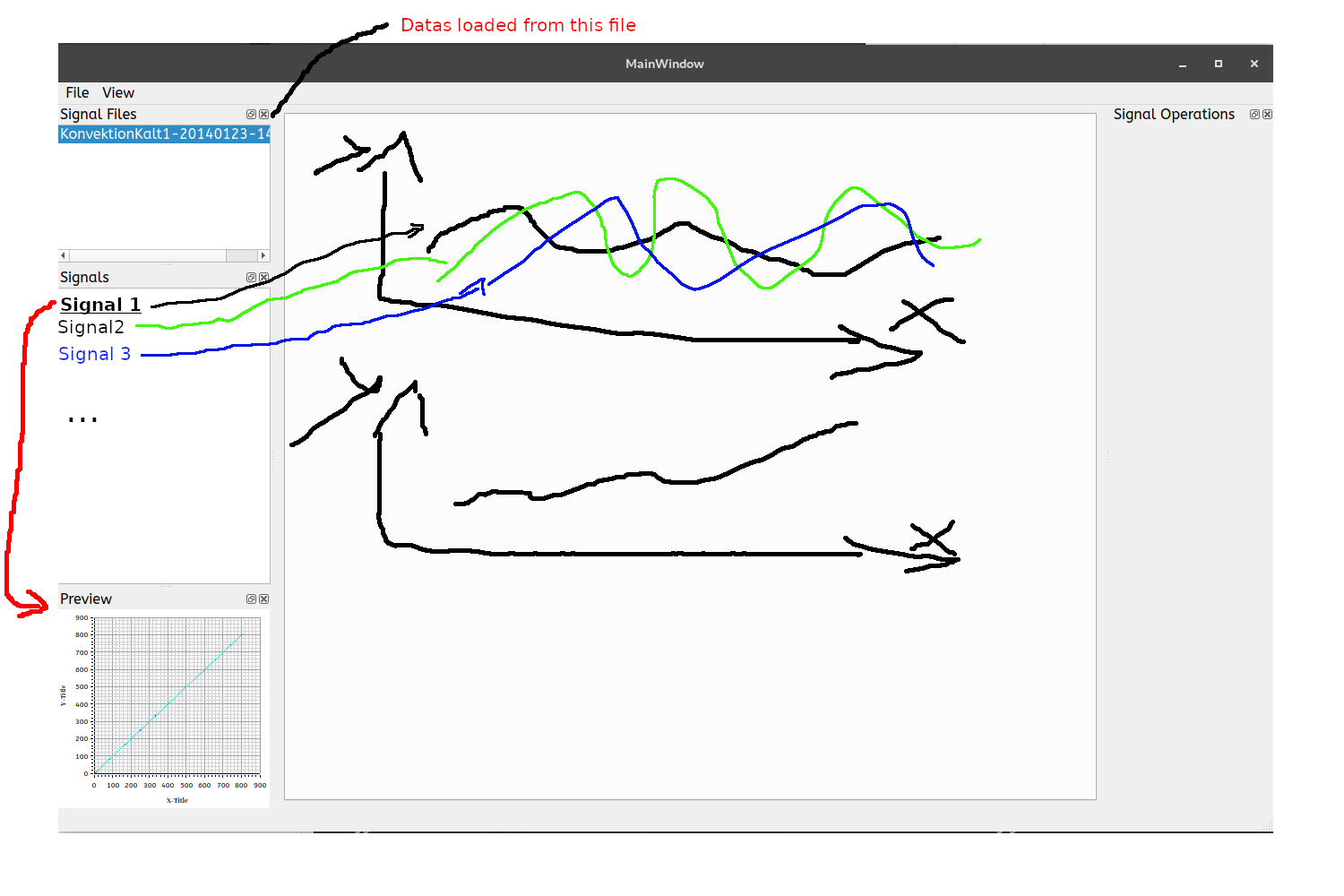
              Here is the main view.

              0_1540573885327_MDFViewer.png

              This application should load Data files *.mf4 and store this data. The signals which are in this file are listen in the Listview "Signals". If you click on one of this signals, you will see a preview of this signal in the "Preview" Listview. The central Widget contains a tabwidget, where you can add charts. At the end you should be able to drag a Signal name in one of this charts, and the signal will be showed in this chart.

              So I need the Signal name in the "Signals" Listview and the Signal data in the "Preview" and in the central widget charts.

              1 Reply Last reply
              0
              • SGaistS Offline
                SGaistS Offline
                SGaist
                Lifetime Qt Champion
                wrote on last edited by
                #10

                Ok, then isn't it rather a tree style model that you should have ?

                Or if still a table style, you should maybe consider creating an object that encapsulates your signals data and build your model on top of that.

                Interested in AI ? www.idiap.ch
                Please read the Qt Code of Conduct - https://forum.qt.io/topic/113070/qt-code-of-conduct

                1 Reply Last reply
                1
                • W Offline
                  W Offline
                  Wuzi
                  wrote on last edited by
                  #11

                  @SGaist said in Using different Views with one model and different data:

                  Ok, then isn't it rather a tree style model that you should have ?

                  You mean something like this:
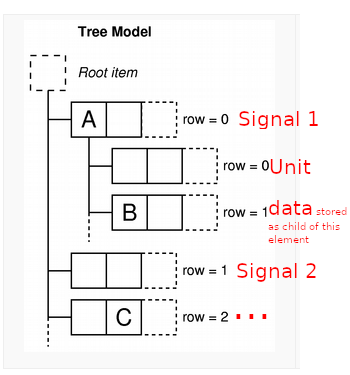
                  0_1540627115290_TreeView.png
                  Sounds good for me, thanks

                  @SGaist said in Using different Views with one model and different data:

                  Or if still a table style, you should maybe consider creating an object that encapsulates your signals data and build your model on top of that

                  You mean. creating for every signal a own model? Putting The signal names in a seperate model than the data?

                  1 Reply Last reply
                  0
                  • W Offline
                    W Offline
                    Wuzi
                    wrote on last edited by
                    #12

                    No I created a tree model like in this example.

                    This is the code which add the data as SignalDataTreeItems to the m_root_item

                        beginInsertRows(QModelIndex(), 0, channel_list.size()-1);
                    
                        for (int channel_index : channel_list) {
                            const mdf::channel& ch = channels[channel_index];
                    
                            QList<QVariant> signalname = {QVariant::fromValue<QString>(QString::fromStdString(ch.get_name()))};
                            SignalDataTreeItem *signal = new SignalDataTreeItem(signalname);
                    
                            QList<QVariant> unit_string = {QVariant::fromValue<QString>(QString::fromStdString(ch.get_metadata_unit()))};
                            SignalDataTreeItem *unit = new SignalDataTreeItem(unit_string,signal);
                            signal->appendChild(unit);
                    
                    
                            // TODO: optimize this step!
                            std::vector<double> column;
                            ch.get_data_real(column);
                            QList<QVariant> datas;
                            foreach(double d, column){
                                datas.append(QVariant(d));
                            }
                            SignalDataTreeItem *data = new SignalDataTreeItem(datas,signal);
                            signal->appendChild(data);
                    
                            m_rootItem->appendChild(signal);
                        }
                    
                        endInsertRows();
                    

                    The problem is, that in the proxy the function data will never called.

                    SignalNamesProxyModel::SignalNamesProxyModel(QObject *parent): QSortFilterProxyModel (parent){
                    }
                    
                    int SignalNamesProxyModel::rowCount(const QModelIndex &parent) const {
                        int rowcount = sourceModel()->rowCount(QModelIndex()); // of root item (number of signals)
                        return rowcount;
                    }
                    
                    int SignalNamesProxyModel::columnCount(const QModelIndex &parent) const{
                        return 1;
                    }
                    
                    QVariant SignalNamesProxyModel::data(const QModelIndex &index, int role) const {
                    
                        QString value = sourceModel()->data(index).toString();
                    
                        return value;
                    }
                    
                    QModelIndex SignalNamesProxyModel::index(int row, int column, const QModelIndex &parent)const {
                    
                        return sourceModel()->index(row,0,QModelIndex()); // child "row" of m_root_item of sourceModel (signal)
                    }
                    

                    The problem is, that I don't understand how do I have to use beginInsertRows and endInsertRows, when I have to different datas, because the row count matches only for one view not for both at the same time.

                    1 Reply Last reply
                    0
                    • SGaistS Offline
                      SGaistS Offline
                      SGaist
                      Lifetime Qt Champion
                      wrote on last edited by
                      #13

                      I just re-read your first post. In the end, can't it be simplified to a two column table ?

                      First column: name
                      Second column: data

                      Interested in AI ? www.idiap.ch
                      Please read the Qt Code of Conduct - https://forum.qt.io/topic/113070/qt-code-of-conduct

                      1 Reply Last reply
                      0
                      • W Offline
                        W Offline
                        Wuzi
                        wrote on last edited by
                        #14

                        @SGaist said in Using different Views with one model and different data:

                        I just re-read your first post. In the end, can't it be simplified to a two column table ?
                        First column: name
                        Second column: data

                        The problem is, that in the data variable are multiple signals:

                        row0, column0: signal0, first value
                        row0, column1: signal0, second value
                        row1, column0: signal1, first value
                        row1, colimn1: signal1, second value
                        ....

                        So this is the second concept I tested while the weekend, it has nothing to do with the tree model.
                        I moved the signal name in a seperate listmodel (So it is easy to list all signal names in a list view).
                        The data I store in a table model.

                        The problem is, how can I set, which row of this table should be shown?
                        For example:
                        I have a chart where I would like to plot some of this data (but only few signals, not every row). I would like to select which signal should be used for the x axis and which should be used on the y axis. To do that I created a QSortFilterProxyModel and reimplemented the rowCount, columnCount and the mapToSource function as follows:

                        int SignalPreviewProxyModel::rowCount(const QModelIndex &parent) const {
                            return 2*m_mapToSourceIndex.lenght();
                        }
                        
                        int SignalPreviewProxyModel::columnCount(const QModelIndex &parent) const{
                        
                            int column = sourceModel()->columnCount(parent);
                            return column;
                        }
                        
                        QModelIndex SignalPreviewProxyModel::mapToSource(const QModelIndex & proxyIndex) const {
                        
                            if(!proxyIndex.isValid()){
                                return QModelIndex();
                            }
                        
                            int row = proxyIndex.row();
                            int column = proxyIndex.column();
                        
                            int axis = row % 2; // modulo 2, because x and y axis
                            int value = row /2; // graph
                        
                            if(axis == 0){
                                row = m_mapToSourceIndex.at(value).first;
                            }else{
                                row = m_mapToSourceIndex.at(value).second;
                            }
                            QModelIndex index2 = sourceModel()->index(row,column,QModelIndex()); // get from already existing item the index
                            return index2;
                        }
                        

                        In this concept, the problem is, that mapToSource transformation is not invertable ( when there should be the possibility to display mutiple signals in the graph, this is why m_mapToSourceIndex is a vector of mappings), so I'm not able create the mapFromSource function and I get a segmentation fault.

                        I really don't know how I can solve this problem (which is the most common way?).
                        Thanks for helping me! :)
                        0_1540820607321_MDFViewer.png

                        1 Reply Last reply
                        0
                        • SGaistS Offline
                          SGaistS Offline
                          SGaist
                          Lifetime Qt Champion
                          wrote on last edited by
                          #15

                          I'm still wondering if there's not a bit of model over-engineering.

                          Wouldn't it be simpler to have a class that encapsulates a "signal". Store of all your signals in a QVector of that class.

                          Then build a simple table module that would return the data from the correct signal object.

                          struct Signal
                          {
                              QString name;
                              QString unit;
                              QVector<QVariant> data;
                          };
                          
                          class SignalTableModel
                          {
                          
                          QVariant data(const QModelIndex &index, int role) const
                          {
                              // Add index validity checks
                              Signal signal(_signalVector.at(index.row()));
                              if (index.column() == 1) {
                                  return signal.name();
                              }
                             // etc.
                          }
                          
                          };
                          

                          Interested in AI ? www.idiap.ch
                          Please read the Qt Code of Conduct - https://forum.qt.io/topic/113070/qt-code-of-conduct

                          1 Reply Last reply
                          0
                          • W Offline
                            W Offline
                            Wuzi
                            wrote on last edited by
                            #16

                            So you mean, when column ==1 then return name, when column == 2 then return unit and when the column is greater than 2 return the respective value?

                            So then I have to use a proxy between this model and the signal name list view and set the columcount to 1?

                            And for the chartview(derived from tableview) I have to use a proxy, which maps the index to +2 because the first two rows are name and unit?

                            Do I understand you correct?

                            1 Reply Last reply
                            0
                            • SGaistS Offline
                              SGaistS Offline
                              SGaist
                              Lifetime Qt Champion
                              wrote on last edited by
                              #17

                              What do you mean by respective value ?

                              You can use a QListView so no need for fiddling with a proxy model.

                              And for the table view, you can simply hide the columns you don't want to show.

                              Interested in AI ? www.idiap.ch
                              Please read the Qt Code of Conduct - https://forum.qt.io/topic/113070/qt-code-of-conduct

                              1 Reply Last reply
                              1
                              • W Offline
                                W Offline
                                Wuzi
                                wrote on last edited by
                                #18

                                @SGaist said in Using different Views with one model and different data:

                                What do you mean by respective value ?
                                One signal consists of multiple data (due to a time range on which the signal was logged). The different signals are stored in a 2d array:

                                std::vector<std::vector<double> > m_data;
                                

                                @SGaist said in Using different Views with one model and different data:

                                You can use a QListView so no need for fiddling with a proxy model.

                                Yes for the signal names I have a QListView. The signal names are stored in a list model. This works fine.

                                Or did I missunderstand your question?

                                1 Reply Last reply
                                0
                                • SGaistS Offline
                                  SGaistS Offline
                                  SGaist
                                  Lifetime Qt Champion
                                  wrote on last edited by
                                  #19

                                  You wrote that you wanted to use a proxy and setting the columns count to 1 so I thought you were trying to "re-invent" QListView.

                                  Interested in AI ? www.idiap.ch
                                  Please read the Qt Code of Conduct - https://forum.qt.io/topic/113070/qt-code-of-conduct

                                  1 Reply Last reply
                                  0
                                  • W Offline
                                    W Offline
                                    Wuzi
                                    wrote on last edited by
                                    #20

                                    @SGaist said in Using different Views with one model and different data:

                                    You wrote that you wanted to use a proxy and setting the columns count to 1 so I thought you were trying to "re-invent" QListView.

                                    Oh sorry. this was in the concept with the tree model, but in the actual concept I have the data stored in a tablemodel.

                                    1 Reply Last reply
                                    0
                                    • SGaistS Offline
                                      SGaistS Offline
                                      SGaist
                                      Lifetime Qt Champion
                                      wrote on last edited by
                                      #21

                                      Ok, good.

                                      So at what point are you now ?

                                      Interested in AI ? www.idiap.ch
                                      Please read the Qt Code of Conduct - https://forum.qt.io/topic/113070/qt-code-of-conduct

                                      1 Reply Last reply
                                      0
                                      • W Offline
                                        W Offline
                                        Wuzi
                                        wrote on last edited by
                                        #22

                                        @SGaist said in Using different Views with one model and different data:

                                        Ok, good.
                                        So at what point are you now ?

                                        After reading you question I had a new idea (before I thought it is not possible to use KDChart to plot) :D :

                                        1. a data class which stores all the data
                                        2. a table model which stores a pointer to the data which I would like to display.
                                          In this model I reimplement the data, rowcount and columncount function as following:
                                        class Data
                                        {
                                        public:
                                           QVector<double>* getDataPointer(int index){return &m_data.at(index);}
                                        private:
                                         QVector<QVector<double>> m_data;
                                        };
                                        
                                        // Every Diagram uses an object of this class
                                        class SignalModel: public QAbstractTableModel
                                        {
                                        public:
                                        - override rowcount
                                        - override columncount
                                        - override data
                                        void addData(QVector<double>* xaxis, QVector<double>* yaxis);
                                        private:
                                            QVector<QVector<double>*> m_data;
                                        };
                                        
                                        void SignalModel::addData(QVector<double>* xaxis, QVector<double>* yaxis){
                                        // KDChart expects, that the axis keys and values are stored in different rows
                                        m_data.append(xaxis);
                                        m_data.append(yaxis);
                                        }
                                        
                                        int SignalModel::rowCount(const QModelIndex &parent) const {
                                          return m_data.lenght();
                                        }
                                        
                                        int SignalModel::columnCount(const QModelIndex &parent) const{
                                        
                                          int column = m_data.at(0)->length()
                                          return column;
                                        }
                                        
                                        QVariant SignalModel::data(const QModelIndex &index) const{
                                        
                                          return m_data.at(index.row)->at(index.column);
                                        }


                                        removeRow and insertRow must be reimplemented too, to add dynamically new data.

                                        For showing the signal names I would reimplement a listmodel.

                                        I think it is the simplest method to do my task. (If there are errors in my code, it is because I didn't tested it, it's just a sketch).
                                        I found kst-plot which does exactly what I want. So I think it is easier to extend this program and help to contribute to this one, than rewriting a new one.

                                        Thank you SGaist for your help and the inspiration. If this last concept is unclear, just write and I will extend it.

                                        1 Reply Last reply
                                        0

                                        • Login

                                        • Login or register to search.
                                        • First post
                                          Last post
                                        0
                                        • Categories
                                        • Recent
                                        • Tags
                                        • Popular
                                        • Users
                                        • Groups
                                        • Search
                                        • Get Qt Extensions
                                        • Unsolved