Skip to content
  • Categories
  • Recent
  • Tags
  • Popular
  • Users
  • Groups
  • Search
  • Get Qt Extensions
  • Unsolved
Collapse
Brand Logo
  1. Home
  2. Qt Development
  3. General and Desktop
  4. single QProgressDialog button push produces two signals
Qt 6.11 is out! See what's new in the release blog

single QProgressDialog button push produces two signals

Scheduled Pinned Locked Moved Solved General and Desktop
20 Posts 5 Posters 2.2k Views 3 Watching
  • Oldest to Newest
  • Newest to Oldest
  • Most Votes
Reply
  • Reply as topic
Log in to reply
This topic has been deleted. Only users with topic management privileges can see it.
  • SGaistS Offline
    SGaistS Offline
    SGaist
    Lifetime Qt Champion
    wrote on last edited by
    #2

    Hi,

    Does that code get called several times ?
    Do you properly delete m_fileTransferDialog after use or before calling that part ?

    Interested in AI ? www.idiap.ch
    Please read the Qt Code of Conduct - https://forum.qt.io/topic/113070/qt-code-of-conduct

    1 Reply Last reply
    2
    • mzimmersM Offline
      mzimmersM Offline
      mzimmers
      wrote on last edited by
      #3

      I only call that code once (per file transfer).

      I hadn't been destroying the object, but now I do (same results). Here's the slot:

      void Widget::relayTransferCanceled()
      {
          emit fwUpdateCanceled();
          m_fileTransferDialog->close();
          delete m_fileTransferDialog;
          QMessageBox qmb(QMessageBox::NoIcon,
                          "File Transfer Canceled",
                          "The file transfer has been canceled.",
                          QMessageBox::Ok,
                          this);
      }
      
      kshegunovK 1 Reply Last reply
      0
      • mzimmersM mzimmers

        I only call that code once (per file transfer).

        I hadn't been destroying the object, but now I do (same results). Here's the slot:

        void Widget::relayTransferCanceled()
        {
            emit fwUpdateCanceled();
            m_fileTransferDialog->close();
            delete m_fileTransferDialog;
            QMessageBox qmb(QMessageBox::NoIcon,
                            "File Transfer Canceled",
                            "The file transfer has been canceled.",
                            QMessageBox::Ok,
                            this);
        }
        
        kshegunovK Offline
        kshegunovK Offline
        kshegunov
        Moderators
        wrote on last edited by kshegunov
        #4

        Use show(), not open().

        Disregard, I must've had a brain aneurysm or something.

        Read and abide by the Qt Code of Conduct

        1 Reply Last reply
        0
        • mzimmersM Offline
          mzimmersM Offline
          mzimmers
          wrote on last edited by
          #5

          Yeah, I was wondering how that was going to make a difference. The QDialog documentation doesn't really go into the difference between show() and open(), but they look almost identical in this use instance.

          kshegunovK 1 Reply Last reply
          0
          • mzimmersM mzimmers

            Yeah, I was wondering how that was going to make a difference. The QDialog documentation doesn't really go into the difference between show() and open(), but they look almost identical in this use instance.

            kshegunovK Offline
            kshegunovK Offline
            kshegunov
            Moderators
            wrote on last edited by
            #6

            @mzimmers said in single QProgressDialog button push produces two signals:

            The QDialog documentation doesn't really go into the difference between show() and open(), but they look almost identical in this use instance.

            The latter is just show() for a modal dialog (i.e. it calls setModal(true) for you). I had that anti-epiphany due to QProgress's own open() overload, which allows you to bind a function pointer to one of the dialog's signals. Anyway.
            Is it possible you have created 2 dialogs and due to having two objects emitting the signal you get to the slot twice? That'd be the most "obvious" thing I'd check as you're holding objects as members and it happens to us all (unfortunately) to forget having an object and just replacing the pointer member variable without realizing.

            Read and abide by the Qt Code of Conduct

            1 Reply Last reply
            3
            • mzimmersM Offline
              mzimmersM Offline
              mzimmers
              wrote on last edited by
              #7

              I only create that object in one place, and according to the debugger, it's only getting called once.

              I've deleted the build directory and rebuilt...same results.

              1 Reply Last reply
              0
              • Christian EhrlicherC Offline
                Christian EhrlicherC Offline
                Christian Ehrlicher
                Lifetime Qt Champion
                wrote on last edited by
                #8

                @mzimmers said in single QProgressDialog button push produces two signals:

                m_fileTransferDialog

                You only delete the QProgressDialog when it's canceled, at least in the show you've shown us.

                Qt Online Installer direct download: https://download.qt.io/official_releases/online_installers/
                Visit the Qt Academy at https://academy.qt.io/catalog

                mzimmersM 1 Reply Last reply
                0
                • Christian EhrlicherC Christian Ehrlicher

                  @mzimmers said in single QProgressDialog button push produces two signals:

                  m_fileTransferDialog

                  You only delete the QProgressDialog when it's canceled, at least in the show you've shown us.

                  mzimmersM Offline
                  mzimmersM Offline
                  mzimmers
                  wrote on last edited by
                  #9

                  @Christian-Ehrlicher good point, and I'll correct that. I don't think it has any bearing on this problem though, as this issue occurs the first time through the code.

                  JonBJ 1 Reply Last reply
                  0
                  • mzimmersM mzimmers

                    @Christian-Ehrlicher good point, and I'll correct that. I don't think it has any bearing on this problem though, as this issue occurs the first time through the code.

                    JonBJ Offline
                    JonBJ Offline
                    JonB
                    wrote on last edited by JonB
                    #10

                    @mzimmers
                    If you say relayTransferCanceled() is called twice, what is the value of m_fileTransferDialog second time? You can put a breakpoint to see it hitting delete m_fileTransferDialog;. So really it should crash on the second time (on the m_fileTransferDialog->close();), unless the calls have quite distinct m_fileTransferDialog;s?

                    mzimmersM 1 Reply Last reply
                    0
                    • JonBJ JonB

                      @mzimmers
                      If you say relayTransferCanceled() is called twice, what is the value of m_fileTransferDialog second time? You can put a breakpoint to see it hitting delete m_fileTransferDialog;. So really it should crash on the second time (on the m_fileTransferDialog->close();), unless the calls have quite distinct m_fileTransferDialog;s?

                      mzimmersM Offline
                      mzimmersM Offline
                      mzimmers
                      wrote on last edited by mzimmers
                      #11

                      @JonB that's exactly what it does -- crash on the second close() attempt.

                      In looking at the canceled() signal, I wonder if I should disconnect it from the default slot cancel() before I use it. I notice that closing the window also triggers the signal.

                      EDIT:

                      Tried the above, no help. I'm definitely doing something to cause this code to execute twice, but I sure don't know what it is. Here's the latest effort:

                      void Widget::showFileTransfer()
                      {
                          m_fileTransferDialog = new QProgressDialog("Transferring file", "Abort Transfer", 0, 100, this);
                          QObject::connect(this, &Widget::progressChanged, m_fileTransferDialog, &QProgressDialog::setValue);
                          QObject::connect(m_fileTransferDialog, &QProgressDialog::canceled, this, &Widget::relayTransferCanceled);
                          m_fileTransferDialog->show();
                      }
                      
                      void Widget::relayTransferCanceled()
                      {
                          emit transferCanceled();
                          deleteProgressDialog(false);void Widget::deleteProgressDialog(bool success)
                      }
                      void Widget::deleteProgressDialog(bool success)
                      {
                          QString title;
                          QString text;
                      
                          if (success)
                          {
                              title = "File Transfer Complete";
                              text = "The file transfer has completed.";
                          }
                          else
                          {
                              title = "File Transfer Did Not Complete";
                              text = "The file transfer did not complete successfully.";
                          }
                      
                          QMessageBox *qmb;
                      
                          qmb = new QMessageBox(QMessageBox::NoIcon,
                                          title,
                                          text,
                                          QMessageBox::Ok,
                                          this);
                          qmb->exec();
                          m_fileTransferDialog->close();
                          delete m_fileTransferDialog;
                          delete qmb;
                      }
                      
                      JonBJ 1 Reply Last reply
                      0
                      • SGaistS Offline
                        SGaistS Offline
                        SGaist
                        Lifetime Qt Champion
                        wrote on last edited by
                        #12

                        How many file transfert can you have ?

                        If several, you should reconsider your dialog and give it the capability to show information for more than one transfert.

                        Interested in AI ? www.idiap.ch
                        Please read the Qt Code of Conduct - https://forum.qt.io/topic/113070/qt-code-of-conduct

                        1 Reply Last reply
                        0
                        • mzimmersM Offline
                          mzimmersM Offline
                          mzimmers
                          wrote on last edited by
                          #13

                          Just one, and I want the dialog to block. The file transfer is for tranferring OTA firmware updates, so multiple concurrent transfers are unnecessary and would be prone to causing all kinds of trouble.

                          1 Reply Last reply
                          0
                          • mzimmersM mzimmers

                            @JonB that's exactly what it does -- crash on the second close() attempt.

                            In looking at the canceled() signal, I wonder if I should disconnect it from the default slot cancel() before I use it. I notice that closing the window also triggers the signal.

                            EDIT:

                            Tried the above, no help. I'm definitely doing something to cause this code to execute twice, but I sure don't know what it is. Here's the latest effort:

                            void Widget::showFileTransfer()
                            {
                                m_fileTransferDialog = new QProgressDialog("Transferring file", "Abort Transfer", 0, 100, this);
                                QObject::connect(this, &Widget::progressChanged, m_fileTransferDialog, &QProgressDialog::setValue);
                                QObject::connect(m_fileTransferDialog, &QProgressDialog::canceled, this, &Widget::relayTransferCanceled);
                                m_fileTransferDialog->show();
                            }
                            
                            void Widget::relayTransferCanceled()
                            {
                                emit transferCanceled();
                                deleteProgressDialog(false);void Widget::deleteProgressDialog(bool success)
                            }
                            void Widget::deleteProgressDialog(bool success)
                            {
                                QString title;
                                QString text;
                            
                                if (success)
                                {
                                    title = "File Transfer Complete";
                                    text = "The file transfer has completed.";
                                }
                                else
                                {
                                    title = "File Transfer Did Not Complete";
                                    text = "The file transfer did not complete successfully.";
                                }
                            
                                QMessageBox *qmb;
                            
                                qmb = new QMessageBox(QMessageBox::NoIcon,
                                                title,
                                                text,
                                                QMessageBox::Ok,
                                                this);
                                qmb->exec();
                                m_fileTransferDialog->close();
                                delete m_fileTransferDialog;
                                delete qmb;
                            }
                            
                            JonBJ Offline
                            JonBJ Offline
                            JonB
                            wrote on last edited by
                            #14

                            @mzimmers said in single QProgressDialog button push produces two signals:

                            @JonB that's exactly what it does -- crash on the second close() attempt.

                            Aha! OK, you didn't say that :)

                            So I presume when you hit each time the stacktraces don't reveal anything different?

                            mzimmersM 1 Reply Last reply
                            0
                            • JonBJ JonB

                              @mzimmers said in single QProgressDialog button push produces two signals:

                              @JonB that's exactly what it does -- crash on the second close() attempt.

                              Aha! OK, you didn't say that :)

                              So I presume when you hit each time the stacktraces don't reveal anything different?

                              mzimmersM Offline
                              mzimmersM Offline
                              mzimmers
                              wrote on last edited by
                              #15

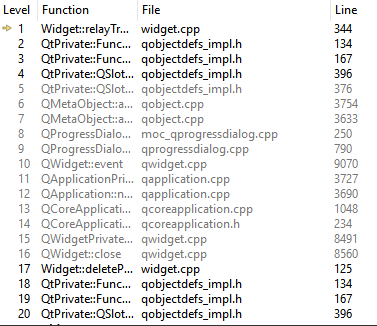
                              @JonB: not until you get fairly deep:

                              0_1540592128270_first.PNG

                              0_1540592135667_second.PNG

                              JonBJ 1 Reply Last reply
                              0
                              • mzimmersM mzimmers

                                @JonB: not until you get fairly deep:

                                0_1540592128270_first.PNG

                                0_1540592135667_second.PNG

                                JonBJ Offline
                                JonBJ Offline
                                JonB
                                wrote on last edited by
                                #16

                                @mzimmers
                                Can't read the full name in column Function. The second one is to do with Widget::deleteP... and QWidget::close, clue?

                                1 Reply Last reply
                                0
                                • mzimmersM Offline
                                  mzimmersM Offline
                                  mzimmers
                                  wrote on last edited by
                                  #17

                                  Sorry about that. The stack quickly enters Qt space, so I can't do much with it myself. Interesting, though, that the 2nd iteration shows my code on level 17 whereas the 1st one doesn't.

                                  0_1540593442509_first.PNG

                                  0_1540593446800_second.PNG

                                  JonBJ 1 Reply Last reply
                                  0
                                  • mzimmersM mzimmers

                                    Sorry about that. The stack quickly enters Qt space, so I can't do much with it myself. Interesting, though, that the 2nd iteration shows my code on level 17 whereas the 1st one doesn't.

                                    0_1540593442509_first.PNG

                                    0_1540593446800_second.PNG

                                    JonBJ Offline
                                    JonBJ Offline
                                    JonB
                                    wrote on last edited by
                                    #18

                                    @mzimmers
                                    So the second call to the slot is coming from your Widget::deleteProgressDialog() on line m_fileTransferDialog->close();

                                    I know nothing about this, but does closing the dialog cause the QProgressDialog::canceled signal to be raised? Does unconnecting that signal prior to m_fileTransferDialog->close(); solve your problem? take a look at https://www.qtcentre.org/threads/53056-QProgressDialog-cancel-signal-is-emitted-always ?

                                    Also, you are calling deleteProgressDialog() in your relayTransferCanceled() slot. Should you/is it safe to be going

                                        m_fileTransferDialog->close();
                                        delete m_fileTransferDialog;
                                    

                                    from a slot? Should it be more link deleteLater()?

                                    These are just thoughts for you! I know nothing... :)

                                    1 Reply Last reply
                                    4
                                    • mzimmersM Offline
                                      mzimmersM Offline
                                      mzimmers
                                      wrote on last edited by
                                      #19

                                      Hi Jon - all good suggestions, and all appreciated. I don't know of any reason I can't delete from a slot, but I did convert it to deleteLater().

                                      I thought I'd already tried your suggestion to use disconnect() without success, but I tried it again, and now it seems to work.

                                      void Widget::showFileTransfer()
                                      {
                                          m_fileTransferDialog = new QProgressDialog("Transferring file", "Abort Transfer", 0, 100, this);
                                          QObject::connect(this, &Widget::progressChanged, m_fileTransferDialog, &QProgressDialog::setValue);
                                          QObject::connect(m_fileTransferDialog, &QProgressDialog::canceled, this, &Widget::relayTransferCanceled);
                                          m_fileTransferDialog->show();
                                      }
                                      
                                      void Widget::relayTransferCanceled()
                                      {
                                          QObject::disconnect(m_fileTransferDialog, &QProgressDialog::canceled, nullptr, nullptr);
                                          emit transferCanceled();
                                          deleteProgressDialog(FILE_TRANSFER_CANCELED);
                                      }
                                      

                                      I'd like to get to the bottom of this issue, so I'm going to leave it as unsolved for a few days, but at least I have a workaround. Thanks.

                                      1 Reply Last reply
                                      2
                                      • mzimmersM Offline
                                        mzimmersM Offline
                                        mzimmers
                                        wrote on last edited by
                                        #20

                                        I think I may have found at least part of the problem. It seems that my call to close() emits the canceled() signal, which was getting me in trouble, as my slot wasn't prepared for a signal under these circumstances. I guess I'm not supposed to call close(), which is actually a slot.

                                        My app seems to be working now. I'm going to keep this unsolved for another day, just in case someone has something else to add.

                                        So

                                        1 Reply Last reply
                                        0

                                        • Login

                                        • Login or register to search.
                                        • First post
                                          Last post
                                        0
                                        • Categories
                                        • Recent
                                        • Tags
                                        • Popular
                                        • Users
                                        • Groups
                                        • Search
                                        • Get Qt Extensions
                                        • Unsolved