
Convert QImage to char array and back
-
Hello, I have to process images (.bmp and .png) in my GUI Qt project using a low-level programming language, which is C++ in my case. I'm not allowed to use any preconfigured methods who allow to process the image like OpenCV.
What is asked in the project:- Enlarge, reduce image
- R.O.I
- image expansion
- image expansion using bilinear interpolation and spline (using polynomials)
- simple/multiple thresholding
I have already experience in processing an image in C using pointers and I would like to do the same in Qt.
I know to charge a QImage to an array of char (to edit it afterwards with pointers) but from this array of char BACK to the QImage I get an error message but ONLY when the image was edited using char *.
Here is my code (simplified)unsigned char *temp; QByteArray bytes; //Fournie un tableau de type byte QBuffer buffer(&bytes); buffer.open(QIODevice::WriteOnly); imageObject_2 = new QImage(*original_imageObject); imageObject_2->save(&buffer, "BMP"); buffer.close(); unsigned char *data_image = (unsigned char *)malloc(bytes.size()); memcpy(data_image, reinterpret_cast<unsigned char *>(bytes.data()), (unsigned int)bytes.size()); *psize = bytes.size(); //Image processing using an algorithm //ERROR IN "imageObject_2->loadFromData(data_image, size)" if(!imageObject_2->loadFromData(data_image, size)) qWarning("Image loading failed"); delete data_image; data_image = nullptr; image_2 = QPixmap::fromImage(*imageObject_2); scene_2 = new QGraphicsScene(this); scene_2 -> addPixmap(image_2); scene_2 -> setSceneRect(image_2.rect()); ui -> graphicsView_2 -> setScene(scene_2);Can anyone explain why this doesn't work and how I can solve this problem.
Regards. -
Hi and welcome to devnet,
Why not use QImage's constructor that takes a char array as parameter ? That would be simpler.
By the way, what exact error are you getting ?
Also, there's no need to allocate QImage on the heap.
-
Thank you very much, that worked out well.
But there is another problem, the image is incorrectly processed.//Allocation of memory to edit image with unsigned char * unsigned char *temp; QByteArray bytes; //Fournie un tableau de type byte QBuffer buffer(&bytes); buffer.open(QIODevice::WriteOnly); QImage imageObject_2 = QImage(*original_imageObject); imageObject_2.save(&buffer, "BMP"); buffer.close(); unsigned char *data_image = (unsigned char *)malloc(bytes.size()); memcpy(data_image, reinterpret_cast<unsigned char *>(bytes.data()), (unsigned int)bytes.size()); *psize = bytes.size(); //calculate negative of an image unsigned char *val = data_image; int i, j; for(i = 0; i < imageObject_2.heigth(); i++) { for(j = 0; j < imageObject_2.width(); j++) { *(val + j + (i * 256) = (uchar) (256 - *(val + j + (i * 256))); } } //Creation QImage using raw data (unsigned char *) QImage temp = QImage(data_image, imageObject_2.height, imageObject_2.width, QImage::Format_Indexed8); //Height and width are both 256, to find out the format I have used ImageObject_2.format() //Convert image into Pixmap and print image image_2 = QPixmap::fromImage(temp); scene_2 = new GraphicsScene(this); scene_2 -> addPixmap(image_2); scene_2 -> setSceneRect(image_2.rect()); ui -> graphicsView_2 -> setScene(scene_2);But the result is confusing as you can see in the added picture. The negative of the original image has been successfully calculated but it is been turned 180 degrees.!
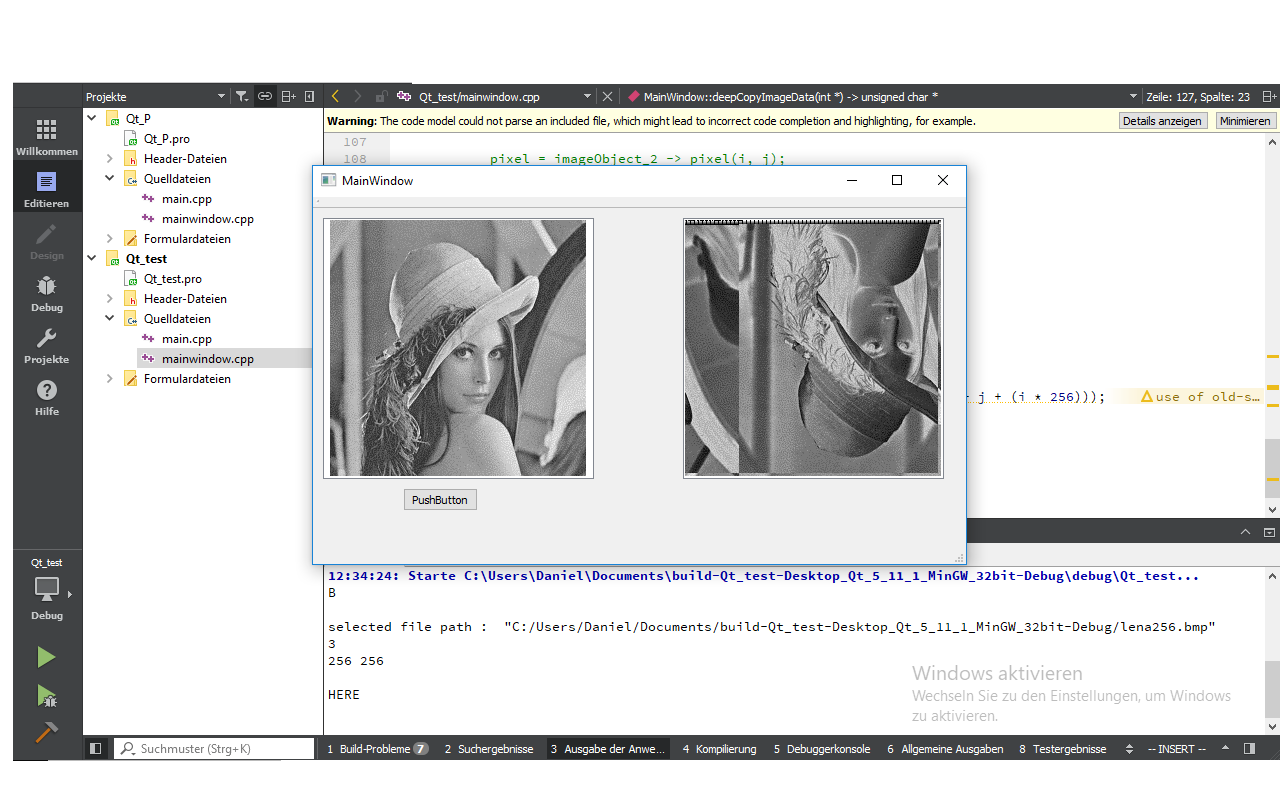
-
You're saving an image as BMP, then simply modifying the data without respecting the BMP format specifications, reading it back by simply passing the garbage data to a QImage ctor an wonder why the image is screwed up... strange stuff.
When you want to modify the pixels of an image you should use QImage::scanLine ( http://doc.qt.io/qt-5/qimage.html#scanLine ) or similiar functions
and btw: there is a big memleak - you're using an old c malloc function but not freeing the data at all instead just working on the char* array returned by QByteArray (which is still wrong due to not respecting the BMP format spec).

