Skip to content
  • Categories
  • Recent
  • Tags
  • Popular
  • Users
  • Groups
  • Search
  • Get Qt Extensions
  • Unsolved
Collapse
Brand Logo
  1. Home
  2. Qt Development
  3. General and Desktop
  4. how to add children to the QTree Widget
Qt 6.11 is out! See what's new in the release blog

how to add children to the QTree Widget

Scheduled Pinned Locked Moved Solved General and Desktop
67 Posts 3 Posters 27.7k Views 1 Watching
  • Oldest to Newest
  • Newest to Oldest
  • Most Votes
Reply
  • Reply as topic
Log in to reply
This topic has been deleted. Only users with topic management privileges can see it.
  • mrjjM mrjj

    @ManiRon
    hi
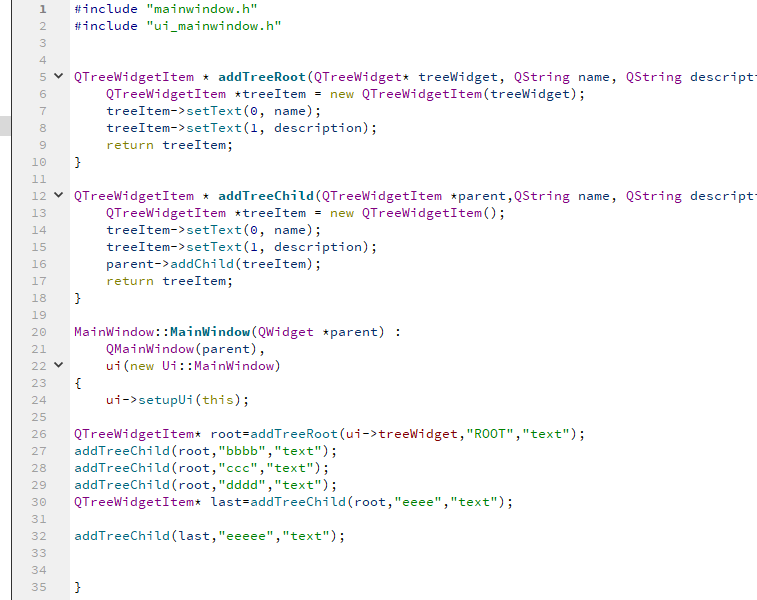
    Just paste them into cpp file. they are just free functions.

    alt text

    ManiRonM Offline
    ManiRonM Offline
    ManiRon
    wrote on last edited by
    #53

    @mrjj errors came

    0_1536658393514_5.jpg

    JonBJ 1 Reply Last reply
    0
    • ManiRonM ManiRon

      @mrjj errors came

      0_1536658393514_5.jpg

      JonBJ Offline
      JonBJ Offline
      JonB
      wrote on last edited by
      #54

      @ManiRon
      Look at your line #100. What in the world is the -- there?? You really ought be able to do this sort of thing for yourself....

      ManiRonM 1 Reply Last reply
      1
      • JonBJ JonB

        @ManiRon
        Look at your line #100. What in the world is the -- there?? You really ought be able to do this sort of thing for yourself....

        ManiRonM Offline
        ManiRonM Offline
        ManiRon
        wrote on last edited by
        #55

        @JonB I removed it sir, Same error coming

        JonBJ 1 Reply Last reply
        0
        • ManiRonM ManiRon

          @JonB I removed it sir, Same error coming

          JonBJ Offline
          JonBJ Offline
          JonB
          wrote on last edited by JonB
          #56

          @ManiRon
          So after removing the -- is still warns on line #102 with specific message "expected primary-expression before "*" token", that's what you're saying, right?

          ManiRonM 1 Reply Last reply
          0
          • JonBJ JonB

            @ManiRon
            So after removing the -- is still warns on line #102 with specific message "expected primary-expression before "*" token", that's what you're saying, right?

            ManiRonM Offline
            ManiRonM Offline
            ManiRon
            wrote on last edited by
            #57

            @JonB NO sir other than that all error are there

            JonBJ 1 Reply Last reply
            0
            • ManiRonM ManiRon

              @JonB NO sir other than that all error are there

              JonBJ Offline
              JonBJ Offline
              JonB
              wrote on last edited by JonB
              #58

              @ManiRon
              Great, so I tell you one thing that is wrong, and you say it does not change the errors when in fact it does, and I have to guess....

              Look at the very first error message line. It tells you you are still inside function on_pushButton_clicked(). Do you show us that function? No. There is nothing (else) wrong with what you have pasted, but you haven't pasted it in the correct place. Nobody is going to be able to help you on that with what you show. Good luck, I'm out.

              ManiRonM 1 Reply Last reply
              1
              • JonBJ JonB

                @ManiRon
                Great, so I tell you one thing that is wrong, and you say it does not change the errors when in fact it does, and I have to guess....

                Look at the very first error message line. It tells you you are still inside function on_pushButton_clicked(). Do you show us that function? No. There is nothing (else) wrong with what you have pasted, but you haven't pasted it in the correct place. Nobody is going to be able to help you on that with what you show. Good luck, I'm out.

                ManiRonM Offline
                ManiRonM Offline
                ManiRon
                wrote on last edited by
                #59

                @JonB

                The whole code

                void MainWindow::on_pushButton_clicked()
                {
                // Create new item (top level item)
                QTreeWidgetItem *topLevelItem = new QTreeWidgetItem(ui->treeWidget);

                // Set text for item
                topLevelItem->setText(0,"Item");
                
                // Add it on our tree as the top item.
                ui->treeWidget->addTopLevelItem(topLevelItem);
                
                // Create new item and add as child item
                QTreeWidgetItem *item=new QTreeWidgetItem(topLevelItem)
                
                 QList<QTreeWidgetItem*>m_Data;
                 m_Data.append(new QTreeWidgetItem);
                

                QString Data = 0;
                QTreeWidgetItem* item1 =new QTreeWidgetItem(ui->treeWidget);
                for(int i=1;i<3;i++)
                {

                   Data = QString("SubItem"+QString::number(i));
                
                   item1->setText(0,"data1");
                   m_Data.append(item1);
                   item1->setText(0,Data.toLatin1().constData());
                   m_Data.append(item1);
                
                
                }
                

                item1->addChildren(m_Data);
                item->addChild(item1);

                QTreeWidgetItem * addTreeRoot(QTreeWidget* treeWidget, QString name,QString description)
                {
                     QTreeWidgetItem *treeItem = new QTreeWidgetItem(treeWidget);
                     treeItem->setText(0, name);
                     treeItem->setText(1, description);
                     return treeItem;
                }
                
                QTreeWidgetItem * addTreeChild(QTreeWidgetItem *parent,QString name,QString description)
                {
                     QTreeWidgetItem *treeItem = new QTreeWidgetItem();
                     treeItem->setText(0, name);
                     treeItem->setText(1, description);
                     parent->addChild(treeItem);
                     return treeItem;
                }
                QTreeWidgetItem* root=addTreeRoot(ui->treeWidget,"ROOT","text");
                addTreeChild(root,"bbbb","text");
                addTreeChild(root,"ccc","text");
                addTreeChild(root,"dddd","text");
                QTreeWidgetItem* last=addTreeChild(root,"eeee","text");
                
                addTreeChild(last,"eeeee","text"); // notice last as parent
                

                }

                mrjjM 1 Reply Last reply
                0
                • ManiRonM ManiRon

                  @JonB

                  The whole code

                  void MainWindow::on_pushButton_clicked()
                  {
                  // Create new item (top level item)
                  QTreeWidgetItem *topLevelItem = new QTreeWidgetItem(ui->treeWidget);

                  // Set text for item
                  topLevelItem->setText(0,"Item");
                  
                  // Add it on our tree as the top item.
                  ui->treeWidget->addTopLevelItem(topLevelItem);
                  
                  // Create new item and add as child item
                  QTreeWidgetItem *item=new QTreeWidgetItem(topLevelItem)
                  
                   QList<QTreeWidgetItem*>m_Data;
                   m_Data.append(new QTreeWidgetItem);
                  

                  QString Data = 0;
                  QTreeWidgetItem* item1 =new QTreeWidgetItem(ui->treeWidget);
                  for(int i=1;i<3;i++)
                  {

                     Data = QString("SubItem"+QString::number(i));
                  
                     item1->setText(0,"data1");
                     m_Data.append(item1);
                     item1->setText(0,Data.toLatin1().constData());
                     m_Data.append(item1);
                  
                  
                  }
                  

                  item1->addChildren(m_Data);
                  item->addChild(item1);

                  QTreeWidgetItem * addTreeRoot(QTreeWidget* treeWidget, QString name,QString description)
                  {
                       QTreeWidgetItem *treeItem = new QTreeWidgetItem(treeWidget);
                       treeItem->setText(0, name);
                       treeItem->setText(1, description);
                       return treeItem;
                  }
                  
                  QTreeWidgetItem * addTreeChild(QTreeWidgetItem *parent,QString name,QString description)
                  {
                       QTreeWidgetItem *treeItem = new QTreeWidgetItem();
                       treeItem->setText(0, name);
                       treeItem->setText(1, description);
                       parent->addChild(treeItem);
                       return treeItem;
                  }
                  QTreeWidgetItem* root=addTreeRoot(ui->treeWidget,"ROOT","text");
                  addTreeChild(root,"bbbb","text");
                  addTreeChild(root,"ccc","text");
                  addTreeChild(root,"dddd","text");
                  QTreeWidgetItem* last=addTreeChild(root,"eeee","text");
                  
                  addTreeChild(last,"eeeee","text"); // notice last as parent
                  

                  }

                  mrjjM Offline
                  mrjjM Offline
                  mrjj
                  Lifetime Qt Champion
                  wrote on last edited by mrjj
                  #60

                  @ManiRon
                  did u put the full functions INSIDE void MainWindow::on_pushButton_clicked() ????
                  it sure seems so. And that is plain wrong.
                  Should be OVER void MainWindow::on_pushButton_clicked()
                  and never, ever inside.
                  Look at the picture again. :)

                  ManiRonM 1 Reply Last reply
                  0
                  • mrjjM mrjj

                    @ManiRon
                    did u put the full functions INSIDE void MainWindow::on_pushButton_clicked() ????
                    it sure seems so. And that is plain wrong.
                    Should be OVER void MainWindow::on_pushButton_clicked()
                    and never, ever inside.
                    Look at the picture again. :)

                    ManiRonM Offline
                    ManiRonM Offline
                    ManiRon
                    wrote on last edited by
                    #61

                    @mrjj

                    I put it inside void MainWindow::on_pushButton_clicked() first . Now i removed it and pasted it over that still that error remains

                    mrjjM 1 Reply Last reply
                    0
                    • ManiRonM ManiRon

                      @mrjj

                      I put it inside void MainWindow::on_pushButton_clicked() first . Now i removed it and pasted it over that still that error remains

                      mrjjM Offline
                      mrjjM Offline
                      mrjj
                      Lifetime Qt Champion
                      wrote on last edited by
                      #62

                      @ManiRon
                      please show the exact error

                      ManiRonM 1 Reply Last reply
                      0
                      • mrjjM mrjj

                        @ManiRon
                        please show the exact error

                        ManiRonM Offline
                        ManiRonM Offline
                        ManiRon
                        wrote on last edited by
                        #63

                        @mrjj errors solved

                        ManiRonM 1 Reply Last reply
                        0
                        • ManiRonM ManiRon

                          @mrjj errors solved

                          ManiRonM Offline
                          ManiRonM Offline
                          ManiRon
                          wrote on last edited by
                          #64

                          @ManiRon Thanks sir its working fine

                          mrjjM 1 Reply Last reply
                          0
                          • ManiRonM ManiRon

                            @ManiRon Thanks sir its working fine

                            mrjjM Offline
                            mrjjM Offline
                            mrjj
                            Lifetime Qt Champion
                            wrote on last edited by mrjj
                            #65

                            @ManiRon
                            ok super :)
                            Hard birth.
                            Using functions makes it easier to read and hopefully also easier for you
                            to create other tree structures.

                            ManiRonM 2 Replies Last reply
                            0
                            • mrjjM mrjj

                              @ManiRon
                              ok super :)
                              Hard birth.
                              Using functions makes it easier to read and hopefully also easier for you
                              to create other tree structures.

                              ManiRonM Offline
                              ManiRonM Offline
                              ManiRon
                              wrote on last edited by
                              #66

                              @mrjj yes sir sure

                              1 Reply Last reply
                              0
                              • mrjjM mrjj

                                @ManiRon
                                ok super :)
                                Hard birth.
                                Using functions makes it easier to read and hopefully also easier for you
                                to create other tree structures.

                                ManiRonM Offline
                                ManiRonM Offline
                                ManiRon
                                wrote on last edited by ManiRon
                                #67

                                @mrjj Working Code

                                QTreeWidgetItem * addTreeRoot(QTreeWidget* treeWidget, QString name,QString description)
                                {
                                QTreeWidgetItem *treeItem = new QTreeWidgetItem(treeWidget);
                                treeItem->setText(0, name);
                                treeItem->setText(1, description);
                                return treeItem;
                                }

                                QTreeWidgetItem * addTreeChild(QTreeWidgetItem *parent,QString name,QString description)
                                {
                                QTreeWidgetItem *treeItem = new QTreeWidgetItem();
                                treeItem->setText(0, name);
                                treeItem->setText(1, description);
                                parent->addChild(treeItem);
                                return treeItem;
                                }

                                void MainWindow::on_pushButton_clicked()
                                {

                                QTreeWidgetItem* root= addTreeRoot(ui->treeWidget,"ROOT","text");
                                

                                addTreeChild(root,"bbbb","text");
                                addTreeChild(root,"ccc","text");
                                addTreeChild(root,"dddd","text");
                                QTreeWidgetItem* last = addTreeChild(root,"eeee","text");

                                addTreeChild(last,"eeeee","text"); // notice last as parent
                                

                                }

                                1 Reply Last reply
                                0

                                • Login

                                • Login or register to search.
                                • First post
                                  Last post
                                0
                                • Categories
                                • Recent
                                • Tags
                                • Popular
                                • Users
                                • Groups
                                • Search
                                • Get Qt Extensions
                                • Unsolved