Skip to content
  • Categories
  • Recent
  • Tags
  • Popular
  • Users
  • Groups
  • Search
  • Get Qt Extensions
  • Unsolved
Collapse
Brand Logo
  1. Home
  2. Qt Development
  3. General and Desktop
  4. how to add children to the QTree Widget
Qt 6.11 is out! See what's new in the release blog

how to add children to the QTree Widget

Scheduled Pinned Locked Moved Solved General and Desktop
67 Posts 3 Posters 28.5k Views 1 Watching
  • Oldest to Newest
  • Newest to Oldest
  • Most Votes
Reply
  • Reply as topic
Log in to reply
This topic has been deleted. Only users with topic management privileges can see it.
  • mrjjM mrjj

    @ManiRon
    Ok.
    Nothing odd then :)
    Then you just need to keep aaaa pointer around and
    eeee so you can add child to that.

    ManiRonM Offline
    ManiRonM Offline
    ManiRon
    wrote on last edited by
    #49

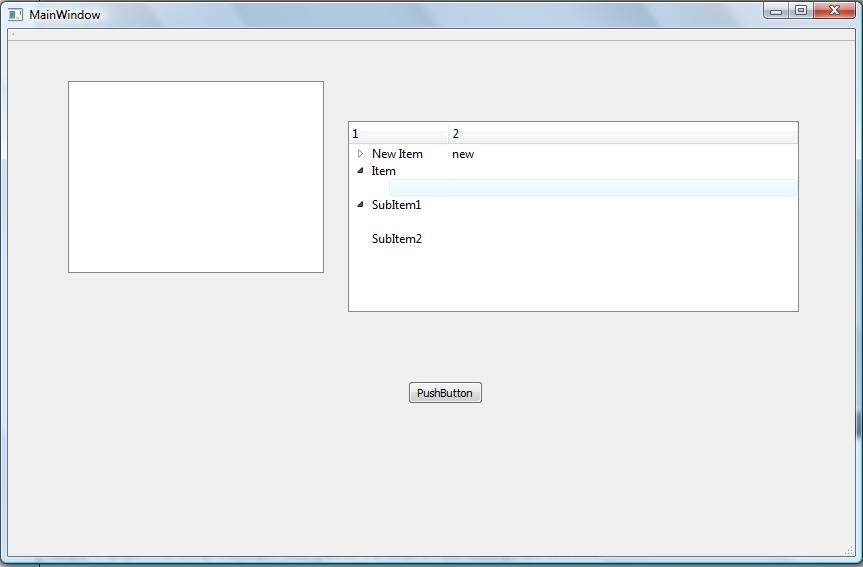
    @mrjj sir i tried the way u mentioned but i got like this 1_1536636757572_4.jpg 0_1536636757570_3.jpg

    my code:

    QList<QTreeWidgetItem*>m_Data;
    m_Data.append(new QTreeWidgetItem);

    QString Data = 0;
    for(int i=1;i<3;i++)
    {
    Data = QString("SubItem"+QString::number(i));
    QTreeWidgetItem* item1 =new QTreeWidgetItem(ui->treeWidget);
    item1->setText(0,"data1");
    m_Data.append(item1);
    item1->setText(0,Data.toLatin1().constData());
    m_Data.append(item1);
    item->addChild(item1);
    item1->addChildren(m_Data);
    }

    mrjjM 1 Reply Last reply
    0
    • ManiRonM ManiRon

      @mrjj sir i tried the way u mentioned but i got like this 1_1536636757572_4.jpg 0_1536636757570_3.jpg
      my code:

      QList<QTreeWidgetItem*>m_Data;
      m_Data.append(new QTreeWidgetItem);

      QString Data = 0;
      for(int i=1;i<3;i++)
      {
      Data = QString("SubItem"+QString::number(i));
      QTreeWidgetItem* item1 =new QTreeWidgetItem(ui->treeWidget);
      item1->setText(0,"data1");
      m_Data.append(item1);
      item1->setText(0,Data.toLatin1().constData());
      m_Data.append(item1);
      item->addChild(item1);
      item1->addChildren(m_Data);
      }

      mrjjM Offline
      mrjjM Offline
      mrjj
      Lifetime Qt Champion
      wrote on last edited by
      #50

      @ManiRon
      hi
      seems like blank texts. also i dont see u new item.??
      anyway, that loop looks so messy and hard to read
      if you use functions, it can look like this

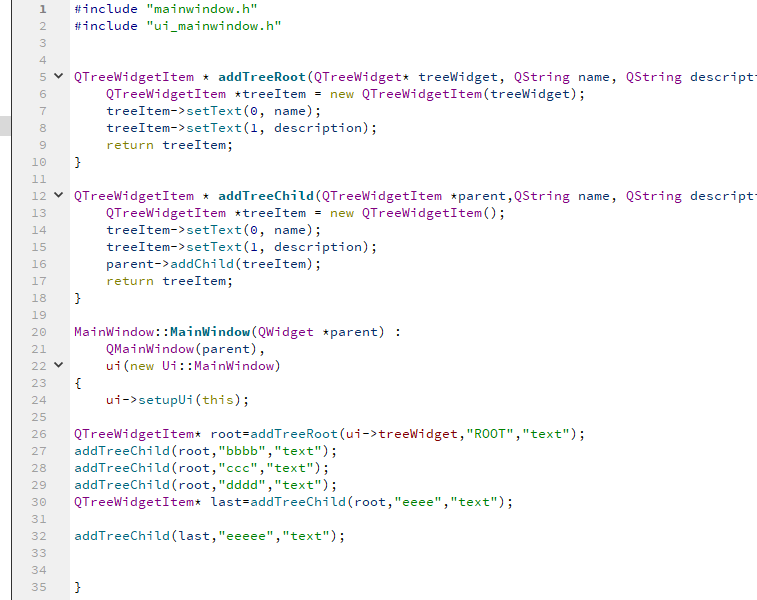
      QTreeWidgetItem * addTreeRoot(QTreeWidget* treeWidget, QString name, QString description) {
          QTreeWidgetItem *treeItem = new QTreeWidgetItem(treeWidget);
          treeItem->setText(0, name);
          treeItem->setText(1, description);
          return treeItem;
      }
      
      QTreeWidgetItem * addTreeChild(QTreeWidgetItem *parent,QString name, QString description) {
          QTreeWidgetItem *treeItem = new QTreeWidgetItem();
          treeItem->setText(0, name);
          treeItem->setText(1, description);
          parent->addChild(treeItem);
          return treeItem;
      }
      --
      
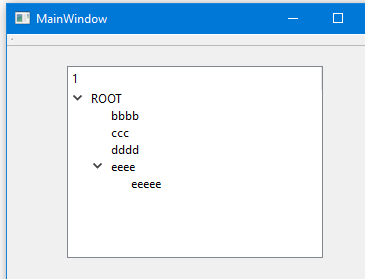
      QTreeWidgetItem* root=addTreeRoot(ui->treeWidget,"ROOT","text");
      addTreeChild(root,"bbbb","text");
      addTreeChild(root,"ccc","text");
      addTreeChild(root,"dddd","text");
      QTreeWidgetItem* last=addTreeChild(root,"eeee","text");
      
      addTreeChild(last,"eeeee","text"); // notice last as parent


      alt text

      ManiRonM 1 Reply Last reply
      1
      • mrjjM mrjj

        @ManiRon
        hi
        seems like blank texts. also i dont see u new item.??
        anyway, that loop looks so messy and hard to read
        if you use functions, it can look like this

        QTreeWidgetItem * addTreeRoot(QTreeWidget* treeWidget, QString name, QString description) {
            QTreeWidgetItem *treeItem = new QTreeWidgetItem(treeWidget);
            treeItem->setText(0, name);
            treeItem->setText(1, description);
            return treeItem;
        }
        
        QTreeWidgetItem * addTreeChild(QTreeWidgetItem *parent,QString name, QString description) {
            QTreeWidgetItem *treeItem = new QTreeWidgetItem();
            treeItem->setText(0, name);
            treeItem->setText(1, description);
            parent->addChild(treeItem);
            return treeItem;
        }
        --
        
        QTreeWidgetItem* root=addTreeRoot(ui->treeWidget,"ROOT","text");
        addTreeChild(root,"bbbb","text");
        addTreeChild(root,"ccc","text");
        addTreeChild(root,"dddd","text");
        QTreeWidgetItem* last=addTreeChild(root,"eeee","text");
        
        addTreeChild(last,"eeeee","text"); // notice last as parent


        alt text

        ManiRonM Offline
        ManiRonM Offline
        ManiRon
        wrote on last edited by
        #51

        @mrjj i am not getting sir,
        how i will declare the these functions?

        mrjjM 1 Reply Last reply
        0
        • ManiRonM ManiRon

          @mrjj i am not getting sir,
          how i will declare the these functions?

          mrjjM Offline
          mrjjM Offline
          mrjj
          Lifetime Qt Champion
          wrote on last edited by mrjj
          #52

          @ManiRon
          hi
          Just paste them into cpp file. they are just free functions.

          alt text

          ManiRonM 1 Reply Last reply
          1
          • mrjjM mrjj

            @ManiRon
            hi
            Just paste them into cpp file. they are just free functions.

            alt text

            ManiRonM Offline
            ManiRonM Offline
            ManiRon
            wrote on last edited by
            #53

            @mrjj errors came

            0_1536658393514_5.jpg

            JonBJ 1 Reply Last reply
            0
            • ManiRonM ManiRon

              @mrjj errors came

              0_1536658393514_5.jpg

              JonBJ Offline
              JonBJ Offline
              JonB
              wrote on last edited by
              #54

              @ManiRon
              Look at your line #100. What in the world is the -- there?? You really ought be able to do this sort of thing for yourself....

              ManiRonM 1 Reply Last reply
              1
              • JonBJ JonB

                @ManiRon
                Look at your line #100. What in the world is the -- there?? You really ought be able to do this sort of thing for yourself....

                ManiRonM Offline
                ManiRonM Offline
                ManiRon
                wrote on last edited by
                #55

                @JonB I removed it sir, Same error coming

                JonBJ 1 Reply Last reply
                0
                • ManiRonM ManiRon

                  @JonB I removed it sir, Same error coming

                  JonBJ Offline
                  JonBJ Offline
                  JonB
                  wrote on last edited by JonB
                  #56

                  @ManiRon
                  So after removing the -- is still warns on line #102 with specific message "expected primary-expression before "*" token", that's what you're saying, right?

                  ManiRonM 1 Reply Last reply
                  0
                  • JonBJ JonB

                    @ManiRon
                    So after removing the -- is still warns on line #102 with specific message "expected primary-expression before "*" token", that's what you're saying, right?

                    ManiRonM Offline
                    ManiRonM Offline
                    ManiRon
                    wrote on last edited by
                    #57

                    @JonB NO sir other than that all error are there

                    JonBJ 1 Reply Last reply
                    0
                    • ManiRonM ManiRon

                      @JonB NO sir other than that all error are there

                      JonBJ Offline
                      JonBJ Offline
                      JonB
                      wrote on last edited by JonB
                      #58

                      @ManiRon
                      Great, so I tell you one thing that is wrong, and you say it does not change the errors when in fact it does, and I have to guess....

                      Look at the very first error message line. It tells you you are still inside function on_pushButton_clicked(). Do you show us that function? No. There is nothing (else) wrong with what you have pasted, but you haven't pasted it in the correct place. Nobody is going to be able to help you on that with what you show. Good luck, I'm out.

                      ManiRonM 1 Reply Last reply
                      1
                      • JonBJ JonB

                        @ManiRon
                        Great, so I tell you one thing that is wrong, and you say it does not change the errors when in fact it does, and I have to guess....

                        Look at the very first error message line. It tells you you are still inside function on_pushButton_clicked(). Do you show us that function? No. There is nothing (else) wrong with what you have pasted, but you haven't pasted it in the correct place. Nobody is going to be able to help you on that with what you show. Good luck, I'm out.

                        ManiRonM Offline
                        ManiRonM Offline
                        ManiRon
                        wrote on last edited by
                        #59

                        @JonB

                        The whole code

                        void MainWindow::on_pushButton_clicked()
                        {
                        // Create new item (top level item)
                        QTreeWidgetItem *topLevelItem = new QTreeWidgetItem(ui->treeWidget);

                        // Set text for item
                        topLevelItem->setText(0,"Item");
                        
                        // Add it on our tree as the top item.
                        ui->treeWidget->addTopLevelItem(topLevelItem);
                        
                        // Create new item and add as child item
                        QTreeWidgetItem *item=new QTreeWidgetItem(topLevelItem)
                        
                         QList<QTreeWidgetItem*>m_Data;
                         m_Data.append(new QTreeWidgetItem);
                        

                        QString Data = 0;
                        QTreeWidgetItem* item1 =new QTreeWidgetItem(ui->treeWidget);
                        for(int i=1;i<3;i++)
                        {

                           Data = QString("SubItem"+QString::number(i));
                        
                           item1->setText(0,"data1");
                           m_Data.append(item1);
                           item1->setText(0,Data.toLatin1().constData());
                           m_Data.append(item1);
                        
                        
                        }
                        

                        item1->addChildren(m_Data);
                        item->addChild(item1);

                        QTreeWidgetItem * addTreeRoot(QTreeWidget* treeWidget, QString name,QString description)
                        {
                             QTreeWidgetItem *treeItem = new QTreeWidgetItem(treeWidget);
                             treeItem->setText(0, name);
                             treeItem->setText(1, description);
                             return treeItem;
                        }
                        
                        QTreeWidgetItem * addTreeChild(QTreeWidgetItem *parent,QString name,QString description)
                        {
                             QTreeWidgetItem *treeItem = new QTreeWidgetItem();
                             treeItem->setText(0, name);
                             treeItem->setText(1, description);
                             parent->addChild(treeItem);
                             return treeItem;
                        }
                        QTreeWidgetItem* root=addTreeRoot(ui->treeWidget,"ROOT","text");
                        addTreeChild(root,"bbbb","text");
                        addTreeChild(root,"ccc","text");
                        addTreeChild(root,"dddd","text");
                        QTreeWidgetItem* last=addTreeChild(root,"eeee","text");
                        
                        addTreeChild(last,"eeeee","text"); // notice last as parent
                        

                        }

                        mrjjM 1 Reply Last reply
                        0
                        • ManiRonM ManiRon

                          @JonB

                          The whole code

                          void MainWindow::on_pushButton_clicked()
                          {
                          // Create new item (top level item)
                          QTreeWidgetItem *topLevelItem = new QTreeWidgetItem(ui->treeWidget);

                          // Set text for item
                          topLevelItem->setText(0,"Item");
                          
                          // Add it on our tree as the top item.
                          ui->treeWidget->addTopLevelItem(topLevelItem);
                          
                          // Create new item and add as child item
                          QTreeWidgetItem *item=new QTreeWidgetItem(topLevelItem)
                          
                           QList<QTreeWidgetItem*>m_Data;
                           m_Data.append(new QTreeWidgetItem);
                          

                          QString Data = 0;
                          QTreeWidgetItem* item1 =new QTreeWidgetItem(ui->treeWidget);
                          for(int i=1;i<3;i++)
                          {

                             Data = QString("SubItem"+QString::number(i));
                          
                             item1->setText(0,"data1");
                             m_Data.append(item1);
                             item1->setText(0,Data.toLatin1().constData());
                             m_Data.append(item1);
                          
                          
                          }
                          

                          item1->addChildren(m_Data);
                          item->addChild(item1);

                          QTreeWidgetItem * addTreeRoot(QTreeWidget* treeWidget, QString name,QString description)
                          {
                               QTreeWidgetItem *treeItem = new QTreeWidgetItem(treeWidget);
                               treeItem->setText(0, name);
                               treeItem->setText(1, description);
                               return treeItem;
                          }
                          
                          QTreeWidgetItem * addTreeChild(QTreeWidgetItem *parent,QString name,QString description)
                          {
                               QTreeWidgetItem *treeItem = new QTreeWidgetItem();
                               treeItem->setText(0, name);
                               treeItem->setText(1, description);
                               parent->addChild(treeItem);
                               return treeItem;
                          }
                          QTreeWidgetItem* root=addTreeRoot(ui->treeWidget,"ROOT","text");
                          addTreeChild(root,"bbbb","text");
                          addTreeChild(root,"ccc","text");
                          addTreeChild(root,"dddd","text");
                          QTreeWidgetItem* last=addTreeChild(root,"eeee","text");
                          
                          addTreeChild(last,"eeeee","text"); // notice last as parent
                          

                          }

                          mrjjM Offline
                          mrjjM Offline
                          mrjj
                          Lifetime Qt Champion
                          wrote on last edited by mrjj
                          #60

                          @ManiRon
                          did u put the full functions INSIDE void MainWindow::on_pushButton_clicked() ????
                          it sure seems so. And that is plain wrong.
                          Should be OVER void MainWindow::on_pushButton_clicked()
                          and never, ever inside.
                          Look at the picture again. :)

                          ManiRonM 1 Reply Last reply
                          0
                          • mrjjM mrjj

                            @ManiRon
                            did u put the full functions INSIDE void MainWindow::on_pushButton_clicked() ????
                            it sure seems so. And that is plain wrong.
                            Should be OVER void MainWindow::on_pushButton_clicked()
                            and never, ever inside.
                            Look at the picture again. :)

                            ManiRonM Offline
                            ManiRonM Offline
                            ManiRon
                            wrote on last edited by
                            #61

                            @mrjj

                            I put it inside void MainWindow::on_pushButton_clicked() first . Now i removed it and pasted it over that still that error remains

                            mrjjM 1 Reply Last reply
                            0
                            • ManiRonM ManiRon

                              @mrjj

                              I put it inside void MainWindow::on_pushButton_clicked() first . Now i removed it and pasted it over that still that error remains

                              mrjjM Offline
                              mrjjM Offline
                              mrjj
                              Lifetime Qt Champion
                              wrote on last edited by
                              #62

                              @ManiRon
                              please show the exact error

                              ManiRonM 1 Reply Last reply
                              0
                              • mrjjM mrjj

                                @ManiRon
                                please show the exact error

                                ManiRonM Offline
                                ManiRonM Offline
                                ManiRon
                                wrote on last edited by
                                #63

                                @mrjj errors solved

                                ManiRonM 1 Reply Last reply
                                0
                                • ManiRonM ManiRon

                                  @mrjj errors solved

                                  ManiRonM Offline
                                  ManiRonM Offline
                                  ManiRon
                                  wrote on last edited by
                                  #64

                                  @ManiRon Thanks sir its working fine

                                  mrjjM 1 Reply Last reply
                                  0
                                  • ManiRonM ManiRon

                                    @ManiRon Thanks sir its working fine

                                    mrjjM Offline
                                    mrjjM Offline
                                    mrjj
                                    Lifetime Qt Champion
                                    wrote on last edited by mrjj
                                    #65

                                    @ManiRon
                                    ok super :)
                                    Hard birth.
                                    Using functions makes it easier to read and hopefully also easier for you
                                    to create other tree structures.

                                    ManiRonM 2 Replies Last reply
                                    0
                                    • mrjjM mrjj

                                      @ManiRon
                                      ok super :)
                                      Hard birth.
                                      Using functions makes it easier to read and hopefully also easier for you
                                      to create other tree structures.

                                      ManiRonM Offline
                                      ManiRonM Offline
                                      ManiRon
                                      wrote on last edited by
                                      #66

                                      @mrjj yes sir sure

                                      1 Reply Last reply
                                      0
                                      • mrjjM mrjj

                                        @ManiRon
                                        ok super :)
                                        Hard birth.
                                        Using functions makes it easier to read and hopefully also easier for you
                                        to create other tree structures.

                                        ManiRonM Offline
                                        ManiRonM Offline
                                        ManiRon
                                        wrote on last edited by ManiRon
                                        #67

                                        @mrjj Working Code

                                        QTreeWidgetItem * addTreeRoot(QTreeWidget* treeWidget, QString name,QString description)
                                        {
                                        QTreeWidgetItem *treeItem = new QTreeWidgetItem(treeWidget);
                                        treeItem->setText(0, name);
                                        treeItem->setText(1, description);
                                        return treeItem;
                                        }

                                        QTreeWidgetItem * addTreeChild(QTreeWidgetItem *parent,QString name,QString description)
                                        {
                                        QTreeWidgetItem *treeItem = new QTreeWidgetItem();
                                        treeItem->setText(0, name);
                                        treeItem->setText(1, description);
                                        parent->addChild(treeItem);
                                        return treeItem;
                                        }

                                        void MainWindow::on_pushButton_clicked()
                                        {

                                        QTreeWidgetItem* root= addTreeRoot(ui->treeWidget,"ROOT","text");
                                        

                                        addTreeChild(root,"bbbb","text");
                                        addTreeChild(root,"ccc","text");
                                        addTreeChild(root,"dddd","text");
                                        QTreeWidgetItem* last = addTreeChild(root,"eeee","text");

                                        addTreeChild(last,"eeeee","text"); // notice last as parent
                                        

                                        }

                                        1 Reply Last reply
                                        0

                                        • Login

                                        • Login or register to search.
                                        • First post
                                          Last post
                                        0
                                        • Categories
                                        • Recent
                                        • Tags
                                        • Popular
                                        • Users
                                        • Groups
                                        • Search
                                        • Get Qt Extensions
                                        • Unsolved